- Core Web Vitals are three specific Google metrics that measure real user experience on your website: speed, visual stability, and responsiveness
- Google officially uses Core Web Vitals as a ranking signal, making them both a technical and SEO priority
- The three metrics are LCP (Largest Contentful Paint), CLS (Cumulative Layout Shift), and INP (Interaction to Next Paint)
- You can check your Core Web Vitals for free using Google Search Console, PageSpeed Insights, and Google's web.dev platform
- Most Core Web Vitals issues on WordPress websites can be fixed without a developer using WP Rocket, Cloudflare, and image optimisation plugins
1 What Are Core Web Vitals and Why Did Google Create Them
In May 2020, Google announced something that changed the SEO landscape permanently. For the first time in its history, Google publicly confirmed that user experience metrics would become official ranking signals. Those metrics are called Core Web Vitals.
Core Web Vitals are a set of three specific measurements that quantify how real users experience your website. Not how fast your server responds on paper. Not what a theoretical benchmark says. How actual human beings experience your pages on their actual devices in their actual locations.
Before Core Web Vitals, website speed was measured using technical metrics like Time to First Byte and First Contentful Paint. These were useful for developers but disconnected from what visitors actually felt when using a website. A page could score well on these metrics and still feel painfully slow or visually unstable to a real user.
Google created Core Web Vitals to bridge that gap. Each metric maps directly to a real human experience.
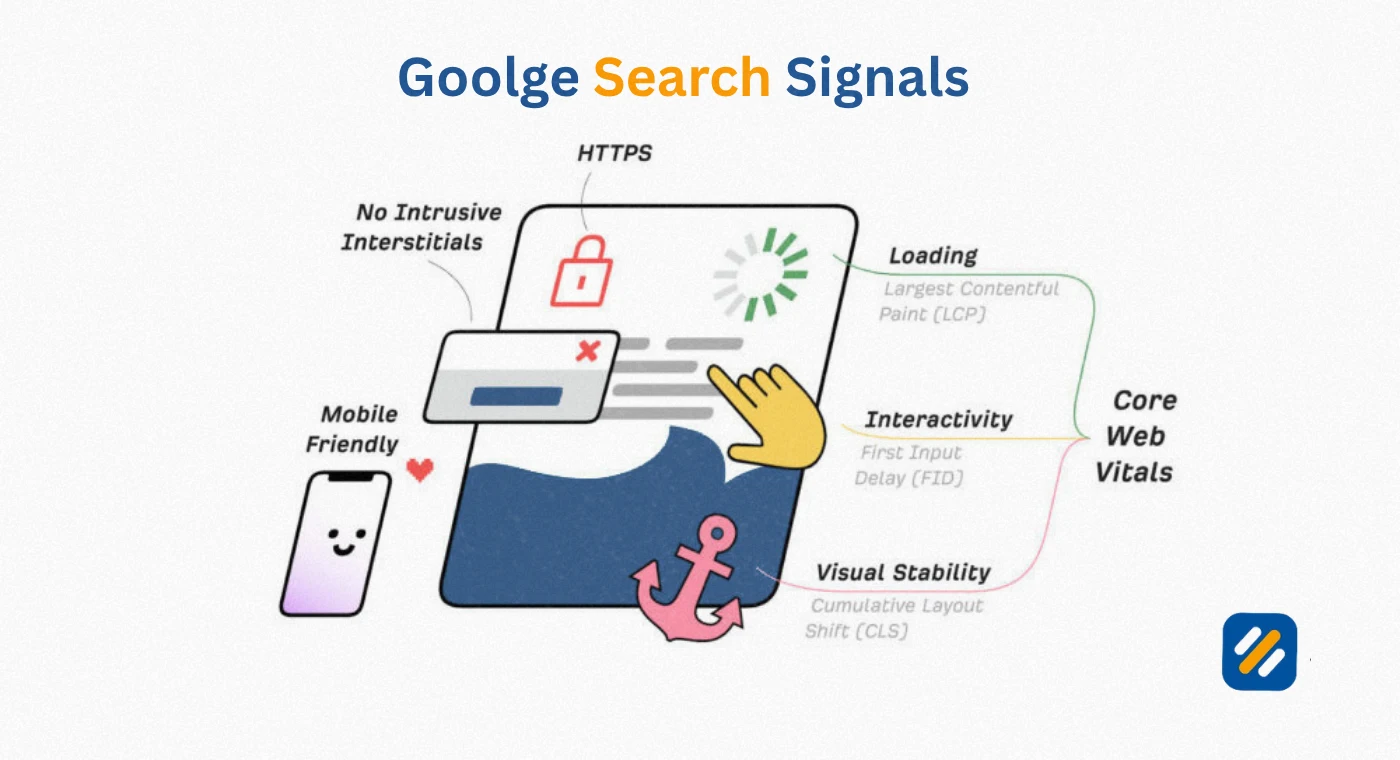
The three Core Web Vitals metrics are:
LCP (Largest Contentful Paint): How long it takes for the biggest visible element on your page to load. This is what the user sees as "the page has loaded."
CLS (Cumulative Layout Shift): How much the page layout unexpectedly shifts while loading. This is what users experience as content jumping around just as they are about to click something.
INP (Interaction to Next Paint): How quickly the page responds after a user interacts with it. This is what users feel as sluggishness or lag when clicking buttons, opening menus, or submitting forms.
In many years of doing technical SEO audits for client websites, Core Web Vitals failures are consistently the most overlooked performance problem on small business websites. Pages with genuinely great content lose rankings to competitors with faster, more stable pages because Google now officially weighs user experience alongside content quality.
2 Core Web Vitals and SEO | How Google Uses These Metrics as a Ranking Signal
Google officially incorporated Core Web Vitals into its ranking algorithm in June 2021 as part of the Page Experience update. This was a significant moment in SEO history because it was the first time Google explicitly tied measurable user experience data to search rankings.
Here is what that means in practical terms. Two pages covering the exact same topic with similar content quality and backlink profiles will not necessarily rank the same. The page with better Core Web Vitals scores has a ranking advantage. Not an enormous advantage, but a real one, and a measurable tiebreaker in competitive search results.
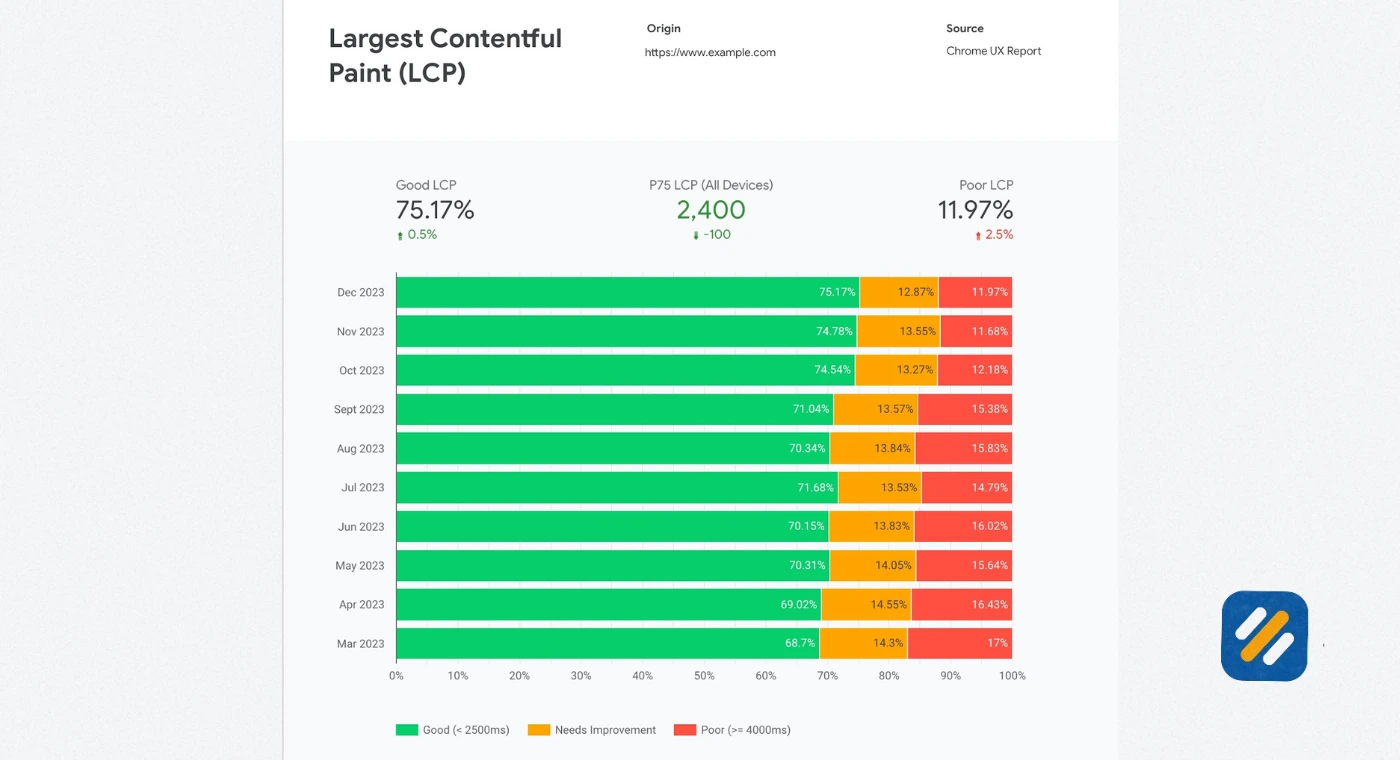
Google collects Core Web Vitals data from real Chrome users through a program called the Chrome User Experience Report (CrUX). This means Google is not testing your website in a lab. It is using actual data from real people visiting your pages on real devices to evaluate your scores.
What makes this especially important for small business websites is that Google prioritises mobile Core Web Vitals data for ranking decisions. The majority of searches happen on mobile devices. If your website loads fast on desktop but performs poorly on mobile, your rankings reflect the mobile experience, not the desktop one.
Beyond rankings, Core Web Vitals directly affect conversion rates. Research from Google's own data shows that pages meeting Core Web Vitals thresholds see 24% fewer users abandoning their session compared to pages that fail the thresholds. For an ecommerce site or a service business, that difference directly translates into revenue.
3 The Three Core Web Vitals Metrics Explained in Simple Terms
Each Core Web Vital measures a different aspect of user experience. Understanding what each one actually measures is essential before trying to fix any of them.
LCP | Largest Contentful Paint
LCP measures the time from when a user first navigates to a page to when the largest visible content element finishes loading. That largest element is typically a hero image, a featured photo, a video thumbnail, or a large block of text at the top of the page.
Think of LCP as the moment a user can see that the page has actually arrived. Before LCP completes, the user is looking at a blank or partially loaded screen. After LCP, they can engage with the content.
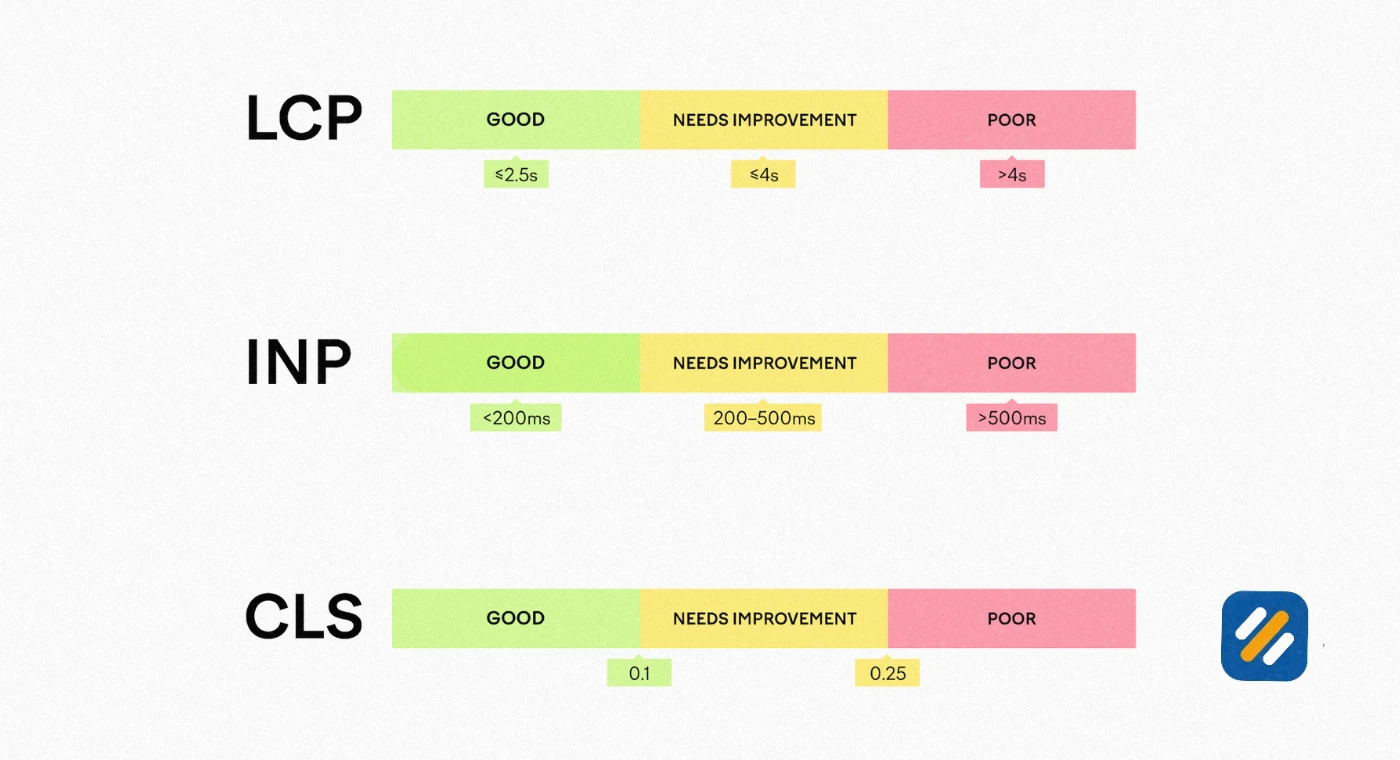
Google's LCP thresholds:
- Good: Under 2.5 seconds
- Needs improvement: 2.5 to 4.0 seconds
- Poor: Over 4.0 seconds
The most common causes of poor LCP on WordPress websites are unoptimised hero images, slow server response times, and render-blocking JavaScript files that delay how quickly the browser can display content.
CLS | Cumulative Layout Shift
CLS measures the total amount of unexpected layout movement that happens during the entire lifespan of a page visit. It is expressed as a score rather than a time measurement.
Here is what poor CLS looks like in real life. You visit a page and start reading. Suddenly an image loads above the paragraph you were reading and pushes all the text down. You lose your place. Or you go to click a button and at the last moment an ad loads above it, shifting the button down, and you accidentally click the wrong thing.
That frustration is exactly what CLS measures and what Google penalises.
Google's CLS thresholds:
- Good: 0.1 or less
- Needs improvement: 0.1 to 0.25
- Poor: Over 0.25
INP | Interaction to Next Paint
INP replaced the previous metric First Input Delay (FID) in March 2024. This was a significant upgrade because FID only measured the response time of the very first user interaction on a page. INP measures the response time of every interaction throughout the entire page visit and reports the worst one.
This matters because many pages perform well on first interaction but become sluggish after a user has been on the page for a while and more scripts have loaded or the browser is managing more complex operations.
Google's INP thresholds:
- Good: 200 milliseconds or less
- Needs improvement: 200 to 500 milliseconds
- Poor: Over 500 milliseconds
4 Core Web Vitals Metrics at a Glance | Full Reference Table
| Metric | What It Measures | Good Score | Needs Improvement | Poor Score | Primary Cause of Failure |
|---|---|---|---|---|---|
| LCP (Largest Contentful Paint) | How fast the main content loads | Under 2.5s | 2.5s to 4.0s | Over 4.0s | Large unoptimised images, slow server |
| CLS (Cumulative Layout Shift) | How stable the page layout is | Under 0.1 | 0.1 to 0.25 | Over 0.25 | Images without dimensions, ads loading late |
| INP (Interaction to Next Paint) | How fast the page responds to clicks | Under 200ms | 200ms to 500ms | Over 500ms | Heavy JavaScript, too many third party scripts |
| TBT (Total Blocking Time) | Lab proxy for INP | Under 200ms | 200ms to 600ms | Over 600ms | Long JavaScript tasks blocking main thread |
Note: TBT is not an official Core Web Vital but is used in lab testing tools like PageSpeed Insights as a proxy for INP because INP requires real user data to measure accurately.
5 How to Check Your Core Web Vitals Scores for Free
You do not need any paid tool to check your Core Web Vitals. Here are the four best free tools and exactly how to use each one:
Tool 1: Google PageSpeed Insights (pagespeed.web.dev)
This is the fastest starting point. Go to pagespeed.web.dev, enter any URL on your website, and click Analyze. Within 30 seconds you will see your Core Web Vitals scores for both mobile and desktop alongside a full list of specific issues to fix.
PageSpeed Insights shows two types of data. Field data, which is real user data collected from Chrome browsers, and lab data, which is a controlled test run in a simulated environment. Always look at field data first because that is what Google uses for ranking decisions.
Tool 2: Google Search Console
Google Search Console has a dedicated Core Web Vitals report under the Experience section of the left sidebar. This report groups all pages on your website into three categories: Good, Needs Improvement, and Poor. It uses real Chrome user data making it the most accurate picture of how Google sees your website's performance.
The GSC report is especially useful for identifying patterns. If fifty pages all have a poor CLS score, that points to a site-wide issue rather than a page-specific problem.
Tool 3: Google's web.dev Measure Tool
The web.dev platform built by Google's developer team offers a more detailed technical breakdown than PageSpeed Insights. It runs a full Lighthouse audit and provides specific recommendations in plain language alongside estimated impact scores for each fix. Particularly useful for non-developers who want to understand exactly what is causing each problem.
Tool 4: Chrome DevTools Lighthouse Audit
For WordPress users who want to test pages that require login or pages not publicly indexed yet, running a Lighthouse audit directly in Chrome DevTools gives you full Core Web Vitals lab data without the page being publicly accessible. Open Chrome, right click on any page, click Inspect, then navigate to the Lighthouse tab and click Analyze Page Load.
6 How to Fix Core Web Vitals on a WordPress Website | Step by Step
This section is written specifically for WordPress website owners who want to improve their Core Web Vitals without hiring a developer. Every fix below is achievable using free or affordable plugins.
How to Improve LCP on WordPress
The three most impactful LCP fixes for WordPress websites are:
Fix 1: Compress and convert your hero image to WebP format.
Your hero image is almost always the LCP element. If it is a large unoptimised JPEG or PNG, it is almost certainly the main reason your LCP is slow. Install the Smush plugin, compress all existing images, and enable WebP conversion. WebP images are typically 30 to 35 percent smaller than JPEG at the same visual quality.
Fix 2: Enable caching with WP Rocket.
WP Rocket is the single most effective performance plugin for WordPress. Enabling page caching means returning visitors load a pre-built version of your page rather than waiting for the server to generate it fresh each time. Enable caching under WP Rocket's main settings and set cache preloading to run automatically.
Fix 3: Add Cloudflare free CDN.
Cloudflare's free plan routes your website's content through servers located closer to each visitor geographically. A visitor in New York loading your website hosted in London will experience significantly faster loading after Cloudflare is enabled because content is delivered from a Cloudflare server in New York instead.
How to Improve CLS on WordPress
Fix 1: Add explicit dimensions to every image.
In WordPress, always fill in the width and height fields when uploading images. This tells the browser to reserve that exact space before the image loads, preventing content from jumping as images appear. If you have existing images without dimensions, the Smush plugin can add them automatically.
Fix 2: Avoid loading ads or widgets at the top of the page without reserved space.
AdSense ads, newsletter popups, and sticky header bars are the most common sources of CLS on WordPress blogs. If you use AdSense, use fixed-size ad units rather than responsive ones in positions where they appear above the fold.
Fix 3: Use system fonts or preload custom fonts.
Google Fonts loaded from an external server cause CLS because the browser displays text in a fallback font first and then swaps to the web font when it loads, causing a visible layout jump. In WP Rocket, enable the Load Google Fonts Locally option which downloads and serves the fonts from your own server, eliminating the font swap delay.
How to Improve INP on WordPress
Fix 1: Minimise JavaScript execution.
Too many active plugins is the most common cause of poor INP on WordPress websites. Each plugin adds JavaScript that runs in the browser. Go through your installed plugins and deactivate any that are not essential. Even deactivated plugins that you never removed from your site can contribute background script execution.
Fix 2: Enable Delay JavaScript Execution in WP Rocket.
WP Rocket's Delay JavaScript feature defers non-essential scripts from loading until the user first interacts with the page. This keeps the main browser thread clear during initial page load, dramatically improving how quickly the page responds to early user interactions.
Fix 3: Remove unused third party scripts.
Social media share buttons, chat widgets, analytics scripts, and heatmap tools all add third party JavaScript that runs continuously in the background. Audit which tools you actually use and remove the rest. Every third party script you remove improves INP without touching your content.
7 Core Web Vitals vs Traditional Page Speed | What Is Actually Different
Before Core Web Vitals existed, website speed was measured using metrics like Time to First Byte, Page Load Time, and First Contentful Paint. These metrics are still useful but they tell an incomplete story.
Here is the fundamental difference:
| Traditional Speed Metrics | Core Web Vitals |
|---|---|
| Measured in controlled lab conditions | Measured from real Chrome user data |
| Report how fast the server responds | Report how fast users perceive the experience |
| Single point in time measurements | CLS measures throughout the entire page visit, INP measures all interactions |
| Not directly used as ranking signals | Officially used as Google ranking signals |
| Developer-focused technical data | Designed to be understandable by website owners |
| Can be gamed by optimising the test environment | Cannot be gamed, based on real user behaviour |
The practical implication of this difference is significant. A website can have a perfect PageSpeed score in a lab environment and still fail Core Web Vitals because real users on slower mobile connections in different geographic locations experience it differently from the controlled test.
This is why Google's Core Web Vitals data in Search Console and PageSpeed Insights field data always takes precedence over lab scores when making optimisation decisions.
8 The Real Business Impact of Failing Core Web Vitals
Most articles about Core Web Vitals focus exclusively on rankings. But the business impact extends well beyond search position changes.
Google's own research published through web.dev shows consistent correlations between Core Web Vitals performance and business outcomes:
Vodafone improved their LCP by 31% and saw an 8% increase in sales. Carpe improved their LCP and saw a 73% increase in conversions from organic search. The Economic Times reduced their LCP by 43% and saw a 43% reduction in bounce rate.
These are not small improvements from minor technical tweaks. They are revenue-level changes driven by making websites faster and more stable.
Here is why the business impact is so direct. When a page loads slowly, visitors make a split-second judgement about whether to wait or leave. Research from Google shows that 53% of mobile site visits are abandoned if the page takes longer than 3 seconds to load. Every second of delay reduces conversion rate by approximately 7%.
For a small business website or personal brand blog, this means Core Web Vitals optimisation is not just an SEO task. It is a direct investment in how many visitors become leads, customers, or returning readers.
9 3 Expert Tips to Improve Core Web Vitals Like a Pro
Tip 1: Fix LCP on your homepage and top five traffic pages first.
Not every page on your website needs to be perfect immediately. Google's ranking algorithm evaluates Core Web Vitals at the page level, not just the site level. Start by identifying which pages send you the most organic traffic using Google Search Console, then prioritise fixing LCP on those specific pages before working through the rest of your site.
Tip 2: Test on real mobile devices, not just desktop simulations.
PageSpeed Insights desktop scores are almost always significantly better than mobile scores. The mobile test is what actually matters for rankings. Before concluding your Core Web Vitals are acceptable, test your pages on a real mid-range Android device on a standard 4G connection. The experience is often dramatically different from what desktop testing shows.
Tip 3: Check Core Web Vitals after every major plugin update.
One of the most common causes of sudden Core Web Vitals drops I have seen on client websites is a plugin update that adds new JavaScript or changes how assets load. Set a monthly reminder to check your PageSpeed Insights scores and compare them to the previous month. A sudden score drop after an update is almost always plugin-related and fixable by reverting or replacing that specific plugin.
10 Conclusion
Core Web Vitals are no longer a future concern or an optional technical improvement. They are a present reality that affects your rankings, your user experience, and ultimately your revenue every single day your website is live.
The good news is that most Core Web Vitals problems on WordPress websites are fixable without a developer. WP Rocket, Smush, Cloudflare, and Google's own free tools give you everything you need to identify problems and fix them systematically.
Start with Google PageSpeed Insights today. Run your homepage URL through the tool. Look at your field data scores for LCP, CLS, and INP. Then work through the fixes in this guide starting with whichever metric is furthest from the good threshold.
One afternoon of Core Web Vitals work can move pages that are ranking between positions 5 and 15 closer to page one. Not because you wrote better content, but because you made Google's job easier and your visitors' experience better.
That is what Core Web Vitals optimisation actually means. And it is one of the highest return technical SEO investments you can make.
Have a question about your Core Web Vitals scores or a specific fix? Leave a comment below and I will help you work through it personally.
Join 1,000+ business owners and bloggers who get one actionable SEO tip every week — straight to their inbox. Free forever.
Get Free Weekly Tips →