- A subheading is a secondary title placed below a main heading that guides readers through sections of content
- Subheadings are one of the most underused SEO elements on most websites despite directly influencing rankings
- Google reads subheadings as strong relevance signals, making keyword placement inside them a genuine ranking factor
- The difference between a heading and a subheading is hierarchy, a heading introduces the page topic while a subheading introduces each section
- Well-written subheadings reduce bounce rate, increase time on page, and improve the chance of appearing in Google's AI Overviews
1 What Is a Subheading | The Clearest Definition You Will Find
If you have ever scrolled through a blog post or a webpage and noticed the bold lines of text breaking up the content into sections, those are subheadings. But most people, including many content writers, do not fully understand what they are, how they work, or why they matter as much as they do.
A subheading is a secondary title that appears below the main heading of a page or article. It introduces a new section of content and tells the reader, and Google, exactly what that section is about. Think of the main heading as the title of a book and each subheading as the title of a chapter inside that book.
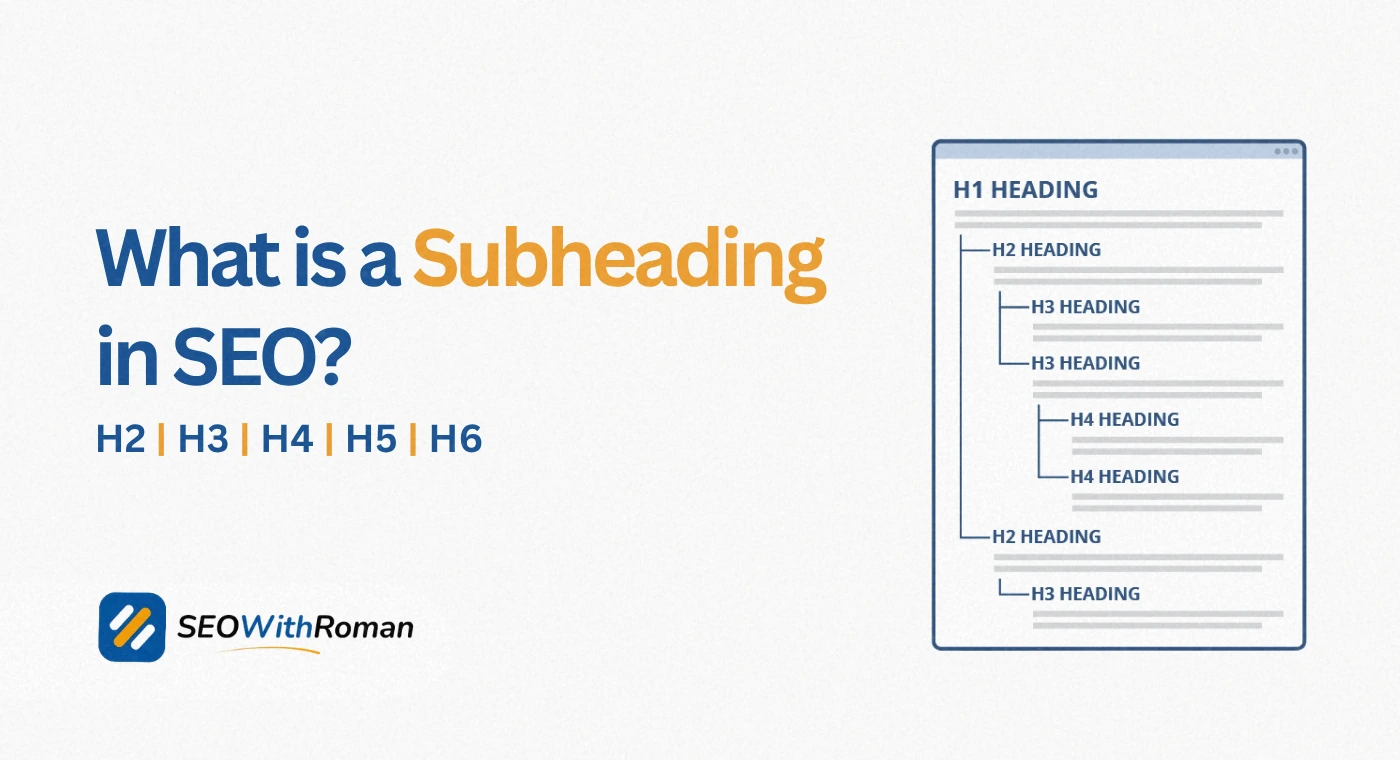
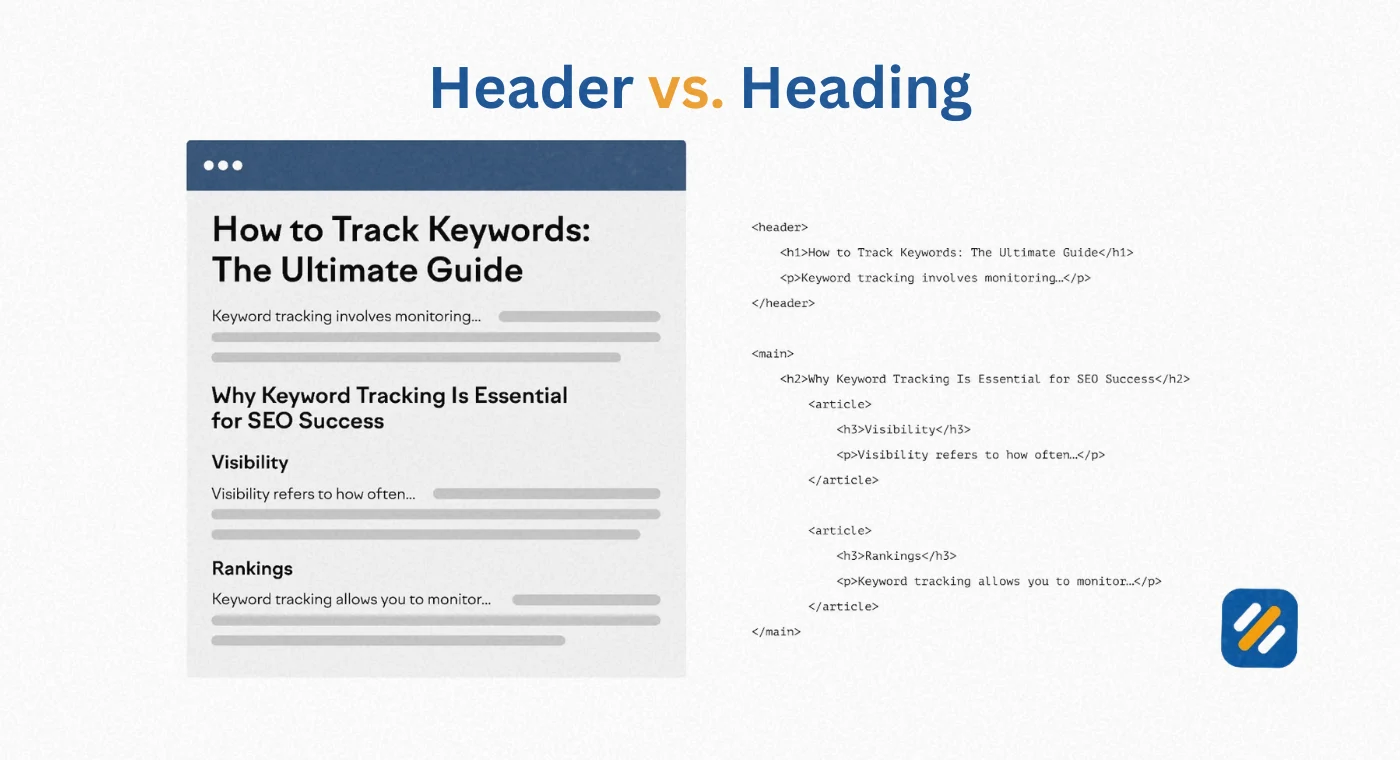
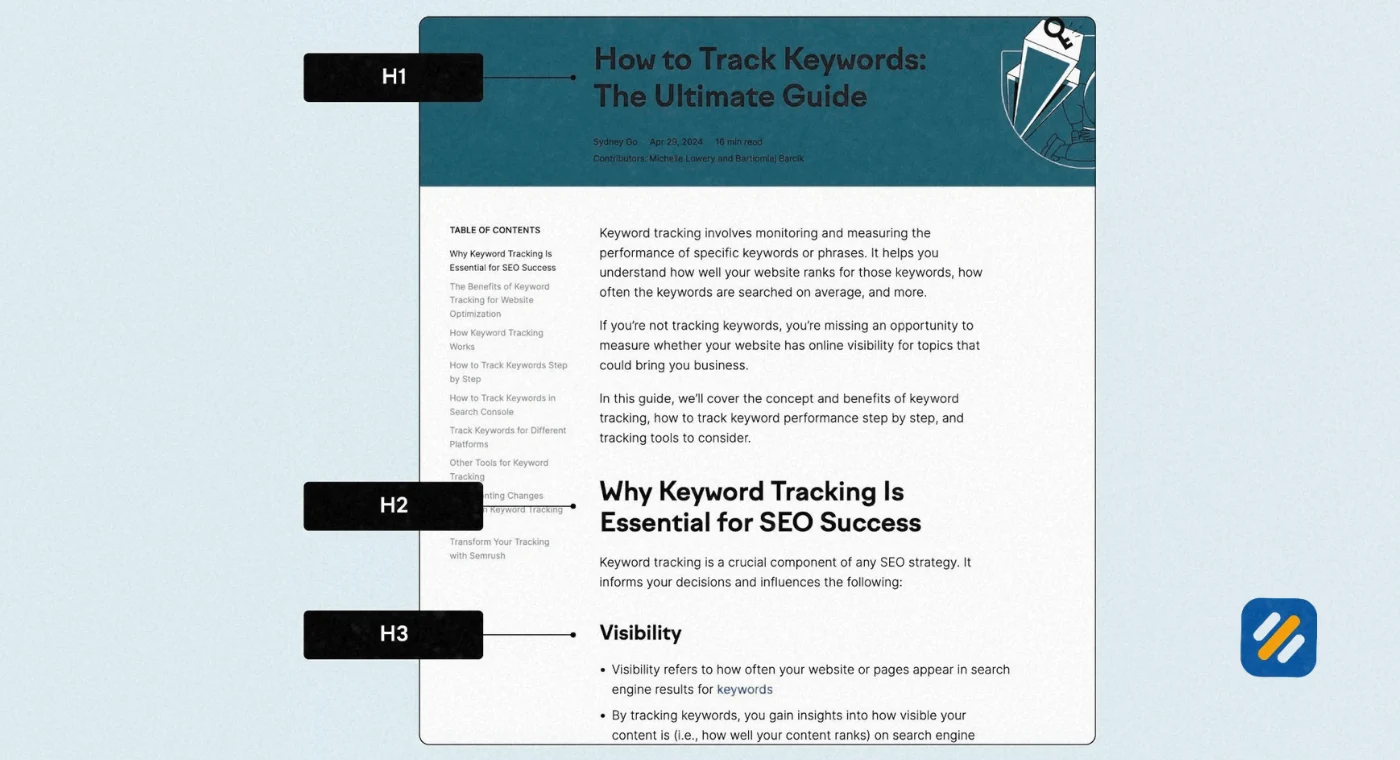
In HTML terms, which is what powers every website on the internet, the main heading of a page is tagged as Heading H1. Subheadings are tagged as H2, H3, H4, and so on, depending on how deep the content hierarchy goes.
Here is a simple way to understand the structure
- H1: The title of the entire page or article
- H2: Main section headings that divide the content into major topics
- H3: Sub-sections within an H2 section
- H4 and below: Rarely needed but used for deeply nested content
Every article you read online, every product page you browse, every landing page you visit uses this exact hierarchy. It is the skeleton that holds web content together.
2 What Is a Subheading Example | Seeing It in Real Life
The fastest way to understand what a subheading is and how it functions is to see real examples in context. Here are three different types of content and how subheadings appear in each:
Example 1: A Blog Article About Keyword Research
Main Heading (H1): How to Do Keyword Research for Free Step by Step
Subheadings (H2):
- What Is Keyword Research and Why Does It Matter
- How to Use Google Keyword Planner for Free
- The Difference Between Short Tail and Long Tail Keywords
- How to Check Keyword Difficulty Before You Write
- Common Keyword Research Mistakes Beginners Make
Each H2 subheading introduces a new section. The reader can scan these subheadings and immediately know what the article covers without reading a single body paragraph.
Example 2: A Product Page for SEO Software
Main Heading (H1): Rank Math SEO Plugin | The Free SEO Plugin That Does Everything
Subheadings (H2):
- What Can Rank Math Do for Your Website
- How to Install Rank Math in Under 5 Minutes
- Rank Math Free vs Rank Math Pro: Which Do You Need
- What Real Users Say About Rank Math
Example 3: A Wikipedia Style Informational Page
Main Heading (H1): Search Engine Optimisation
Subheadings (H2):
- History of SEO
- How Search Engines Work
- On-Page SEO Techniques
- Off-Page SEO and Link Building
- Technical SEO Explained
In every case the subheadings do the same job. They break the content into clearly labelled sections that make scanning, reading, and understanding easier for both humans and search engines.
3 What Is the Meaning of Subheadings | Beyond the Basic Definition
The word subheading literally means a heading that sits below another heading in a hierarchy. Sub comes from the Latin word meaning under or below. A subheading is therefore a heading that is subordinate to, and supports, the main heading above it.
But the meaning of subheadings goes far deeper than the definition alone.
In content writing and SEO, a subheading carries three distinct meanings depending on who is reading it
To the human reader, a subheading is a navigation aid. Research consistently shows that most website visitors do not read content word by word. They scan. Studies from the Nielsen Norman Group found that users read at most 28% of words on a webpage during a typical visit. Subheadings are the visual anchors that readers use to decide which sections are worth stopping to read fully.
To Google's algorithm, a subheading is a relevance signal. When Google crawls your page it gives extra weight to text inside heading tags because they represent the writer's own summary of what each section covers. A subheading containing your secondary keyword tells Google that keyword is genuinely covered on the page, not just mentioned once in the body text.
To Google's AI Overview system, a subheading is a content boundary marker. When Google's AI is looking for a specific answer to extract and display in an AI Overview, it looks for content that is clearly labelled with a descriptive heading. A section with a clear, question-based subheading like "What Is a Subheading for Beginners" is far more likely to be extracted and displayed than the same content sitting inside a paragraph with no heading above it.
This triple meaning is why subheadings deserve far more attention than most beginner content writers give them.
4 What Is the Difference Between Headings and Subheadings
This is one of the most common questions beginners ask, and the confusion is understandable because the two terms are closely related and sometimes used interchangeably in casual conversation.
Here is the exact difference
| Element | HTML Tag | Purpose | Where It Appears |
|---|---|---|---|
| Heading | H1 | Introduces the entire page or article topic | Once per page, at the very top |
| Subheading Level 1 | H2 | Introduces a major section of the content | Multiple times per page |
| Subheading Level 2 | H3 | Introduces a sub-section within an H2 section | Inside H2 sections when needed |
| Subheading Level 3 | H4 | Introduces a sub-section within an H3 section | Rarely needed, for deeply nested content |
| Body Text | Paragraph tags | The actual content of each section | Everywhere between headings |
| Title Tag | Invisible HTML tag | Tells Google what the page is about | Not visible on page, appears in Google results |
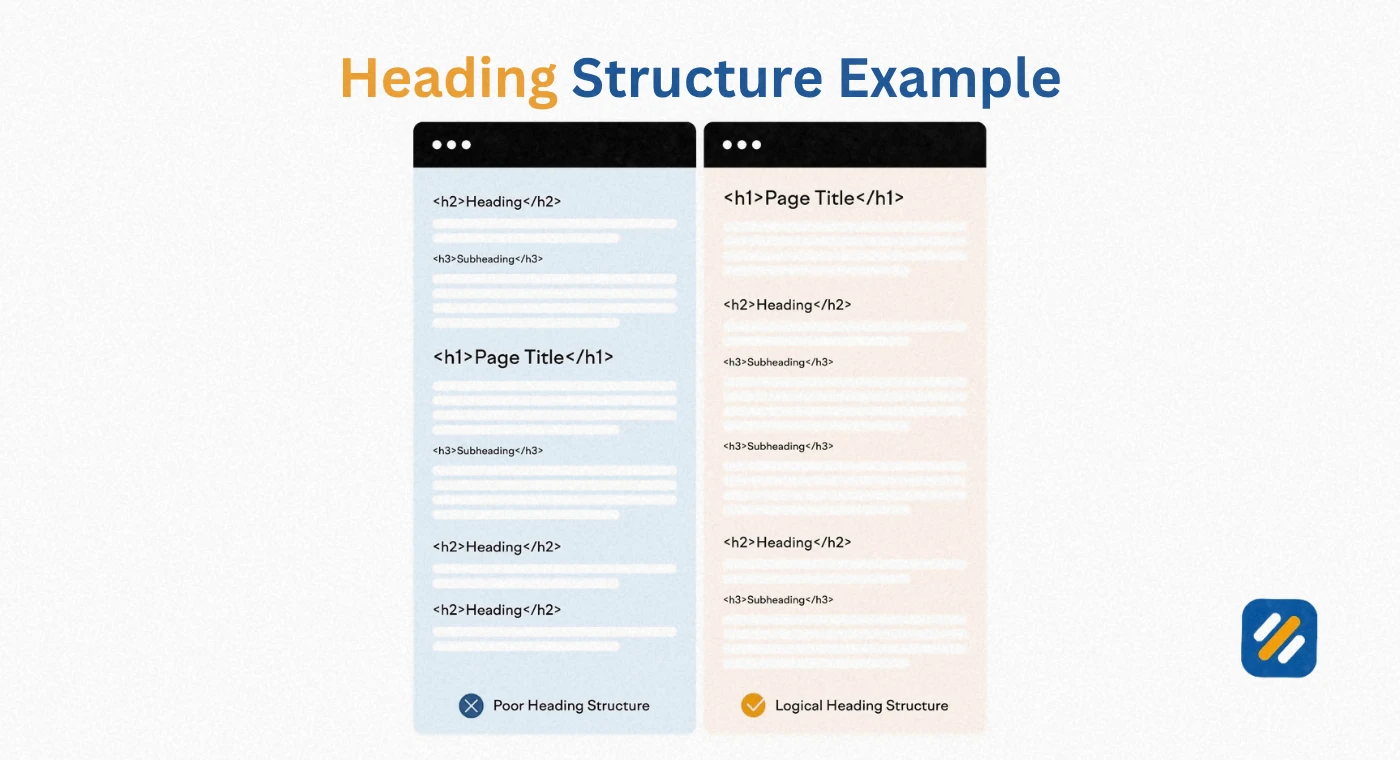
The most important distinction to understand is this. There should only ever be one H1 heading per page. That is the rule. Everything below it, the H2s, H3s, and H4s, are all subheadings in the broad sense of the word, though in everyday content writing the term subheading almost always refers specifically to H2 tags.
Think of it like a newspaper. The headline across the top of the front page is the H1. The section titles inside the paper like World News, Business, or Sports are the H2 subheadings. The smaller titles above individual stories within each section are H3 subheadings.
5 What Is a Subheading for Beginners | The Simplest Explanation
If you have ever needed to explain what a subheading is to a child, a student, or someone who has never thought about how writing is structured, here is the simplest possible explanation.
Imagine you are writing a report about animals for school. Your report is called "Amazing Animals of the World." That big title at the top is your heading. It tells everyone what the whole report is about.
But your report has different parts. One part is about lions. One part is about dolphins. One part is about eagles. Each of these parts needs its own smaller title so the reader knows when you have moved from talking about lions to talking about dolphins. Those smaller titles are your subheadings.
So in the report
Main Heading: Amazing Animals of the World
Subheading 1: Lions - The Kings of the African Plains
Subheading 2: Dolphins - The Smartest Animals in the Ocean
Subheading 3: Eagles - Masters of the Sky
Each subheading tells the reader what that section is going to be about before they read a single word of it. That is exactly what a subheading does in an article, a blog post, a website, or a textbook.
The rule is simple. The main heading is for the whole piece. Subheadings are for each individual part inside it.
6 Why Subheadings Are Critical for SEO | What Most Guides Miss
Most guides tell you that subheadings help readers scan your content. That is true but it is only a fraction of the story. The SEO impact of subheadings runs much deeper than readability.
Subheadings directly influence keyword rankings. When you place a secondary keyword inside an H2 subheading, you are telling Google that your page covers that topic as a meaningful section, not just a passing mention. This is why well structured articles with keyword-rich subheadings consistently outrank poorly structured articles with the same keyword density in body text alone.
Subheadings determine AI Overview eligibility. Google's AI Overviews, previously known as Search Generative Experience, extract answers from content that is clearly organised with descriptive headings. A page with vague subheadings like "More Information" or "Other Points" is almost never featured. A page with specific, question-answering subheadings like "What Is a Subheading in an Article" gets extracted repeatedly across different search queries.
Subheadings reduce bounce rate. When a visitor arrives at your page and can immediately see from the subheadings that you cover exactly what they came for, they stay. When they see a wall of text with no clear structure, they leave within seconds. Google tracks this engagement data and rewards pages that keep readers on site.
Subheadings create internal anchor points. On longer articles, browsers automatically allow linking directly to heading sections using anchor links. This means other websites can link directly to the specific section of your article that answers their readers' question, which is a more targeted and valuable form of backlink than a link to your homepage.
7 The Headline, Subheadline, and CTA Structure | How the Three Work Together
Understanding what a subheading is in isolation is useful. Understanding how it functions as part of a three-part content structure is what separates average content from content that converts readers into action-takers.
Every piece of persuasive content, whether it is a landing page, a blog post, or a product description, works through a three stage structure
Stage 1: The Headline (H1)
The headline grabs attention. It makes a promise, creates curiosity, or presents a problem the reader recognises in themselves. The headline alone does not convert. It simply gets the reader to stop scrolling.
Stage 2: The Subheading (H2 and below)
The subheading deepens the commitment. After the headline creates interest, the subheading must answer the reader's immediate question: "Is this actually relevant to me?" A strong subheading confirms relevance, expands the promise, or introduces the benefit they will get from reading further.
Stage 3: The Call to Action
The CTA converts. It tells the reader exactly what to do next, whether that is subscribing, buying, commenting, or clicking to read another article.
Without a strong subheading connecting the headline to the CTA, most readers never reach the action stage. The subheading is the bridge.
| Stage | Element | Reader's Mental Response |
|---|---|---|
| 1 | Headline | "This looks interesting, tell me more" |
| 2 | Subheading | "Yes, this is exactly what I need" |
| 3 | Call to Action | "I know what to do next" |
| Missing subheading | Headline straight to CTA | "What is this even about? I am leaving" |
8 How to Write Powerful Subheadings That Actually Work
Knowing what a subheading is matters less than knowing how to write one that does its job properly. Here is the exact approach I use when writing subheadings for SEO content:
Make every subheading self-explanatory. A reader who only reads your subheadings and skips the body text should still understand what your article covers. If your subheadings only make sense in the context of the paragraphs beneath them, rewrite them.
Use your secondary keywords naturally inside subheadings. You do not need to force keywords into every H2. But where a secondary keyword fits naturally as the subject of a section, put it there. "What Is Keyword Difficulty" as an H2 is more valuable than "Understanding Difficulty Scores" even if the content below is identical.
Write subheadings as questions where appropriate. Question-based subheadings mirror exactly how people search on Google. A subheading that reads "What Is a Subheading for Beginners" is more likely to appear in a People Also Ask box than one that reads "Explaining Subheadings Simply."
Keep subheadings between 40 and 70 characters. Short enough to scan at a glance. Long enough to be descriptive. Subheadings under 20 characters are usually too vague. Subheadings over 80 characters start to look like body text.
Maintain consistent tone and parallel structure. If three of your subheadings start with "How to," the fourth should not suddenly start with "The Reason Why." Consistent structure creates a rhythm that readers follow subconsciously.
Never write a subheading that is just a single word. "Introduction" or "Overview" or "Summary" as standalone H2 subheadings tell the reader and Google nothing useful. Every subheading should describe the specific content of its section.
9 Subheading Best Practices Compared | Good vs Bad Examples
| Weak Subheading | Strong Subheading | Why the Strong Version Wins |
|---|---|---|
| Introduction | What Is a Subheading and Why Does It Matter | Descriptive, keyword-rich, answers a real question |
| More Information | How Subheadings Directly Affect Your Google Rankings | Specific benefit, connects to reader's goal |
| Tips | 6 Proven Rules for Writing Subheadings That Rank | Number creates expectation, power word adds trust |
| Summary | 3 Expert Tips to Write Better Subheadings Starting Today | Action-oriented, specific, creates urgency |
| Background | What Is the Difference Between a Heading and Subheading | Direct question format, mirrors how people search |
| Conclusion | The One Subheading Habit That Changes Everything | Curiosity gap, specific, emotionally engaging |
10 3 Expert Tips for Writing Subheadings That Rank and Convert
Tip 1: Write Your Subheadings Before You Write Your Body Content
Most writers write the body first and add subheadings afterward as labels for what they already wrote. The better approach is to write all your subheadings first as an outline, then write the body content to fill each section. This forces every subheading to be intentional and descriptive rather than a summary label added as an afterthought.
Tip 2: Check Every Subheading Against the People Also Ask Box
Before finalising your subheadings, Google your primary keyword and read through every People Also Ask question on the first page. If any of those questions match a section you are covering, rewrite your subheading to match the PAA question as closely as possible. This is the single fastest way to get your content featured in Google's AI Overviews.
Tip 3: Never Repeat the Same Phrase in Two Subheadings
Repeating words or phrases across your H2 subheadings wastes your most valuable SEO real estate. Each subheading is an opportunity to cover a different secondary keyword or a different angle on your topic. If two subheadings are saying similar things, merge the sections or rewrite one to cover genuinely new ground.
11 Conclusion
A subheading is far more than a formatting tool. It is a navigation system for your readers, a relevance signal for Google, a boundary marker for AI extraction, and a conversion bridge between your headline and your call to action.
Every article you publish without properly structured subheadings is an article that is working at half capacity. The content might be excellent. The keyword targeting might be correct. But without clear, descriptive, keyword-aware subheadings guiding both Google and the reader through your content, you are leaving rankings and readers on the table.
Start with your next article. Write the subheadings before the body. Make every one self-explanatory. Check it against what people are actually searching for. Then watch how much easier the rest of the writing process becomes.
Have a question about subheadings or heading structure? Drop a comment below and I will answer it directly.
Join 1,000+ business owners and bloggers who get one actionable SEO tip every week — straight to their inbox. Free forever.
Get Free Weekly Tips →