- Pagination SEO is the practice of correctly signalling to Google how multiple pages of content relate to each other
- Poorly implemented pagination wastes crawl budget, creates duplicate content issues, and dilutes link equity across dozens of pages
- Self-referencing canonical tags on every paginated page is the single most important technical fix for pagination
- Infinite scroll, load more buttons, and view all pages are the three main alternatives to traditional pagination, each with different SEO implications
- Google removed support for rel next and rel prev in 2019, meaning every paginated page now needs to stand on its own merits with proper canonical implementation
1 What Is Pagination in SEO and Why It Deserves Serious Attention
Pagination is one of those technical SEO topics that most beginners ignore until something goes wrong. By the time they notice the problem, Google has already wasted months of crawl budget on the wrong pages.
In SEO, pagination refers to the practice of splitting a large set of content across multiple pages and implementing that split in a way that search engines can understand, crawl efficiently, and index correctly.
Think about a blog with 200 articles, an ecommerce store with 5,000 products, or a forum with thousands of discussion threads. Showing all of that content on a single page would create a page so large it would take minutes to load and would be impossible to navigate. Pagination solves this by breaking content into manageable chunks, typically showing 10, 20, or 50 items per page with navigation links to move between pages.
The SEO challenge is that pagination creates multiple pages that look similar to each other. Page two of a product category and page three of the same category have identical headers, footers, navigation, and layout. Only the product listings differ. Google's algorithms see this similarity and flag it as potential duplicate content unless you tell Google explicitly how these pages relate to each other.
After many years of auditing websites across ecommerce, SaaS, and content publishing, pagination issues appear in almost every technical SEO audit I run. They are silent problems. They do not throw error messages. They just quietly reduce the effectiveness of everything else you do.
2 Is Pagination Good or Bad for SEO | The Honest Answer
This is the question most beginners ask first and it deserves a direct answer.
Pagination is neither good nor bad for SEO by itself. What determines whether it helps or hurts your rankings is entirely how you implement it.
When implemented correctly, pagination supports SEO in three ways. First, it reduces page load time by limiting how many items render on a single page. A category page loading 20 products loads significantly faster than one loading 2,000 products, and page speed is a confirmed Google ranking factor. Second, pagination creates a logical internal linking structure where pages naturally connect to each other, helping Google understand your site architecture and distributing link equity through the site. Third, it makes large content sets navigable for real users, reducing bounce rates and increasing the chance users find what they are looking for.
When implemented incorrectly, pagination creates three serious SEO problems. Duplicate content occurs when paginated pages share so many common elements that Google sees them as variations of the same page. Crawl budget waste happens when Google spends its daily crawl allocation on page 47 of a category when it should be crawling your most important product pages. And link equity dilution occurs when external backlinks pointing to a category page spread their value across thirty paginated versions rather than consolidating on the primary page.
The solution to all three problems is proper implementation, which the rest of this guide covers in detail.
3 How Google Crawls and Indexes Paginated Pages in 2026
Understanding how Google actually processes pagination changes how you approach every decision in this guide.
Google treats every URL as a unique page. When you create pagination, you are creating multiple unique URLs for what is conceptually one content collection. Google crawls each of these URLs, reads the content, and decides whether to index it, which version to show in search results, and how much authority to give each page.
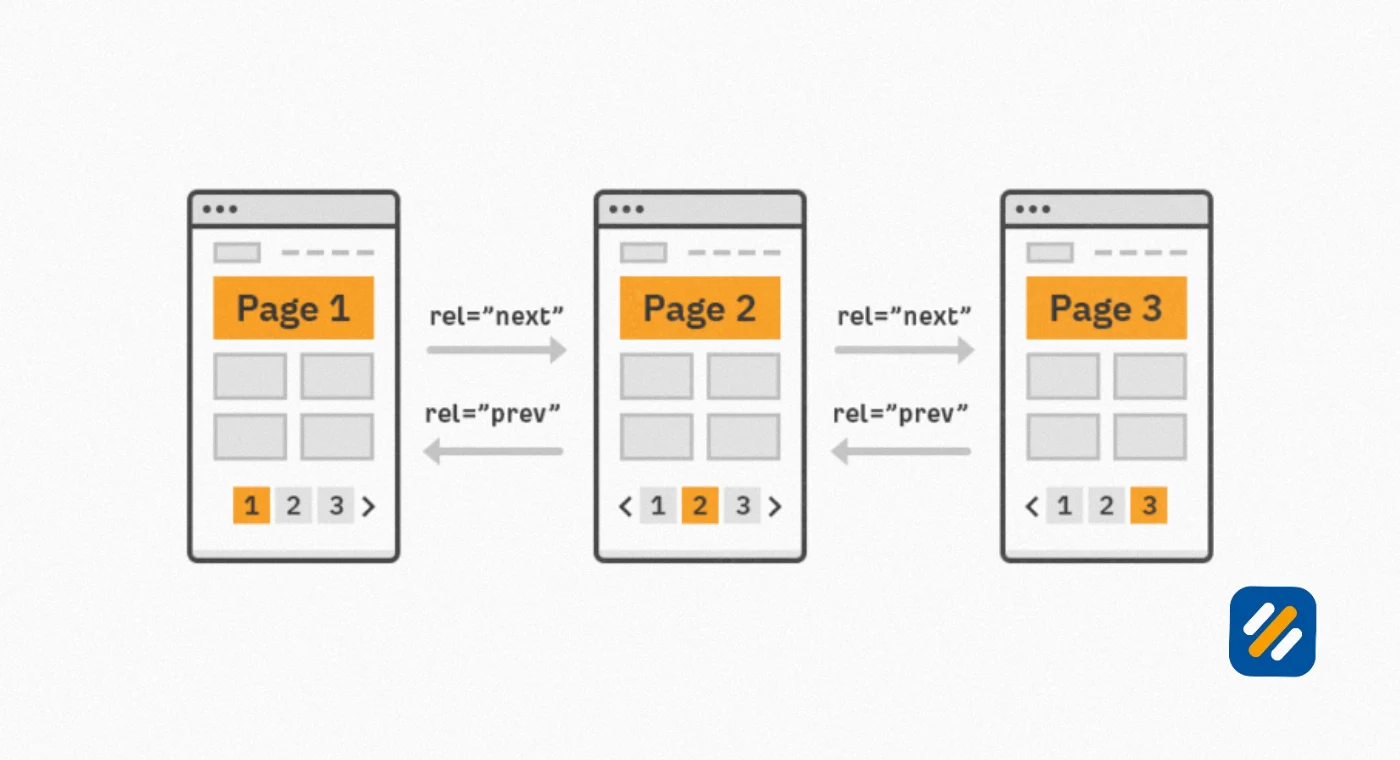
The most important change to understand about modern pagination SEO is what happened in 2019. Google officially deprecated support for rel next and rel prev, the HTML link attributes that used to tell Google about the sequential relationship between paginated pages. Before 2019, adding these tags to your paginated pages was considered best practice. After 2019, Google stated it no longer uses these signals to understand pagination.
This change fundamentally shifted how pagination SEO should be approached. Without rel next and rel prev, every paginated page needs its own complete SEO treatment. You cannot rely on a sequence signal to tell Google that page 5 of your blog is part of a series. You need to implement proper canonical tags and page level optimisation independently on every single page in your pagination sequence.
4 Pagination SEO Best Practices | The Complete Implementation Guide
Here are the exact best practices for implementing pagination correctly in 2026:
Best Practice 1: Self-Canonicalize Every Paginated Page
The most critical technical requirement for pagination SEO is adding a self-referencing canonical tag to every page in your pagination sequence. A canonical tag tells Google which version of a page you consider the authoritative one. When each paginated page points its canonical tag to itself, you are telling Google that each page is unique and should be treated as its own independent URL.
Here is what self-referencing canonicals look like in your HTML:
For page one: link rel canonical href https://example.com/shop/
For page two: link rel canonical href https://example.com/shop/?page=2
For page three: link rel canonical href https://example.com/shop/?page=3
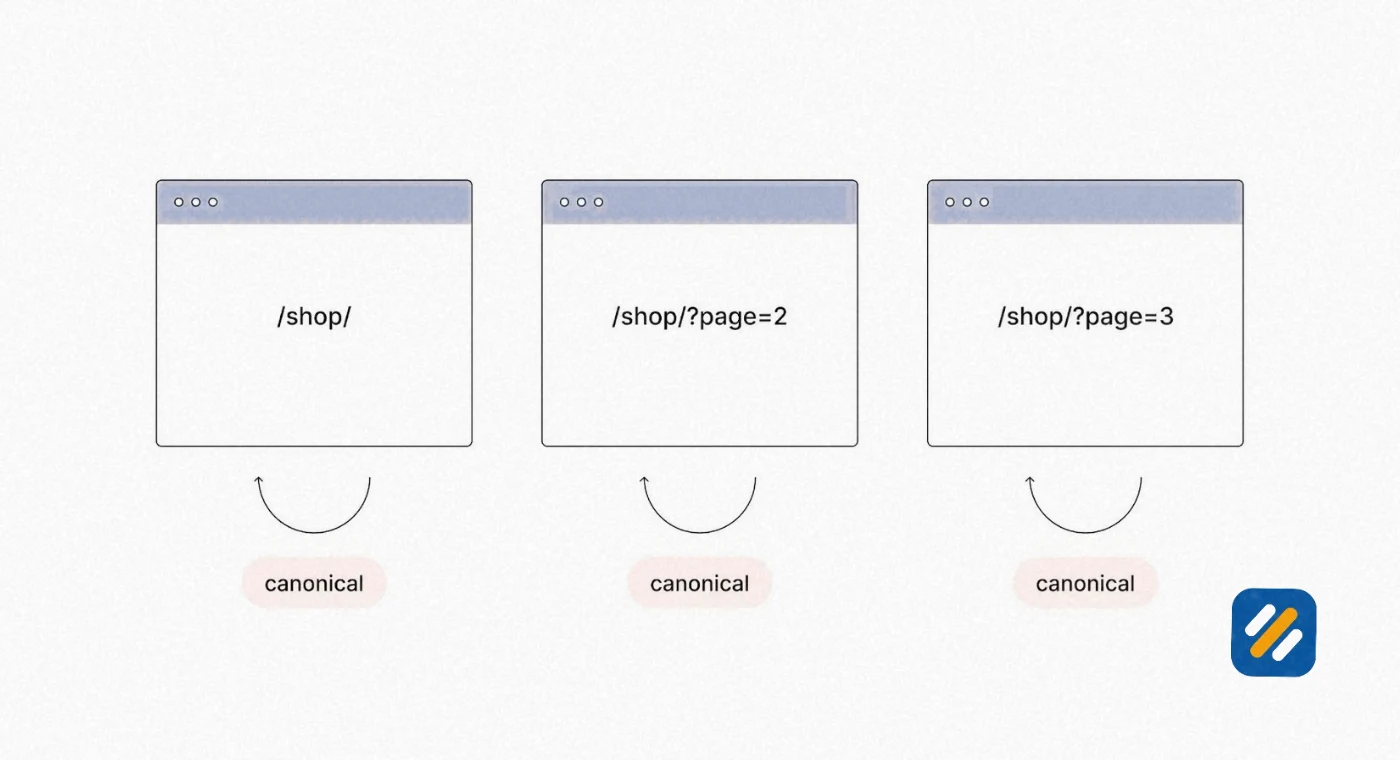
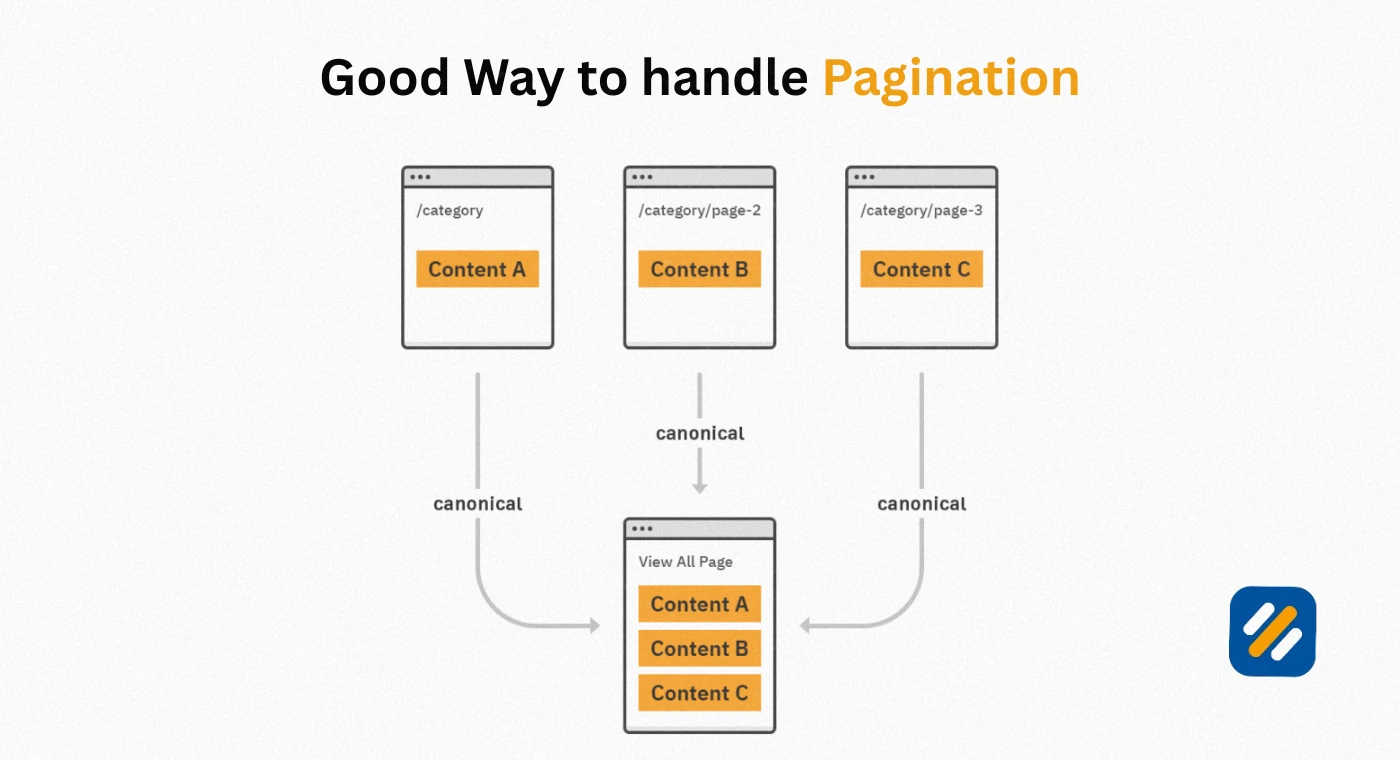
Never point all paginated pages to the first page using canonicals. This is one of the most common pagination mistakes I see in audits. If you canonicalize page 3 to page 1, you are telling Google that page 3 is a duplicate of page 1 and should not be indexed separately. Google will stop crawling page 3 and all the products listed only on that page become invisible to search.
Best Practice 2: Use Clean and Consistent SEO Pagination URL Structures
Your SEO pagination URL structure directly affects whether Google can crawl your paginated pages efficiently. There are two accepted formats:
Query parameter format: example.com/products?page=2
Directory format: example.com/products/page/2
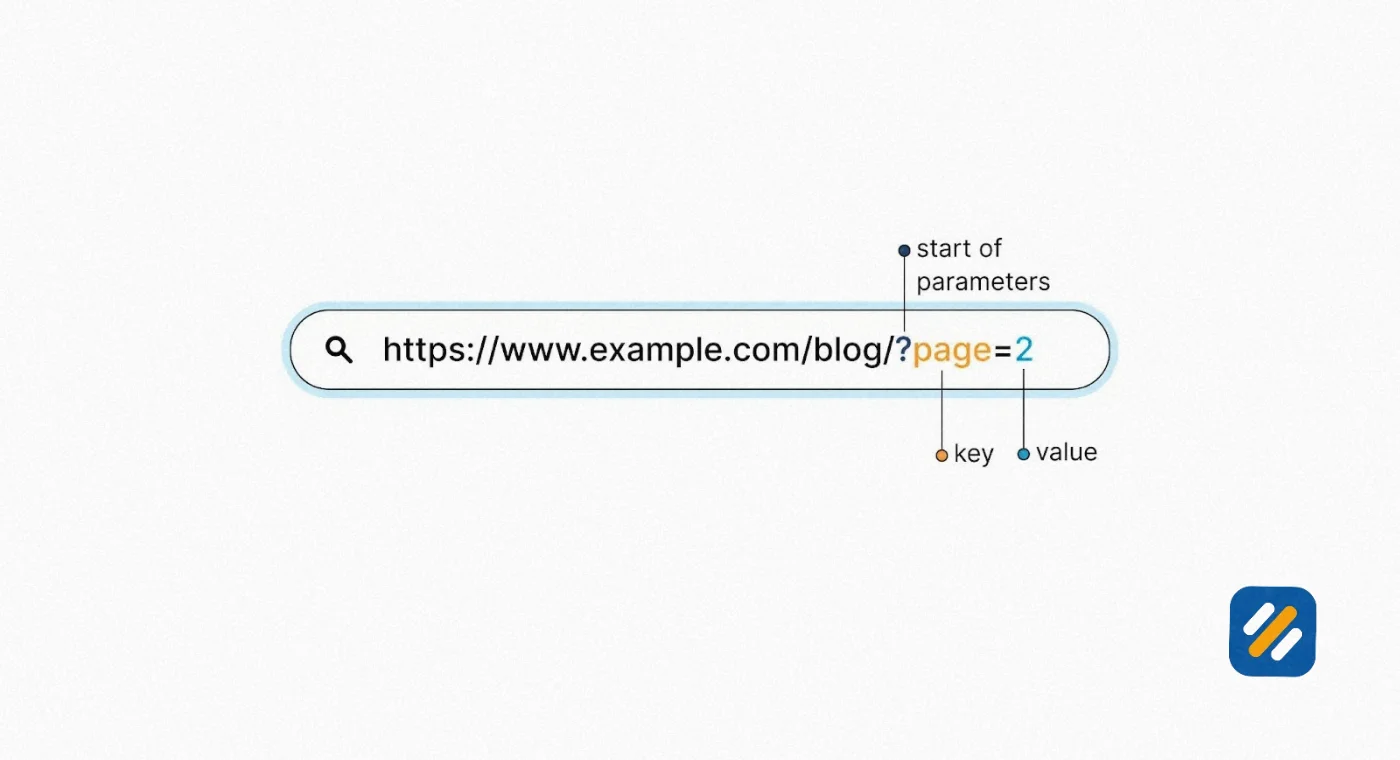
Both formats work for Google. What does not work is mixing formats, using random strings, skipping page numbers, or using fragment identifiers like the hash symbol in URLs.
Google's own documentation recommends query parameters because they are easier to track in Google Search Console. If you are building a new site or doing a migration, implement query parameters from the start and never change the format later without setting up proper redirects.
Best Practice 3: De-Optimise Pages Two and Beyond
Your primary category page, product listing page, or blog archive page is the one you want ranking in Google. Pages two through fifty are navigation aids, not ranking pages.
For pages two and beyond, use generic non-keyword-optimised title tags like "Shop Running Shoes Page 2 | Brand Name." Do not write unique meta descriptions for every paginated page trying to squeeze keyword variations in. Keep heading tags generic and descriptive rather than keyword-focused.
This approach prevents your paginated pages from competing with your main page for the same keywords, which would split your ranking potential across dozens of pages instead of concentrating it on the one page you actually want users to land on.
Best Practice 4: Never Noindex Paginated Pages
Noindexing pagination is a well-intentioned but damaging mistake. The logic sounds sensible: if page 7 of your category is not ranking for anything, why let Google index it? The problem is that noindexing paginated pages cuts off the internal link flow through your pagination sequence.
When Google crawls page 1 and finds a link to page 2, it follows that link and discovers the products on page 2. If page 2 is noindexed, Google still crawls it for its links but stops following the chain. Products listed only on pages 5 through 20 may never be discovered and indexed because the noindexed pages break the crawl path.
Leave paginated pages indexed. Combine this with self-referencing canonicals and de-optimised title tags to get the best balance of crawlability and content control.
Best Practice 5: Avoid Fragment Identifiers in Pagination URLs
Fragment identifiers are the portions of a URL after the hash symbol. A paginated URL like example.com/category/#page2 looks functional to a user but is completely invisible to Google. Search engines do not crawl fragment identifiers because they indicate a position within a page rather than a separate page.
Always use query parameters or directory-based URLs for pagination. Never use hash-based pagination if you want Google to discover and index your paginated content.
5 Pagination SEO URL Structure | What Works and What Breaks Your Rankings
Your pagination URL structure is one of the most important technical decisions you will make for any large content site. Get it wrong at setup and fixing it later requires site-wide redirects and weeks of recrawling.
| URL Structure Type | Example | Google Friendly | Recommended |
|---|---|---|---|
| Query parameter | /products?page=2 | Yes | Yes, Google's preferred format |
| Directory structure | /products/page/2 | Yes | Yes, clean and readable |
| Fragment identifier | /products/#page2 | No, invisible to Google | Never use for pagination |
| Random string | /products/p2x9401 | Technically yes but confusing | Avoid |
| Mixed formats | /products?page=2 and /products/page-3 | Creates duplicate URL problems | Never mix |
| Non-sequential | /products?page=2 then /products?page=4 | Confuses crawlers | Always use consecutive numbers |
The most important rule about SEO pagination URL structure is consistency. Choose one format before you launch and never deviate from it. Every time you change your pagination URL format without setting up proper redirects, you lose all the crawl history and any link equity that accumulated on those URLs.
6 Canonical Pagination SEO | How to Implement It Without Killing Your Rankings
Canonical tags and pagination are the combination that most causes confusion among beginners and even experienced SEO professionals. Here is a clear breakdown of every scenario and the correct canonical approach for each.
Scenario 1: Standard paginated series
Each page canonicals to itself. Page 1 self-canonicals, page 2 self-canonicals, page 3 self-canonicals. This tells Google each page is unique and should be crawled and indexed independently.
Scenario 2: Filtered versions of paginated pages
When a user applies a filter (such as sorting products by price or colour) the URL changes but the page content may be very similar to the unfiltered version. In this case, canonical the filtered URL to the unfiltered equivalent to prevent hundreds of filter combinations from being indexed as unique pages.
For example: example.com/shoes?colour=red should canonical to example.com/shoes
Scenario 3: Paginated pages accessed via multiple URL patterns
If your website can be accessed as both example.com/products?page=2 and example.com/products/page/2 due to URL rewriting rules, one format will be indexed as a duplicate of the other. Set your canonical on the version you want Google to treat as authoritative and 301 redirect the other format to it.
Scenario 4: Paginated blog archive pages
Blog category and tag archive pages that paginate need self-referencing canonicals on each page. Avoid using category canonicals that point all archive pages to the main category page. This would noindex the deeper pages and prevent Google from discovering older blog posts linked only from those archive pages.
7 Ecommerce Pagination SEO | The Specific Challenges Large Stores Face
Ecommerce pagination SEO carries unique challenges that general pagination guides do not fully address. A blog with 200 posts has manageable pagination. An ecommerce store with 50,000 products across 200 categories, each with filter combinations, can have hundreds of thousands of paginated URLs if not controlled properly.
Here are the specific issues ecommerce sites face with pagination and how to address each:
Faceted navigation creating infinite pagination combinations
Most ecommerce platforms allow users to filter products by size, colour, brand, price range, rating, and other attributes. Each combination of filters creates a new URL. Without proper controls, a single category with 10 filter types can generate tens of thousands of unique URLs, all of which Google may attempt to crawl.
The solution is to use canonical tags to point filter combination URLs to the base category URL, and to use the robots.txt file or Google Search Console URL parameter settings to prevent Google from crawling low-value filter combinations.
Deep pagination pages consuming crawl budget
For large product catalogues, pages beyond page 10 or 20 are rarely visited by users and rarely contribute to organic rankings. Yet Google may crawl them extensively, wasting crawl budget that should be spent on your most important product detail pages.
Monitor your Google Search Console crawl stats report to see how many of Google's daily crawl allocations are being spent on deep pagination pages. If pagination is consuming more than 20% of your crawl budget, consider implementing a crawl depth limit by noindexing very deep pages (beyond page 20, for example) while leaving the canonical tags in place so link equity still flows.
Seasonal inventory changes breaking pagination structure
Ecommerce stores regularly add and remove products. When products are removed, pages renumber. What was page 5 becomes page 4. Google has page 5 in its index pointing to a URL that now shows completely different products than when it was first crawled.
The solution is not page-number-based URLs but rather offset-based URLs. Instead of /products?page=2 showing items 21 to 40, use /products?offset=20 to show items starting from position 21 regardless of page numbering. This makes pages more stable when products are added or removed.
8 Infinite Scroll vs Pagination SEO | Which One Is Better for Rankings
This is one of the most debated topics in technical SEO and the answer depends entirely on your use case.
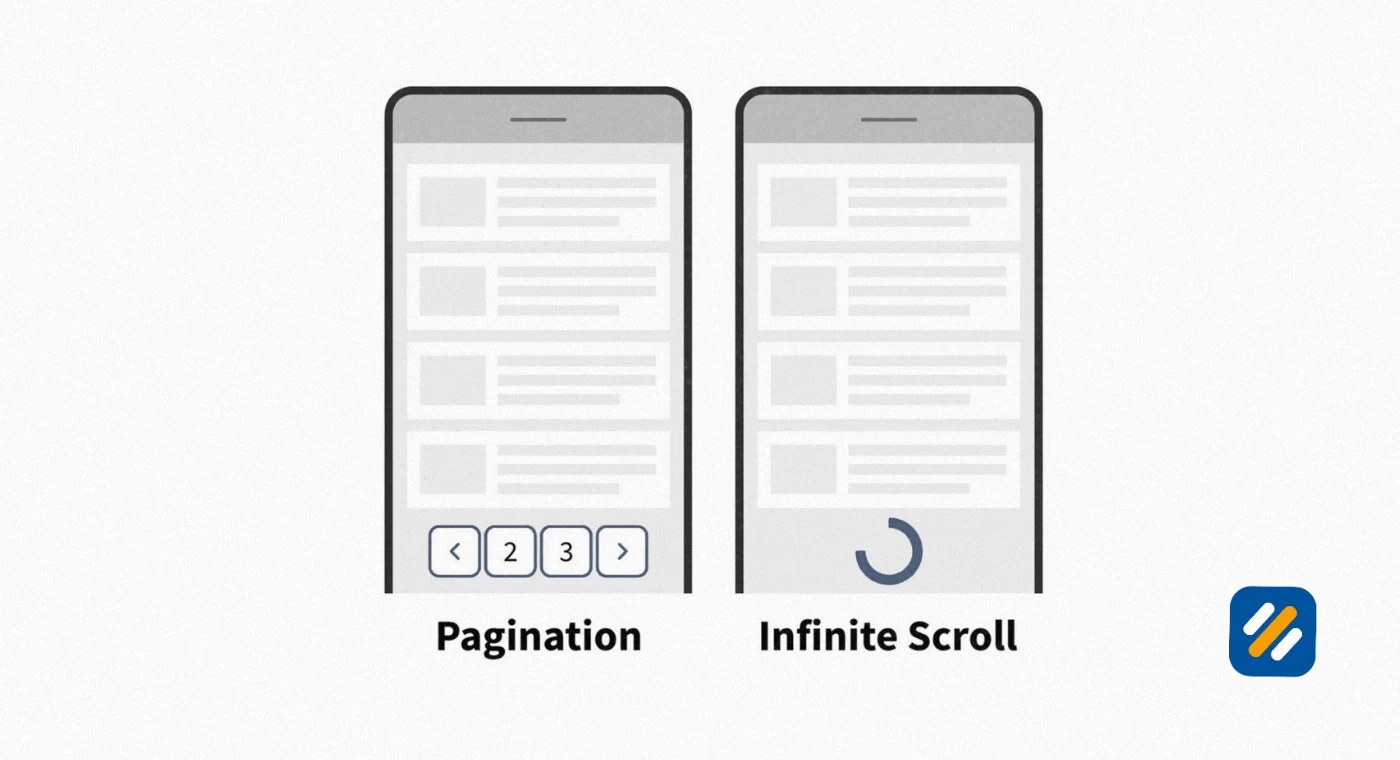
Traditional Pagination loads new content on separate URLs when users click next page or a page number. Each URL is separately indexable by Google. Products or articles on page 5 have their own URL that Google can crawl directly.
Infinite scroll automatically loads additional content as the user scrolls down, without creating new URLs. Social media feeds use infinite scroll because the content is not meant to be indexed individually.
Load more buttons sit between the two approaches. Clicking the button loads additional content on the same URL without creating new pages. This is better than infinite scroll for SEO because it keeps all content on one page but worse than traditional pagination for very large content sets because it creates extremely long single pages.
| Method | SEO Crawlability | User Experience | Best Use Case |
|---|---|---|---|
| Traditional pagination | Excellent, each page has unique URL | Good on desktop, cumbersome on mobile | Blog archives, product catalogues, forums |
| Infinite scroll | Poor without JS rendering, Google may miss content | Excellent on mobile, natural browsing | Social feeds, news streams, image galleries |
| Load more button | Good, all content on one URL | Good, user controls loading | Category pages, search results |
| View all | Good if page is not too large | Poor for large content sets, slow loading | FAQ pages, small product sets under 50 items |
The key technical requirement for infinite scroll SEO is progressive enhancement. If you use infinite scroll, each loaded batch of content must also be accessible via a unique paginated URL. When Google crawls your site, it does not scroll. It follows links. If your infinite scroll content is only accessible by scrolling, Google will only ever see the first batch of content.
The correct implementation combines infinite scroll for user experience with traditional pagination URLs accessible via rel links or sitemap inclusion, so Google can discover all content regardless of whether it can execute your JavaScript scroll behaviour.
9 Blog Pagination Canonical URLs SEO | Specific Guidance for Content Sites
Blog pagination presents slightly different challenges than ecommerce pagination because blog archive pages have less inherent SEO value than product pages and the canonical decisions carry different risk profiles.
Most WordPress blogs create paginated archive pages automatically when you assign posts to categories or tags. A category page showing 10 posts per page with 100 posts creates 10 paginated archive pages. These pages share identical layouts, navigation, and metadata, with only the post listings changing between pages.
Here is the correct SEO approach for blog pagination
Category archive pages: Self-canonicalize each page. Add the current page number to the title tag of pages two and beyond. "SEO Tips Page 2 | Blog Name" is cleaner than trying to optimise page 2 for a different keyword variation.
Tag archive pages: For high-volume tags, self-canonicalize each page. For low-traffic tags with only two or three pages, consider whether the tag page serves enough unique value to be indexed at all. Tag pages with fewer than five posts assigned to them often do more harm than good by creating thin paginated pages that dilute your domain's content quality signals.
Author archive pages: Same approach as category pages. Self-canonicalize each paginated author archive page and add page numbers to title tags to make them distinguishable.
Date archive pages: These are often the most problematic for blog pagination SEO. Yearly and monthly archive pages that paginate can create dozens of low-value URLs. Consider noindexing date archive pages entirely unless your content publishing volume justifies them.
10 How to Find and Fix Pagination SEO Issues on Your Website
Here is the complete process for auditing your pagination implementation using free tools:
Step 1: Crawl your site with Screaming Frog free version
Screaming Frog crawls up to 500 URLs for free. After crawling, filter by URL to find all paginated URLs in your site. Look for the pattern that indicates pagination, such as ?page= or /page/. Export this list and check that each paginated URL has a self-referencing canonical tag.
Step 2: Check indexed paginated pages in Google Search Console
Go to the Pages report under Indexing in Google Search Console. Search for your pagination URL pattern in the filter. This shows you exactly which paginated pages Google has indexed and which it has chosen not to index. A healthy pagination setup will show all pages indexed with no crawl errors.
Step 3: Check crawl budget allocation in GSC crawl stats
Go to Settings then Crawl Stats in Google Search Console. Look at the breakdown of crawled URLs by page type. If pagination URLs are consuming a disproportionate share of your daily crawl allocation compared to your most important content pages, you have a crawl budget problem that needs addressing.
Step 4: Use Ahrefs free Webmaster Tools to check for duplicate content flags
Connect your website to Ahrefs Webmaster Tools for free. Run a site audit and filter for duplicate title tags and duplicate meta descriptions. Pagination often creates dozens of pages with identical titles and descriptions if SEO patterns were not set up correctly.
Step 5: Test individual paginated URLs with the URL Inspection tool in GSC
For any specific pagination URL you are concerned about, use the URL Inspection tool in Google Search Console to see the last crawl date, indexing status, canonical URL Google has selected, and any crawl errors encountered. This is the most direct way to verify whether your canonical implementation is working as intended.
| Tool | What It Checks | Cost | Best For |
|---|---|---|---|
| Google Search Console | Index status, crawl stats, URL inspection | Free | Primary monitoring tool |
| Screaming Frog free | Canonical tags, URL structure, page titles | Free up to 500 URLs | Small site audits |
| Ahrefs Webmaster Tools | Duplicate content, technical issues, crawl errors | Free for your own sites | Monthly monitoring |
| Google Analytics 4 | User behaviour on paginated pages, engagement time | Free | UX analysis |
| Semrush Site Audit | Comprehensive technical issues including canonicals | Paid | Agency level auditing |
11 Pagination SEO Common Mistakes and How to Fix Them
After running technical SEO audits across dozens of websites, the same pagination mistakes appear consistently:
Mistake 1: Canonicalizing all paginated pages to page one
This tells Google that pages 2 through 50 are duplicates of page 1. Google stops crawling them and all products or posts listed only on those pages become invisible. Fix: Change canonicals to self-referencing on every page in the sequence.
Mistake 2: Still using rel next and rel prev expecting Google to honour them
Google officially dropped support for these attributes in 2019. Adding them does no harm but provides no benefit. Fix: Remove them if they are adding code bloat, or leave them harmless. Do not rely on them as your pagination SEO strategy.
Mistake 3: Using noindex on paginated pages to save crawl budget
Noindexing breaks the internal link chain that Google uses to discover content deeper in your site. Fix: Leave pages indexed, use self-referencing canonicals, and de-optimise title tags instead.
Mistake 4: Creating infinite paginations through filter combinations on ecommerce sites
Allowing Google to crawl every filter combination creates thousands of thin duplicate pages. Fix: Use canonical tags on filter URLs pointing to the base category URL and use robots.txt or GSC parameter settings to limit unnecessary filter crawling.
Mistake 5: Inconsistent URL formats across paginated pages
Mixing ?page=2 with /page/2 creates duplicate URL versions of the same paginated content. Fix: Standardise on one URL format site-wide and implement 301 redirects from the old format to the new.
12 3 Expert Tips for Pagination SEO That Most Guides Miss
Expert Tip 1: Monitor Your Pagination Crawl Depth Monthly
Most SEO guides tell you to implement pagination correctly and leave it at that. What they do not tell you is that pagination problems develop over time as your site grows. A site with 100 products may have perfectly healthy pagination. The same site with 10,000 products three years later may have deep pagination pages consuming 40% of Google's crawl allocation.
Set a monthly reminder to check your crawl stats in Google Search Console and track the percentage of crawls going to paginated pages versus product detail pages and blog posts. If pagination is consuming more than 15 to 20% of your crawl budget, implement crawl depth limits before the problem compounds further.
Expert Tip 2: Use Sitemaps to Supplement Pagination Discovery
Pagination creates internal links that Google follows to discover content. But if your pagination goes 50 pages deep and Google has a limited crawl budget, it may not crawl all the way to page 50. The content on those deep pages stays invisible.
Submit a dedicated XML sitemap containing all your product URLs or blog post URLs directly, regardless of which pagination page they appear on. This gives Google a direct path to every piece of content without requiring it to crawl through all your pagination pages to find them. Products on page 47 become as discoverable as products on page 1.
Expert Tip 3: Test Your Pagination With JavaScript Disabled
Many modern websites implement pagination with JavaScript. The pagination links only appear after JavaScript executes. The problem is that Google's crawler does not always execute JavaScript on its first crawl pass. It crawls the raw HTML first and processes JavaScript later, sometimes days later.
Open your paginated pages in your browser with JavaScript disabled in developer tools. If the pagination links disappear, your pagination is JavaScript-dependent and Google may not be discovering all your pages as efficiently as you think. Implement server-side rendered pagination links as a fallback to ensure your paginated URLs are always present in the raw HTML that Google crawls first.
13 Conclusion
Pagination SEO is one of those technical topics that feels complicated but comes down to a small number of decisions made correctly and consistently across your entire site.
Self-referencing canonical tags on every paginated page. Clean consistent URL structures. De-optimised title tags on pages two and beyond. Paginated pages kept indexed but not keyword-targeted. Crawl budget monitored regularly as the site grows.
Get those five things right and pagination becomes a structural asset rather than a silent liability draining your crawl budget and fragmenting your content authority.
The best time to implement correct pagination was when you built your website. The second best time is now.
Start with a crawl in Screaming Frog and a check of your indexed pages in Google Search Console. Those two steps will tell you everything you need to know about where your current pagination SEO stands and what needs fixing first.
Have a specific pagination issue you are trying to solve? Drop a comment below and I will help you work out the right fix for your setup.
Join 1,000+ business owners and bloggers who get one actionable SEO tip every week — straight to their inbox. Free forever.
Get Free Weekly Tips →