- Google Keyword Planner is a free keyword research tool built inside Google Ads, originally designed for PPC campaigns but equally powerful for SEO keyword research
- You need a free Google Ads account to access it and you do not need to run any paid ads or spend any money
- Google Keyword Planner pulls search volume data directly from Google, making it the most accurate source of keyword data available to any website owner
- The tool shows search volume ranges, seasonal trends, competition levels for ads, and top of page bid data all in one place
- Combining Google Keyword Planner with free tools like Ahrefs free keyword generator and Google Trends gives you a complete keyword research system at zero cost
1 What Is Google Keyword Planner and Why Every Website Owner Needs It
If you have ever searched for an SEO keyword tool and felt overwhelmed by the price tags, Google Keyword Planner is the answer you have been looking for.
Google Keyword Planner is a free keyword research tool built directly inside the Google Ads platform. Google originally designed it to help advertisers find the right keywords for their paid search campaigns. But over the years it has become one of the most widely used free SEO keyword research tools in the industry, and for a very good reason.
Every piece of data inside Google Keyword Planner comes directly from Google itself. Not from a third-party database, not from an algorithm estimating what might be true. The search volume data, the seasonal trends, the geographic breakdowns, all of it comes from the same database Google uses to run its own advertising platform. No other free tool can make that claim.
I have been using Google Keyword Planner as part of my SEO workflow for six years across dozens of client websites in B2b, ecommerce, healthcare, and SaaS. It is always the first tool I open when starting keyword research for a new website because it gives me a direct line to what real people are actually searching for on Google right now.
For any small business owner or blogger trying to grow organic traffic without spending money on tools, Google Keyword Planner is the non-negotiable starting point.
2 Is Google Keyword Planner Free and Is It Still Available in 2026
Yes, Google Keyword Planner is completely free to use. And yes, it is still fully available in 2026 with no signs of being discontinued.
This is one of the most commonly searched questions about the tool, and the answer has not changed since Google first made it available. You do not pay anything to use it. You do not need to run Google Ads. You do not need a paid subscription to any Google product.
The only requirement is a free Google Ads account. This trips up a lot of beginners because setting up the account looks like it requires payment information. It does ask for a payment method during setup, but Google only places a temporary authorisation on your card to verify it. As long as you never actually launch an ad campaign, you will never be charged.
There is one important limitation worth knowing about. Users who have never run an active Google Ads campaign see search volume data displayed as ranges rather than exact numbers. For example, a keyword might show 1,000 to 10,000 monthly searches instead of a specific number like 4,800. If you run even a small active campaign with a minimal budget, exact volumes become visible. For most SEO users working on a zero budget, the ranges are sufficient to make solid keyword decisions.
3 How to Get to Google Keyword Planner | Step by Step
Getting access to Google Keyword Planner takes less than ten minutes if you follow these steps exactly:
Step 1: Create a free Google Ads account
Go to ads.google.com and click Start Now. Sign in with your existing Google account or create a new one. Google will walk you through a campaign setup process.
Step 2: Skip the campaign creation process
This is the step most beginners miss. Google will try to guide you into creating an ad campaign immediately. Do not fill in the campaign details. Look for a small “Skip” or “Switch to Expert Mode” link, usually at the bottom of the screen. Click it. Then when prompted to create a campaign, select “Create an account without a campaign.”
Step 3: Enter your billing information
Google requires a billing country, time zone, currency, and payment method. Fill these in accurately. A temporary authorisation may appear on your card but will not be charged if you never run an ad.
Step 4: Navigate to Keyword Planner
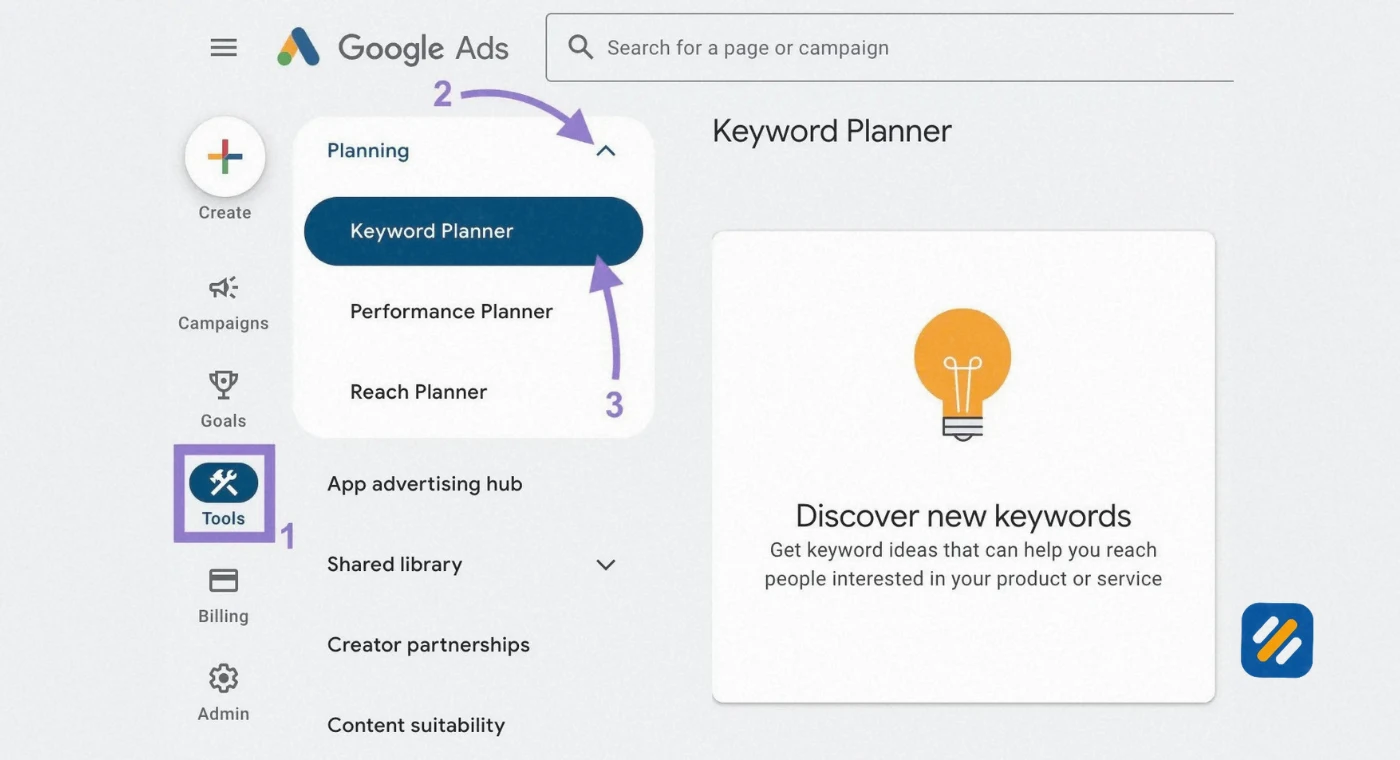
Once inside your Google Ads dashboard, click the Tools icon at the top of the screen. Under the Planning section, click Keyword Planner. You now have full access.
Step 5: Choose your research mode
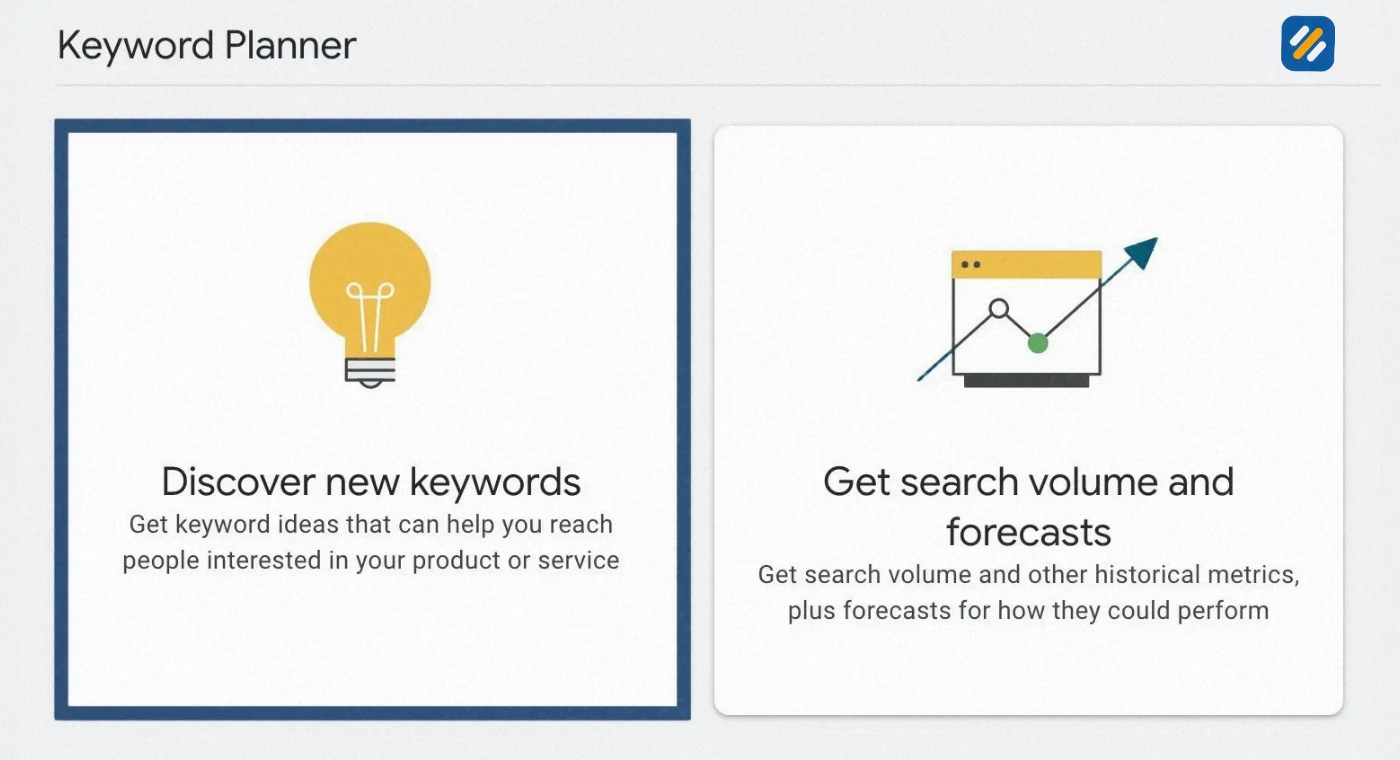
You will see two options. “Discover new keywords” for finding keyword ideas from scratch, and “Get search volume and forecasts” for checking data on a list of keywords you already have.
| Step | Action | Time Needed |
|---|---|---|
| Create Google Ads account | Go to ads.google.com and sign up | 2 minutes |
| Skip campaign creation | Click Expert Mode then skip campaign | 1 minute |
| Enter billing details | Add payment info, no charge unless ads run | 2 minutes |
| Access Keyword Planner | Tools then Planning then Keyword Planner | 30 seconds |
| Start keyword research | Choose Discover New Keywords or Get Forecasts | Immediate |
4 How to Use Google Keyword Planner for SEO Keyword Research
Most guides show you how to use Google Keyword Planner for Google Ads. This section focuses specifically on how to use it for SEO keyword research, which is a slightly different process with different priorities.
Start with a seed keyword or competitor URL
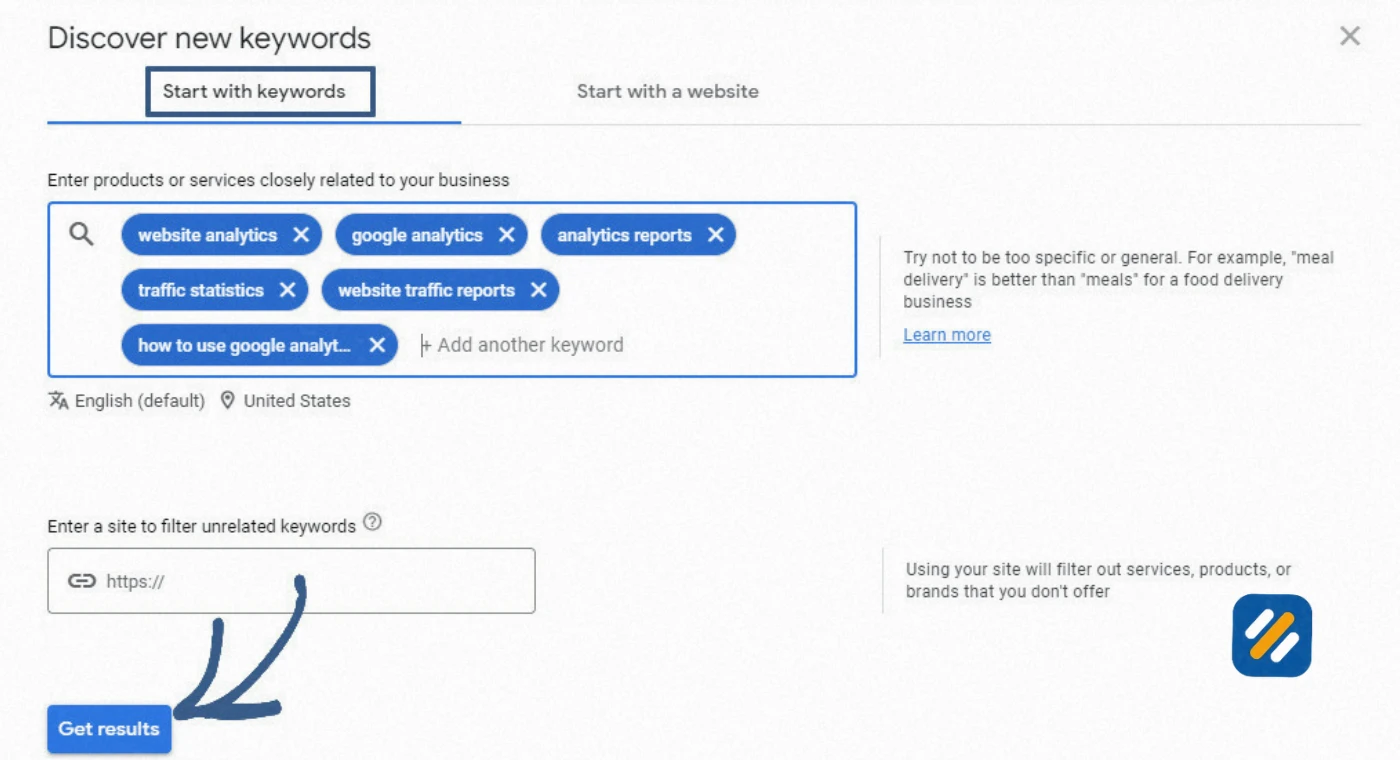
When you open Discover New Keywords, you have two options. You can enter up to ten seed keywords related to your topic, or you can enter a competitor’s URL and let Google show you which keywords that website targets.
The competitor URL method is underused and incredibly powerful. Enter any competitor’s homepage or a specific blog post URL and Google will return keyword suggestions based on that page’s content. This gives you a direct view into the keyword strategy of websites already ranking in your niche.
Filter for keywords that match your website’s authority level
Google Keyword Planner shows a competition column but this reflects Google Ads competition, not organic SEO competition. Do not use it to judge how hard a keyword is to rank for organically. Instead, use the search volume ranges to identify keywords with at least 100 monthly searches and cross-reference the difficulty in Ahrefs free keyword difficulty checker before targeting them.
For a brand new website, focus on keywords showing 100 to 1,000 monthly searches in the low competition bracket of Google Ads. These keywords often have lower organic difficulty too and give you the best chance of getting early rankings.
Use the date range and seasonal filters
One feature most SEO users overlook is the ability to change the date range for search volume data. Switching from the default twelve-month average to a specific month shows you exactly how seasonal a keyword is. A keyword that shows 1,000 to 10,000 searches in December but only 10 to 100 in July is a seasonal keyword, and publishing content for it six to eight weeks before peak season gives you the best chance of ranking when demand is highest.
Sort by top of page bid to find commercially valuable keywords
The top of page bid column shows what advertisers are willing to pay per click for a keyword. A high bid means the keyword has strong commercial intent, meaning people searching it are likely ready to buy something. For a personal brand SEO blog with affiliate links, these commercially valuable keywords are the ones where a ranking can generate real income, not just traffic.
5 Google Keyword Planner for PPC Keywords | How It Differs From SEO Use
While SEO professionals use Google Keyword Planner for content strategy, it was built specifically for PPC keyword research, and understanding how advertisers use it helps you extract even more value from the tool.
In PPC, the goal is to find keywords where the cost per click is manageable and the conversion potential is high. In SEO, the goal is to find keywords where organic competition is low and search volume is sufficient to drive meaningful traffic. The data is the same. The decisions are different.
| Feature | How SEO Uses It | How PPC Uses It |
|---|---|---|
| Search volume | Validates demand before writing content | Estimates impression potential for ad campaigns |
| Competition column | Ignored for SEO, irrelevant to organic rankings | Used to gauge advertiser competitiveness |
| Top of page bid | Signals commercial intent for affiliate content | Sets budget expectations for ad campaigns |
| Seasonal trends | Times content publication for peak traffic | Schedules ad spend for peak buying periods |
| Geographic data | Targets content for specific US or UK audiences | Targets ad spend to high-converting locations |
| Keyword suggestions | Seeds content calendar with new article ideas | Expands ad group coverage |
| Long-tail keywords | Targets low-difficulty ranking opportunities | Reduces cost per click with specific match types |
For a personal brand blog like SEOWithRoman.com, the most valuable PPC insight to borrow for SEO is the top of page bid data. Keywords with bids above five dollars per click indicate topics where businesses are spending serious money to reach searchers. If you can rank organically for those same keywords, every visitor represents the kind of person who takes SEO seriously enough to potentially hire a consultant or purchase a recommended tool through an affiliate link.
6 Can You Use ChatGPT for Keyword Research Instead of Google Keyword Planner
This is one of the most common questions beginners ask in 2026, and the honest answer is: yes, but not as a replacement for Google Keyword Planner. As a complement to it.
ChatGPT does not have access to real search volume data. It cannot tell you that “how to do keyword research for free” gets 4,400 monthly searches. What it can do is help you think about keyword angles, question formats, and topic clusters in a way that traditional keyword tools cannot.
Here is how to use both tools together effectively
Use ChatGPT to generate seed keyword ideas and question-based variations: Ask it to list the twenty most common questions a small business owner with no SEO knowledge would ask about your topic. These naturally phrased questions often match exactly how real people search on Google, especially for long-tail keywords and voice search queries.
Use Google Keyword Planner to validate which of those ideas have real search volume: Take the list ChatGPT generated and enter each one into Keyword Planner. The ones with confirmed search volume become your target keywords. The ones showing no data get discarded.
Use Claude AI for search intent analysis: Claude is particularly useful for understanding why people search a keyword, not just what they search. Ask it to explain what a small business owner is trying to accomplish when they search “google keyword planner free” and you get insight into the content format and depth that will best serve that searcher.
The combination of AI-generated keyword angles plus Google’s own volume data is a more powerful research process than either tool delivers alone.
7 Google Keyword Planner vs Other Free Keyword Research Tools
Google Keyword Planner is not the only free keyword research tool available, and understanding where it fits in the landscape helps you build a more complete research workflow.
| Tool | Data Source | Search Volume | Keyword Difficulty | Best Use Case |
|---|---|---|---|---|
| Google Keyword Planner | Direct from Google | Ranges, exact with active campaign | Not available | Volume validation, PPC intent data, seasonal trends |
| Ahrefs Free Keyword Generator | Ahrefs database | Estimates | Yes, KD score | Finding low-difficulty long-tail keywords |
| Google Search Console | Direct from Google | Exact, your site only | Not available | Tracking existing rankings, finding quick win opportunities |
| Google Trends | Direct from Google | Relative interest, not volume | Not available | Seasonal analysis, trending topic discovery |
| Ubersuggest Free | Neil Patel database | Estimates, limited per day | Yes | Getting a quick overview of a keyword |
| ChatGPT | AI language model | None | None | Generating keyword angles and question variations |
| Claude AI | AI language model | None | None | Search intent analysis, question-based keyword ideas |
| People Also Ask | Direct from Google | Not shown | Not shown | Question-based keywords, AIO-ready content angles |
The clear advantage Google Keyword Planner holds over every other tool in this list is data provenance. Every other tool is estimating or modelling what Google’s data might show. Google Keyword Planner is showing you the actual data.
8 Advanced Google Keyword Planner Features Most Beginners Never Use
These are the features that separate intermediate keyword researchers from beginners. Every one of them is available completely free.
Geographic search volume by city and state
Most keyword tools only show national search volumes. Google Keyword Planner lets you change the location to a specific US state or city and see volume ranges for that area. For a small business targeting a local market, this is the difference between seeing 100,000 monthly searches nationally for “plumber” and 500 monthly searches for “plumber in Birmingham Alabama.” The local number is the one that actually matters for your content strategy.
Year over year change column
This column shows whether a keyword is growing or declining compared to the same period last year. Sorting keyword ideas by this column from highest to lowest reveals emerging topics where competition has not yet caught up with growing demand. Publishing on a keyword with plus 200 percent year over year growth six months before competitors notice it is one of the most underused advantages available in the tool.
Three month change for seasonal keywords
The three month change column works the same way but over a shorter window. Sorting by this column in October shows you exactly which keywords are entering their seasonal peak, giving you a clear publishing priority list for the coming weeks.
Competitor URL analysis
Entering a competitor’s specific blog post URL rather than their homepage gives you the exact keywords Google associates with that individual page. This is one of the fastest ways to reverse engineer why a specific article is ranking and which keywords you should target to compete with it directly.
9 3 Expert Tips to Get More From Google Keyword Planner
Tip 1: Enter competitor URLs instead of seed keywords for faster research
Instead of starting from scratch with seed keywords, paste your top competitor’s URL directly into the Discover New Keywords tool. Google returns keyword suggestions based on that page’s actual content, giving you a pre-validated list of keywords that are already working in your niche.
Tip 2: Use the forecast tab to estimate more precise search volumes
Set your bid to the maximum in the forecast view for any keyword. The impressions number shown approximates the monthly search volume more accurately than the broad ranges shown in the standard view. This works best for commercial intent keywords.
Tip 3: Combine Keyword Planner data with Google Trends before writing
Always validate your shortlisted keywords in Google Trends before publishing. A keyword with strong Keyword Planner volume but a declining trend line in Google Trends is a topic losing relevance. Choose keywords where both tools agree: solid volume and stable or rising trend.
10 Conclusion
Google Keyword Planner is one of the most powerful free tools available to any website owner and it is sitting inside a platform that millions of people already have access to but never fully use.
It gives you direct access to Google’s own search data, competitor keyword intelligence, seasonal trend analysis, and geographic volume breakdowns, all completely free. No subscription required. No monthly limit on searches. No third-party data estimation.
The businesses and bloggers who use it properly are building content strategies based on real Google data. The ones who ignore it are guessing.
Open Google Ads today, navigate to Keyword Planner, and run your first keyword search. Spend thirty minutes exploring the filters and columns covered in this guide. By the end of that session you will have more validated keyword ideas than you can write articles for in the next three months.
Have a question about how to use Google Keyword Planner for your specific niche or website? Leave a comment below and I will answer it personally.
Join 1,000+ business owners and bloggers who get one actionable SEO tip every week — straight to their inbox. Free forever.
Get Free Weekly Tips →