- A 404 error means a page cannot be found on the server, either because it was deleted, moved, or the URL was typed incorrectly
- There are two types of 404 errors: hard 404s which Google removes from its index, and soft 404s which confuse Google and waste crawl budget
- Too many unresolved 404 errors reduce your site's crawl budget, lose backlink value, and damage user experience simultaneously
- Google Search Console, Screaming Frog, and Ahrefs free tools can all find 404 errors on your website for free
- The fastest fix for a 404 error pointing to a page with backlinks is a 301 redirect to the most relevant live page
1 What Is a 404 Error and Where Does It Actually Come From
If you have ever clicked a link and landed on a page that says "Page Not Found," you have experienced a 404 error firsthand. But what most website owners do not understand is what is actually happening behind the scenes when that error appears.
Every time a browser requests a webpage, the web server responds with a three-digit HTTP status code. A 200 status code means the page loaded successfully. A 301 means the page has permanently moved somewhere else. A 404 error means the server received the request but could not find any resource at that URL.
The number 404 itself comes from HTTP protocol conventions. The 4 at the beginning indicates a client-side error, meaning the problem exists with the URL being requested rather than with the server itself. The full code 404 specifically means "Not Found."
In six years of doing technical SEO audits for clients across multiple industries, 404 errors are consistently one of the most commonly ignored problems on small business websites. They pile up silently over months and years while quietly damaging rankings, wasting crawl budget, and frustrating visitors who never come back.
Here is what causes a 404 error in practice:
- A page was deleted but internal links pointing to it were never updated
- The URL structure was changed during a website redesign without setting up redirects
- A typo in an internal link sends both users and Google to a non-existent address
- An external website links to an old URL that no longer exists on your site
- A plugin or theme update accidentally breaks page URLs on a WordPress website
2 Hard 404 vs Soft 404: The Difference That Matters for SEO
Not all 404 errors work the same way. Understanding the difference between a hard 404 and a soft 404 is essential because Google treats them completely differently, and confusing the two leads to SEO problems that are difficult to diagnose.
Hard 404 errors happen when a page does not exist and the server correctly returns a 404 HTTP status code. Google's crawlers see this, understand the page is gone, and eventually remove it from the index. This is the clean, expected behaviour when a page is intentionally deleted.
Soft 404 errors are more dangerous and far more common on WordPress websites. A soft 404 happens when a page that does not have real content returns a 200 OK status code instead of a proper 404. Google visits the page, sees it is live, but then reads the content and determines it is essentially empty or useless. Google flags it as a soft 404 in Search Console.
Common causes of soft 404 errors:
- Search result pages with no results returning a 200 status
- Empty category pages or tag pages with no posts assigned
- Pages showing "no products found" on ecommerce sites
- Thin placeholder pages that were never properly built out
| Error Type | HTTP Status Returned | How Google Handles It | SEO Risk Level |
|---|---|---|---|
| Hard 404 | 404 Not Found | Removes from index over time | Medium, manageable |
| Soft 404 | 200 OK | Keeps crawling but flags as low quality | High, wastes crawl budget |
| Intentional 404 | 404 Not Found | Stops indexing, expected behaviour | Zero risk |
| Redirect to wrong page | 301 or 302 | Indexes the wrong destination page | Medium, misleads Google |
| Broken redirect chain | Multiple codes | Crawl errors, link equity lost | High, complex to fix |
Pro Tip: Track Your 404 Page in Google Analytics - Add GA4 tracking to your 404 page template to see which broken URLs get the most traffic. These are your highest priority pages to either restore or redirect.
3 How 404 Errors Damage Your SEO in Ways Most Beginners Never See
The visible damage from a 404 error is obvious. A user clicks a link, hits a dead end, and leaves your website frustrated. The invisible damage to your SEO is what most beginners miss entirely.
Crawl budget waste: Google allocates a specific number of page crawls per day to your website based on its authority and size. Every time Googlebot visits a URL that returns a 404, that crawl is wasted on a page that cannot rank. On websites with hundreds of broken links, this means important pages are crawled less frequently and rankings update more slowly.
Lost backlink value: This is the most financially damaging consequence of 404 errors that nobody talks about enough. When another website links to one of your pages and that page returns a 404, the link equity from that backlink goes nowhere. It does not flow to your homepage. It does not flow to any other page. It simply disappears. A single high quality backlink lost this way can represent months of outreach work gone to waste.
Broken internal linking: Internal links distribute authority across your website. A 404 error in your internal link structure breaks that distribution, creating orphaned pages that Google has difficulty discovering and ranking.
Negative user experience signals: When a visitor lands on a 404 page and immediately clicks back to Google, that sends a negative engagement signal. Over time, a pattern of high bounce rates from specific pages tells Google your website is not serving users well.
4 How to Find Every 404 Error on Your Website for Free
You do not need an expensive tool to find 404 errors on your website. Here are the three most effective free methods ranked by ease of use:
Method 1: Google Search Console
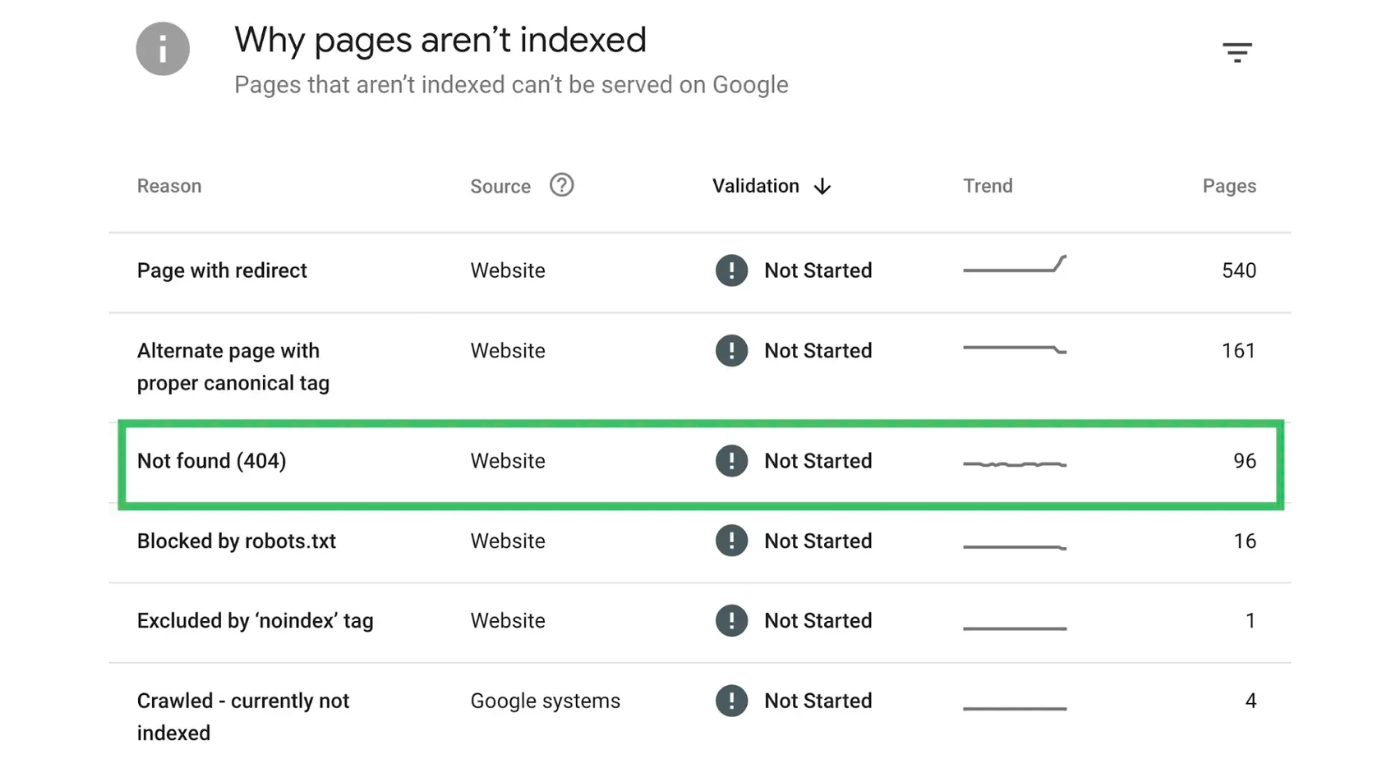
Google Search Console is the most reliable source for 404 data because it shows you exactly which URLs Google has already tried to crawl and found broken. To find 404 errors in GSC:
Go to Indexing then Pages in the left sidebar. Scroll down to the "Why pages aren't indexed" section. Look for "Not found 404" and "Soft 404" rows. Click either row to see the full list of affected URLs.
The advantage of GSC is that it shows real Google crawl data, not just what a tool simulates. The limitation is that it only shows URLs Google has already visited, so very new broken links may not appear immediately.
Method 2: Screaming Frog Free Version
Screaming Frog crawls up to 500 URLs for free and identifies every internal link returning a 404 status code. After crawling your site, filter the response codes column by 4XX to see all broken pages instantly. This is the fastest way to get a complete picture of internal 404 errors on a small website.
Method 3: Ahrefs Free Webmaster Tools
Ahrefs free Webmaster and other SEO Tools shows you 404 errors from two angles. First, it shows broken internal links that your own site is pointing to. Second, and more importantly for SEO, it shows external backlinks pointing to 404 pages on your site. This second report is where the real financial damage is visible, because these are the URLs losing backlink equity every single day they are not fixed.
Pro Tip: Never Redirect All 404s to Your Homepage - Google treats this as a soft 404 redirect and passes little to no link equity. Always redirect to the most topically relevant live page on your site instead.
5 The SEO 404 Page Best Practices Guide | How to Fix Every Type
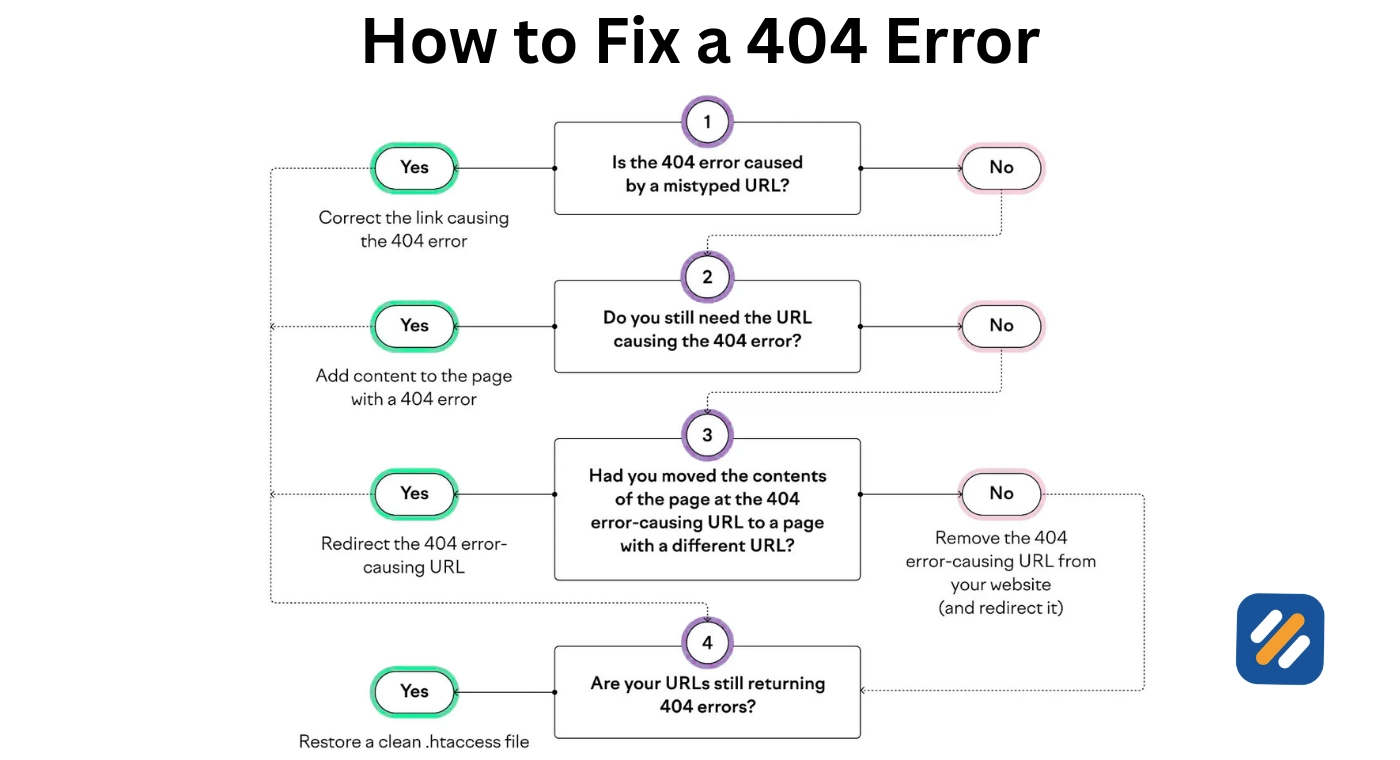
Not every 404 error needs the same fix. Here is the correct solution for each situation:
| Situation | Best Fix | Why |
|---|---|---|
| Page deleted permanently, no backlinks pointing to it | Leave as 404 | Correct behaviour, no action needed |
| Page URL changed, old URL has backlinks | 301 redirect old URL to new URL | Preserves backlink equity and user experience |
| Internal link pointing to wrong URL due to typo | Correct the link directly | Cleanest fix, no redirect needed |
| Page deleted but still has strong backlinks | 301 redirect to most relevant live page | Recovers backlink value that would otherwise be lost |
| Soft 404 from empty category or tag page | Add content or noindex the page | Stops wasting crawl budget |
| Multiple redirect chains causing 404s | Flatten all redirects to single hop | Removes crawl inefficiency and link equity leakage |
| WordPress permalink structure change | Update permalink settings and add redirects | Prevents site-wide 404 outbreak |
How to set up a 301 redirect in WordPress without a plugin:
The most reliable method is to add redirect rules directly to your .htaccess file.
Method: Open your .htaccess file through your hosting file manager and add a line in this format.
Redirect 301 /old-page-url/ https://yoursite.com/new-page-url/
If you prefer a plugin approach, Redirection by John Godley is free, well-maintained, and used by over two million WordPress websites. It lets you add and manage 301 redirects through a simple dashboard without touching any code.
6 How to Design a 404 Page That Recovers Users Instead of Losing Them
Most websites treat their 404 page as an afterthought. The default WordPress 404 page is bland, unhelpful, and sends users straight back to Google. A well-designed 404 page does the opposite. It keeps the user on your site and redirects them somewhere useful.
Here is what every effective 404 page should include:
A clear, human explanation. Tell the user in plain language that the page they were looking for does not exist. Do not use technical HTTP language. Something like "Looks like this page has moved or been deleted" is clear and non-threatening.
A search bar. If a user arrived at a 404 page looking for something specific, giving them a search bar lets them find it themselves without leaving your site. This is the single highest-impact element you can add to a 404 page.
Links to your most popular content. Show the user three to five of your best performing articles directly on the 404 page. This turns a dead end into a discovery opportunity and reduces the chance they leave your site empty-handed.
Your navigation menu. Keep your standard header and footer on the 404 page. Users should be able to navigate to any part of your site from a 404 page as easily as from any other page.
A consistent brand tone. Some of the best 404 pages on the internet use humour or creativity to turn a frustrating moment into a memorable brand experience. Amazon uses a photo of a dog. GitHub uses an animated octocat. You do not need to be a large brand to inject personality into your 404 page.
7 Google 404 Handling: What Google Actually Does With Your Broken Pages
There is a lot of misinformation about how Google handles 404 errors. Here is what Google's own documentation and real-world SEO experience confirms:
Google does not immediately remove a 404 page from its index. When Googlebot first encounters a 404, it flags the URL and revisits it periodically to check whether the page comes back. If the URL continues to return a 404 after several crawl attempts over days or weeks, Google removes it from the index.
This means a temporarily broken page that you fix within a few days may never be fully deindexed. But a 404 that persists for weeks will eventually disappear from Google's index entirely.
Google's John Mueller has confirmed publicly that 404 errors on pages that are intentionally gone are completely fine and expected. The problem is never intentional 404s. The problem is accidental 404s on pages that should be live, and 404s on pages that have backlinks pointing to them from external websites.
The priority list for fixing 404 errors on any website follows this order:
First, fix any 404 errors that have backlinks pointing to them. These are losing real SEO value every day.
Second, fix any 404 errors that appear in your internal link structure. These are wasting crawl budget and breaking your site architecture.
Third, fix any soft 404 errors Google Search Console has flagged. These are confusing Google about your site's content quality.
Fourth, leave any intentional 404s on pages you genuinely do not want users to access. These require no action.
Pro Tip: Fix Backlink 404s First - Before touching anything else, pull your external backlinks report and redirect every 404 page that has backlinks pointing to it. These pages are losing real link equity every single day they go unfixed.
8 404 Error Monitoring: How to Catch New Errors Before They Damage Rankings
Finding and fixing existing 404 errors is only half the job. The other half is making sure new ones do not accumulate undetected.
Here is a simple monitoring routine that takes under fifteen minutes per month:
Weekly check in Google Search Console. Every Monday, open the Pages report in GSC and check whether the count of "Not found 404" errors has increased. A sudden spike in 404 errors usually means a plugin update, a permalink change, or a site migration created new broken URLs.
Monthly Screaming Frog crawl. Run a fresh crawl of your website once per month and compare the 4XX URL list to the previous month. Any new additions need to be investigated and fixed before they accumulate.
Set up GSC email alerts. Google Search Console can send you email notifications when it detects a significant increase in crawl errors. Enable this in your GSC settings so you are notified immediately rather than discovering a problem weeks later.
Check Ahrefs Webmaster Tools monthly for external 404s. New backlinks can appear pointing to old broken URLs at any time. Checking your lost backlinks report monthly ensures you catch these quickly and set up redirects before the link equity has been sitting uncollected for too long.
9 Conclusion
A 404 error is not the end of the world. Every website accumulates them over time as content changes, URLs evolve, and site structures get updated. The websites that maintain strong SEO are not the ones that never have 404 errors. They are the ones that find them quickly, fix the ones that matter, and leave the intentional ones alone.
Start with Google Search Console today. Look at your Pages report and find out how many 404 errors Google has already flagged on your website. Then work through the fixes in the priority order outlined above, starting with any 404 pages that have external backlinks pointing to them.
One afternoon spent fixing 404 errors can recover backlink equity that has been sitting dormant for months and restore crawl budget that Google has been wasting on dead pages.
Have a question about a specific 404 error you are seeing on your website?
Drop a comment below and I will help you work out the right fix.
Join 1,000+ business owners and bloggers who get one actionable SEO tip every week — straight to their inbox. Free forever.
Get Free Weekly Tips →