Most local business owners pour their time into Google and never think about Bing. That is a quiet but costly gap. Bing Places is the free tool Microsoft offers to control how your business shows up on Bing Search, Bing Maps and other Microsoft products, and setting it up takes roughly twenty minutes.
I have set up and audited local listings for businesses in the US and UK for years, and the same pattern keeps repeating. The owner has a polished Google profile, but the Bing listing is missing, outdated, or claimed by someone who left the company years ago. This guide fixes that. You will learn what Bing Places is, how it supports local SEO, whether it costs money, and how to claim or create your listing from scratch.
1 What Is Bing Places and Why Does It Exist
Bing Places is Microsoft’s free business listing service. Its full name is Bing Places for Business, and plenty of people simply type bingplaces into the search bar. You use it to publish your business name, address, phone number, opening hours, website, photos and category, so Bing can show accurate details when someone searches nearby.
If you know Google Business Profile, you already understand the idea. The difference is the ecosystem. A Bing business listing feeds Bing Search, Bing Maps, and the Microsoft products and partners that rely on Bing data, instead of Google’s properties.
A quick note on names, because this confuses almost everyone. Bing business, Bing for business, Bing business profile and Bing business listing are all everyday ways of describing the same thing: the profile you manage inside Bing Places. It is not Microsoft Advertising, which is the paid ads platform, and it is not Bing Webmaster Tools, which handles website indexing.
Simple example: A bakery in Leeds searches its own name on Bing and finds an address from a previous lease. Anyone using Bing Maps gets sent to the wrong street. Claiming the listing in Bing Places lets the owner fix it in minutes.
2 How Bing Places Helps Local SEO
Bing Places does not give you a magic ranking boost, and anyone promising one is overselling. What it gives you is control over your local data in a search engine that millions of people use every day. Here is where that control pays off.
You show up in Bing’s local results
When someone searches for a service near them on Bing, the engine can display a map pack and a business panel built from listing data. With no listing, or an unclaimed one, you depend on whatever Bing scraped from the web.
You strengthen your citation consistency
Local SEO leans heavily on consistency. When your name, address and phone number match across your website, your Google profile, directories and your Bing business profile, search engines have less reason to doubt you. Microsoft has not published a ranking formula, but consistent business data is a long accepted principle in local search.
Your reach goes beyond Bing itself
Other search products use Bing’s results in part, Yahoo and DuckDuckGo being the best known, so a healthy Bing presence can travel further than the Bing logo suggests.
You prepare for AI generated answers
Microsoft Copilot answers draw on the Bing index. Clean, verified business facts are easier for AI systems to find and repeat. That makes your listing useful for generative engine optimization as well as classic local SEO. This area is still evolving, so treat it as a smart bet, not a guarantee.
You protect your brand from wrong information
Hours, photos and a website link let you correct errors before customers discover them. Fewer wrong turns and unanswered calls means a better first impression.
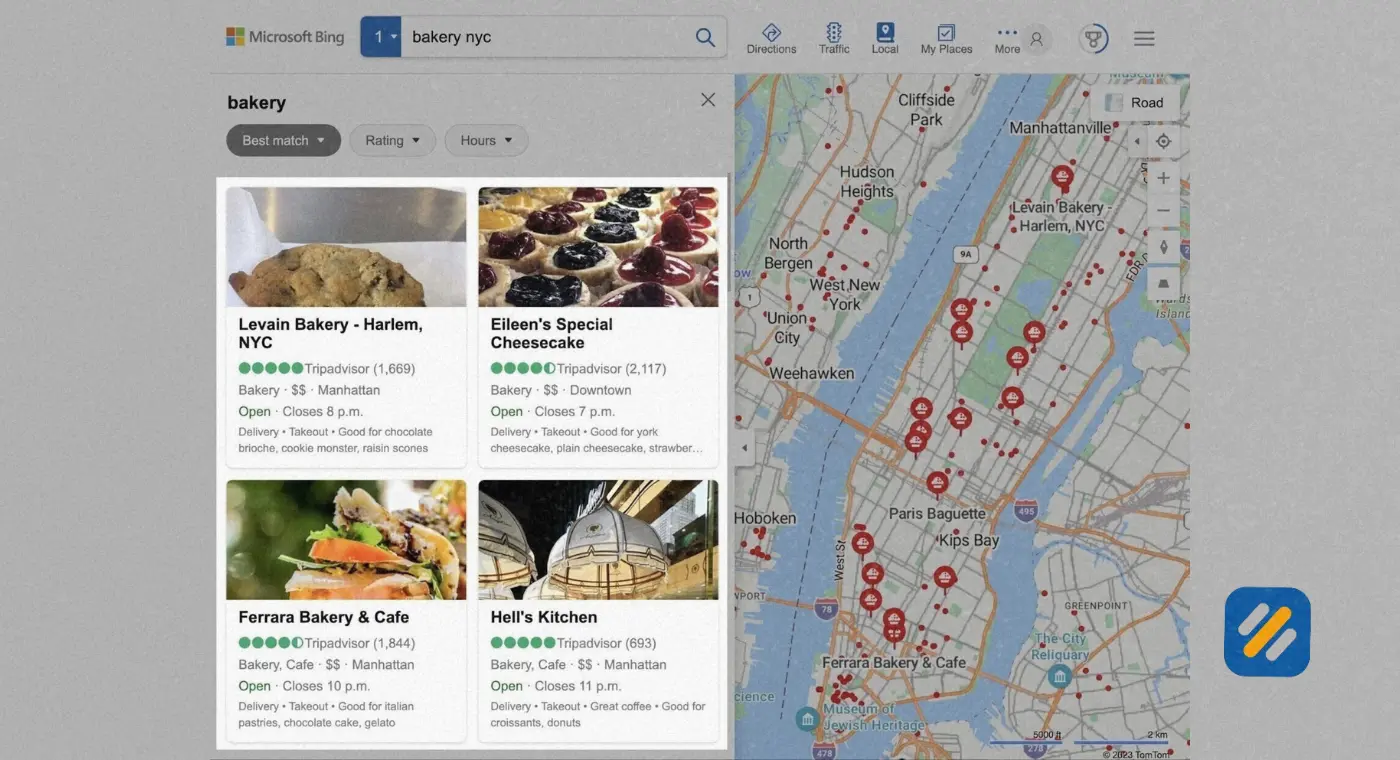
3 Is Bing Places for Business Free?
Yes. Creating, claiming and editing your listing costs nothing. Microsoft does not charge to appear in local results, and there is no paid tier that lifts you up the map pack.
Money only enters the picture in two places. One is Microsoft Advertising, if you choose to run paid campaigns. The other is third party “listing management” companies that sell you something you can do yourself in one sitting. If a caller tells you that you must pay to keep your Bing business listing live, treat it as a red flag.
| What You Do | Cost | Notes |
|---|---|---|
| Create or claim a listing | Free | No subscription needed |
| Edit hours, photos and details | Free | Update as often as you like |
| Verification by phone, email or postcard | Free | Microsoft sends the code |
| Bulk upload for many locations | Free | Built for multi-location brands |
| Microsoft Advertising | Paid | Optional and separate |
| Agency or aggregator services | Paid | Optional, never required |
4 Is Bing Places for Business Worth It?
For most local businesses, yes, and the math is simple. The cost is zero dollars and one short afternoon task. Even a handful of extra calls or direction requests pays that back.
Bing is not Google. Its global share of searches sits at around four percent according to StatCounter, though it tends to be stronger on desktop and in the US, partly because Windows and the Edge browser default to Bing. Check StatCounter for the latest number before quoting it anywhere.
Who benefits most:
- Businesses whose customers search at a desk, such as accountants, law firms and B2B services
- Audiences who keep default browser settings, often older or less tech focused users
- Brands targeting US desktop searches
- Multi-location businesses, where small gains multiply across every branch
Who benefits less: A one person mobile service in a small town where almost every customer searches on a phone using Google. I would still set it up because the effort is tiny, but I would not expect a flood of leads.
💡 Pro Tip 1: Before deciding how much time to spend, open your website analytics and check how many organic visits come from Bing. If Bing already sends 5 to 10 percent of your traffic, your listing deserves proper attention.
5 Bing Places vs Google Business Profile
You do not have to choose. Think of Google Business Profile as your main shop and Bing Places as a second location that costs nothing to run. Here is how they compare.
| Feature | Bing Places | Google Business Profile |
|---|---|---|
| Cost | Free | Free |
| Main surfaces | Bing Search, Bing Maps, Microsoft products | Google Search, Google Maps |
| Import from the other | Can import from Google Business Profile | No import from Bing |
| Reviews | Mostly shows reviews from third party sources | Native Google reviews, central to local ranking |
| Verification | Phone, text, email, postcard, instant in some cases | Varies by business type and location |
| Best use | Extra reach and consistent data | Primary local visibility |
6 How to Get Listed on Bing Places (Step by Step)
Step 1. Open the Bing Places site
Go to bingplaces.com and choose to add or claim a business.
Step 2. Sign in
Use a Microsoft, Google or Facebook account. Choose an email that belongs to the business, not a personal inbox.
Step 3. Choose your path
You can import from Google Business Profile (the fastest route), add a new business manually, or search for an existing listing to claim.
Step 4. Enter exact details
Add your business name as it appears on your signage, plus address, phone, website, primary category and opening hours. Service area businesses can hide their street address and list the areas they cover.
Step 5. Add visuals and a description
Upload a logo, storefront photo, interior shots and team photos. Write a plain description covering what you do and where.
Step 6. Verify your business
Pick from the methods Bing offers, covered in the next section.
Step 7. Wait, then check
Publishing after verification can take a few days. Search your business name and city on Bing to confirm it appears.
Screen labels change from time to time, so follow the on-screen prompts if they differ slightly from the above.
💡 Pro Tip 2: If your Google profile is already verified and accurate, importing it can speed up verification and sometimes make it instant. Always recheck imported hours and categories afterwards, since the mapping is not always perfect.
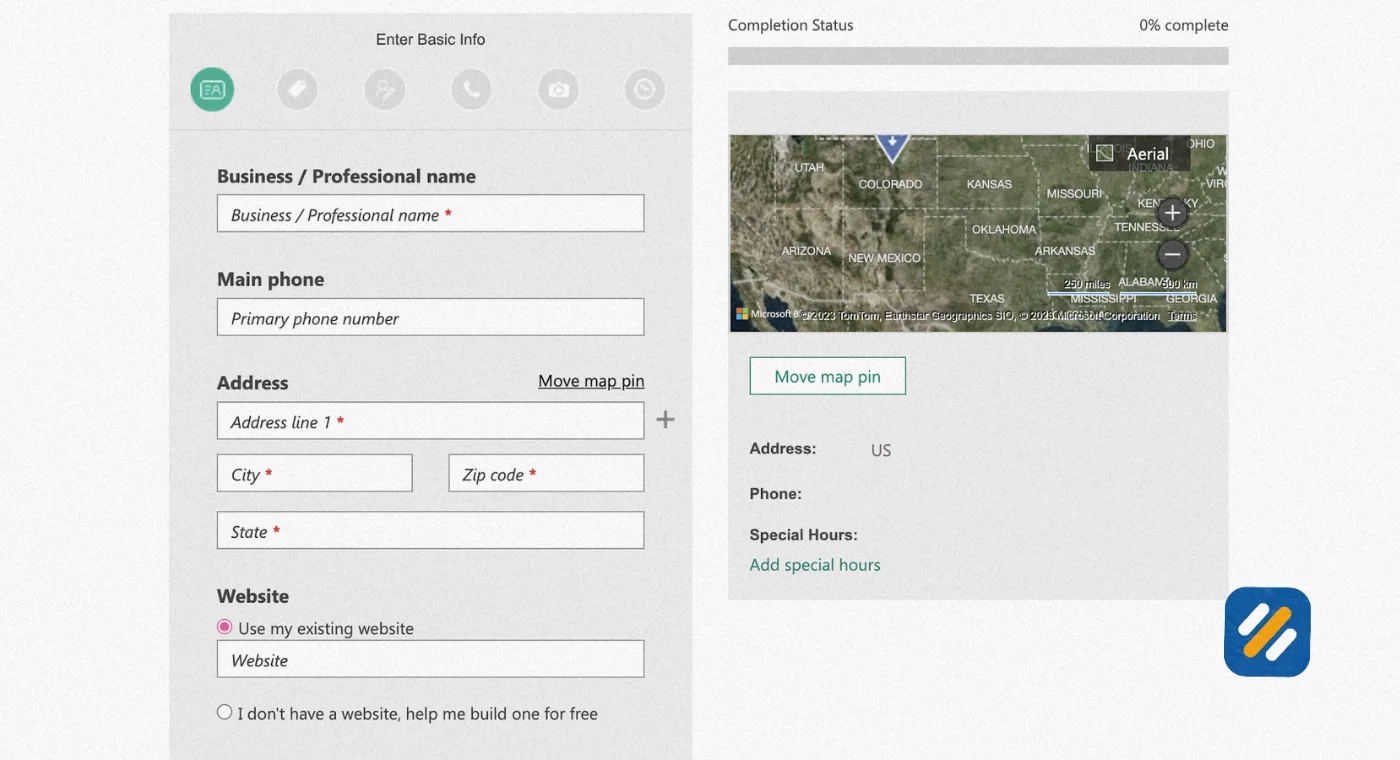
7 How to Claim a Bing Places Listing
Claiming and creating are not the same thing. Bing may already show a listing for your business, built from public sources. In that case you claim it instead of creating a duplicate, which keeps your data clean and your reputation in one place.
- Search for your business inside the Bing Places dashboard using your name plus phone number or address.
- Select the matching result and choose the claim option.
- Review the details and correct anything that is wrong.
- Verify that you own or manage the business.
- If someone else already claimed it, use the ownership dispute or support option. Be ready to show proof such as a business license or utility bill, as requirements vary.
Verification methods at a glance
| Method | Typical Speed | Good to Know |
|---|---|---|
| Phone call | Minutes | Use a line someone at the business will answer |
| Text message | Minutes | Mobile numbers only |
| Minutes | Offered for some listings only | |
| Postcard | Several days to about two weeks | Mailed to the listed address, so watch your mail |
| Instant via Google import | Immediate | Works only when details match a verified Google profile |
Bing only shows the options available for your business, so you may not see every method above.
8 Bing Places for Business Login: Where to Go and What to Do When It Fails
The Bing Places for Business login lives at bingplaces.com. Click sign in and choose Microsoft, Google or Facebook. The account you used when you first created the listing is the one you must keep using.
Many owners search for Bing business login or Bing for business login and land on the wrong page. Those phrases all point to the same Bing Places sign in page. Microsoft Advertising and Bing Webmaster Tools have their own separate logins, so if you see campaigns or sitemaps instead of your listing, you are in the wrong tool.
Common login problems and fixes
“No business found”: You are signed in with a different account than the one that created the listing. Try your other emails.
An agency set it up: Ask them to transfer ownership or add you as a user.
Lost access to the email: Recover that email account with its provider first, then try logging in again.
Still stuck: Use the help or support section inside Bing Places.
💡 Pro Tip 3: Create the listing under a shared business email, store the login in a password manager, and add it to your onboarding documents. I have seen listings sit orphaned for years because the one person holding the login left the company.
9 How to Find Your Bing Business Listing
Run this four check audit in about five minutes:
- Search your business name plus city on Bing in a private window.
- Open Bing Maps and search the same name. Compare the pin with your real location.
- Search your phone number. Duplicate listings often appear this way when name searches miss them.
- Compare what you find against your website and Google profile: name, address, phone and hours.
The phone number check is the one most people skip, and it is the one that catches old numbers and forgotten duplicates.
10 How to Optimize Your Bing Business Profile
Choose the most specific primary category. “Italian restaurant” beats “restaurant.”
Use your real business name. Stuffing keywords into the name can get a listing rejected.
Link to the right page. For a branch, point to its own location page, not just the homepage.
Upload original photos and refresh them every few months.
Keep hours current, including holidays.
Submit your website to Bing Webmaster Tools and consider IndexNow so Bing learns about site changes faster.
Add LocalBusiness structured data to your site using the same name, address and phone as your listing.
11 Common Bing Places Mistakes to Avoid
- Creating a second listing instead of claiming the existing one
- Using a call tracking number as the only phone number, which breaks consistency
- Using a virtual office or PO box address, which usually fails verification
- Setting up the profile once and never revisiting it
- Paying for a “guaranteed Bing ranking package,” because no such guarantee exists
12 Research Sources and Further Reading
| Source | What It Covers | Link |
|---|---|---|
| Bing Places (official) | Create, claim and manage listings | https://www.bingplaces.com |
| Bing Webmaster Tools | Site indexing and sitemaps | https://www.bing.com/webmasters |
| IndexNow | Instant URL update notifications | https://www.indexnow.org |
| StatCounter | Current search engine market share | https://gs.statcounter.com/search-engine-market-share |
| Google Search Central | LocalBusiness structured data | https://developers.google.com/search/docs/appearance/structured-data/local-business |
| Schema.org | LocalBusiness markup vocabulary | https://schema.org/LocalBusiness |
| BrightLocal | Local consumer behaviour research | https://www.brightlocal.com/research/local-consumer-review-survey/ |
13 Conclusion
Bing Places will not replace your Google strategy, and it is not meant to. It is a free, low effort way to make sure the second biggest search engine in the West tells the truth about your business. Claim your listing, verify it, keep your details consistent, and revisit it every quarter. Twenty minutes today can quietly bring in customers for years.
Join 1,000+ business owners and bloggers who get one actionable SEO tip every week — straight to their inbox. Free forever.
Get Free Weekly Tips →