- What YouTube SEO is and the three places your videos can be discovered
- The ranking signals YouTube openly talks about, and which ones you can control
- How to SEO your YouTube channel and every single upload
- How to rank videos on Google and get cited in AI answers
- Whether YouTube really pays $4,000 for 1 million views
- A 30-day plan to reach your first 10,000 views
1 What Is YouTube SEO and Why Does It Matter?
YouTube SEO is the practice of optimizing your videos, playlists and channel so YouTube can understand what they cover, show them to the right viewers, and keep showing them because people actually watch.
If you are asking what is YouTube SEO in the simplest terms, think of it as two jobs done at once. The first job is telling YouTube what your video is about, using titles, descriptions, captions and chapters. The second job is proving that viewers like it, through clicks, watch time and shares. Skip either job and a well-made video can sit at 200 views for months.
Here is the part most guides leave out. You are not optimizing for one door, you are optimizing for three
YouTube Search: people typing a question into the search bar
Suggested and Home feed: YouTube recommending your video based on what a viewer watched before
Google Search: video carousels, key moments and AI answers
A solid YouTube SEO routine feeds all three at the same time, and that is what separates a channel that grows from one that plateaus.
Simple example: Someone searches “how to fix a leaking tap.” A video titled “How to Fix a Leaking Tap in 10 Minutes (No Plumber Needed)” tells both YouTube and the viewer exactly what to expect. A video titled “My Saturday Project” tells them nothing, even if the content is identical.
Why it matters: YouTube is widely reported to be the second most visited website in the world, behind Google. Because Google owns it, videos regularly appear inside regular search results. Learning the basics of seo youtube optimization therefore gives you a second route to the same audience your blog is chasing.
2 How YouTube Decides What to Rank
YouTube does not publish a formula, but it does explain the general logic on its own help pages. Every piece of YouTube SEO advice worth following traces back to these signals.
| Signal | What it means in plain words | What you control |
|---|---|---|
| Relevance | Does the video match the search? | Title, description, captions, chapters, spoken words |
| Click-through rate | Do people click when they see it? | Thumbnail and title packaging |
| Watch time and retention | Do viewers stay and finish? | Hook, pacing, editing, structure |
| Viewer satisfaction | Do people say it was worth their time? | Delivering what the title promised |
| Viewer context | Language, location, watch history | Mostly nothing, but a clear niche helps |
| Channel consistency | Does the channel cover a clear topic? | Content focus and playlists |
One point worth remembering: YouTube has stated there is no ideal video length. A tight six minute video that people finish often beats a padded fifteen minute one. Length is a result of the topic, not a ranking trick.
3 Build a Video SEO Strategy Before You Hit Record
The best YouTube SEO happens before you film anything. A good video SEO strategy starts with demand, not with a camera.
Video search engine optimization also differs from blog SEO in one important way. Intent is more specific. Someone searching a tutorial wants to see a process, not read about it, so your topic has to be something that actually works on screen.
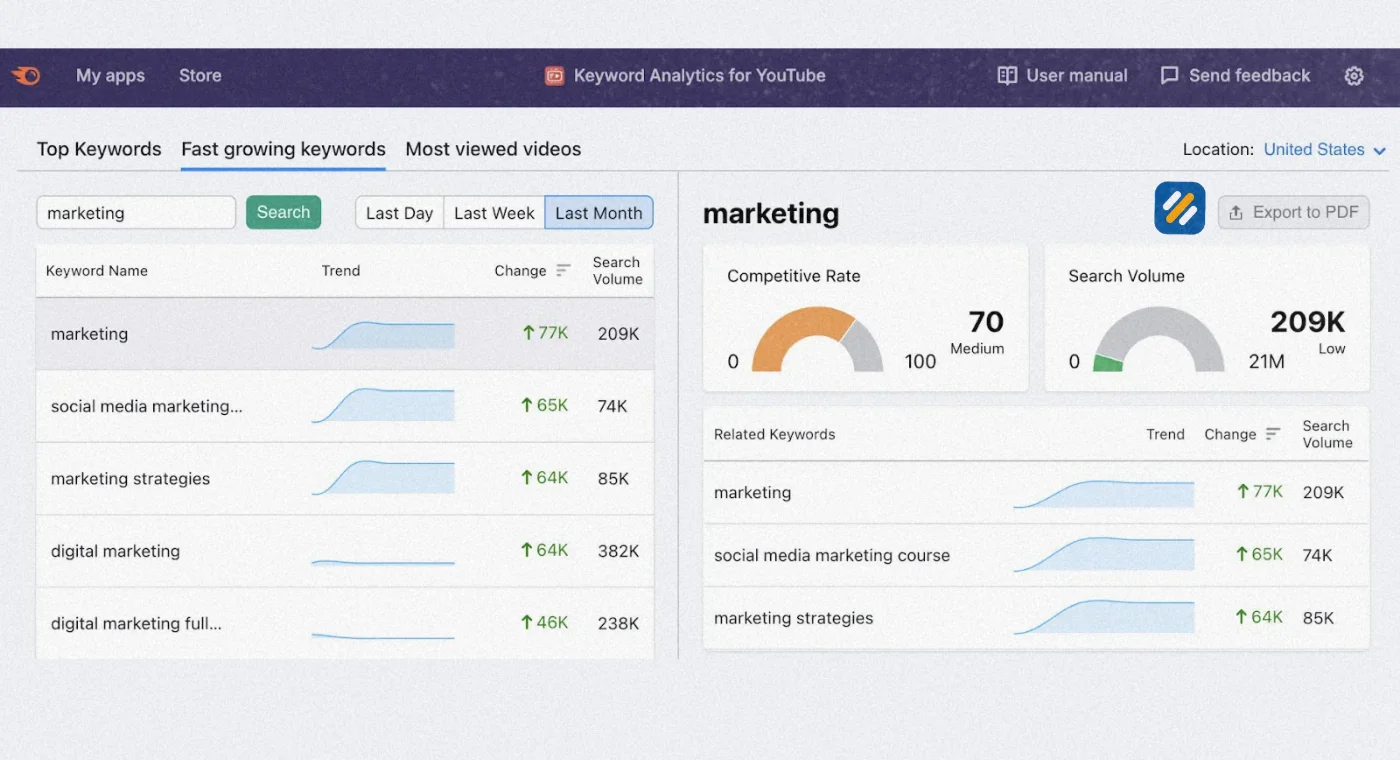
Step 1: Find a topic with proven demand. Type a seed phrase into the YouTube search bar and note every autocomplete suggestion. Then open YouTube Studio, go to Analytics, and check the Research tab to see what your audience and the wider platform are searching for.
Step 2: Run the video-friendly test. Search your keyword on Google. If a video carousel appears, Google already treats the query as video intent. How-to, review, comparison and demo queries usually pass this test.
Step 3: Size the competition honestly. Look for results from channels about your size. If a small channel has a video with far more views than its subscriber count, that topic is open to newcomers.
Step 4: Match the format. If the top results are all 8 minute tutorials, a 40 minute lecture is fighting the pattern.
Step 5: Write the title and thumbnail idea first. Package the video before you script it. If you cannot explain why someone would click, do not film it yet.
4 How Do I SEO My YouTube Channel?
To SEO your YouTube channel, make the channel itself easy to understand, then optimize each upload. Channel level work is quick and only needs doing once, but it supports every video you publish.
Name and handle: Keep it brandable, but make the topic obvious somewhere in the banner or tagline.
Channel description: Put your main topic and who you help in the first two lines. Write it for a person, not a robot.
Channel trailer: Use a short 30 to 60 second pitch for people who are not subscribed yet.
Playlists as topic hubs: Name playlists with search phrases, for example “Beginner Guitar Lessons,” and order videos from easiest to hardest. Playlists can rank on their own and keep viewers watching longer.
Niche focus: Ten videos on one subject send a much clearer signal than ten unrelated ones.
Featured sections and links: Pin your best video, add your website and a business email, and show your credentials where relevant.
Weekly analytics check: Look at impressions, click-through rate and traffic sources in Studio. Channel level YouTube SEO is a loop of publish, measure and adjust.
5 YouTube Video SEO: How to Optimize Every Upload
Good YouTube video SEO is mostly small details done consistently. Here is the quick reference, then the detail.
| Element | What to do | Common mistake |
|---|---|---|
| Title | Keyword near the front, under about 65 characters, with a clear benefit | Clickbait that tanks retention |
| Thumbnail | 1280 x 720, under 2 MB, readable on a phone | Tiny text and cluttered images |
| Description | Keyword and promise in the first two lines | Pasting a wall of links first |
| Captions | Upload or edit your own file | Trusting auto captions blindly |
| Chapters | At least 3 timestamps, starting at 0:00 | Vague names like “Part 2” |
| Tags | 3 to 5 relevant ones | Spending an hour on them |
| Hashtags | 1 to 3 | Adding more than 15, which makes YouTube ignore them all |
Title
Think of the title as a promise. Lead with the topic, then add the outcome. “YouTube SEO Tips That Doubled My Search Views” works better than “Some Thoughts on Optimization.”
Thumbnail
Shrink your thumbnail to the size of a postage stamp before you publish. If you cannot read it, viewers on a phone cannot either. Use one focal point and no more than three words. If your Studio offers the thumbnail test and compare feature, use it.
Description
Only the first couple of lines show before the “more” button, so make them count. After that, write 150 to 250 words that summarize the video naturally, then add links and timestamps.
Captions and transcript
Captions help viewers who watch on mute, help accessibility, and give YouTube a clean text version of what you said. Upload your own subtitle file or fix the auto-generated one, because brand names and technical terms are often wrong.
Chapters
Chapters need at least three timestamps, the first at 0:00, and each at least 10 seconds long. Write chapter names as short search phrases, because Google can show them as key moments in search results.
Tags and hashtags
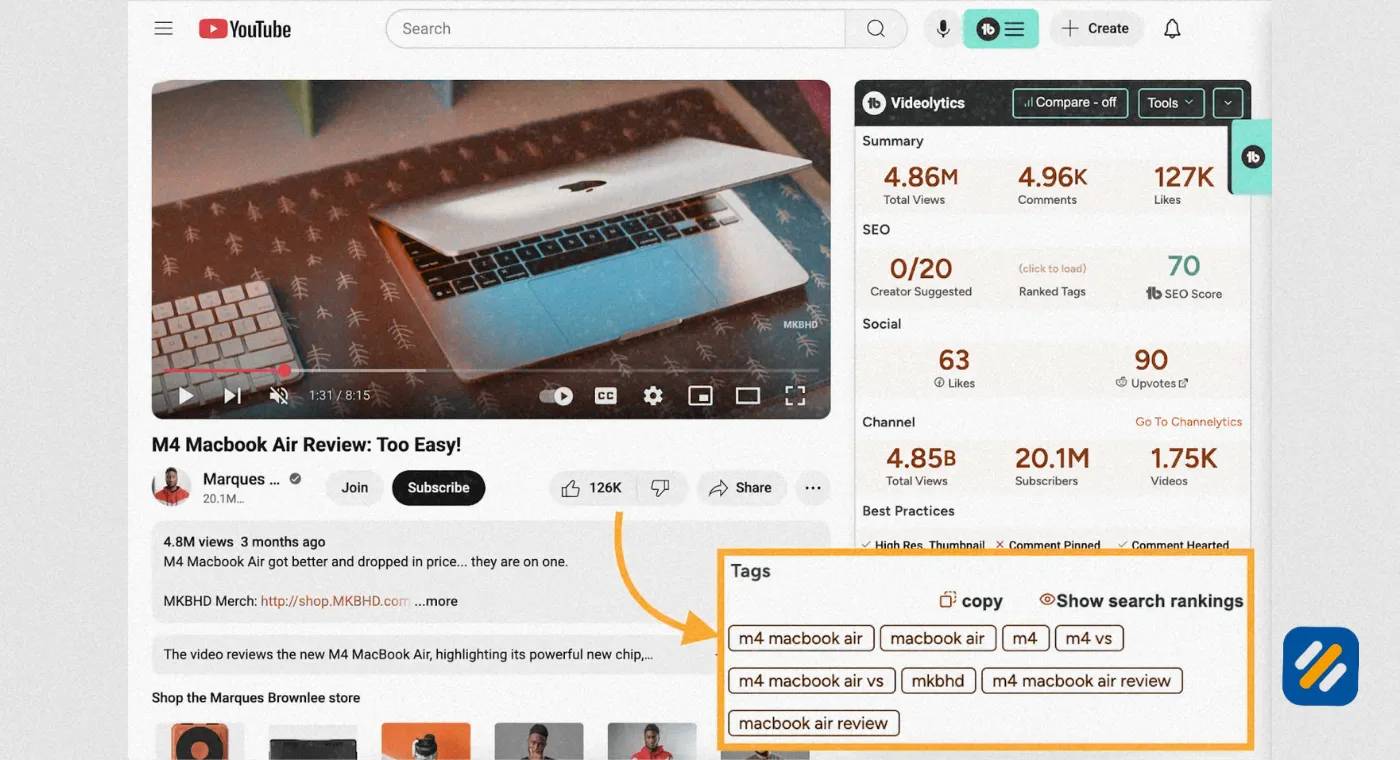
YouTube says tags play a minor role, mostly helping with commonly misspelled words. Do not obsess over them. Hashtags are more visible, since the first three appear above your title.
6 Video SEO for Google: Ranking Beyond YouTube
Treating every seo video as a YouTube-only asset is a missed opportunity. Video for SEO works best when the video also lives on a page you own. These videos for SEO purposes can earn thumbnails and key moments in Google results, so your YouTube SEO work does double duty.
How to do video optimization for SEO on your own site
1: Embed on a page where the video is the main content. Surround it with unique written text, not just an embed on a thin page.
2: Add VideoObject structured data. Include name, description, thumbnail URL, upload date and duration.
3: Make sure the page is crawlable. Add it to your XML sitemap, or create a dedicated video sitemap.
4: Add a transcript or a written summary in plain HTML so search engines can read it.
5: Check the Video indexing report in Google Search Console to see which pages Google found videos on and why others were skipped.
YouTube or self-hosting?
| Option | Strength | Weakness |
|---|---|---|
| YouTube embed | Free reach and a second search surface | Viewers can leave for suggested videos |
| Self-hosted (Wistia, Vimeo and similar) | More control over branding and viewer journey | No built-in YouTube discovery |
For most small businesses, YouTube plus an embed is the practical choice.
Does video improve website SEO? It can help, but not automatically. Google has never confirmed time on page as a direct ranking factor. What video can do is make a page more useful and make it eligible for video results. Think of it as an opportunity, not a guarantee.
7 Video SEO Marketing: How Search Works on Other Platforms
Video SEO marketing does not stop at YouTube. Each platform reads different clues.
| Platform | What its search mostly reads | Quick win |
|---|---|---|
| YouTube | Title, description, captions, engagement | Chapters and a keyword-led title |
| Page text, structured data, video indexing | VideoObject schema and a transcript | |
| TikTok | Spoken words, on-screen text and captions | Say the keyword in the first few seconds |
| Caption keywords and on-screen text | Write a descriptive caption instead of piling on hashtags |
The practical move is to film once and repurpose: a full video on YouTube, a clip on Shorts, a short on Instagram, and an embed in a blog post.
8 How to Make Your Videos Easy for AI Search to Cite
AI Overviews and other AI answers pull from pages and videos they can parse quickly. Nobody outside these companies knows the exact formula, but these habits make your content easier to understand and cite:
- Answer first. State the answer in the first 30 seconds and in the first lines of your description.
- Use question-style chapter titles, such as “How long does YouTube SEO take?”
- Publish a clean transcript on the page that embeds the video.
- Name things clearly. Say your topic, tool names and your own name out loud and in text, so the entities are unambiguous.
- Show who you are. Add an author bio, real experience and a last updated date.
This is where YouTube SEO and generative engine optimization meet. Clear structure helps people and machines.
9 Does YouTube Pay $4,000 for 1 Million Views?
Sometimes, but not by default. YouTube does not pay a fixed rate per view. Earnings depend on RPM, which is revenue per 1,000 views after YouTube takes its share. Creators on the Partner Program receive 55% of the ad revenue attributed to long-form videos.
The math is simple: views divided by 1,000, multiplied by RPM
| RPM (creator-reported range) | Earnings from 1 million views |
|---|---|
| $1 | $1,000 |
| $2 | $2,000 |
| $4 | $4,000 |
| $8 | $8,000 |
| $15 | $15,000 |
| Shorts (often under $0.10) | Roughly $100 or less |
These ranges come from what creators commonly report, not from YouTube, so check your own Analytics for your real RPM.
Why the numbers swing so much
- Niche: Finance and software audiences attract higher advertiser bids than entertainment.
- Viewer location: Views from the US, UK and Canada usually pay more.
- Video length: Videos over 8 minutes can carry mid-roll ads.
- Season: Ad rates tend to rise in the fourth quarter.
- Monetized views: Not every view shows an ad.
Eligibility: You need to join the YouTube Partner Program. The standard route is 1,000 subscribers plus 4,000 public watch hours in 12 months, or 10 million public Shorts views in 90 days. Check the current rules on YouTube’s help page, since they change.
Good YouTube SEO will not set your RPM, but it brings in the views that RPM multiplies. Many creators also earn more from sponsorships, affiliate links and memberships than from ads.
10 How to Get 10,000 Views on YouTube
There is no secret trick, and anyone promising a guarantee is selling something. What works is a repeatable system. Here is a 30 day plan.
| Week | Focus | Action |
|---|---|---|
| 1 | Research | Pick 3 low-competition topics using autocomplete and the Research tab |
| 2 | Packaging | Write titles and thumbnails first, then film and publish video one |
| 3 | Distribution | Share in relevant communities, email list and your blog, and publish video two |
| 4 | Optimization | Review click-through and retention, improve weak titles, publish video three |
Habits that move the needle:
1: Aim for a search topic, not a trend. Search videos keep earning for months, while trend videos spike and die.
3: Fix the first 15 seconds. If your retention graph drops hard early, rework the hook.
4: Build a playlist so one viewer watches three videos instead of one.
5: Reply to every early comment. It adds engagement and shows you real questions for future videos.
6: Cut Shorts from long videos and link back to the full version.
7: Collaborate with a channel at a similar size.
Most channels hit 10,000 views through one video that finally clicks, not through steady slow growth. So your job is to publish enough well-packaged videos to give that one a chance.
11 3 YouTube SEO Tips Most Creators Skip
These YouTube SEO tips are simple, but few people actually do them.
Pro Tip 1: The 28 day title swap. Open an older video in Studio and check impressions against click-through rate. High impressions with low clicks means the topic is fine and the packaging is weak. Rewrite the title and thumbnail, then compare results.
Pro Tip 2: Mine your own comments. Every “but how do I...?” comment is a keyword you did not know existed. Turn the best five into your next five videos.
Pro Tip 3: Write chapters like search queries. Instead of “Setup,” write “How to set up your channel keywords.” Chapter text can surface in Google, so these seo tips for YouTube pay off outside the platform too.
12 Common YouTube SEO Mistakes
- Choosing keywords by guesswork instead of checking the search bar
- Writing misleading titles that spike clicks and wreck retention
- Ignoring the first 15 seconds
- Leaving auto captions uncorrected
- Never updating old videos
- Judging results after three days, when search growth often takes weeks
13 Research Sources and Tools
| Resource | What it covers | Link |
|---|---|---|
| YouTube Help: Discovery and performance FAQs | How YouTube search and discovery work | https://support.google.com/youtube/answer/141805 |
| How YouTube Works: Recommendations | How suggested videos are chosen | https://www.youtube.com/howyoutubeworks/product-features/recommendations/ |
| YouTube Partner Program overview | Eligibility and monetization rules | https://support.google.com/youtube/answer/72851 |
| Google Search Central: Video best practices | How Google finds and shows videos | https://developers.google.com/search/docs/appearance/video |
| Google Search Central: Video structured data | VideoObject markup | https://developers.google.com/search/docs/appearance/structured-data/video |
| YouTube Help: Video chapters | Timestamp rules | https://support.google.com/youtube/answer/9884579 |
| YouTube Help: Custom thumbnails | Size and format limits | https://support.google.com/youtube/answer/72431 |
| YouTube Help: Subtitles and captions | Adding and editing captions | https://support.google.com/youtube/answer/2734796 |
14 Final Thoughts
YouTube SEO comes down to three habits: choose topics people already search for, package each video so it earns the click, and keep viewers watching until the end. Pick one video you already published, apply the 28 day title swap, and see what changes.
Join 1,000+ business owners and bloggers who get one actionable SEO tip every week — straight to their inbox. Free forever.
Get Free Weekly Tips →