- A Google keyword position checker shows you exactly where your website ranks in search results for any target keyword
- Tracking keyword positions without a dedicated tool means you are making SEO decisions based on guesswork, not data
- Free rank checker tools like Google Search Console and Ahrefs Webmaster Tools give reliable position data without any cost
- Keyword rankings fluctuate daily based on algorithm updates, competitor activity, and content freshness
- Checking your keyword position in the right target location and device type is essential for accurate SEO decisions
1 What Is a Google Keyword Position Checker and Why Every Website Needs One
Let me start with something most SEO guides skip entirely.
You can spend months writing content, optimising title tags, and building internal links. But if you are not checking your keyword positions regularly, you have no idea whether any of it is actually working. You are flying blind.
A Google keyword position checker is a tool that tells you exactly where your website appears in Google search results for a specific keyword. Type in your domain and your target keyword, and the tool returns a number. Position 1 means you are the first organic result. Position 11 means you are at the top of page two. Position 47 means you are invisible to almost everyone searching.
That number is one of the most important data points in your entire SEO strategy.
Here is something I noticed early in my career doing SEO for clients across multiple industries. The businesses that grow their organic traffic consistently are not always the ones with the best content. They are the ones that track their rankings closely, spot drops before they become disasters, and identify ranking opportunities before competitors do.
A keyword rank tracker is not a luxury tool for advanced SEOs. It is the basic feedback loop that tells you whether your work is paying off. Without it, you are optimising in the dark.
2 How Does a Google Keyword Position Checker Actually Work
Understanding how these tools work helps you interpret the data they return more accurately and avoid common misreading mistakes.
When you enter a keyword and domain into a rank checker, the tool sends an automated search query to Google for that keyword and scans the results page to find where your domain appears. It records the position number and returns it to you.
Most professional rank tracking tools do this from specific geographic locations using dedicated IP addresses. This is important because Google shows different results to users in different countries, cities, and even neighbourhoods for location-sensitive searches.
Here is what the best keyword position checkers track simultaneously
Geographic location. A plumber in Manchester ranks differently in Manchester searches than in London searches. Accurate rank tracking requires checking from the correct target location, not just from wherever the tool’s servers happen to be.
Device type. Google ranks websites differently on mobile and desktop. Since Google shifted to mobile-first indexing, mobile keyword positions are the primary signal. Always check both but treat mobile as your main benchmark.
Search engine variant. Google.com results differ from Google.co.uk results even for identical keywords. If your target audience is in the UK, checking against Google.co.uk is essential for accurate data.
SERP features. Modern rank trackers also detect whether your page appears in featured snippets, People Also Ask boxes, local packs, or image results. A page ranking position 4 with a featured snippet can outperform a page at position 1 for click through rate.
3 Best Free Google Keyword Position Checker Tools in 2026
You do not need to pay for rank tracking when you are starting out. These free tools give you reliable keyword position data across different use cases.
| Tool | Cost | Keywords Tracked | Location Accuracy | Best For |
|---|---|---|---|---|
| Google Search Console | Free | Unlimited | Global and country level | Seeing all keywords your site already ranks for |
| Ahrefs Rank Tracker | Free via Webmaster Tools | Up to 100 | Country level | Accurate daily position tracking with history |
| SEMrush Free | Free tier | Limited daily | Country level | Competitor keyword position comparison |
| Seobility Ranking Check | Free | 10 keywords | Country and city level | Quick position spot checks |
| SmallSEOTools Keyword Position | Free | Unlimited spot checks | Country level | Fast one-off position verification |
| Google Search itself | Free | Manual, one at a time | Your current location | Verifying a single keyword position quickly |
| Keyword-tools.org | Free | Limited | Country level | Live Google ranking checks without an account |
4 Google Search Console | The Most Underused Free Rank Tracker Available
Most beginners treat Google Search Console as a technical SEO tool for fixing errors. It is actually one of the most powerful free keyword position checkers available, and it shows data that no third-party tool can replicate.
Here is why Google Search Console rank data is uniquely valuable. The position numbers come directly from Google’s own servers. No simulation, no estimation, no database lag. When GSC shows your page at average position 6.4 for a keyword, that is based on real impressions across real searches over your selected date range.
How to use Google Search Console as a keyword position checker
Go to Performance then Search Results in the left sidebar. Enable all four metrics at the top: Total Clicks, Total Impressions, Average CTR, and Average Position. This gives you the complete picture for every keyword.
To check the position of a specific keyword, click the Queries tab below the graph and search for your target keyword in the filter bar. GSC shows you the exact average position, how many times your page appeared in search results, and how many people actually clicked through.
The Page filter is even more powerful. Click on any URL in the Pages tab to see every keyword that specific page ranks for, along with each keyword’s position. This is how you identify which articles are ranking between positions 5 and 15 and need to be updated to push into the top three.
One thing GSC does that third-party rank checkers cannot is show you keywords you did not know you were ranking for. Every few weeks I find client pages ranking on page one for keywords they never specifically targeted. These are content expansion opportunities hiding in plain sight.
5 Ahrefs Rank Tracker | The Most Accurate Free Keyword Position Tool
For ongoing keyword rank tracking with historical data and daily updates, Ahrefs Rank Tracker available through Ahrefs Webmaster Tools is the most reliable free option in 2026.
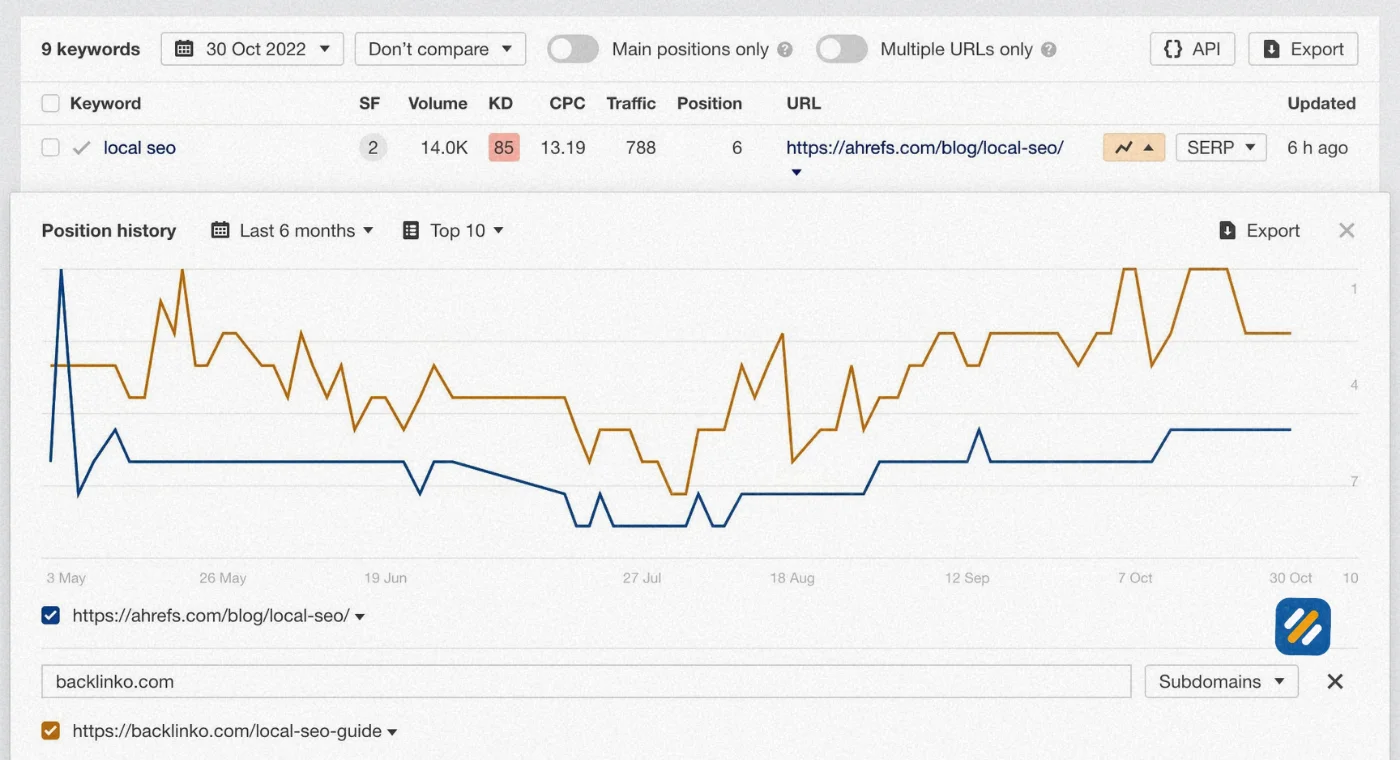
Unlike one-off position checkers that only show you where you rank right now, Ahrefs Rank Tracker shows you a position history graph for every keyword you are tracking. This is critical for understanding whether your SEO work is producing a trend of improvement or whether rankings are unstable and fluctuating without direction.
What Ahrefs Rank Tracker gives you for free
- Daily position updates for up to 100 keywords
- Historical position graphs showing ranking trends over time
- SERP feature tracking including featured snippets and image packs
- Visibility score showing your overall search presence across tracked keywords
- Competitor position comparison for the same keywords
How to set up Ahrefs Rank Tracker for your website
Sign up for Ahrefs Webmaster Tools at ahrefs.com/webmaster-tools using your Google Search Console account for verification. Add your website as a project. Navigate to Rank Tracker and add the keywords you want to monitor. Set your target country and language. Ahrefs begins tracking from the moment you add keywords and updates positions daily.
The most valuable use of this tool is tracking the keywords you are actively optimising. Every time you update an article or improve its on-page SEO, you can see within days whether the position moved in response.
6 How to Check Your Google Keyword Position Manually Without Any Tool
Sometimes you need a quick position check for a single keyword without logging into any tool. Here is how to do it accurately without the personalisation bias that makes manual searching unreliable.
The problem with simply Googling a keyword yourself is that Google personalises results based on your search history, location, and browsing behaviour. If you visit your own website regularly, Google may show it higher in your personal results than it actually ranks for the average searcher.
To get an unbiased manual position check
Method 1: Open an Incognito window. Search your keyword in a private browsing window with no Google account signed in. This removes personalisation from your local session but does not remove location bias.
Method 2: Use Google Search with parameters. Add “&pws=0” to the end of a Google search URL to disable personalised results. Also add “&gl=us” or “&gl=uk” to specify the country you want results for.
Method 3: Use a VPN set to your target country. If your audience is in the US or UK and you are based in Pakistan, a VPN set to a US or UK server gives you position data from the perspective of your actual target audience. This is the most accurate manual method available.
Manual checking works for occasional spot verification. For tracking dozens of keywords across weeks and months, a dedicated rank tracking tool is always the more practical choice.
7 How to Use a Keyword Position Checker Step by Step
Here is the exact process I use when setting up keyword rank tracking for a new website
Step 1: List your target keywords before tracking anything. Write down every keyword you have published content targeting. For each article, identify the one primary keyword and up to three secondary keywords worth tracking separately.
Step 2: Set up Google Search Console first. GSC is your baseline. Connect it to your site, verify ownership, and submit your sitemap. Wait seven days for initial data to populate before drawing any conclusions.
Step 3: Add your most important keywords to Ahrefs Rank Tracker. Prioritise the keywords you are actively optimising. Add your primary keyword for each published article. Set location to your primary target country, United States or United Kingdom.
Step 4: Record your baseline positions. Before making any SEO changes, note where each keyword currently ranks. This is your before snapshot. Without it, you cannot measure whether your changes made any difference.
Step 5: Check positions weekly, not daily. Daily position fluctuations are normal and often meaningless. Google tests pages at different positions before settling on a consistent rank. Weekly checks smooth out this noise and show you the real trend.
Step 6: Act on what the data tells you. Any keyword ranking between positions 5 and 15 is your highest priority optimisation target. These pages are close to page one and a focused improvement can push them over the line. Any keyword ranking below position 30 on a recently published article needs more time before intervention.
Step 7: Track competitor positions for the same keywords. Add two or three competitor domains to Ahrefs Rank Tracker for your most important keywords. Watching a competitor gain positions on a keyword you care about is your early warning signal to strengthen that page before you lose ground.
8 What Your Keyword Position Data Is Actually Telling You
Raw position numbers mean very little without context. Here is how to interpret keyword position data the way an experienced SEO specialist does:
| Position Range | What It Means | What to Do Next |
|---|---|---|
| Position 1 to 3 | Strong ranking, high click share | Monitor for drops, update content annually |
| Position 4 to 10 | Page one, moderate traffic | Optimise CTR with better title and meta description |
| Position 11 to 20 | Top of page two, low traffic | Strengthen content depth, add internal links, improve E-E-A-T |
| Position 21 to 30 | Page two to three, minimal traffic | Review search intent match, consider content rewrite |
| Position 31 to 50 | Deep pages, almost no traffic | Assess whether the keyword is realistic for your domain authority |
| Position 51 plus | Not competitive yet | Target lower difficulty variations first, build authority |
| Not ranking | Page not indexed or too new | Check indexing in GSC, build internal links to the page |
The most actionable insight from rank tracking is not where you rank today. It is the direction of movement over time. A keyword moving from position 18 to position 12 over four weeks tells you the page is gaining momentum and deserves more attention. A keyword dropping from position 4 to position 9 over the same period is an urgent signal to investigate before it falls off page one entirely.
9 3 Expert Tips for Getting More From Your Keyword Position Checker
Tip 1: Track the Page, Not Just the Keyword
Most beginners track keywords and forget to monitor which page Google is ranking for that keyword. Google sometimes ranks a different page on your site for a keyword than the one you intended. Check the ranking URL in GSC regularly to make sure the right page is being shown.
Tip 2: Always Check Mobile and Desktop Positions Separately
Mobile and desktop rankings can differ by three to five positions for the same keyword. Since most searchers use mobile, if your mobile position is significantly lower than desktop, your page likely has a mobile usability issue worth fixing before anything else.
Tip 3: Set a 90-Day Review Cycle for All Tracked Keywords
Every 90 days, remove keywords from your tracker that have been consistently below position 50 for six months and replace them with new keyword targets from recently published articles. This keeps your rank tracking focused on opportunities rather than dead ends.
10 Conclusion
A Google keyword position checker is not a reporting tool. It is a decision-making tool.
Every position number it returns tells you something specific. Which content is working. Which pages are losing ground to competitors. Which keywords are close enough to page one to be worth a focused improvement effort this week.
The free tools available in 2026, specifically Google Search Console and Ahrefs Webmaster Tools, give you everything you need to track keyword rankings accurately without spending a single dollar. Set them up before you publish your next article. Record your baseline positions. Check weekly. Act on what you see.
The websites that compound their organic traffic month after month are not doing anything mysterious. They are simply paying attention to their data and making small improvements consistently.
Start tracking your keyword positions today. The data will tell you exactly where to focus next.
Have a question about a specific keyword position you are seeing on your website? Drop a comment below and I will help you interpret what it means.
Join 1,000+ business owners and bloggers who get one actionable SEO tip every week — straight to their inbox. Free forever.
Get Free Weekly Tips →