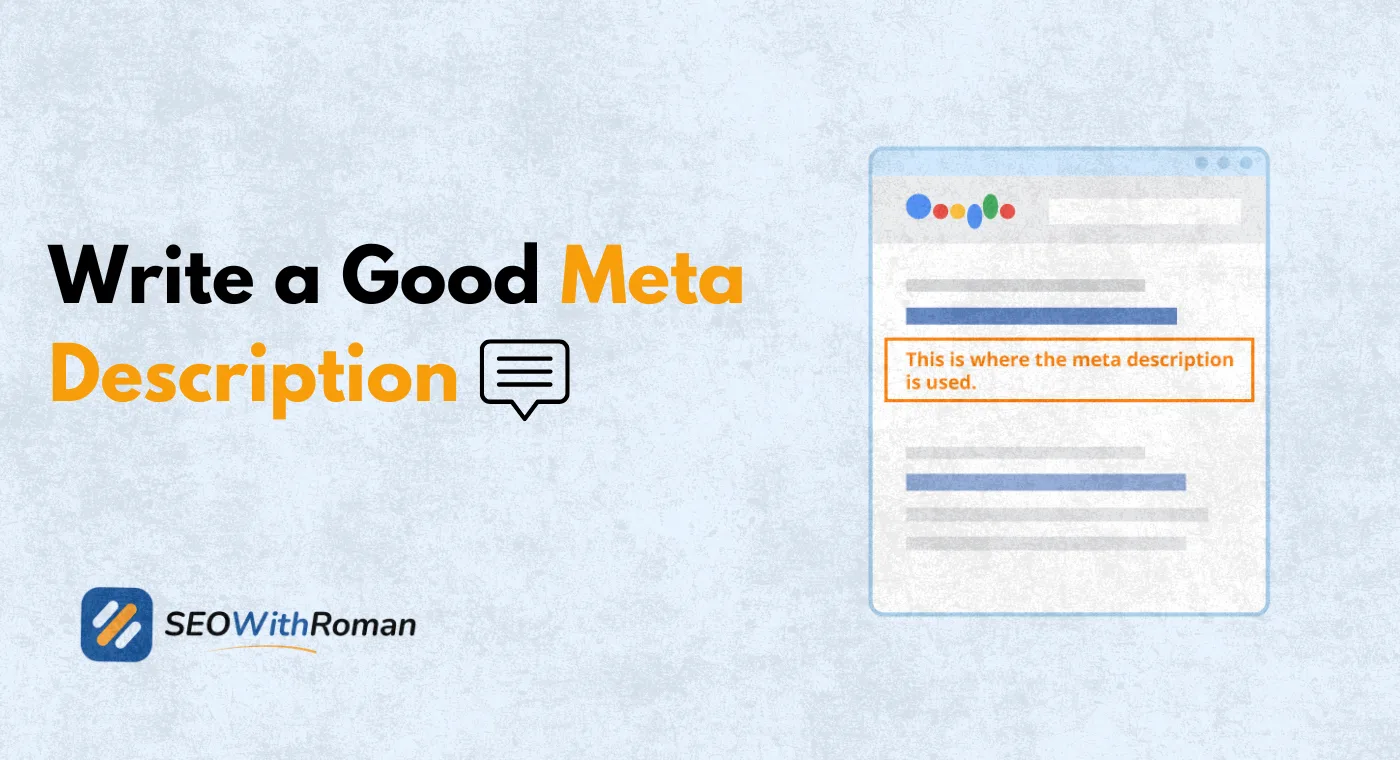
- A meta description is an HTML tag of up to 155 characters that summarises your page content in Google search results
- Meta descriptions are not a direct Google ranking factor but they directly influence click through rate which does affect rankings
- Google rewrites meta descriptions approximately 62% of the time when it finds a better match for the search query
- Every meta description needs four elements: the primary keyword, a benefit statement, a call to action, and a character count under 155
- Writing unique meta descriptions for every page is one of the most underused quick wins in on-page SEO
1 What Is a Meta Description and Why It Is the Most Underrated SEO Element
Every time you search on Google, you see two lines of text beneath each blue headline. Those two lines are the meta description. They are the difference between someone clicking your result and scrolling straight past it to your competitor.
A meta description is an HTML meta tag placed in the head section of your webpage. It looks like this in your page code:
meta name="description" content="Learn what a meta description is and how to write one that gets clicks. Written by a Senior SEO Specialist with 10+ years of real experience."
Google reads this tag and, when it decides the description matches the search query well enough, displays it beneath your page title in search results. This small piece of text is your advertisement in the world's most visited marketplace. It is your one chance to convince a searcher that your page is the right answer before they ever click.
Here is the reality most beginners miss. Two pages can rank in the same position on Google and receive completely different amounts of traffic purely because of how their meta descriptions are written. One description convinces the searcher. The other does not. The first page grows its traffic. The second stays stuck.
In many years of doing on-page SEO for clients across multiple industries, improving meta descriptions is consistently one of the fastest ways to increase organic traffic without publishing a single new piece of content. It is free, it is fast, and most websites have not done it properly.
2 Does a Meta Description Affect SEO Rankings Directly
This is one of the most debated questions in SEO and the answer needs to be clear.
Google has officially confirmed that meta descriptions are not a direct ranking factor. The words inside your meta description do not influence which position your page ranks in search results.
However, the indirect impact on your SEO is significant and very real
Here is the mechanism. Google uses click through rate as a quality signal. When your page ranks in position three and consistently receives more clicks than the pages in positions one and two, Google interprets this as evidence that your result is more relevant and useful. Over time, this can improve your ranking.
Your meta description is the primary driver of click through rate for organic search results. A well-written meta description that matches search intent, contains the keyword the user searched, and ends with a clear call to action will consistently outperform a generic or auto-generated description.
This is the indirect SEO benefit that makes meta description optimisation worth every minute you spend on it. You are not directly influencing your ranking. You are influencing how many people click your result, which then influences your ranking.
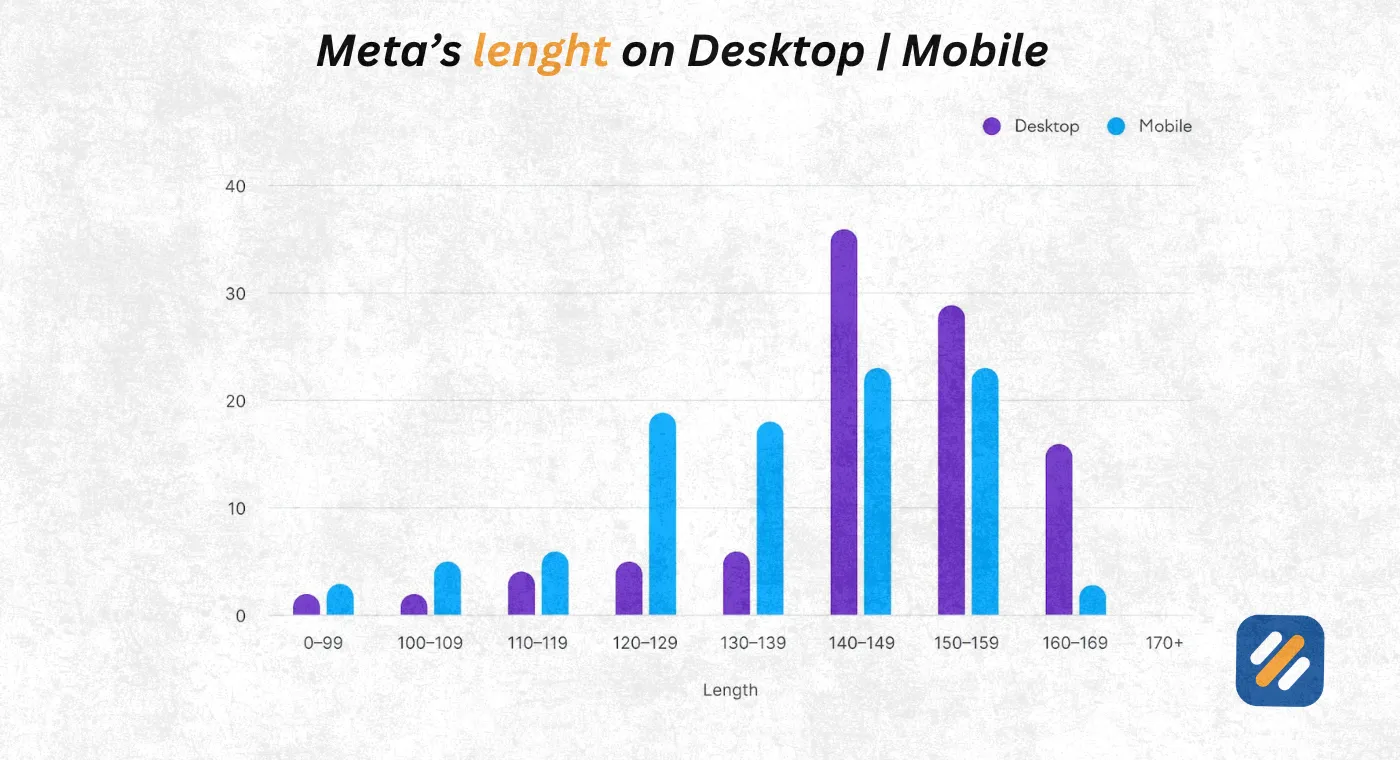
3 Meta Description Length | The Exact Character Limits You Need to Know
One of the most practical questions about meta descriptions is how long they should be. Here is the complete answer with every limit you need to know.
| Device | Recommended Length | Maximum Before Truncation | Pixel Width Limit |
|---|---|---|---|
| Desktop | 120 to 155 characters | 155 characters | 920 pixels |
| Mobile | 100 to 120 characters | 130 characters | 680 pixels |
| Optimal for both | 120 to 150 characters | 155 characters | Varies by font |
The 155 character limit is not a hard technical rule. Google measures description length in pixels, not characters. But 155 characters is the practical safe limit that works across both desktop and mobile search results without truncation.
Going under 120 characters is also a problem. A description that is too short fails to communicate enough value to convince the searcher to click. Google may also replace a short description with a passage from your page content that it considers more informative.
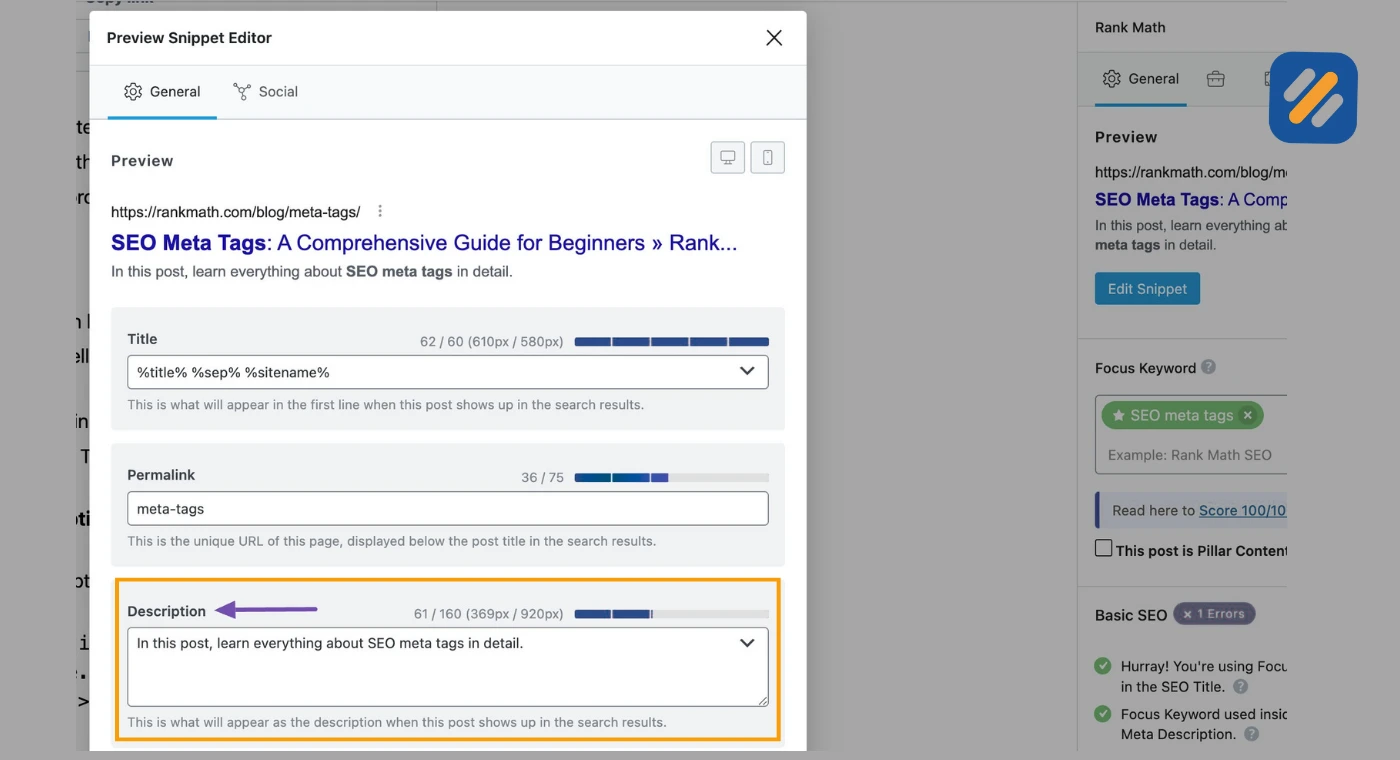
The practical advice is simple. Write your meta description to land between 130 and 155 characters. Use Rank Math's snippet preview in WordPress to check the exact length before publishing. The preview shows you in real time whether your description fits or gets cut off.
4 What Is a Meta Description Tag and How It Works in HTML
Understanding the technical side of meta descriptions helps you control them properly, especially on WordPress where plugins handle the code for you.
In raw HTML, a meta description tag sits inside the head section of your webpage and looks like this:
head
meta name="description" content="Your description goes here. Keep it under 155 characters and include your primary keyword naturally."
/head
This tag is not visible to users when they visit your page. It exists purely for search engines and social media platforms to read. Google reads it when crawling your page and uses it to decide what description to show in search results.
On WordPress with Rank Math installed, you never need to touch this HTML code directly. Rank Math adds a meta description field to every post and page editor. Whatever you type into that field is automatically inserted into the correct HTML tag in your page code.
On Yoast SEO, the process is identical. The snippet editor inside Yoast gives you a live preview of how your description will appear in Google search results as you type it.
The important thing to understand is that Google does not always use the description you write. Research by Portent found that Google rewrites meta descriptions approximately 62% of the time. This happens when Google decides a passage from your page content better matches what the searcher typed. The best defence against this is writing a description that already does exactly what Google wants: clearly matching the search intent with the keywords the user typed.
5 The Meta Description Writing Formula That Consistently Works
After writing hundreds of meta descriptions for client pages across different industries, one formula consistently produces higher click through rates than any other structure.
The Formula:
Primary Keyword + Specific Benefit + Supporting Detail + Call to Action
Here is how it works in practice across different page types:
| Page Type | Formula Applied | Example Meta Description |
|---|---|---|
| How-to guide | Keyword + what they learn + who it is for + CTA | Learn how to do keyword research for free using Google Planner and Ahrefs. Step by step guide for beginners with zero SEO experience. Start today. |
| Product page | Keyword + key feature + trust signal + CTA | SEO audit tool trusted by 50,000 marketers. Find technical errors, keyword gaps, and ranking opportunities in minutes. Try free for 7 days. |
| Comparison article | Keyword + what is compared + the deciding factor + CTA | Rank Math vs Yoast SEO compared across 12 features. See which plugin wins for speed, ease of use, and free features in 2026. Read the full breakdown. |
| Service page | Keyword + problem solved + credibility + CTA | Professional SEO services for US and UK small businesses. 10+ years of experience. Real rankings, not just reports. Get a free consultation today. |
| Blog category | Keyword + what the category covers + audience + CTA | All our keyword research guides in one place. Written for beginners and small business owners who want Google traffic without paying for ads. Explore now. |
| Definition page | Keyword + plain English answer + extra value + CTA | A meta description is a 155-character HTML tag that appears in Google search results. Learn what it is, why it matters, and how to write a great one. |
6 How to Write a Meta Description Step by Step
Here is the exact process I use when writing meta descriptions for client websites and my own content. This process works for any page type, any industry, and any keyword.
Step 1: Identify the primary keyword and search intent. Before writing a single word, be clear on exactly what the person who will read this description just typed into Google. What were they hoping to find? A how-to guide, a product, a definition, or a comparison? Your description needs to promise exactly that.
Step 2: Open with the primary keyword. Google bolds the searched keyword in the description when it appears. This bold text makes your result visually stand out in the search results page. Start your description with or near the primary keyword to maximise this effect.
Step 3: State the specific benefit of clicking. Tell the reader what they will get if they click your result. Not what your page is about. What they will get. "Learn how to" is better than "This page explains." "Get a step by step guide" is better than "A guide to."
Step 4: Add a call to action. End every meta description with a short action phrase. "Learn more," "Read the full guide," "Start for free," "See real examples." A call to action creates a micro-commitment in the reader's mind and increases click through rate.
Step 5: Check the character count. Paste your description into a character counter or use Rank Math's snippet preview. Confirm you are between 130 and 155 characters. Trim filler words if over. Add a specific detail if under.
Step 6: Read it out loud. If it sounds like a robot wrote it, rewrite it. Your meta description will be read by a real human in under two seconds. It needs to feel like a helpful expert talking to them, not a list of keywords with punctuation.
7 Meta Description Examples | Good vs Bad With Explanations
The fastest way to understand what makes a strong meta description is to compare weak ones with strong ones side by side.
Example 1: SEO Blog Post
Weak: "This post talks about SEO basics and how search engines work for beginners."
Strong: "New to SEO? Learn exactly how Google ranks websites, what keywords are, and the three things that matter most for beginners. Written by a working SEO specialist."
Why the strong version wins: It speaks directly to the reader, promises specific value, and includes an E-E-A-T trust signal in one sentence.
Example 2: Product Page
Weak: "We sell high quality running shoes in multiple sizes and colours."
Strong: "Lightweight running shoes built for marathon training. Free delivery over $50, 30-day returns. Shop 200+ styles and find your perfect pair today."
Why the strong version wins: It addresses the specific buyer, removes purchase risk with delivery and return details, and ends with a clear action.
Example 3: Service Page
Weak: "Muhammad Roman is an SEO specialist who helps businesses grow online."
Strong: "Senior SEO Specialist with 10+ years of experience helping US and UK businesses rank on Google. Book a free strategy call and see what is holding your site back."
Why the strong version wins: It leads with credentials, names the target audience, and turns the CTA into an irresistible offer.
Example 4: Informational Page
Weak: "Find out what a 404 error is on this page."
Strong: "A 404 error means Google cannot find your page, and it is silently draining your rankings. Learn what causes it and how to fix every type in under an hour."
Why the strong version wins: It creates urgency with "silently draining your rankings," answers the question partially to reward curiosity, and promises a time-bound fix.
8 Meta Description SEO Best Practices | The Complete Checklist
Use this checklist every time you write or update a meta description on any page of your website:
| Best Practice | Why It Matters | Pass or Fail Check |
|---|---|---|
| Between 130 and 155 characters | Prevents truncation on desktop and mobile | Count characters in Rank Math preview |
| Contains primary keyword | Google bolds it, increases visual CTR | Read description and confirm keyword is present |
| Written in active voice | Reads naturally, creates action | Remove all passive constructions |
| Includes a clear call to action | Increases clicks by creating micro-commitment | Ends with Learn, Get, Read, Try, or similar |
| Matches the page content exactly | Prevents high bounce rate and Google penalty | Read the page, then read the description |
| Unique across all pages | Prevents duplicate metadata issues | Check for copy-pasted descriptions across similar pages |
| Does not use quotation marks | Quotation marks break the HTML attribute | Remove all double quotes from descriptions |
| Addresses the reader directly | Second person increases engagement | Contains "you" or "your" at least once |
| Includes a specific benefit or number | Numbers increase trust and specificity | Add a stat, timeframe, or quantity where possible |
9 What Are Meta Keywords and Do They Still Matter
Since we are covering all SEO metadata in this guide, it is important to address a question that still causes confusion among beginners.
Meta keywords are a separate HTML tag from meta descriptions. They look like this in page code
meta name="keywords" content="SEO, keyword research, meta description, on-page SEO"
Google officially stopped using the meta keywords tag as a ranking factor in 2009. Google's own John Mueller has confirmed multiple times that Google completely ignores this tag.
Bing and other smaller search engines also announced that they ignore meta keywords or, worse, use them as a spam signal.
The practical conclusion is clear. Do not waste any time writing meta keywords for your pages. Every minute you spend on meta keywords would be better spent improving your meta descriptions, title tags, or actual page content.
The only metadata tags that genuinely matter for SEO in 2026 are your meta title and your meta description. Everything else is either ignored or used against you.
10 3 Expert Tips for Writing Meta Descriptions That Outperform Competitors
These are the three tips I use when writing meta descriptions for competitive keywords where every click counts.
Tip 1: Google your keyword and study the existing descriptions before writing yours.
Open an incognito browser, search your target keyword, and read every meta description on page one. Find the gap. What benefit is nobody else promising? What specific detail is missing from every other description? Write yours to fill that gap. Your description does not need to be the best written. It needs to offer something the others do not.
Tip 2: Match your description to the emotional state of the searcher, not just their query.
Someone searching "how to fix 404 errors" is slightly stressed. Someone searching "best keyword research tools" is curious and in discovery mode. Someone searching "hire SEO specialist" is ready to make a decision. Write your description in the emotional register of the person searching, not in the neutral register of a help document. The description that feels most like it was written for exactly that person gets the click.
Tip 3: Treat low CTR pages as your highest priority meta description updates.
In Google Search Console, go to Search Results and sort your pages by impressions. Find pages with high impressions but below average CTR. These pages are already ranking but not getting clicked. A rewritten meta description on these pages is the fastest way to increase traffic from pages that are already doing the hard work of ranking.
11 Conclusion
A meta description is not a box to tick before you publish. It is the single piece of text that determines whether months of SEO work results in actual traffic or wasted potential sitting invisibly on page one.
The formula is not complicated. Start with your keyword. Promise a specific outcome. Write for the human reading it. Stay under 155 characters. End with a call to action.
Do that for every page on your website and you will consistently outperform competitors who treat meta descriptions as an afterthought.
Open Google Search Console right now and find your highest-impression pages with the lowest click through rates. Rewrite those descriptions first using the formula in this guide. That one action can increase your organic traffic this week without publishing a single new article.
Have a question about a specific meta description you are working on? Drop it in the comments below and I will give you honest feedback.
Join 1,000+ business owners and bloggers who get one actionable SEO tip every week — straight to their inbox. Free forever.
Get Free Weekly Tips →