- Microsoft SEO means optimising your website to rank on Bing, which powers Microsoft Copilot, Windows search, and Edge browser results
- Bing holds over 27% of US desktop search market share and its users skew older, higher income, and higher purchase intent than Google users
- Bing Webmaster Tools, IndexNow, and Bing Places are the three free Microsoft SEO tools every website owner must set up immediately
- Bing weights exact-match keywords, domain age, social signals, and multimedia content more heavily than Google does
- Microsoft Clarity is a free behaviour analytics tool that helps you improve user engagement signals which directly influence Bing search rankings
1 What Is Microsoft SEO and Why It Deserves a Place in Your Strategy Right Now
When most website owners talk about SEO, they mean Google. That focus makes sense given Google's global dominance. But it creates a significant blind spot that smart businesses are quietly exploiting every single day.
Microsoft SEO is the practice of optimising your website to rank higher on Bing, Microsoft's search engine, and across the broader Microsoft search ecosystem including Microsoft Copilot, Windows search integration, and Edge browser results. It follows the same core principles as Google SEO but with important differences in how the algorithm weighs ranking signals.
Here is why this matters more in 2026 than it has at any point in the last decade.
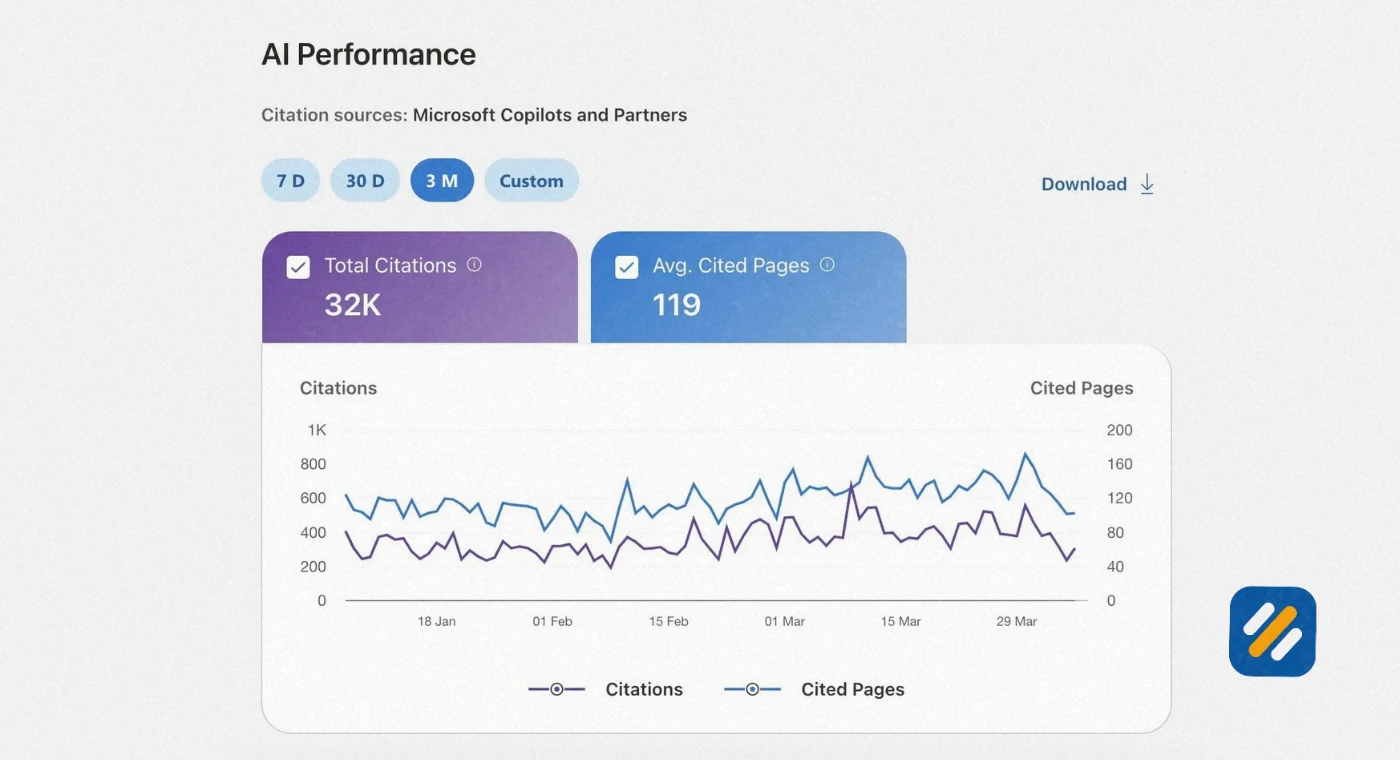
Bing now powers Microsoft Copilot, one of the fastest-growing AI assistants in the world integrated directly into Windows 11, Microsoft 365, and the Edge browser. When Copilot answers a question, it pulls its information from Bing's index. Getting your content ranked on Bing is now simultaneously getting your content cited in AI-generated answers across Microsoft's entire product ecosystem.
In many years of doing SEO for B2B and service-based businesses, one of the patterns I see consistently is that the clients who invest even basic effort in Bing SEO get a disproportionate return because their competitors are not doing it at all. Lower competition plus high-intent audience plus AI visibility equals an opportunity most businesses are leaving completely untouched.
2 How Big Is Bing and Who Actually Uses It
Understanding Bing's audience is what convinces most businesses to start taking Microsoft SEO seriously.
Bing is not a niche search engine. It is the second largest search engine in the world. According to Statcounter data, Bing holds approximately 27% of the US desktop search market share as of 2026. On desktop specifically, nearly one in three searches in the United States does not happen on Google.
The Bing user demographic is also commercially valuable in ways the raw numbers do not immediately convey
Bing users skew significantly older than Google users, with a higher concentration in the 35 to 65 age bracket. This demographic has more purchasing power, makes more considered buying decisions, and converts at higher rates for service-based and B2B businesses.
Bing is the default search engine in Windows, Microsoft Edge, and across Microsoft 365. This means anyone who opens Edge without changing their default settings, or uses Cortana, or runs a Windows device without actively installing Chrome, is searching on Bing. These are typically enterprise users, corporate employees, and older demographics on unmodified Windows installations.
For B2B businesses, SaaS companies, professional services, and local service providers, Bing's audience demographic is often a better match for their ideal customer than Google's broader, more fragmented audience.
3 Microsoft SEO vs Google SEO | The Key Differences That Change Your Strategy
Microsoft SEO and Google SEO share the same foundational principles. Both reward relevant, high-quality, technically sound content. But Bing's algorithm places different weights on specific signals and that changes how you should approach optimisation.
| Ranking Factor | Google SEO | Bing SEO | What to Do Differently |
|---|---|---|---|
| Keyword matching | Semantic, understands synonyms | Exact match weighted more heavily | Include exact keyword phrases in title, H1, and URL |
| Backlinks | Volume and quality together | Quality over quantity, favours .edu, .gov, aged domains | Prioritise authoritative backlinks over link volume |
| Social signals | Not a stated ranking factor | Officially stated as an influence | Build genuine social engagement across LinkedIn, Facebook, X |
| Domain age | Minor factor | Older domains perform noticeably better | Consistent publishing builds trust faster on newer domains |
| Multimedia content | Helpful but secondary | Images and video weighted more heavily | Add relevant images with descriptive alt text to every page |
| Meta keywords | Completely ignored | Still read by Bing's crawler | Add relevant meta keywords to your pages |
| HTTPS | Strong positive signal | Required for serious ranking consideration | Ensure SSL is active on every page |
| Schema markup | Strong positive signal | Strong positive signal, especially for rich results | Implement Article, FAQ, and LocalBusiness schema |
| Page speed | Core Web Vitals are primary signal | Important but slightly less critical than Google | Optimise for speed but CWV are less penalising on Bing |
| AI visibility | Google AI Overviews | Microsoft Copilot citations | Strong Bing rankings lead directly to Copilot citations |
The most practically significant difference for most websites is keyword matching. Google has spent years building sophisticated semantic understanding that interprets what you mean rather than just what you typed. Bing is improving in this area but still relies more heavily on exact keyword phrases appearing in specific locations on the page.
This does not mean keyword stuffing. It means being more deliberate about including your exact target keyword in your title tag, your H1, your first paragraph, your URL slug, and at least one subheading.
4 Bing Webmaster Tools | The Complete Setup Guide for Microsoft SEO
Bing Webmaster Tools is the foundation of any Microsoft SEO strategy. It is free, takes under fifteen minutes to set up, and gives you access to data and controls that directly influence how Bing crawls and ranks your website.
Here is the complete setup process
Step 1: Create your Bing Webmaster Tools account
Go to bing.com/webmasters and sign in with a Microsoft account. If you already have a Google Search Console account connected to your website, Bing allows you to import your site data directly from GSC in two clicks. This is the fastest setup path and immediately populates your Bing Webmaster Tools account with your existing sitemap and site structure.
Step 2: Verify your website
Bing offers three verification methods. The XML file method involves downloading a small file and uploading it to your root directory. The meta tag method involves adding a single line of code to your homepage header. If you are using Rank Math or Yoast SEO on WordPress, there is a dedicated Bing verification field in the plugin settings that handles this automatically.
Step 3: Submit your sitemap
Once verified, go to Sitemaps in the left navigation and submit your sitemap URL. For WordPress websites using Rank Math, your sitemap lives at yourdomain.com/sitemap_index.xml. Submit this URL and Bing will begin systematically crawling all your pages.
Step 4: Enable IndexNow
IndexNow is a protocol co-created by Microsoft and Yandex that instantly notifies Bing when you publish or update a page. Instead of waiting for Bingbot to crawl your site on its natural schedule, IndexNow sends a real-time ping that gets new content indexed within hours. Rank Math has native IndexNow support built in. Enable it in Rank Math's settings under General then IndexNow.
Step 5: Explore the free tools inside Bing Webmaster Tools
Most people set up Bing Webmaster Tools and never explore what is inside. The platform includes a free keyword research tool, a site scan for technical SEO issues, a backlink checker, and a SEO analyser that scores individual pages. These tools are free and provide Bing-specific data you cannot get from any other source.
5 Bing Keyword Research | How to Find the Right Keywords for Microsoft Search
Bing keyword research follows the same logic as Google keyword research but uses different tools and produces slightly different data because Bing's user base searches differently.
The most important free tool for Bing keyword research is inside Bing Webmaster Tools itself. Navigate to Research then Keyword Research after setting up your account. This tool shows you search volume specifically on Bing, not estimates from Google's database. For keywords where Bing's audience skews differently from Google's audience, this data can produce meaningfully different keyword priorities.
Here is how I approach Bing keyword research for a new website
Start with your core topic. Enter your main business topic into Bing's keyword research tool. Note the monthly impressions, click volume, and suggested related keywords. Pay attention to the click-through rate column. Keywords with high impressions but low CTR represent opportunities where better content could earn significantly more clicks.
Cross-reference with Google Keyword Planner. Compare Bing keyword data with Google Keyword Planner data for the same terms. When a keyword has high search volume on Google but the Bing volume is also solid, that is a strong signal to prioritise it. When the Bing volume is disproportionately high relative to Google, that often indicates a keyword that Bing's older, desktop-heavy audience searches more frequently.
Use exact match phrases deliberately. Because Bing's algorithm weights exact match keywords more heavily, prioritise keywords that appear exactly as your audience would type them rather than relying on semantic variations. "Accounting software for small business" should appear in those exact words in your title tag for a Bing-targeted strategy, rather than trusting Bing to infer that "bookkeeping tools for SMBs" means the same thing.
Check Bing's People Also Ask and autocomplete. Bing's SERP features work similarly to Google's. The autocomplete suggestions in Bing's search bar and the related questions that appear in results are direct signals of what Bing users are actually typing. These suggestions come from real search data and represent question-based keyword opportunities that can be turned directly into H2 headings within your content.
6 Bing Ranking Factors | What Bing's Algorithm Actually Rewards
Understanding Bing's ranking factors is what separates Microsoft SEO from simply applying Google SEO tactics and hoping they transfer. Most of the fundamentals do transfer. But several factors are weighted differently enough to change your priorities.
On-Page Keyword Signals
Bing places greater emphasis on exact keyword placement than Google. In practical terms this means your primary keyword needs to appear in:
Your title tag, as close to the beginning as possible. Bing's crawler reads title tags with significant weight and exact keyword matches in the title tag carry more ranking influence on Bing than on Google.
Your URL structure. Clean, keyword-rich URLs like yourdomain.com/bing-seo-guide rank noticeably better on Bing than dynamically generated URLs with query parameters or numbers.
Your H1 heading, which should closely match or exactly replicate your title tag keyword. Bing uses H1 tags as a primary on-page relevance signal.
Your first 100 words of body content. Bing's algorithm gives additional weight to keywords that appear in the opening section of a page, confirming to the crawler that the keyword in your title matches the actual content that follows.
Backlink Quality and Domain Authority
Bing favours backlinks from established, authoritative domains with age and history over sheer link volume. A single link from a .edu domain, a government website, or a 10-year-old industry publication carries significantly more weight on Bing than dozens of links from newer or lower authority sites.
This actually benefits smaller websites in a meaningful way. If you focus on earning three to five genuinely high-quality backlinks rather than pursuing link volume, your Bing rankings can improve faster than your Google rankings because the competition for those high-authority links is lower.
Social Signals
Bing is the only major search engine that openly acknowledges social signals as a ranking factor. Content that earns genuine engagement on LinkedIn, Facebook, X, and Pinterest is more likely to rank well on Bing than identical content with no social presence.
This does not mean manufacturing fake social engagement. It means consistently sharing your content across your active social channels and writing content compelling enough that real readers want to share it. For B2B businesses, LinkedIn engagement is particularly valuable because it aligns with Bing's professional, higher-income audience demographic.
Content Freshness
Bing's algorithm responds strongly to content freshness for time-sensitive topics. Updating existing articles with new data, statistics, or developments keeps them competitive in Bing SERPs even when they were originally published months or years ago. Adding a "Last updated" date to your articles signals freshness directly to both Bing and to readers who find your content.
Multimedia Signals
Pages with relevant, optimised images and embedded videos rank better on Bing than text-only pages. Every image on your website should have descriptive alt text that includes relevant keywords. Video content embedded from YouTube or hosted on your site increases dwell time, and Bing measures user engagement as a quality signal.
Bing also has its own image search and video search verticals that can send additional traffic to your website. Optimising images with descriptive file names and relevant alt text creates a secondary traffic channel beyond standard organic search results.
7 How to Set Up and Use Microsoft Clarity for SEO
Microsoft Clarity is one of the most underrated free tools in the entire SEO ecosystem and it is completely free with no session limits or data sampling.
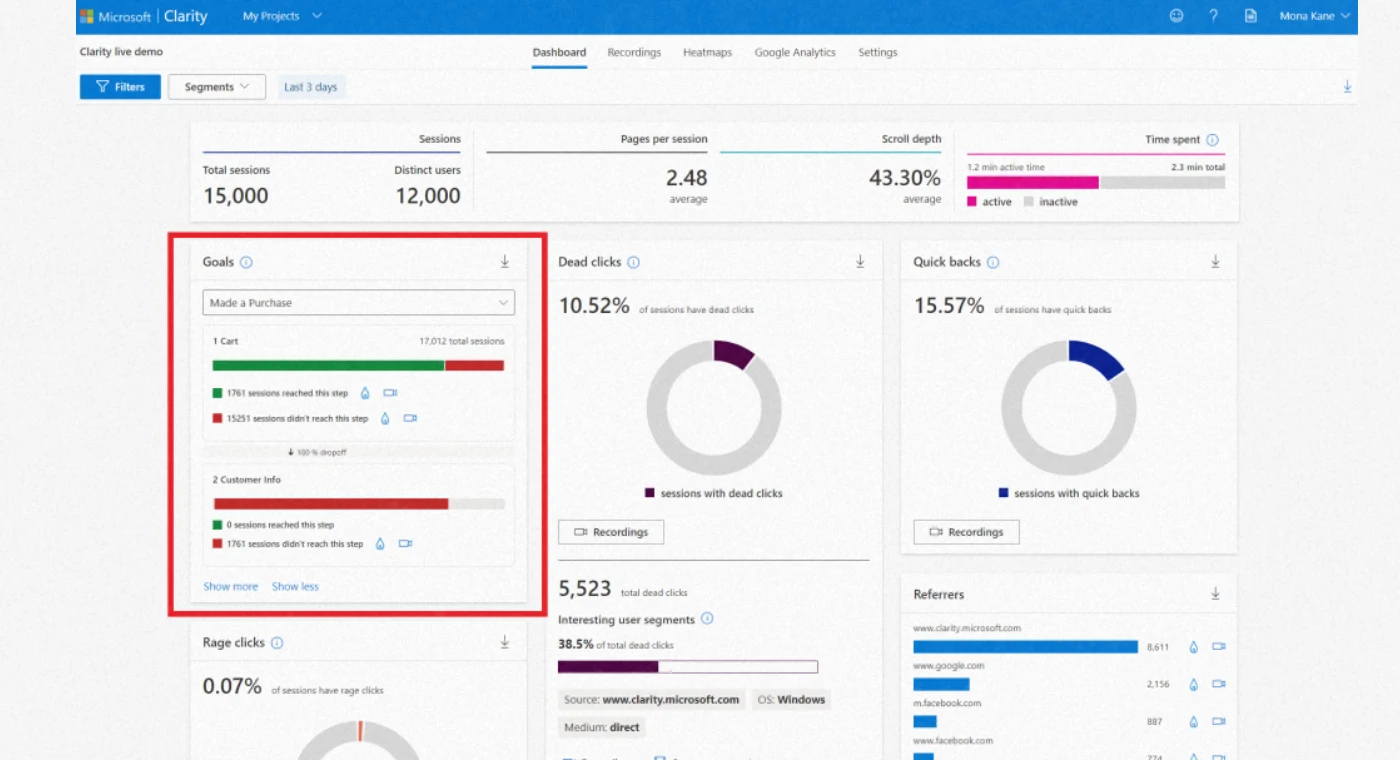
Clarity is a behaviour analytics platform that records user sessions on your website, generates heatmaps showing where visitors click and scroll, and identifies frustration signals like rage clicks and dead clicks. Unlike Google Analytics which shows you what traffic does in aggregate, Clarity shows you exactly how individual users experience each page on your website.
Here is why Microsoft Clarity SEO matters specifically for Bing rankings. Bing uses engagement signals as a ranking factor. Pages where users stay longer, scroll further, and interact more are interpreted as higher quality content. Pages where users arrive and immediately leave, or where they show frustration signals, are interpreted as failing to meet search intent.
Clarity helps you identify and fix the exact reasons users are leaving your pages quickly, which directly improves the engagement signals Bing uses to evaluate your content quality.
How to install Microsoft Clarity:
Go to clarity.microsoft.com and create a free account. Add your website, then copy the tracking code Clarity provides. On WordPress, paste this code in your theme's header.php file before the closing head tag, or use the Insert Headers and Footers plugin to add it without touching code. Clarity begins collecting data immediately and you can view heatmaps and session recordings within 24 to 48 hours of installation.
How to use Clarity data to improve Bing SEO:
Look at the scroll depth maps for your most important pages. If users are not reaching your key content, calls to action, or important information, restructure the page to move that content higher. Short average scroll depth is a strong predictor of poor engagement signals.
Review rage click reports to identify broken elements or confusing UI that causes frustration. Fixing these issues reduces bounce rate and improves the user experience signals Bing evaluates.
Study the session recordings for pages that have high impressions but low click-through rates in Bing Webmaster Tools. Often the disconnect is visible in how users navigate the page after arriving, providing clear direction for what to change.
8 IndexNow | The Microsoft Protocol That Gets Your Content Indexed in Hours
IndexNow is one of the most practically impactful Microsoft SEO tools available and one of the least discussed outside of technical SEO circles.
It is an open protocol co-developed by Microsoft and Yandex that allows website owners to instantly notify participating search engines when new content is published or existing content is updated. Instead of waiting for Bingbot to crawl your website on its natural schedule, which for newer or lower authority websites can take days to weeks, IndexNow delivers a real-time signal that gets your page into Bing's index within hours.
The speed difference is genuinely significant. A new article submitted via IndexNow can appear in Bing search results the same day it is published. The same article relying on natural crawling might take one to three weeks to appear, particularly on websites that Bingbot visits infrequently.
How IndexNow works technically:
When you publish or update a page, your website sends an HTTP request to the IndexNow API endpoint with your site URL and a unique API key. Bing receives this request and prioritises crawling and indexing the submitted URL. The protocol is designed to be lightweight and can be triggered automatically by your CMS or SEO plugin.
How to enable IndexNow on WordPress with Rank Math:
Go to Rank Math in your WordPress dashboard, then General Settings, then the IndexNow tab. Toggle IndexNow to enabled. Rank Math will automatically generate your API key, verify it with Bing, and submit every new or updated page to Bing automatically from that point forward. No manual action is required after the initial setup.
How to enable IndexNow with Yoast SEO:
Yoast SEO also supports IndexNow natively. Go to Yoast SEO settings, click on the Integrations tab, and enable IndexNow. The process is identical and works the same way as Rank Math's implementation.
For websites using neither plugin, you can manually submit URLs through Bing Webmaster Tools under URL Submission, or access the IndexNow API directly at api.indexnow.org to submit URLs programmatically.
9 Bing Places | Local Microsoft SEO for Businesses Serving a Geographic Area
If your business serves customers in a specific city, region, or country, Bing Places is the Microsoft equivalent of Google Business Profile and it is where local Microsoft SEO wins or loses.
Bing Places for Business is a free listing platform that controls how your business appears in Bing local search results and on Bing Maps. A fully optimised Bing Places listing increases your chances of appearing in Bing's local pack, which shows three local businesses prominently at the top of location-based search results, equivalent to Google's Map Pack.
How to set up and optimise Bing Places:
Go to bingplaces.com and sign in with your Microsoft account. Search for your business name to see if a listing already exists. Many businesses already have auto-generated Bing Places listings created from publicly available data. If yours exists, claim it rather than creating a new one.
Complete every field in your listing without exception. Business name, address, phone number, website, business hours, business categories, and a full business description. Consistency is critical. Your name, address, and phone number must match exactly what appears on your website, your Google Business Profile, and every other online directory. Inconsistencies in this information, even minor variations like "St" versus "Street," confuse both Bing's algorithm and users.
Upload a minimum of ten high-quality photos covering your premises, your team, your products or services, and any relevant before and after work if applicable. Bing Places listings with photos receive significantly more clicks than listings without images.
Actively encourage satisfied customers to leave reviews on your Bing Places listing. Bing incorporates review count and average rating into its local ranking algorithm. A business with twenty positive reviews consistently outranks a business with no reviews for the same keyword in the same location, all other factors being equal.
10 Microsoft Copilot and AI Search | How Bing SEO Feeds the New AI Search Economy
This is the section that most Microsoft SEO guides completely miss, and it is arguably the most important development in search since the introduction of featured snippets.
Microsoft Copilot is an AI assistant integrated across the entire Microsoft product suite including Windows 11, Microsoft 365, Edge browser, and the standalone Copilot app. When a user asks Copilot a question, it generates an answer by pulling information from Bing's index and citing the sources it used.
This creates a direct, measurable connection between your Bing search rankings and your visibility inside AI-generated answers. Content that ranks well on Bing is the content Copilot draws from when answering questions in your topic area.
For businesses and content creators, this means Microsoft SEO is no longer just about ranking in Bing's traditional search results. It is about being the source that an AI assistant with hundreds of millions of active users cites when answering questions your target audience is asking.
How to optimise for Microsoft Copilot citations (AEO and GEO):
Answer Engine Optimisation and Generative Engine Optimisation are the emerging disciplines focused on making content citable by AI systems. For Microsoft's ecosystem specifically, here is what makes content more likely to be cited by Copilot:
Write content that directly answers specific questions in clear, concise language. Copilot's citation system favours content where the answer to a question is clearly stated rather than buried in surrounding context. If your article answers "what is IndexNow," that answer should appear in a clear, standalone sentence in the first paragraph of that section.
Use structured formatting. Content with clear H2 and H3 headings, short paragraphs, and specific factual statements is easier for AI systems to extract and cite accurately. Copilot tends to pull from content that is well-structured rather than dense, unbroken prose.
Include specific data points and statistics. AI citation systems favour content that contains verifiable, specific information because it makes the generated answer more authoritative. Include relevant statistics, dates, version numbers, and specific examples throughout your content.
Build topical authority. Copilot's citation system, like Bing's organic ranking algorithm, favours websites that demonstrate comprehensive, consistent expertise in a specific topic area. A website with thirty articles all focused on Microsoft SEO and Bing optimisation will be cited more frequently than a general website with one article on the topic.

11 The Complete Microsoft SEO Strategy | Step by Step Implementation
Here is the exact implementation sequence I would follow if tasked with building a Microsoft SEO strategy for a new website from scratch in 2026:
Week 1: Technical Foundation
Set up Bing Webmaster Tools and import your Google Search Console data. Submit your XML sitemap. Enable IndexNow through your SEO plugin. Install Microsoft Clarity and configure it to record all sessions. Verify that your website uses HTTPS on every page and that there are no mixed content warnings.
Check your robots.txt file to confirm Bingbot is not accidentally blocked. Go to yourdomain.com/robots.txt and look for any "Disallow: /" rule that applies to all bots. If you see one, fix it immediately as it prevents Bing from crawling your entire website.
Week 2: Bing Webmaster Tools Audit
Run the SEO analyser on your most important pages. Address any critical issues identified. Review the site scan report for crawl errors, missing meta descriptions, duplicate title tags, and missing alt text. Fix these in priority order starting with your highest-traffic pages.
Submit your five most important pages for priority indexing through the URL Submission tool in Bing Webmaster Tools. This ensures your core pages are indexed correctly before you begin building out additional content.
Week 3: Keyword Research and Content Planning
Use Bing's native keyword research tool to identify your primary keyword targets. Cross-reference with Google Keyword Planner to confirm search volume. Build a content calendar targeting one primary keyword per article, using exact match keyword phrases as the basis for each title tag and H1.
For existing content, identify pages ranking between positions 5 and 20 in Bing Webmaster Tools. These are your quickest wins. Update them with better exact-match keyword placement, additional multimedia content, and stronger schema markup to push them into the top five.
Week 4: Off-Page and Social Strategy
Claim your Bing Places listing and complete every field. Begin a consistent social sharing strategy, posting every new piece of content to LinkedIn, Facebook, and any other platform where your audience is active. Identify three to five industry publications or websites where you could earn a high-quality backlink through guest posting or resource page inclusion.
Ongoing Monthly Tasks
Review Bing Webmaster Tools performance data every two weeks. Monitor your Clarity heatmaps monthly for any new pages with poor engagement signals. Update any high-impression, low-click articles in Bing search results with better title tags and meta descriptions. Submit any updated pages through IndexNow to ensure fast reindexing.
12 Bing Webmaster Guidelines | What Bing Explicitly Rewards and Penalises
Unlike Google which is often vague about its ranking signals, Bing publishes explicit Webmaster Guidelines at bing.com/webmaster/help/webmaster-guidelines that state directly what the algorithm rewards and what it penalises.
Understanding these guidelines is the foundation of sustainable Microsoft SEO because violating them can result in manual penalties that are significantly harder to recover from on Bing than on Google.
What Bing explicitly rewards:
Content that clearly and accurately answers the search query without making users click through multiple pages to find the complete answer. Bing's guidelines specifically mention content depth and completeness as quality signals.
Natural, editorial backlinks from relevant, authoritative websites. Bing distinguishes between links earned through genuine editorial decisions and links acquired through manipulation and rewards the former significantly.
Websites that are fast, mobile-friendly, and easy to navigate. Bing's guidelines mirror Google's user experience requirements in this area.
Verified business information. Websites connected to a verified Bing Places listing or a verified business entity receive additional trust signals in Bing's ranking system.
What Bing explicitly penalises:
Keyword stuffing in title tags, headings, or body content. Bing's guidelines define keyword stuffing as using keywords in a way that feels unnatural to a reader and specifically flag it as a manipulative practice.
Thin content pages with minimal original value. Pages that are very short, contain only aggregated information from other sources, or provide no original insight are flagged as low quality.
Cloaking, which means showing Bingbot different content than what human users see. This is a serious violation that can result in complete removal from Bing's index.
Hidden text or links designed to manipulate rankings. Any content that is invisible to users but present in the page's code for keyword density purposes is explicitly penalised.
13 3 Expert Tips to Get Better Results From Microsoft SEO Faster
These three tips go beyond what most Microsoft SEO guides cover and are based on real patterns I have observed across multiple client websites where Bing was a significant traffic source.
Expert Tip 1: Add Meta Keywords Back to Your Bing Pages
Google stopped reading meta keywords in 2009 and every SEO guide since then has told you to ignore them. But Bing still reads meta keywords as a relevance signal. This is confirmed in Bing's own documentation. On WordPress, add your target keyword and two to three related variations as meta keywords in Rank Math's Advanced tab for each page. It takes thirty seconds per page and gives you a ranking signal that your Google-focused competitors are not using at all.
Expert Tip 2: Use Bing's Free SEO Analyser Before Publishing Every Article
Inside Bing Webmaster Tools under SEO Tools is a free SEO analyser. Enter any page URL and it returns a detailed score with specific recommendations for that page based on Bing's actual ranking signals. Most people never open this tool. Using it before every article goes live gives you a Bing-specific optimisation checklist that no Google-focused tool can replicate. Fix every critical issue the analyser flags before publishing and you will consistently outperform competitors who never check it.
Expert Tip 3: Target the Same Keywords on Bing That Rank on Page Two on Google
Here is a practical strategy that takes zero extra content creation. Take your Google Search Console data and identify keywords where you rank between positions 11 and 20 on Google. These are keywords you are close to ranking for on Google but not quite there yet. Now check your Bing Webmaster Tools data for the same keywords. Because competition is lower on Bing, those same pages often rank on page one already. Optimising these pages specifically for Bing's exact-match keyword preferences, adding meta keywords, improving multimedia, and strengthening internal links can push them to the top three on Bing while your Google rankings improve in parallel.
14 Conclusion
Microsoft SEO is not a replacement for Google SEO. It is an additional channel that most of your competitors are ignoring, which makes it one of the highest ROI SEO investments available to any website owner in 2026.
The audience is real. The search volume is significant. The connection to Microsoft Copilot and AI search means Bing rankings now influence your visibility inside one of the fastest-growing AI platforms in the world. And the competition for those rankings is a fraction of what you face on Google.
The implementation is not complex. Set up Bing Webmaster Tools. Enable IndexNow. Claim your Bing Places listing. Use Microsoft Clarity to improve your engagement signals. Publish keyword-targeted content with exact match phrases in your titles and headings. Build a handful of high-quality backlinks from authoritative domains.
That foundation, consistently maintained, builds a stable second source of organic traffic that compounds over time exactly the way Google SEO does, but with far fewer competitors standing in your way.
Have a question about your Microsoft SEO setup? Leave a comment below and I will answer it personally.
Join 1,000+ business owners and bloggers who get one actionable SEO tip every week — straight to their inbox. Free forever.
Get Free Weekly Tips →