- Https has been an official Google ranking factor since 2014 and affects the majority of search queries globally
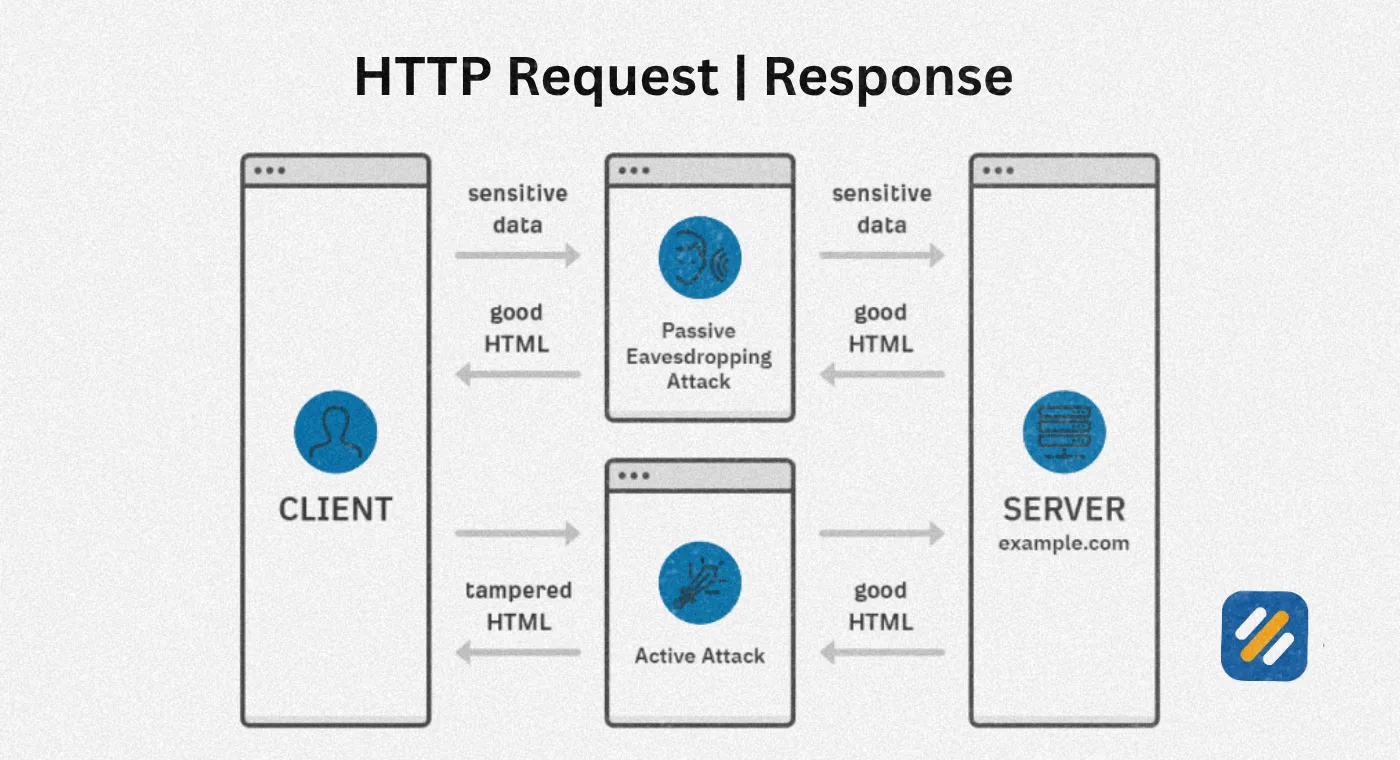
- Http sends all data in plain text making it vulnerable to interception, https encrypts every request and response between browser and server
- Switching from http to https without proper redirects can cause significant ranking drops and permanent traffic loss
- Google Chrome marks all http websites as "Not Secure" which destroys user trust and directly increases bounce rates
- A free SSL certificate from Let's Encrypt combined with proper redirect setup and GSC verification is all you need to migrate safely
1 What Is https and Why Every Website Needs It
If you have ever noticed the small padlock icon next to a website address in your browser, you have already seen https in action. But most website owners treat https as a purely technical checkbox rather than understanding what it actually does for their search rankings, their user trust, and their business.
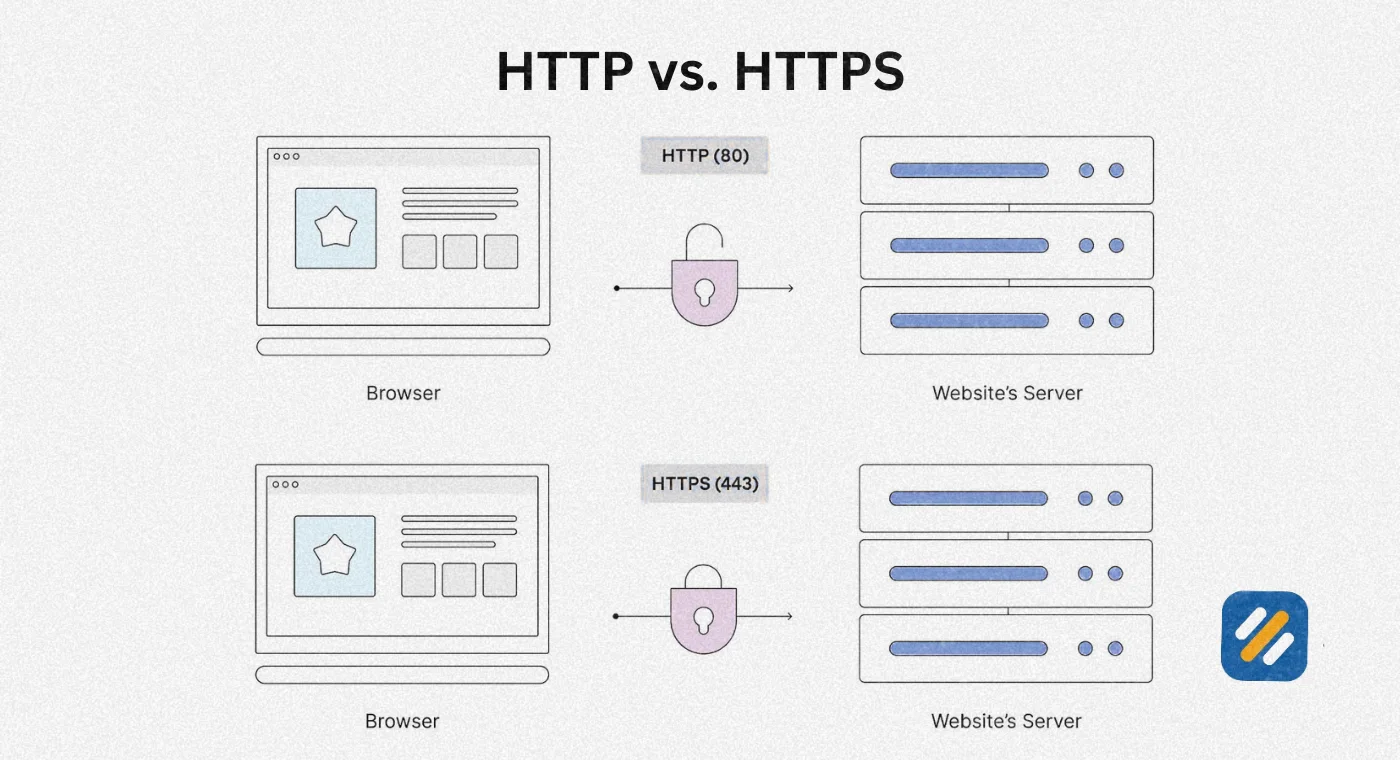
Https stands for Hypertext Transfer Protocol Secure. It is the secure version of https, the foundational protocol that governs how data is transferred between a web browser and a web server. The difference between the two is not cosmetic. It is fundamental to how safely that data travels.
When a user visits an https website, every piece of information exchanged between their browser and your server travels in plain text. Their search queries, form submissions, and even login credentials can be intercepted by anyone with the right tools on the same network. This b and it is far more common on public WiFi networks than most people realise.
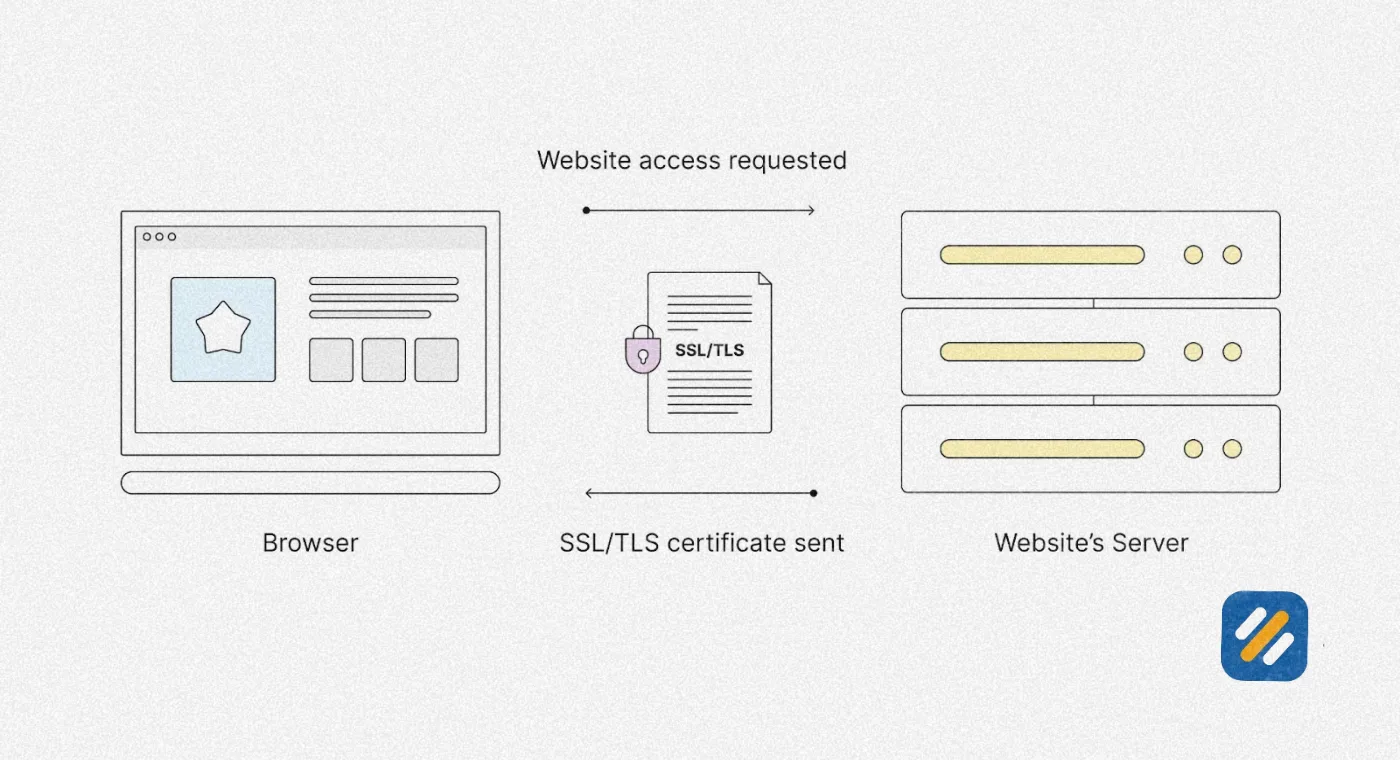
Https encrypts that entire communication using an SSL or TLS certificate installed on your web server. Even if someone intercepts the data, they see nothing but scrambled, unreadable characters.
Https is not optional for any website that wants to rank on Google, earn user trust, or accept any form of user input. It is the baseline standard for every website on the internet.
2 What Is DNS Over https and Why It Takes Security One Step Further
Most website owners understand https at the page level. Fewer understand DNS over https, which takes security one level deeper and is becoming increasingly relevant for SEO and privacy in 2026.
Every time someone types a URL into their browser, a DNS lookup happens first. The browser contacts a DNS resolver to translate the human-readable domain name into the IP address of the server that hosts the website. Traditionally this DNS lookup happens in plain text, meaning anyone monitoring the network can see which websites a user is visiting even if the pages themselves are https encrypted.
DNS over https, commonly abbreviated as DoH, encrypts this DNS lookup process itself. The query travels over an https connection to a DoH-compatible resolver, making the entire chain from typing a URL to loading the page private and secure.
For SEO professionals and website owners, DNS over https matters for two reasons. First, it protects your users' browsing behaviour from surveillance at the network level. Second, as privacy becomes a stronger signal in Google's quality assessment framework, websites that take a comprehensive approach to user security are increasingly viewed as more trustworthy by both users and search engines.
Major browsers including Chrome and Firefox have already integrated DoH support. Understanding it positions you ahead of most competitors who are still treating https as simply a padlock icon in the address bar.
3 Http vs https for SEO | The Real Difference That Affects Your Rankings
The debate between http vs https for SEO is not actually a debate anymore. Google settled it in 2014 when it officially announced https as a ranking signal. But understanding exactly how and why https affects rankings helps you make smarter decisions about your own website.
Here is the complete comparison:
| Factor | HTTP | HTTPS | SEO Impact |
|---|---|---|---|
| Google ranking signal | Not a signal | Official ranking factor since 2014 | https has direct ranking advantage |
| Browser security label | "Not Secure" warning in Chrome | Padlock icon, clean address bar | HTTP warning increases bounce rate |
| Data transmission | Plain text, interceptable | Fully encrypted end to end | https builds user trust |
| Referral data in Analytics | Referral source lost, shows as direct | Referral source preserved accurately | https gives accurate traffic data |
| Google Search Console features | Limited https report access | Full https report available | Better data for SEO decisions |
| User trust signals | Low, users are warned | High, padlock visible | Trust directly affects engagement metrics |
| Core Web Vitals impact | No direct impact | No direct impact | Equal on this specific factor |
| E-E-A-T contribution | Weak trustworthiness signal | Strong trustworthiness signal | https supports E-E-A-T Trust pillar |
| DNS over https compatibility | Not applicable | Fully compatible | Future-proof security standard |
The single most misunderstood point in http vs https for SEO is the referral data issue. When a user on and https website clicks a link to an http website, the referral source information is stripped out entirely. Your analytics shows that traffic as "Direct" when it actually came from another website. This means http websites consistently underreport their referral traffic, making SEO decisions based on incomplete data.
4 Does https Affect SEO? What Google Has Actually Confirmed
This is the question I get asked most often by clients who are hesitant about migrating. So let me answer it with what Google has actually confirmed on the record rather than speculation.
In August 2014 Google's Gary Illyes and Zineb Ait Bahajji published a post on the Google Search Central Blog officially announcing that https was being used as a ranking signal. At launch Google described it as a lightweight signal affecting fewer than 1% of global queries. However Google explicitly stated they intended to strengthen its weight over time as more websites adopted https.
By 2016 Google had made https a significantly more important factor across the majority of websites. By 2018 Google Chrome began marking all http pages as "Not Secure" in the address bar, creating a visible trust penalty that directly affects user behaviour and bounce rates.
In 2022 Google launched a dedicated https report inside Google Search Console that shows webmasters exactly which pages are being served as http rather than https. The existence of this specific report confirms that Google monitors https status at the individual page level, not just the domain level.
The honest answer to "does https affect SEO" is: yes, directly through ranking signal weight, and indirectly through user trust signals, bounce rate, and referral data accuracy. All three of these factors feed back into Google's assessment of your website's quality.
5 SSL SEO: Understanding SSL Certificates and Which Type You Actually Need
SSL and HTTPS are terms that get used interchangeably but they are not technically identical. Understanding the difference helps you make the right decision when setting up your own website security.
SSL stands for Secure Sockets Layer. It was the original encryption protocol used to secure web communications. TLS, Transport Layer Security, is its modern replacement and is technically what all "SSL certificates" actually use today. The industry kept calling them SSL certificates out of habit even after the underlying technology switched to TLS.
When you install an SSL certificate on your web server, you are enabling your website to use https. The certificate itself does three things. It authenticates that your website is genuinely what it claims to be. It enables encryption of all data transmitted to and from your server. It creates the padlock icon and https prefix that users and Google both look for as trust signals.
Here are the types of SSL certificates and which one your website actually needs
| Certificate Type | What It Verifies | Best For | Cost | SEO Benefit |
|---|---|---|---|---|
| Domain Validated (DV) | Confirms you own the domain | Blogs, personal sites, small business | Free via Let's Encrypt | Full https ranking signal |
| Organisation Validated (OV) | Verifies organisation identity | Business websites, B2B sites | $50 to $300 per year | Full https ranking signal plus trust |
| Extended Validation (EV) | Deepest identity verification | Ecommerce, financial sites | $100 to $500 per year | Full https signal plus maximum trust |
| Wildcard SSL | Covers domain and all subdomains | Sites with multiple subdomains | $100 to $500 per year | Full https across entire subdomain structure |
| Multi-domain SSL | Covers multiple different domains | Agencies, multi-brand businesses | $150 to $600 per year | Full https across all covered domains |
For SEOWithRoman.com and the majority of small business or personal brand websites, a free Domain Validated certificate from Let's Encrypt provides the full SEO ranking benefit of https. Google does not give additional ranking weight to OV or EV certificates compared to DV. The difference is in user-visible trust signals, not ranking signals.
Hostinger, the hosting provider used for SEOWithRoman.com, includes a free SSL certificate automatically with every hosting plan. There is no additional cost and no manual certificate installation required.
6 How to Switch From http to https Without Losing Your Rankings
This is where most website owners make critical mistakes that result in ranking drops, lost traffic, and broken analytics. The migration from http to https needs to be done in the correct sequence or the consequences can take months to recover from.
Here is the exact step by step process I follow when migrating client websites from http to https
Step 1: Install your SSL certificate.
If you are on Hostinger, the SSL certificate is already installed and waiting to be activated. For other hosting providers, either activate the free Let's Encrypt certificate through your hosting dashboard or purchase a certificate and install it through your server settings.
Step 2: Activate http in WordPress.
Go to Settings then General in your WordPress dashboard. Change both the WordPress Address URL and Site Address URL from http:// to https://. Save changes. From WordPress 5.7 onwards, WordPress will prompt you to do this automatically if SSL is detected on your server.
Step 3: Set up 301 redirects from HTTP to HTTPS.
Every http URL on your website needs a permanent 301 redirect pointing to its https equivalent. The fastest way to do this in WordPress is using the Really Simple SSL plugin which handles all redirects automatically. Alternatively, add the following rules to your .htaccess file to redirect all http traffic to https at the server level.
Step 4: Update all internal links.
After setting up redirects, update every internal link in your content from http:// to https://. Use Screaming Frog free version to crawl your site and identify any remaining internal http links that need updating.
Step 5: Update your sitemap.
Regenerate your sitemap in Rank Math or Yoast to ensure all URLs in the sitemap use the https protocol. Submit the updated sitemap in Google Search Console.
Step 6: Add and verify the https version in Google Search Console.
Add your https domain as a new property in GSC and verify it. Set the https version as your preferred canonical version. This tells Google officially that https is now the authoritative version of your website.
Step 7: Monitor for 30 days.
Check Google Search Console daily for the first two weeks after migration. Watch for any crawl errors, coverage issues, or unexpected drops in indexed pages. A properly executed migration should show zero ranking impact within two to four weeks.
7 Common https SEO Mistakes That Cause Ranking Drops
After migrating dozens of websites from http to https across multiple industries, I have seen the same mistakes cause the same problems repeatedly. Here is what to avoid:
Mixed content errors. This happens when an http page loads some resources, usually images, scripts, or stylesheets, over https rather than https. Browsers block or flag these resources, creating security warnings that destroy the trust benefit you just worked to establish. Use the Really Simple SSL plugin to detect and fix mixed content automatically.
Missing redirects on specific page types. Many WordPress migrations correctly redirect the homepage and blog posts but miss category pages, tag pages, author archive pages, and attachment pages. Run a Screaming Frog crawl after migration specifically checking that every URL type returns https.
Not updating Google Analytics property settings. After migrating to https, update your Google Analytics property default URL to https:// to ensure referral data is tracked correctly going forward.
Forgetting to update backlinks where possible. While you cannot control every external website that links to you, reach out to high-value linking sites after migration and ask them to update their links from http to https. This ensures the full link equity flows directly to the https version without losing any value in the redirect.
Letting the SSL certificate expire. An expired SSL certificate turns your entire https website back to "Not Secure" overnight. Set a calendar reminder 30 days before your certificate renewal date. Let's Encrypt certificates expire every 90 days. Most hosting providers auto-renew them but verify this is configured in your hosting dashboard.
8 Https SEO Ranking Impact | What to Realistically Expect After Migration
One of the most common questions I hear from clients after completing an https migration is: when will I see my rankings improve?
The honest answer is that https migration rarely produces a sudden visible ranking jump. Here is what actually happens:
In the first two weeks after a properly executed migration, you may see minor ranking fluctuations as Google recrawls and reindexes your pages under the new https protocol. This is normal and temporary.
Over weeks two to six, rankings stabilise and return to their pre-migration levels. A clean migration should produce zero net ranking impact in the short term.
The real SEO benefit of https is not a dramatic ranking jump. It is the removal of a ranking disadvantage combined with long term compounding of trust signals. Websites that remained on http while their competitors migrated to https have been accumulating a ranking deficit for years. Migrating to https stops that deficit from growing and allows your other SEO efforts to work at full effectiveness.
The indirect benefits are often larger than the direct ranking signal. Chrome's "Not Secure" warning on http pages demonstrably increases bounce rates. Users who see that warning leave immediately. High bounce rates send negative engagement signals to Google. Removing that warning by migrating to https directly improves the engagement metrics Google uses to evaluate your content quality.
9 3 Expert Tips on https SEO That Most Guides Never Mention
Tip 1: Check https Status at Page Level, Not Just Domain Level
Most website owners check that their homepage loads over https and assume the entire site is secure. Google monitors https at the individual page level. Use the https report in Google Search Console to verify every page on your site is being served correctly. A single high-traffic page loading over http can undermine the trust signals you worked to build across the rest of your site.
Tip 2: Renew Your SSL Certificate Before It Expires, Not After
An expired SSL certificate does not just hurt your SEO. It makes your entire website inaccessible to users and triggers security warnings across all browsers simultaneously. Set a reminder 30 days before your certificate expiry date and verify that your hosting provider's auto-renewal is actually configured and working.
Tip 3: Use HSTS to Make Your https Migration Permanent and Unbreakable
HTTP Strict Transport Security, known as HSTS, is a security header you can add to your server configuration that tells browsers to always use https for your domain, even if someone types http:// directly. Once HSTS is configured, browsers will refuse to load your site over HTTP regardless of what URL is entered. This eliminates any possibility of a user accidentally accessing an unencrypted version of your site and gives Google an additional trust signal that your commitment to https is permanent.
10 Conclusion
Https is not a technical optional extra. It is the foundation of every credible website. It protects your users, it satisfies Google's ranking requirements, it preserves your referral data accuracy, and it builds the kind of trust that keeps visitors on your site long enough to read your content, click your links, and become paying customers.
The migration from http to https is a one-time investment. Done correctly it takes less than a day. Done incorrectly it can cost months of rankings. Follow the step by step process in this guide, verify every stage in Google Search Console, and monitor your coverage report for 30 days after migration.
If your website is still running on https, fixing that is the single highest priority technical SEO task you have. Everything else you do for your rankings is being held back by that one unfixed issue.
Have a question about your https migration or SSL setup? Drop a comment below and I will walk you through the specific fix your website needs.
Join 1,000+ business owners and bloggers who get one actionable SEO tip every week — straight to their inbox. Free forever.
Get Free Weekly Tips →