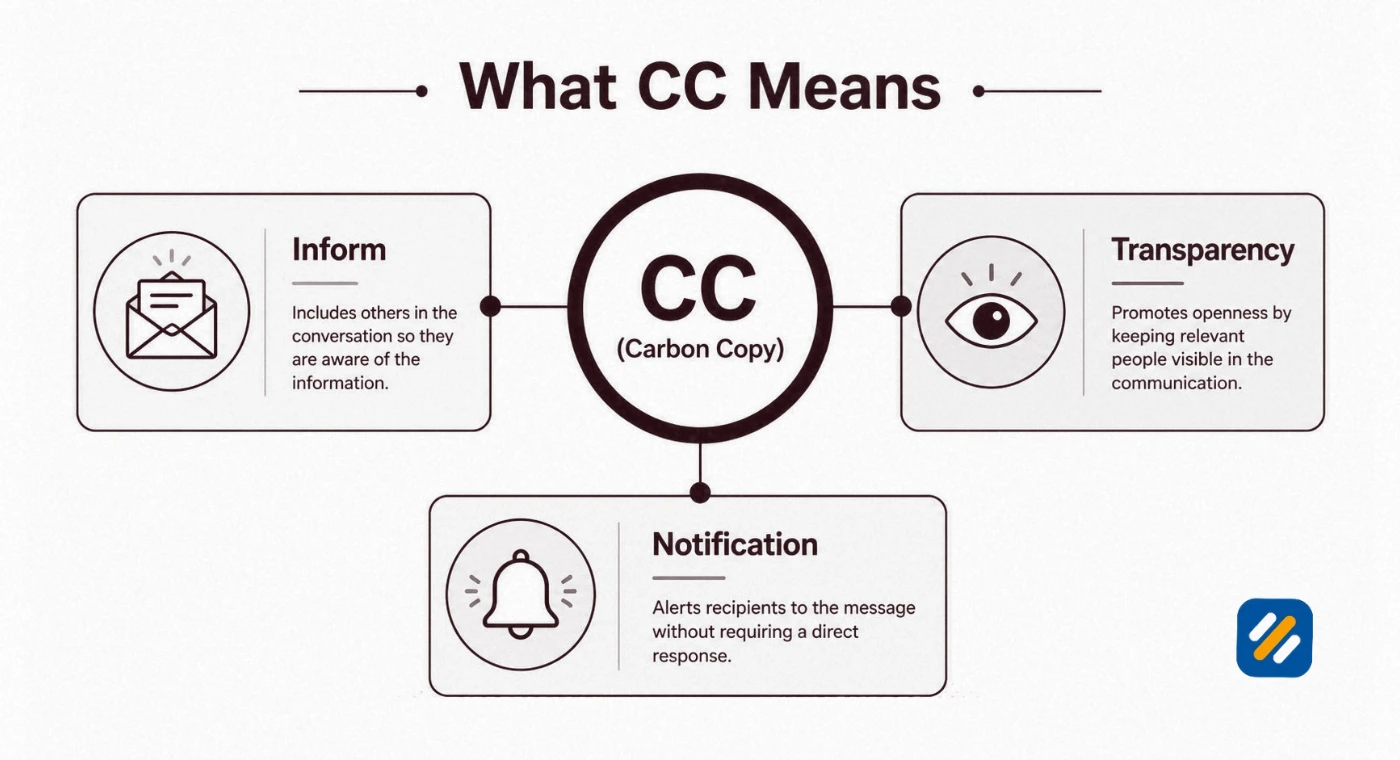
- What does CC mean in email? CC stands for carbon copy. It sends a visible copy of your message to people who should stay informed but are not expected to act
- BCC stands for blind carbon copy. The whole difference between CC and BCC is visibility: everyone can see a CC recipient, and nobody can see a BCC recipient
- The simple rule that works in every inbox is To for action, CC for awareness, and BCC for privacy
- CC and BCC are the wrong tools for email marketing. Google, the FTC, and the UK's ICO all have rules that make a proper email platform the safer choice for bulk sending
- In off-page SEO, a smart CC in your outreach email can lift replies and win backlinks, while a mass BCC blast can damage your domain reputation
1 What Does CC Mean in Email and Why It Still Matters in 2026
CC stands for carbon copy. So, what does CC mean in email? It means you are sending a copy of your message to someone who is not the main recipient. They receive the full email, every other recipient can see their address, and nobody expects them to reply.
The carbon copy meaning comes from paper offices. A typist slid a sheet of carbon paper between two pages, and the pressure of each key pushed ink onto the second page. That second page was the carbon copy. Carbon paper itself was patented in England in 1806 by Ralph Wedgwood, and for well over a century secretaries typed "cc: Mr Smith" at the bottom of a letter to show who else had received it.
Email borrowed the habit and kept the label. Even RFC 5322, the internet standard that defines email headers, still explains the Cc field by pointing back to typewriters and carbon paper. Some people now read CC as "courtesy copy", which is a handy memory trick, but the job is the same.
What is CC in email, in plain terms? It is an FYI line. The short CC meaning email users need is this: "here is a copy so you know what is going on". That is the complete CC email meaning, whether you write in Gmail, Outlook, or Apple Mail.
What does it mean to CC someone in an email? You are telling that person, "you should see this, but I am not asking you to do anything". The people in the To field own the reply. The people in CC own nothing except awareness.
This matters more in 2026 than it did ten years ago. Inboxes are busier, and many of them are now sorted and summarised by AI assistants before a human reads a word. Whether a person or a machine is doing the sorting, To versus CC is the clearest signal of who has to act and who only needs to know.
2 What Is CC With an Example | A Real CC Email You Can Copy
The quickest way to answer "what does CC mean in email" is to look at one. Here is the kind of message I send to clients every month.
CC: james@example.com, ali@example.com
Subject: October SEO report and two approvals needed by Friday
Hi Sarah,
The October report is attached. Organic clicks are up on last month, and I need your approval on the two new service pages by Friday.
James and Aryan are copied so they have the numbers. No action needed from either of them.
Thanks, Roman
That is a clean CC email, and three things are happening in it.
Sarah is in To: She is the marketing manager, the email is addressed to her by name, and the approval is hers to give.
James and Ali are in CC: James is the business owner and Ali is my account manager. Both get the same email at the same moment, and all three people can see each other's addresses.
The body explains the CC: One short line names who is copied and why. Most people skip this, and it is the reason CC'd readers so often reply when they did not need to, or stay silent when they should have spoken.
This is CC in email doing exactly what it was built for. Here are three more everyday cases.
| Situation | Who goes in To | Who goes in CC |
|---|---|---|
| Sending a quote to a new client | The client | Your manager, so they can see the price you offered |
| Handing a client over to a colleague | The client | The colleague taking over, so they have the full history |
| Chasing an unpaid invoice | The accounts contact | The project lead on the client side, so the delay is visible |
3 What Is CC Used For and When Should You CC Someone
The CC field has four real jobs. If your reason for copying someone is not on this list, you probably do not need to copy them.
Keeping a decision maker informed: Your manager or your client's director does not want to write the reply, but they do want to know the reply was sent.
Building a record: A CC'd email lands in a second inbox with the same timestamp. If a deadline or a price is disputed later, two people hold the same proof.
Bringing a new person into a thread: Copying a colleague gives them the whole conversation history below your message, so nobody has to forward ten separate emails.
Showing who is involved: When a supplier can see that your finance lead is copied, they know the question is being watched. Used honestly, that is transparency. Used as a threat, it backfires, and I will come back to that.
When should you CC someone? Use the three question test
Before you add a name, ask yourself these questions in order.
1: Do they need to know this? If they would be surprised to hear about it later from somebody else, the answer is yes.
2: Do they need to do something? If yes, they belong in To, not CC. Copied readers assume the task belongs to someone else.
3: Would everyone on the thread be comfortable with them reading it? If you are unsure, ask the original sender first.
A yes, a no, and a yes means CC is the right call.
When you should not CC someone
When you want action: A request buried in a CC line is a request nobody picks up.
When the thread is sensitive: Every person you copy is one more inbox that can forward, screenshot, or store the message.
When you are copying the boss to apply pressure: Everybody recognises this move, and it damages the working relationship more than a direct phone call ever would.
When the recipients do not know each other: CC shows every address to every person. For a group of strangers, that is a privacy problem, and it is exactly what BCC was made for.
When the attachment is heavy: CC makes a full copy for each person. A 10 MB file copied to six people takes up 60 MB of mailbox space. Send a link instead.
4 What Does BCC Mean in Email and What Does BCC Do
BCC stands for blind carbon copy. Once "what does CC mean in email" is clear, BCC takes ten seconds to learn. It sends the same copy to an extra person, but hides that person's address from everyone else on the email.
That is the BCC email meaning in one line: a copy nobody else can see.
Here is the part most guides leave out. Your email program does not just hide the BCC line on screen. Under the email standard, it removes that line from the message before the copies go out to the To and CC recipients. That is why nobody can find a BCC'd address by opening the email's raw source.
BCC does four jobs well:
Protecting privacy in group emails: Put your own address in To and everyone else in BCC. Each person receives the message and sees only you.
Logging emails to a CRM: Many CRM tools give you a private BCC address. Add it to any email and the message is filed against that contact automatically.
Letting someone leave a thread politely: After an introduction, write "Thanks Ali, moving you to BCC to spare your inbox". Ali sees that one message and receives none of the replies that follow.
Keeping your own copy: BCC a second address of yours when you send from a shared inbox and want a personal record.
The reply all trap
A person in BCC can still see everyone in To and CC. If they click Reply all, their answer goes to the sender and to every visible recipient, and the secret is out. If you BCC someone on purpose, tell them not to reply on the thread.
The BCC meaning email senders should remember is privacy, not secrecy. BCC hides addresses. It does not hide the content, and it does not stop anyone from forwarding what you wrote.
5 CC vs BCC | The Difference Between CC and BCC in Email
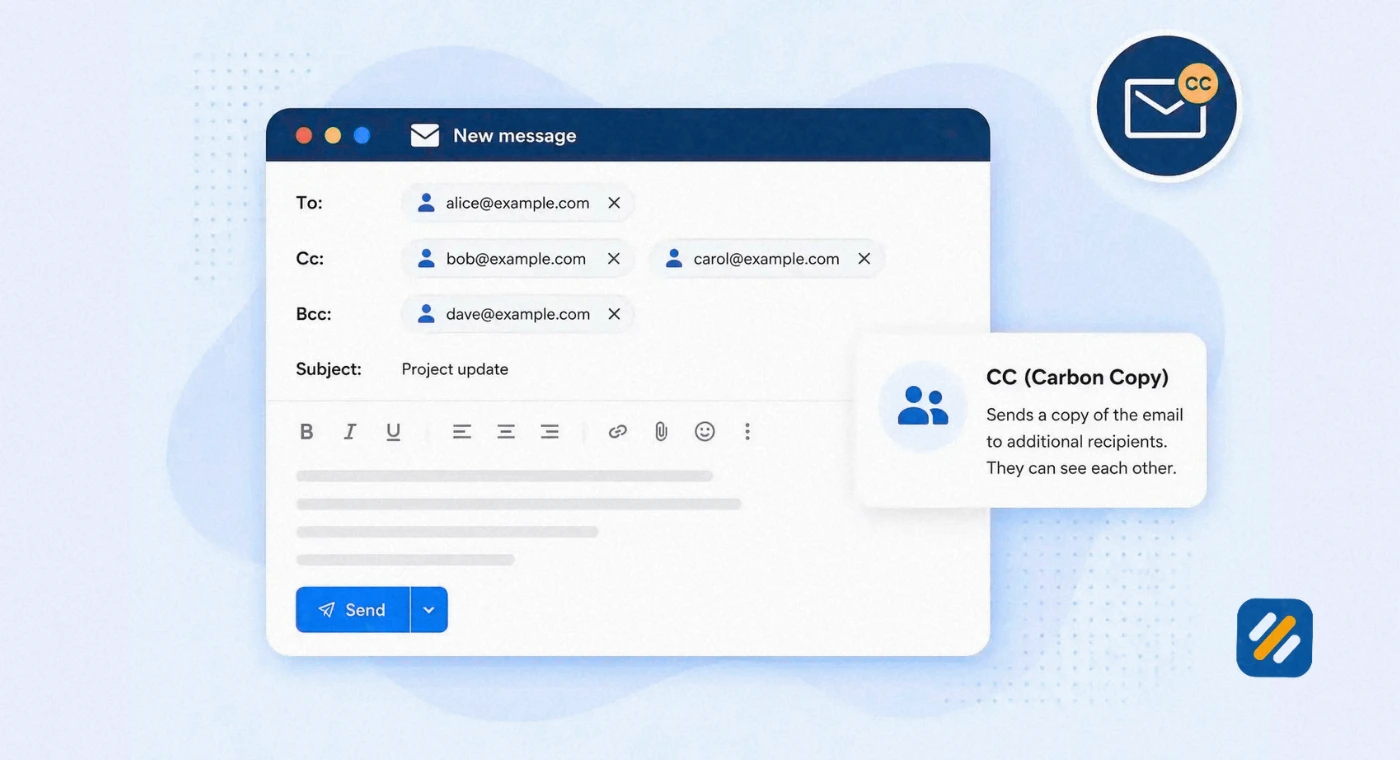
The difference between CC and BCC in email is visibility. A CC recipient is seen by everyone. A BCC recipient is seen by no one except the sender. Everything else follows from that single fact.
If a colleague ever asks you what is CC and BCC in email, this table is the full answer, with the To field included so you can compare all three.
| Feature | To | CC | BCC |
|---|---|---|---|
| Stands for | Main recipient | Carbon copy | Blind carbon copy |
| Role | The person who must act or reply | The person who should stay informed | The person who should receive it privately |
| Address visible to others | Yes | Yes | No |
| Expected to reply | Yes | Only if they have something to add | No |
| Receives Reply all answers | Yes | Yes | No |
| Best for | Requests, questions, approvals | Updates, records, handovers | Group emails to strangers, CRM logging |
| Main risk | Too many names, so nobody owns the task | Crowded inboxes and reply all storms | Lost trust if the hidden copy is discovered |
You can use all three fields in one email. The To and CC people see each other, the BCC people see the To and CC people, and nobody sees the BCC people.
If you want one line to remember from this whole CC vs BCC comparison, use this: To acts, CC knows, BCC stays invisible.
6 How to Add CC and BCC in Gmail, Outlook, and Apple Mail
CC and BCC behave the same way in every email app, because they are part of the email standard and not a feature of one product. Only the buttons move. Most apps hide both fields until you ask for them, which is why so many people forget they exist.
| Email app | How to add CC | How to add BCC |
|---|---|---|
| Gmail on the web | Click Compose, then click Cc at the right end of the To line, or press Ctrl + Shift + C | Click Bcc beside it, or press Ctrl + Shift + B |
| Gmail mobile app | Tap the small arrow at the end of the To line | The same arrow opens Bcc too |
| Outlook on the web and new Outlook | Click Cc at the right end of the To line | Click Bcc beside it |
| Classic Outlook for Windows | The Cc line is already showing | Open the Options tab and click Bcc |
| Apple Mail on Mac | The Cc line is already showing | Open the View menu and choose Bcc Address Field |
| Mail on iPhone | Tap the Cc/Bcc, From line | The same tap opens Bcc |
On a Mac, swap Ctrl for Command in the Gmail shortcuts.
One small time saver in Gmail: you can drag a name from the To line and drop it into Cc or Bcc. It is the fastest way to fix a recipient list before you hit send.
7 How CC and BCC Affect Email Marketing | What Helps and What Hurts
Most articles that answer "what does CC mean in email" stop at office manners. For a business owner, the bigger question is what these two fields do to your marketing.
The honest answer: CC and BCC are for conversations, not campaigns. Pasting 300 customer addresses into BCC and sending from your own inbox feels quick, and it creates four problems at once.
No unsubscribe link: A message sent from your inbox has no opt out. The FTC's CAN-SPAM guide requires a working opt out in every commercial email, gives you 10 business days to honour it, makes no exception for business to business email, and sets penalties of up to $53,088 for each email that breaks the rules.
No protection from spam filters: Google's email sender guidelines expect authenticated mail, a spam rate below 0.3%, and one click unsubscribe on marketing messages for anyone sending around 5,000 emails a day to Gmail accounts. A BCC blast meets none of those, and a free Gmail account stops you at 500 recipients a day anyway.
No data: You cannot see opens, clicks, or bounces, so you learn nothing for the next send.
One slip exposes your whole list: Paste the addresses into CC instead of BCC and every customer sees every other customer. The UK's Information Commissioner's Office says it has seen hundreds of personal data breach reports caused by misuse of the BCC field, and its email and security guidance tells organisations to consider bulk email services or mail merge instead of relying on BCC.
A proper email platform fixes all four. It sends each subscriber an individual copy, adds the unsubscribe link, and reports the results. That leaves you free to focus on the message, one clear call to action, and the landing page it points to.
CC still has a place around your marketing. It just sits in the conversations that campaigns create.
| What you are sending | CC or BCC from your own inbox? | Why |
|---|---|---|
| Newsletter or offer to your list | No, use an email platform | You need unsubscribe handling, tracking, and list privacy |
| Campaign proof before it goes live | Yes, CC the approver's team | Everyone signs off on the same version |
| Invoice or booking confirmation | Yes, CC the customer's accounts address | It is a one to one transactional email |
| Reply to a lead who answered a campaign | Yes, CC the salesperson taking over | The lead meets their new contact in the same thread |
8 CC in Off-Page SEO | How One Extra Recipient Can Win You Backlinks
This is where "what does CC mean in email" turns into a link building question. Off-page SEO runs on outreach. Guest posts, broken link fixes, resource page requests, and digital PR all begin with an email to a stranger, and the recipient fields you choose affect both your reply rate and your sender reputation.
I treat every outreach email as a one to one message. Inside that rule, CC earns its place in four ways.
CC the person who can actually make the change: On many sites the editor decides and a content manager or webmaster edits the page. Put the decision maker in To and copy the other. If one of them is away, your request still moves.
CC a real colleague: Copying the writer who will produce the guest post shows the editor a second human behind the pitch. It also means the thread survives if you are off for a week.
Handle introductions properly: When a mutual contact introduces you to a site owner, reply to all once, thank them, and move the introducer to BCC. The site owner sees you respect people's inboxes before you have asked for anything.
Keep follow ups in the same thread with the same CC line: The history stays attached, and nobody new appears on the third email. Adding a fresh name to a follow up reads as escalation, and editors ignore it.
Here is a broken link request that uses CC the right way.
To: emma@example.com
CC: tom@example.com
Subject: Broken link on your local SEO guide
Hi Emma,
Your local SEO guide links to a study that now returns a 404 error. It is in the third paragraph of the citations section. I published an updated version of that data last month, and it may work as a replacement: [your URL].
I have copied Tom because I believe he looks after page updates. I am happy to send the exact line if that saves him time.
Thanks, Roman
The outreach mistake that hurts your domain
Never BCC a prospect list. One generic pitch sent to 200 editors in BCC arrives with your own address in the To line, which tells every editor it is a mass email. There is no personal detail to earn a reply. Worse, each spam complaint counts against the same domain that sends your proposals and invoices.
Use an outreach tool or a mail merge that sends each editor an individual message, and keep BCC for one job only: your CRM logging address.
| Outreach type | To | CC | BCC |
|---|---|---|---|
| Guest post pitch | The editor | Your writer | Your CRM address |
| Broken link fix | The page author | The webmaster or content manager | Your CRM address |
| Digital PR story | One journalist per email | Nobody | Your CRM address |
| Introduction from a mutual contact | The new contact | Nobody after your first reply | The introducer, once, with a thank you |
9 3 Expert Tips for Using CC and BCC Like a Pro
Knowing the answer to "what does CC mean in email" is the easy part. These three habits are what stop the embarrassing mistakes.
Tip 1: Fill in the Recipient Fields Last Write the email, attach the file, and proofread it before you type a single address. An email with an empty To line cannot be sent by accident, and you choose To, CC, and BCC with the finished message in front of you. In Gmail, also set Undo Send to 30 seconds in Settings. Those 30 seconds have saved me from more than one wrong CC.
Tip 2: Move People, Do Not Just Add Them A healthy thread gets smaller over time. When ownership changes, promote the new owner to To and drop the previous one to CC. When someone's part is finished, move them to BCC with a one line note so they know they are free. If your CC line only ever grows, people stop reading your emails.
Tip 3: Test Your CC Line in Outreach Like You Test a Subject Line For your next link building campaign, send half of your pitches with a colleague in CC and half without. Log both groups through your CRM's BCC address and compare the reply rates after 50 emails each. You will know within a fortnight which version editors in your niche respond to, and you will be working from your own data instead of someone else's opinion.
10 The Official Rules Behind CC and BCC | Sources You Can Check Yourself
The rules in this guide come from five primary sources. None of them is a blog. Each one is the organisation that writes or enforces the rule.
| Source | What it says | What it means for you |
|---|---|---|
| RFC 5322, section 3.6.3 (Internet Engineering Task Force) | Defines To, Cc, and Bcc as the three destination fields and states that Bcc addresses are not revealed to other recipients | CC and BCC work the same way in Gmail, Outlook, Apple Mail, and every other app |
| Email sender guidelines (Google) | Requires authenticated mail, a spam rate below 0.3%, and one click unsubscribe on marketing messages | A BCC blast from your inbox cannot meet the standard Gmail expects |
| Email sender guidelines FAQ (Google) | Treats senders of about 5,000 messages a day to personal Gmail accounts as bulk senders and expects unsubscribes to be honoured within 48 hours | Growing lists need a real email platform long before they feel big |
| CAN-SPAM Act compliance guide (US Federal Trade Commission) | Covers all commercial email including business to business, with penalties of up to $53,088 per email | Outreach and promotional emails to US contacts need an honest sender line and an opt out |
| Email and security guidance (UK Information Commissioner's Office) | Reports hundreds of data breach cases from BCC misuse and recommends bulk email services or mail merge for sensitive sends | In the UK, a CC and BCC mix up can be a data protection breach, not just an awkward moment |
Figures checked on 12 November 2026. Regulators update penalty amounts and thresholds, so open the source before you quote a number to a client.
11 Conclusion
So, what does CC mean in email? It means carbon copy: a visible copy for someone who needs to know and does not need to act. BCC is the same copy with the address hidden. To is for the person who owns the reply.
Get those three fields right and your everyday emails become clearer, your client threads stay shorter, and nobody's address ends up where it should not be.
For marketing, keep CC and BCC out of your campaigns and let a proper email platform handle the list. For off-page SEO, use CC with care in one to one outreach, copy the person who can actually add your link, and never hide a prospect list in BCC.
Start with your next email. Write it first, choose the fields last, and say in one line why each copied person is there.
Have a question about CC, BCC, or email outreach for backlinks? Drop a comment below and I will answer it personally.
12 Frequently Asked Questions About CC and BCC
What does CC mean in email in simple words?
CC means carbon copy. You use it to send a visible copy of an email to someone who should know about the message but does not need to answer it.
What is a CC?
A CC is the copy itself, and people also use the word as a verb. "I got a CC of the contract" and "please CC me on that" both refer to the same thing: an extra copy sent for information.
Can CC recipients see who is in BCC?
No. People in To and CC cannot see any BCC address. People in BCC can see everyone in To and CC, but they cannot see each other.
Can you tell if you were BCC'd on an email?
Usually, yes. If the email reached your inbox and your address is not in the To or CC line, you were most likely in BCC or on a mailing list. Nobody else on the email can tell.
Do CC'd people receive the replies?
Only when someone clicks Reply all. A plain Reply goes to the sender alone. This is why half a team often misses the answer to a question everyone was copied on.
Is it rude to CC someone's manager?
It depends on why. Copying a manager on a routine update is normal. Copying a manager to force a faster answer is seen as a complaint in disguise, and a direct conversation works better.
Should you CC someone or forward the email?
CC them while the conversation is still going, so they see each reply as it arrives. Forward the email afterwards when you want to add a private comment that the original recipients should not read.
Does CC or BCC affect email deliverability?
A few copied addresses change nothing. Dozens or hundreds of addresses in CC or BCC can trigger spam filters and sending limits, which is one more reason to use an email platform for anything that looks like a campaign.
Join 1,000+ business owners and bloggers who get one actionable SEO tip every week — straight to their inbox. Free forever.
Get Free Weekly Tips →