- A content audit is the systematic process of evaluating every page on your website to understand what is working, what is failing, and what needs to be removed or updated
- Websites that run regular content audits consistently outperform those that only publish new content without reviewing what already exists
- The four actions you assign to every page after a content audit are: keep, update, consolidate and redirect, or delete
- Google Search Console and Google Analytics 4 are the two free tools every content audit starts with
- Content audits should be conducted every three to six months for active blogs and quarterly for larger websites
1 What Is a Content Audit and Why Most Websites Desperately Need One
Most website owners spend all their time creating new content and almost no time reviewing what they have already published. This is one of the most expensive mistakes in digital marketing, and it is happening silently on thousands of websites right now.
A content audit is the process of systematically reviewing every page, post, and content asset on your website to evaluate its quality, performance, and relevance. The goal is to understand which content is driving results, which is hurting your SEO, and which needs to be updated, consolidated, or removed entirely.
Think of it this way. Your website is like a shop. If you keep adding new products to the shelves without ever removing the expired, damaged, or irrelevant ones, the shop becomes difficult to navigate, customers leave frustrated, and your best products get buried under the clutter.
A content audit is the process of cleaning the shelves, repositioning your best products, and removing what no longer serves your customers or your business.
After many years of doing SEO across B2B, ecommerce, healthcare, and local service websites, I have seen content audits deliver more ranking improvement in a single month than six months of new content publishing. The reason is simple. Google already knows your existing pages. Improving them requires no new indexing time. The results often arrive within two to four weeks of making changes.
2 Why a Content Audit Is One of the Highest ROI Activities in SEO
Before getting into the process, you need to understand why a content audit matters so much for your organic traffic and keyword rankings.
Every piece of content on your website sends signals to Google. Strong signals from well-optimised, helpful, and regularly updated pages lift your entire domain's authority. Weak signals from thin content, outdated pages, and duplicate content drag your entire website down, including the pages that would otherwise rank well.
Here is what a content audit specifically helps you achieve
Recover lost rankings. Pages that ranked in positions 5 to 15 and slowly slipped to page two are often recoverable through content refreshes. Updating them with current data, better structure, and stronger keyword optimisation can move them back to page one faster than any new article you could publish.
Eliminate thin content that hurts domain authority. Google's helpful content system evaluates your website as a whole. A website with fifty high quality pages and twenty thin or outdated pages performs worse than a website with fifty high quality pages and nothing else. Removing or improving the weak pages lifts the whole site.
Find and fix duplicate content. When two pages on your website target the same keyword or cover the same topic, they compete against each other in Google's index. Neither page ranks as well as one consolidated, authoritative page would. A content audit identifies these cannibalisation issues before they compound.
Identify content gaps. A content audit shows you the topics your competitors rank for that you have not yet covered. These gaps represent immediate keyword opportunities with no competition from your own existing content.
Improve user experience and engagement. Pages with poor structure, outdated information, or irrelevant content increase bounce rate and reduce dwell time. Both are negative signals that Google factors into its quality assessment of your pages.
3 Types of Content Audit | Which One Your Website Actually Needs
Not every content audit looks the same. The type you run depends on your website's size, your goals, and how much data you have available.
| Content Audit Type | Best For | What It Covers | Time Required |
|---|---|---|---|
| Full website content audit | Large sites, annual review | Every page, post, and content asset across the entire domain | 2 to 4 weeks |
| SEO content audit | Blogs and content-heavy sites | Organic traffic, keyword rankings, search intent alignment, on-page optimisation | 1 to 2 weeks |
| Content quality audit | Sites with declining rankings | E-E-A-T signals, content depth, accuracy, readability, author authority | 1 week |
| Technical content audit | Sites with indexing issues | Crawlability, indexing errors, duplicate content, canonical tags, page speed | 3 to 5 days |
| Content gap audit | Growing sites, new niches | Missing topics, competitor keyword coverage, search intent gaps | 3 to 5 days |
| Thin content audit | Sites hit by Google updates | Pages under 300 words, pages with no traffic, pages with poor engagement | 2 to 3 days |
For most small business websites and personal brand blogs, an SEO content audit combined with a content quality audit covers 90% of what you need. Start there before attempting a full website audit, which requires significantly more data collection and analysis time.
4 What Is a Content Inventory and Why You Build One Before Anything Else
A content inventory is the foundation of every content audit. It is a complete list of every URL on your website along with the key data points you need to evaluate each page.
Without a content inventory, you are making decisions based on memory and guesswork rather than data. The inventory is what turns a content audit from an opinion into an evidence-based strategy.
Here is what your content inventory should capture for every URL
- Full page URL
- Page title and meta description
- Target keyword
- Current keyword ranking position
- Monthly organic traffic from Google Search Console
- Number of backlinks pointing to the page
- Word count
- Date of last update
- Number of internal links pointing to the page
- Content category or topic cluster
- Conversion events attributed to the page
- Content engagement metrics from Google Analytics 4
For small websites under 100 pages, you can build this manually in a Google Sheets spreadsheet. For larger websites, use Screaming Frog's free version which crawls up to 500 URLs and exports all page data automatically. For websites with thousands of pages, Semrush Site Audit or Ahrefs Site Audit are the most efficient tools for generating a complete content inventory at scale.
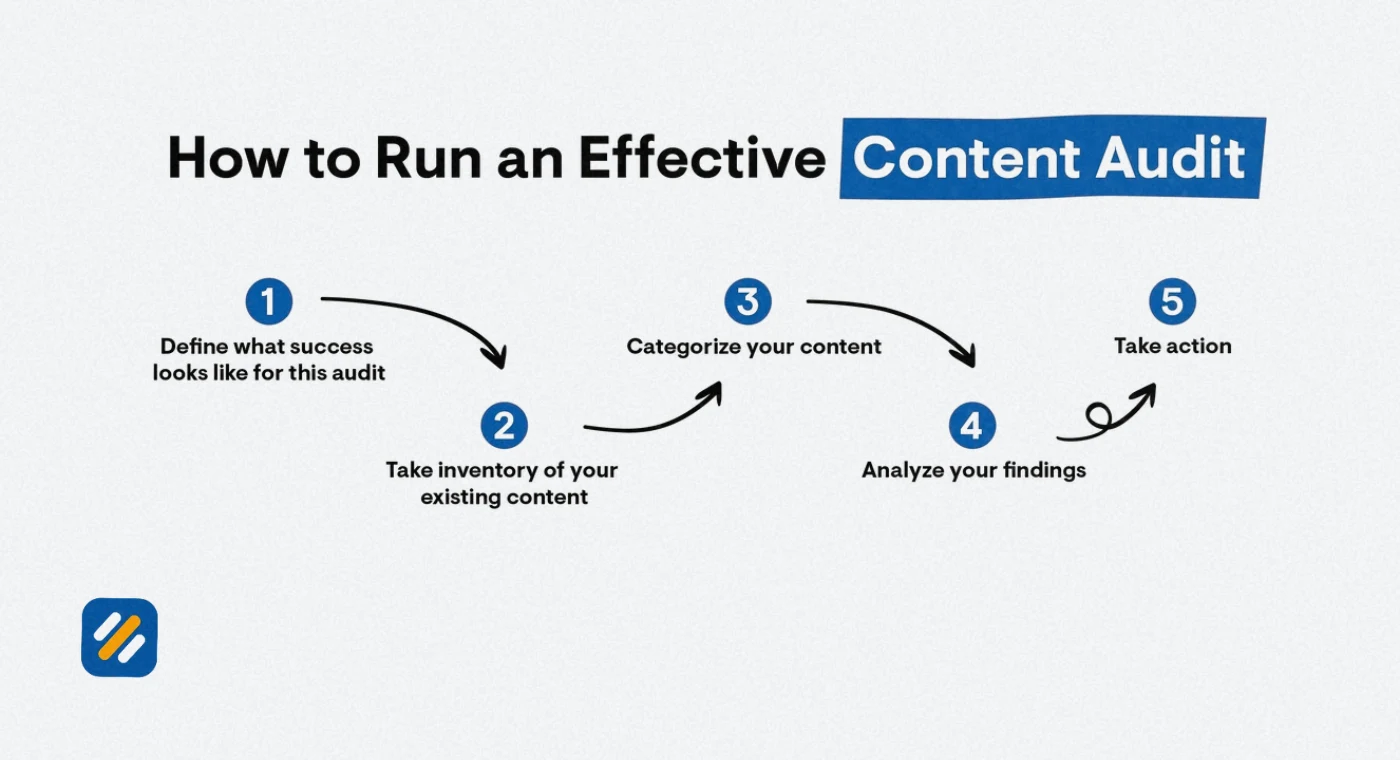
5 How to Do a Content Audit Step by Step
Here is the complete content audit process I use when auditing client websites. Every step builds on the previous one and the output is a prioritised action plan you can implement immediately.
Step 1: Define your content audit goal
Before collecting a single piece of data, you need a clear goal. The goal determines which metrics matter and which actions you prioritise.
Common content audit goals include
- Recovering lost organic traffic after a Google algorithm update
- Improving keyword rankings for specific topic clusters
- Reducing thin content that is dragging domain authority down
- Identifying content gaps to fill with new articles
- Improving conversion rates from existing blog traffic
Attach a specific outcome to your goal. Not "improve SEO" but "increase organic blog traffic by 25% within 90 days by updating the 15 lowest-performing articles in the top-ranking positions 5 to 20."
Step 2: Build your content inventory
Export all URLs from your website using Screaming Frog, Ahrefs, or Semrush Site Audit. Add these URLs to a Google Sheets spreadsheet and create columns for every data point listed in the previous section.
Step 3: Collect performance data from Google Search Console
Go to Google Search Console and navigate to Performance then Search Results. Set the date range to the last three months. Export the data as a CSV file. This gives you clicks, impressions, click-through rate, and average position for every page.
Step 4: Collect traffic data from Google Analytics 4
In GA4, go to Reports then Acquisition then Traffic Acquisition. Filter by organic search as the session source. Set the date range to match your GSC export. Export this data and add it to your content inventory spreadsheet.
Step 5: Check keyword rankings for target keywords
For every page in your inventory, identify the primary target keyword and check its current ranking position. Use Google Search Console's Performance report filtered by page to see the keywords each page ranks for and its average position for each.
Step 6: Analyse backlinks for each page
Use Ahrefs free Webmaster Tools or Semrush Backlinks to see how many external backlinks each page has earned. Pages with strong backlink profiles are your highest-value assets. They deserve updates rather than deletions, no matter how poor their current traffic is.
Step 7: Evaluate content quality against Google's E-E-A-T criteria
For each page, manually review the content against these quality signals: Does it demonstrate first-hand experience? Does it cite credible sources? Is the author clearly identified with relevant credentials? Is the information accurate and up to date? Does the content fully answer the searcher's question?
Step 8: Assign an action to every page
Based on your data and quality review, assign one of four actions to every URL in your content inventory. The decision framework for this assignment is covered in the next section.
Step 9: Implement the action plan by priority
Work through your action list starting with the highest-impact items. Pages ranking between positions 5 and 20 for valuable keywords are the highest priority for updates because they are closest to generating significant organic traffic increases.
Step 10: Monitor results and repeat
After implementing your changes, monitor Google Search Console weekly for the first two months. Compare performance before and after the audit using the same date ranges. Repeat the audit every three to six months.
6 The 4-Action Content Audit Decision Framework
Every page in your content audit gets assigned one of four actions. This is the framework I use to make that decision consistently and efficiently.
| Action | When to Use It | What to Look For | Priority Level |
|---|---|---|---|
| Keep as is | Page is performing well and content is accurate | Stable or growing traffic, strong E-E-A-T, no content gaps, accurate and current information | Low priority, monitor only |
| Update and refresh | Page has good bones but declining performance or outdated content | Falling rankings, outdated data, content gaps compared to top competitors, weak E-E-A-T signals | High priority, act within 30 days |
| Consolidate and redirect | Multiple pages target the same keyword or cover near-identical topics | Keyword cannibalisation, duplicate content, two or more pages splitting traffic for the same query | High priority, resolve within 30 days |
| Delete and redirect | Page has no traffic, no backlinks, irrelevant topic, or adds no value | Zero organic traffic for 12 months, no backlinks, outdated topic with no search demand, low word count with no depth | Medium priority, clean up quarterly |
The most important rule in this framework: Never delete a page with backlinks pointing to it without first setting up a 301 redirect to the most topically relevant live page. Deleting a page with backlinks without a redirect is one of the fastest ways to lose domain authority permanently.
7 Content Audit Checklist | Everything to Evaluate on Every Page
Use this checklist when reviewing each page in your content audit. A page that scores poorly on multiple items is a strong candidate for updating or consolidating.
On-Page SEO Checklist:
- Does the page have a unique title tag under 60 characters containing the primary keyword?
- Does the page have a unique meta description under 160 characters with a clear value proposition?
- Is the primary keyword in the H1 heading, first paragraph, at least one H2, and the URL slug?
- Are secondary keywords used naturally throughout the body without stuffing?
- Does every image have descriptive alt text?
- Is the URL clean, short, and keyword-focused?
- Are there at least two to three internal links connecting this page to related content?
Content Quality Checklist:
- Does the content fully match the search intent of the target keyword?
- Is the information accurate and updated within the last 12 months?
- Does the content demonstrate first-hand experience or genuine expertise?
- Is there a clear author with relevant credentials?
- Does the content cite credible external sources where claims are made?
- Is the content structured with clear H2 and H3 headings that make it easy to scan?
- Is the content significantly better or more useful than the top three competing pages?
Technical Content Checklist:
- Is the page indexed in Google Search Console?
- Does the page load in under three seconds on mobile?
- Are there any broken internal links pointing to this page?
- Is the page included in the sitemap?
- Does the page have a canonical tag pointing to itself?
- Are there any duplicate content issues flagged by Semrush or Screaming Frog?
8 Content Audit Template | Build Yours in Google Sheets
Here is the exact column structure for building your own content audit template in Google Sheets. Create one tab called Master Sheet and add these columns:
| Column | Data to Enter | Source |
|---|---|---|
| A: URL | Full page URL | Screaming Frog or Semrush export |
| B: Page Title | Current title tag | Screaming Frog export |
| C: Target Keyword | Primary keyword this page targets | Your keyword strategy |
| D: Current Ranking | Position for target keyword | Google Search Console |
| E: Monthly Clicks | Organic clicks in last 90 days | Google Search Console |
| F: Monthly Impressions | Impressions in last 90 days | Google Search Console |
| G: CTR | Click through rate percentage | Google Search Console |
| H: Organic Sessions | Sessions from organic in last 90 days | Google Analytics 4 |
| I: Backlinks | Number of external backlinks | Ahrefs or Semrush |
| J: Word Count | Total word count | Screaming Frog |
| K: Last Updated | Date content was last modified | WordPress or CMS |
| L: Internal Links In | Number of internal links pointing to this page | Screaming Frog |
| M: E-E-A-T Score | Your manual quality score 1 to 5 | Manual review |
| N: Search Intent Match | Yes or No | Manual review |
| O: Content Gaps | Yes or No, with notes | Manual review |
| P: Duplicate Risk | Yes or No | Semrush or manual |
| Q: Action | Keep, Update, Consolidate, Delete | Your analysis |
| R: Priority | High, Medium, Low | Your analysis |
| S: Assigned To | Team member responsible | Your team |
| T: Deadline | Target completion date | Your planning |
| U: Notes | Any additional context | Your analysis |
This template gives you everything you need to run a professional-grade content audit on any website regardless of size. The key is completing it with real data from Google Search Console and Google Analytics 4 rather than estimating any figures.
9 SEO Content Audit | How to Find Pages That Need Updating Most Urgently
An SEO content audit focuses specifically on organic search performance rather than overall content quality. Here is the exact process for identifying the highest-priority pages to update for ranking improvement.
Find pages ranking between positions 5 and 20. These are your quickest wins. They are already indexed, trusted by Google, and close to generating significant traffic. A targeted content update to any of these pages can move them into the top five positions where click-through rates increase dramatically.
In Google Search Console, go to Performance then Search Results. Click on Average Position to sort pages by their average ranking. Filter for pages with an average position between 5 and 20 and more than 100 monthly impressions. These are your priority update targets.
Find pages with declining traffic trends. In GA4, compare organic traffic from the last three months to the previous three months. Any page showing a decline of 20% or more needs investigation. Check whether the decline started around a known Google algorithm update date, which confirms the page was affected by a quality signal change.
Find pages with high impressions but low click-through rate. A page with 5,000 monthly impressions but only a 1% CTR is earning rankings but failing to convert those rankings into clicks. This is almost always a title tag and meta description problem. Rewriting these two elements alone can double or triple organic traffic from an already-ranking page without changing a single word of the body content.
10 Content Pruning | When Deleting Content Actually Improves Your Rankings
Content pruning is the practice of removing or consolidating low-quality, outdated, or irrelevant pages from your website. It sounds counterintuitive. How can having fewer pages help your SEO?
The answer lies in how Google evaluates website quality. Google does not just rank individual pages. It forms a quality assessment of your entire domain based on the overall standard of content it finds when crawling your site. A website with 200 pages where 50 are thin, outdated, or irrelevant pulls the perceived quality of the remaining 150 pages down.
Removing those 50 weak pages leaves Google with 150 pages that are all high quality, well-optimised, and genuinely useful. The domain quality signal improves and the remaining pages often see ranking improvements within weeks.
When to prune content rather than update it:
- The page has received zero organic traffic in the past 12 months
- The topic is no longer relevant to your business or audience
- The page has no backlinks and no internal links pointing to it
- The content is too thin to be improved meaningfully
- Duplicate content exists on another page that covers the same topic better
When to update content instead of pruning it:
- The page has backlinks pointing to it
- The topic is still relevant but the content is outdated
- The page had good traffic historically but has since declined
- The content is thin but the keyword has genuine search demand
11 3 Expert Tips to Get More From Your Content Audit
These are the tips that separate a surface-level content audit from one that delivers lasting SEO results.
Expert Tip 1: Start With Your Biggest Traffic Losers, Not Your Worst Pages
Most people start a content audit by looking for the lowest quality pages. I start by finding the pages that used to rank well and have since dropped. These pages already have domain trust, existing backlinks, and indexing history working in their favour. A focused update to a page that ranked on page one eighteen months ago and now sits on page three will outperform almost any other content investment you can make.
Expert Tip 2: Update the Date and One Data Point Before Anything Else
Google and AI platforms both favour recently updated content. For pages where a full rewrite is not immediately possible, make one meaningful update, add one piece of current data or statistic, and change the "last updated" date. This signals freshness to both Google and large language models that are evaluating whether your content is current enough to cite. It takes fifteen minutes per page and can produce measurable ranking improvements within weeks.
Expert Tip 3: Never Audit Content Without Checking Who Is Outranking You First
Before deciding whether to update or delete a page, search the target keyword in Google and read the top three results. Understanding why those pages rank above yours tells you exactly what your update needs to include. If competitors have more specific data, add data. If they have better structure, restructure. If they go deeper on a subtopic you skipped, add that section. Audit in context, not in isolation.
12 Conclusion
A content audit is not a one-time cleanup task. It is a regular strategic practice that separates websites with compounding organic growth from websites that publish endlessly without ever seeing meaningful results.
The process is straightforward: build your content inventory, collect data from Google Search Console and Google Analytics 4, evaluate each page against quality and SEO criteria, assign one of four actions, implement starting with your highest-priority pages, and measure the results.
The websites that win in organic search in 2026 are not always the ones publishing the most content. They are the ones that understand what they already have, maximise what is working, fix what is declining, and remove what is dragging everything else down.
Run your first content audit this month. Start with just your top 20 blog posts. The data will show you opportunities you did not know existed and ranking improvements you can achieve without writing a single new article.
Have a question about running a content audit on your website? Drop a comment below and I will walk you through it personally.
Join 1,000+ business owners and bloggers who get one actionable SEO tip every week — straight to their inbox. Free forever.
Get Free Weekly Tips →