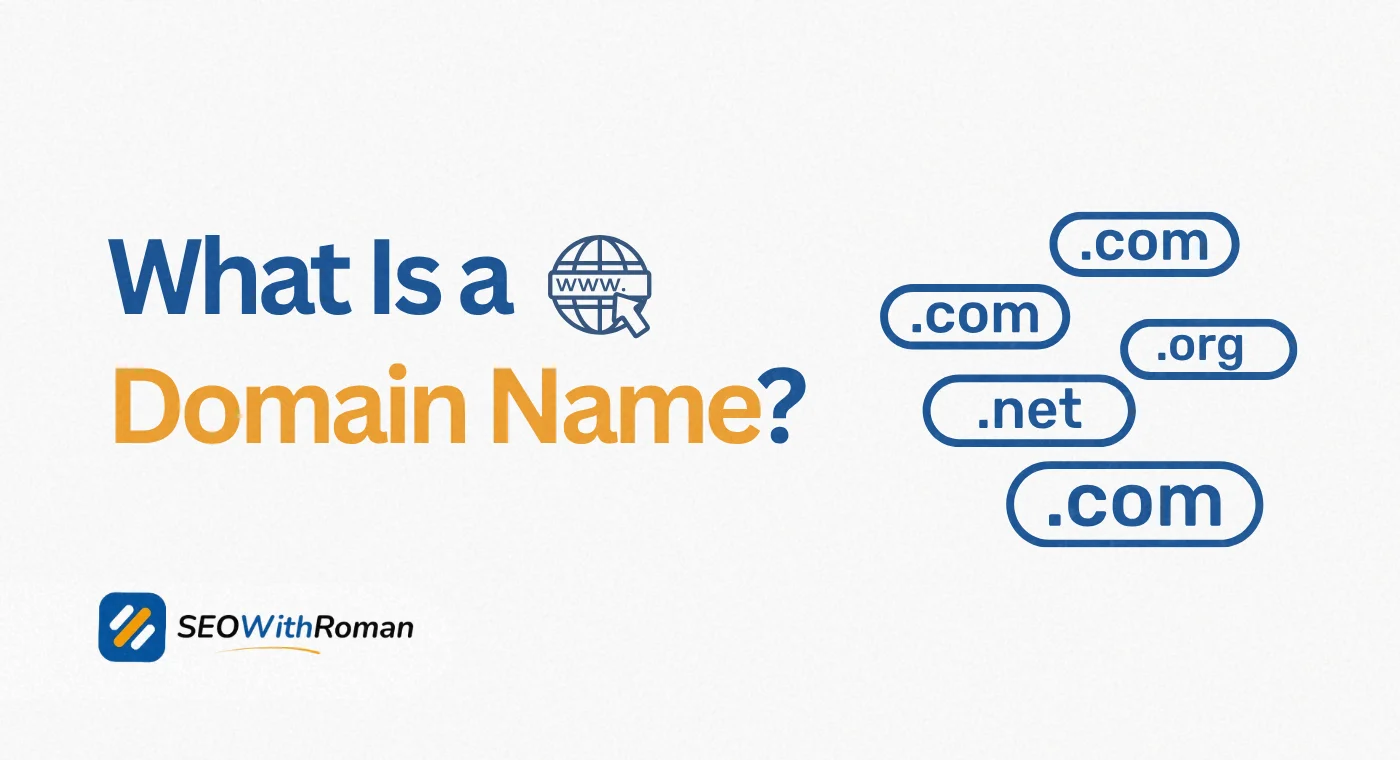
- A domain name is the human-friendly address people type into a browser to find a website, like google.com or seowithroman.com
- Without a domain name, your website has no address and cannot be found by anyone on the internet
- Every domain name has two core parts: the second-level domain and the top-level domain
- A domain name and a URL are not the same thing. The domain is one part of the full URL
- You can register a domain name for as little as $9 to $11 per year through registrars like Namecheap or GoDaddy
- Choosing the right domain name from day one protects your brand, builds trust, and supports your long-term SEO
1 What Is a Domain Name | The Simplest Explanation You Will Find
Every website on the internet has a physical address. Not a street address you can drive to, but a numerical address called an IP address that computers use to find each other. An IP address looks like this: 192.168.1.1. It is precise, functional, and completely impossible for a human being to remember at scale.
A domain name solves that problem. It is the human-readable address that replaces the numerical IP address so that anyone can find a website by typing something they can actually remember.
When you type seowithroman.com into your browser, you are using a domain name. When you type google.com or amazon.com, you are using a domain name. Behind the scenes, a system called the Domain Name System (DNS) instantly translates that readable name into the numerical IP address the server actually uses. You never see that translation happen because it occurs in milliseconds.
Here is the simplest domain name definition you will find anywhere: a domain name is your website's permanent address on the internet, registered exclusively to you, that tells the world exactly where to find you online.
Without a domain name, your website is a file sitting on a server with no address. Nobody can find it. Nobody can link to it. Nobody can type it into a browser. The domain name is what turns a collection of web pages into a real, findable, professional online presence.
2 What Is a Domain Name With Real Examples
The best way to understand what a domain name is in practice is to look at real examples across different types of websites.
| Website Type | Domain Name Example | What It Tells You |
|---|---|---|
| Personal brand SEO blog | seowithroman.com | Name of the person plus the topic, .com extension |
| Global technology company | google.com | Brand name, generic .com extension |
| Non-profit organisation | wikipedia.org | Brand name, .org signals non-commercial purpose |
| US government agency | nasa.gov | Brand name, .gov restricted to government use |
| UK business | bbc.co.uk | Brand name, .co.uk signals UK-based commercial entity |
| Tech startup | stripe.io | Brand name, .io popular with tech companies |
| Educational institution | harvard.edu | Brand name, .edu restricted to accredited institutions |
| Ecommerce store | shopify.com | Service name, .com is the default commercial choice |
Every example above follows the same principle. A recognisable name paired with an extension that signals what type of website or organisation it belongs to.
For your own website, the domain name you choose will be the single most permanent branding decision you make online. Unlike a logo or colour scheme that you can change without consequence, changing a domain name after your site is established means rebuilding SEO authority, updating every backlink, and retraining every customer who already knows where to find you.
Choose it once. Choose it well
3 What Are the Parts of a Domain Name | Domain Components Explained
Most people see a domain name as one single thing. In reality, every domain name has distinct parts that each carry specific meaning and function. Understanding domain parts is essential for making smart choices when you register your own.
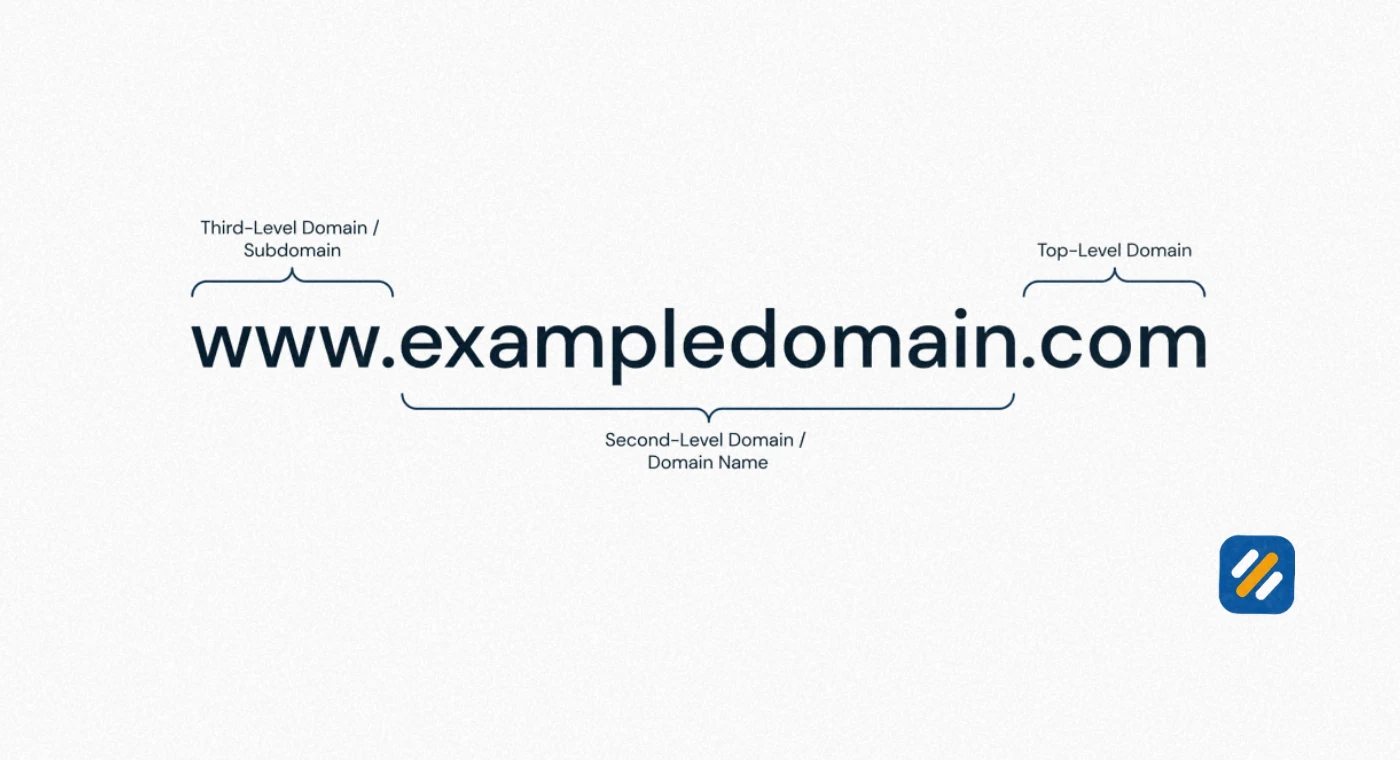
Let us use seowithroman.com as the example
The Second-Level Domain (SLD)
"seowithroman" is the second-level domain. This is the unique, custom part of the domain name that you choose yourself. It is your brand name, your personal name, your business name, or a combination of keywords relevant to your website. The SLD can be up to 63 characters long but shorter is always better for memorability and brand recognition.
The Top-Level Domain (TLD)
".com" is the top-level domain. This is the extension that appears after the dot at the end of every domain name. It indicates the category or geographic origin of the website. The TLD is managed by domain registries and there are now over 1,500 different TLDs available worldwide.
The Subdomain (when present)
"www" is technically a subdomain, though it has become so standard that most websites redirect it automatically. Subdomains are prefixes that appear before the main domain name and can be used to organise different sections of a website. For example, blog.seowithroman.com could be a subdomain pointing to a specific section.
Here is how the full structure looks broken down
| Domain Component | Example | What It Is |
|---|---|---|
| Subdomain | www | Optional prefix, most common is www |
| Second-Level Domain | seowithroman | Your unique brand or keyword name |
| Top-Level Domain | .com | The extension indicating category or country |
| Full Domain Name | seowithroman.com | The complete address people type |
| Full URL | https://seowithroman.com/about/ | Domain plus protocol plus page path |
4 What Is the Domain in a URL | Domain vs URL Explained Clearly
This is one of the most commonly confused distinctions in all of web basics. A domain name and a URL are not the same thing, even though people often use the terms interchangeably.
A URL, which stands for Uniform Resource Locator, is the complete address of a specific page or resource on the internet. The domain name is just one part of that full URL.
Let us break down a full URL into its components
https://seowithroman.com/what-is-seo-for-beginners/
1: https is the protocol. It tells the browser how to communicate with the server. The "s" at the end stands for secure, meaning the connection is encrypted with an SSL certificate. Every website in 2026 should use HTTPS.
2: seowithroman.com is the domain name. This is the website's address.
3: /what-is-seo-for-beginners/ is the path. It tells the server which specific page within the website to load.
So when someone asks "what is the domain in a URL," the answer is always the middle section sitting between the protocol and the first forward slash after the main address.
Here is a practical comparison that shows the difference clearly
| Element | Example | What It Does |
|---|---|---|
| Domain Name | seowithroman.com | Identifies the website |
| URL | https://seowithroman.com/seo-basics/ | Identifies a specific page on that website |
| Protocol | https:// | Tells browser how to connect securely |
| Path | /seo-basics/ | Points to a specific page or resource |
| Full URL | https://seowithroman.com/seo-basics/ | The complete address of one specific page |
Understanding this distinction matters for SEO because Google indexes individual URLs, not just domains. Every page on your website has its own URL and can rank independently in search results.
5 What Is the Difference Between a Website Name and a Domain Name
This question comes up constantly from small business owners who are setting up their first website, and the confusion is completely understandable because the two terms refer to things that are often identical but technically different.
Your website name is what you call your website in conversations, in marketing, and in your branding. It is the human-facing identity of your online presence. For example, "SEO With Roman" is a website name.
Your domain name is the technical address that makes your website accessible on the internet. It is the registered string of characters that points browsers to your server. "seowithroman.com" is the domain name.
In most cases, a business or personal brand chooses a domain name that closely mirrors their website name. "SEO With Roman" becomes seowithroman.com. "Google" becomes google.com. "Amazon" becomes amazon.com.
But they are not always identical. A company might officially be called "Johnson Digital Marketing Solutions Ltd" as a legal business name, but register the domain "johnsondigital.com" because it is shorter, more memorable, and fits within a clean URL structure.
The key difference is this: your website name is a branding choice. Your domain name is a technical and legal registration that you pay for annually and that nobody else can use while it is registered to you.
6 What Are the Types of Domain Names | TLDs Fully Explained
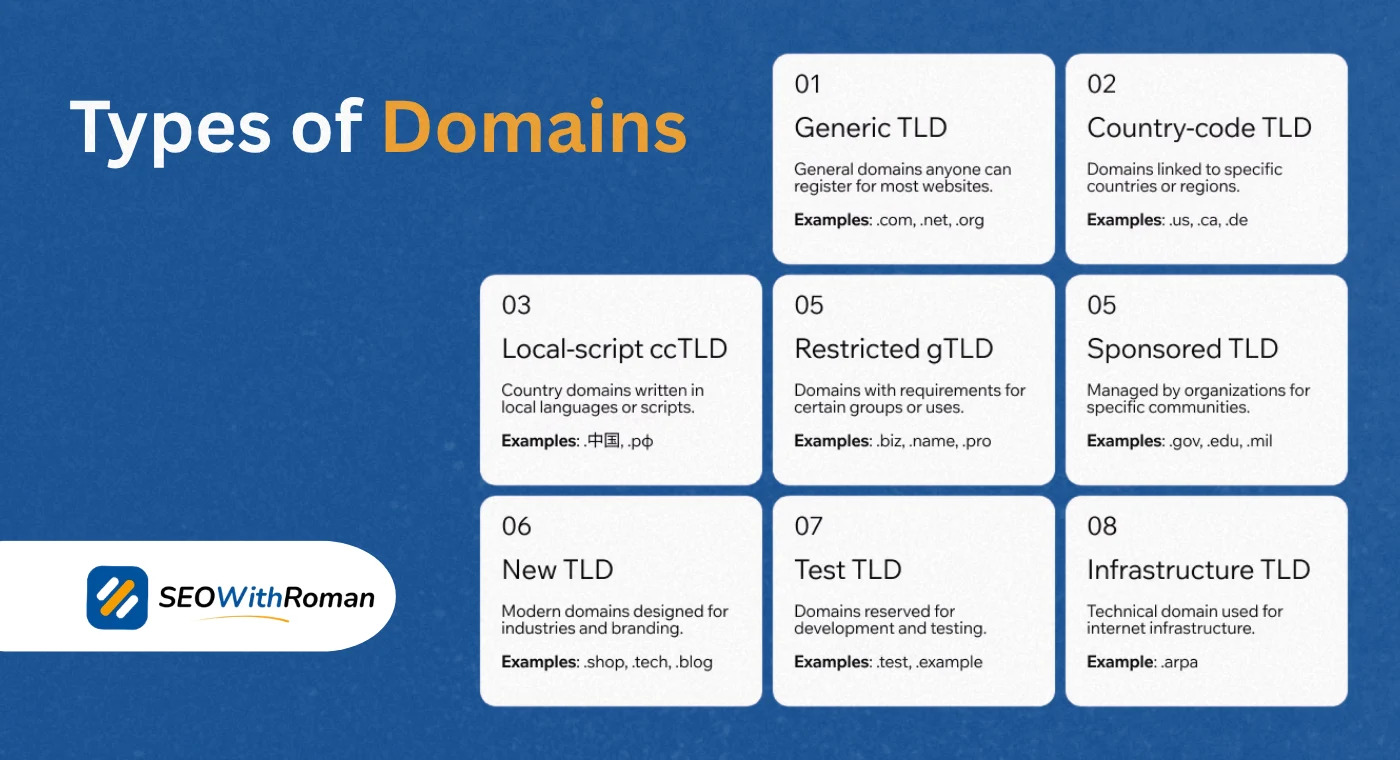
Choosing a domain extension is one of the most important decisions you make when registering a domain. Here is a complete breakdown of every type of domain available and when to use each one.
Generic Top-Level Domains (gTLDs)
These are the most common domain extensions and are available to anyone worldwide with no restrictions.
| Extension | Best Used For | Trust Level |
|---|---|---|
| .com | Any commercial website, personal brands, blogs | Highest — most recognised globally |
| .net | Technology companies, network services | High |
| .org | Non-profits, open source projects, communities | High |
| .info | Informational websites, directories | Medium |
| .biz | Small businesses | Medium |
| .co | Startups, modern brands (short for company) | Growing |
Country-Code Top-Level Domains (ccTLDs)
These extensions are tied to specific countries and are sometimes preferred for local SEO targetin
| Extension | Country | Best Used For |
|---|---|---|
| .co.uk | United Kingdom | UK-based businesses targeting UK customers |
| .us | United States | US-focused businesses and services |
| .pk | Pakistan | Pakistani businesses and organisations |
| .in | India | Indian businesses and regional services |
| .de | Germany | German-market websites |
| .au | Australia | Australian businesses |
New Generic Top-Level Domains (New gTLDs)
These were introduced after 2012 to expand the domain name system and now number over 1,200 extensions.
Popular examples include .blog, .shop, .app, .tech, .io, .agency, .guru, and .online. These can be powerful for niche branding but carry lower baseline trust than .com with general audiences.
For most small businesses, bloggers, and personal brands, .com remains the best choice in 2026. When someone hears a domain name mentioned in conversation or sees it in a social media bio, their instinct is to type .com. Choosing any other extension creates a memory friction that costs you visitors.
7 How Does a Domain Name Actually Work | The DNS Process Explained
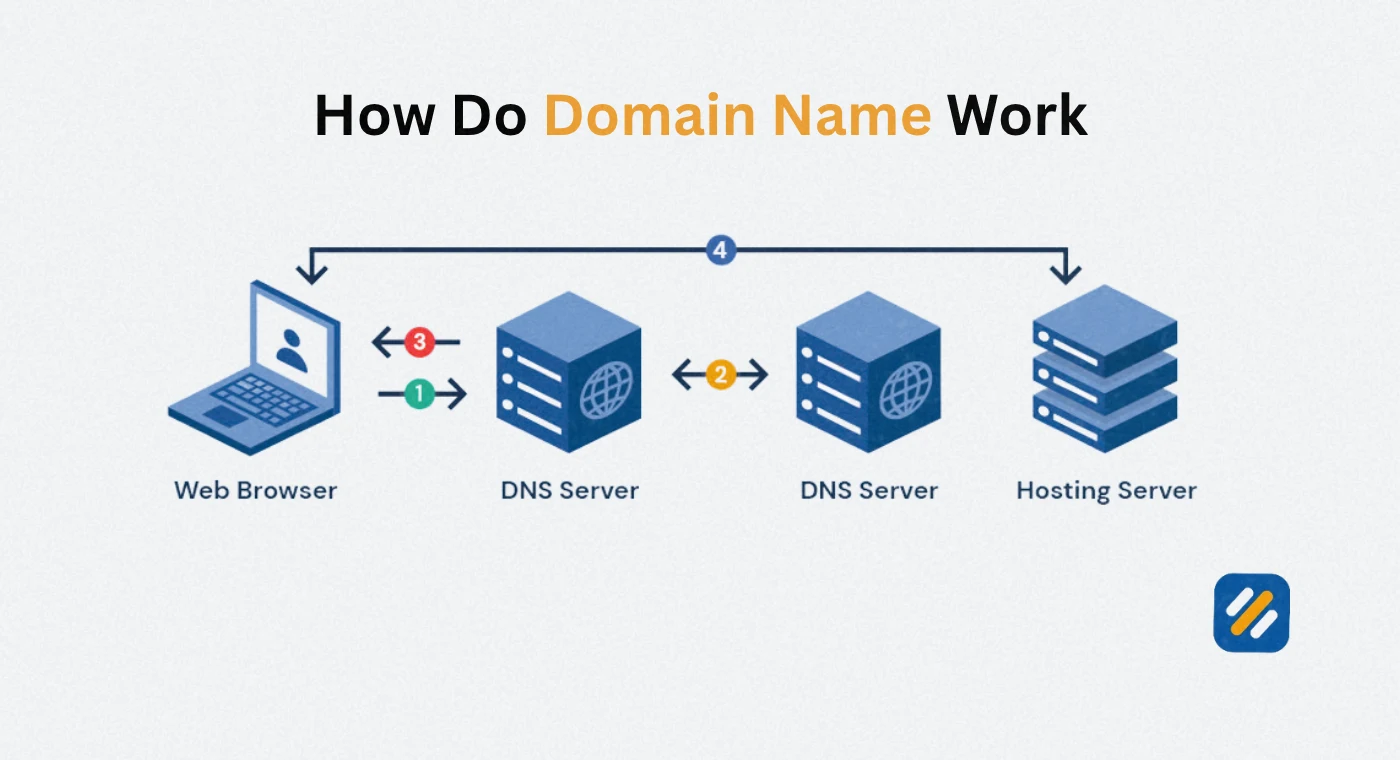
Most people type a domain name and never think about what happens in the fraction of a second between pressing Enter and the page appearing. Understanding the DNS process gives you a clearer picture of why domain management matters for website performance.
Here is what happens step by step when you type seowithroman.com into your browser:
Step 1: Browser checks its own cache. Your browser stores a record of websites you have visited recently. If it has visited seowithroman.com before, it may already know the IP address and skip the remaining steps entirely.
Step 2: Operating system checks its local DNS cache. If the browser does not have a cached record, it asks the operating system, which has its own DNS cache. If the IP address is stored there, the lookup ends here.
Step 3: Query sent to the recursive DNS resolver. If neither cache has the answer, the browser sends a query to the DNS resolver provided by your internet service provider. This resolver is responsible for finding the answer.
Step 4: Root nameserver consulted. The resolver asks a root nameserver where to find the nameservers responsible for .com domains.
Step 5: TLD nameserver consulted. The .com TLD nameserver tells the resolver which nameservers are authoritative for seowithroman.com specifically.
Step 6: Authoritative nameserver returns the IP address. The nameserver registered with Namecheap or whatever registrar holds the domain returns the actual IP address of the server where seowithroman.com is hosted.
Step 7: Browser connects to the server. The browser now has the IP address and connects directly to the hosting server, which sends back the webpage files.
This entire process happens in under 100 milliseconds on a well-configured domain and hosting setup. Slow DNS resolution is one of the contributing factors to poor Core Web Vitals scores.
8 How Do I Find My Domain Name | 3 Ways to Check
If you already have a website but are not sure what your domain name is, or you want to check whether a specific domain is registered and by whom, here are the three most reliable methods:
Method 1: Check your browser address bar
The simplest method. Open your website in any browser and look at the address bar. The text between "https://" and the first forward slash is your domain name. Everything before the first single forward slash is your domain.
Method 2: Use WHOIS lookup
WHOIS is a publicly accessible database that records who owns every registered domain name. Go to whois.domaintools.com or lookup.icann.org, type in any domain name, and you will see the registrar, registration date, expiry date, and in many cases the registrant's contact information. Note that many domain owners use privacy protection services that hide personal contact details while keeping ownership registration intact.
Method 3: Check your hosting or registrar account
If you registered your domain through Namecheap, GoDaddy, or Hostinger, log into your account dashboard. All registered domains appear under your account with renewal dates and DNS settings visible.
For website owners checking their own domain: log into your registrar account. This also shows you your domain expiry date, which is critical information. A domain that expires accidentally can be purchased by someone else within hours and may cost thousands to recover.
9 How Do I Create a Domain Name | Step by Step for Beginners
Creating a domain name means registering it through a domain registrar. Here is the exact process from idea to live registered domain:
Step 1: Choose your domain name
Your domain name should be short, memorable, and relevant to your website's purpose. Aim for under 15 characters if possible. Avoid hyphens, numbers, and double letters that cause spelling confusion. Use your personal name for personal brand sites or your business name for commercial sites.
Step 2: Choose your extension
For most websites targeting US or UK audiences, choose .com as your first preference. If .com is taken, consider .co or a country-specific extension like .co.uk before resorting to less-recognised alternatives.
Step 3: Check availability
Go to Namecheap.com or GoDaddy.com and type your desired domain name into their search bar. The tool will instantly show you whether the exact domain is available and suggest alternatives if it is taken.
Step 4: Register the domain
If your chosen domain is available, add it to your cart and complete the registration. You will pay an annual fee, typically $9 to $11 for a .com domain through Namecheap, which is the registrar used for SEOWithRoman.com. Select a registration period of one to two years.
Step 5: Enable domain privacy protection
During or after checkout, enable WHOIS privacy protection. This replaces your personal contact information in the public WHOIS database with the registrar's proxy information, protecting you from spam and unwanted solicitation.
Step 6: Point your domain to your hosting
After registering, you need to connect your domain to your hosting server by updating the nameservers in your registrar account to the ones provided by your hosting company. For Hostinger hosting, this takes under five minutes and the change propagates globally within 24 to 48 hours.
Step 7: Set up auto-renewal
Enable automatic renewal in your registrar account immediately. A domain that expires, even accidentally, can be snapped up by domain squatters within hours. Auto-renewal costs nothing extra and prevents a potentially catastrophic loss.
10 What Is the Purpose of a Domain Name | Why It Matters More Than You Think
A domain name serves five distinct purposes, most of which beginners do not consider when they first register one.
1. It is your permanent address on the internet. Unlike a social media profile that can be deleted or restricted by a platform, a domain you own is yours as long as you renew it. No algorithm change or policy update can take it away.
2. It builds credibility and trust. A professional domain name signals to visitors that you are serious about your online presence. Research consistently shows that branded email addresses using a custom domain (you@yourdomain.com) generate significantly more trust than generic Gmail addresses in business communications.
3. It supports your SEO strategy. Your domain name is a long-term SEO asset. The domain age, the authority it accumulates over time, and the brand recognition it builds all contribute to your Google rankings. Changing your domain name after establishing SEO authority means starting over.
4. It enables branded email. Once you own a domain name, you can create professional email addresses on that domain. seowithroman.com enables addresses like hello@seowithroman.com or roman@seowithroman.com, which are far more professional than a generic email provider.
5. It protects your brand. Registering your domain name before a competitor or domain squatter does protects your brand name in the digital space. Recovering a domain that someone else has registered is expensive, time-consuming, and sometimes impossible.
11 Domain Name and SEO | What Every Website Owner Must Know
This is the section most domain name guides skip entirely and it is the one that matters most for anyone building a website to generate traffic and revenue.
Your domain name affects your SEO in ways that are subtle but significant over time
Domain age builds authority. Google uses domain age as one of many signals when evaluating how much to trust a website. An older domain that has consistently published quality content carries more inherent authority than a brand new domain with the same content. This is why establishing your domain early, even before you are ready to launch, gives you a head start.
Exact match domains have declined in value but not disappeared. In the early 2010s, owning a domain like "bestseotools.com" gave a significant ranking boost simply because the keyword was in the domain. Google has reduced this effect substantially. However, a domain that naturally contains relevant keywords still sends a relevance signal that helps with click-through rates in search results.
Brand-matching domains build trust signals. When someone searches for "SEO With Roman" and finds seowithroman.com in the results, the match between search query and domain name is a positive signal. It reinforces E-E-A-T by confirming that a real person or brand is behind the website.
Domain history matters. If you purchase a previously owned domain, its historical SEO profile comes with it, both the good and the bad. Always run a WHOIS history check and a backlink audit on any domain you plan to buy used, as a domain with a history of spam or manual penalties can take months to recover.
HTTPS is non-negotiable. Your domain must use HTTPS, meaning it must have an SSL certificate installed. Google has used HTTPS as a ranking signal since 2014 and Chrome marks all HTTP websites as "Not Secure," which reduces user trust and click-through rates dramatically.
12 3 Expert Tips for Choosing and Managing Your Domain Name
Tip 1: Register your name before someone else does.
Even if you are not ready to build your website today, register your domain now. Domain registration costs under $11 per year. Waiting six months and finding that someone else has registered your preferred name could cost you hundreds or thousands to recover it, if you can recover it at all.
Tip 2: Always buy your domain and hosting separately.
Many hosting companies offer free domains with hosting plans. This sounds like a saving but it creates a dependency problem. If you ever want to switch hosting providers, your domain is tied to your current host and transferring it can be complicated. Registering your domain at Namecheap and hosting separately at Hostinger keeps your assets independent and gives you full control.
Tip 3: Set renewal reminders three months in advance.
Domain expiry is the single most avoidable SEO disaster. When a domain expires, it goes through a grace period, then a redemption period, then it becomes publicly available again. If a domain squatter registers it during that window, recovering your domain and all the SEO authority it represents becomes extremely expensive. Enable auto-renewal and set a calendar reminder 90 days before your annual expiry date.
13 Conclusion
A domain name is far more than a technical detail you sort out once and forget. It is the permanent foundation of your entire online presence, the address that every customer, reader, and search engine uses to find you.
Understanding what a domain name is, how it works, what its parts mean, and how to choose one correctly puts you ahead of the majority of small business owners who register a domain without thinking strategically about what it means for their brand, their SEO, and their long-term credibility.
If you do not yet have a domain name, go to Namecheap today, search for the name that best represents your brand, and register it. The entire process takes under ten minutes and costs less than $11 for the first year.
If you already have one, make sure auto-renewal is active, privacy protection is enabled, and your domain is pointed to a hosting server with an SSL certificate installed.
Have a question about choosing your domain name or understanding any part of how domains work? Leave a comment below and I will answer it personally.
Join 1,000+ business owners and bloggers who get one actionable SEO tip every week — straight to their inbox. Free forever.
Get Free Weekly Tips →