- SR meaning is simple: the server builds a complete HTML page and sends it to the browser, rather than making the browser build it
- Server-side rendering gives Google a fully readable page from the first crawl, making it significantly better for SEO than client-side alternatives
- SSR benefits include faster initial page load, better Core Web Vitals scores, improved accessibility, and stronger social media sharing support
- The three most popular SSR frameworks in 2026 are Next.js for React, Nuxt.js for Vue, and SvelteKit for Svelte
- SSR is not always the right choice: high-interactivity web applications like dashboards often perform better with client-side or hybrid rendering approaches
1 What Is SSR and Why the Way Your Page Renders Matters More Than You Think
Most people who build websites never think about what actually happens between the moment a user types a URL and the moment they see a fully loaded page on their screen. That invisible process is called rendering, and the decision you make about where and how that rendering happens has major consequences for your SEO, your page speed, and your user experience.
SSR stands for Server-Side Rendering: It is a web development technique where the web server generates the complete HTML content of a page and sends it to the user's browser as a fully built document. The browser receives a page that is already readable, already structured, and already populated with content before a single line of JavaScript runs on the user's device.
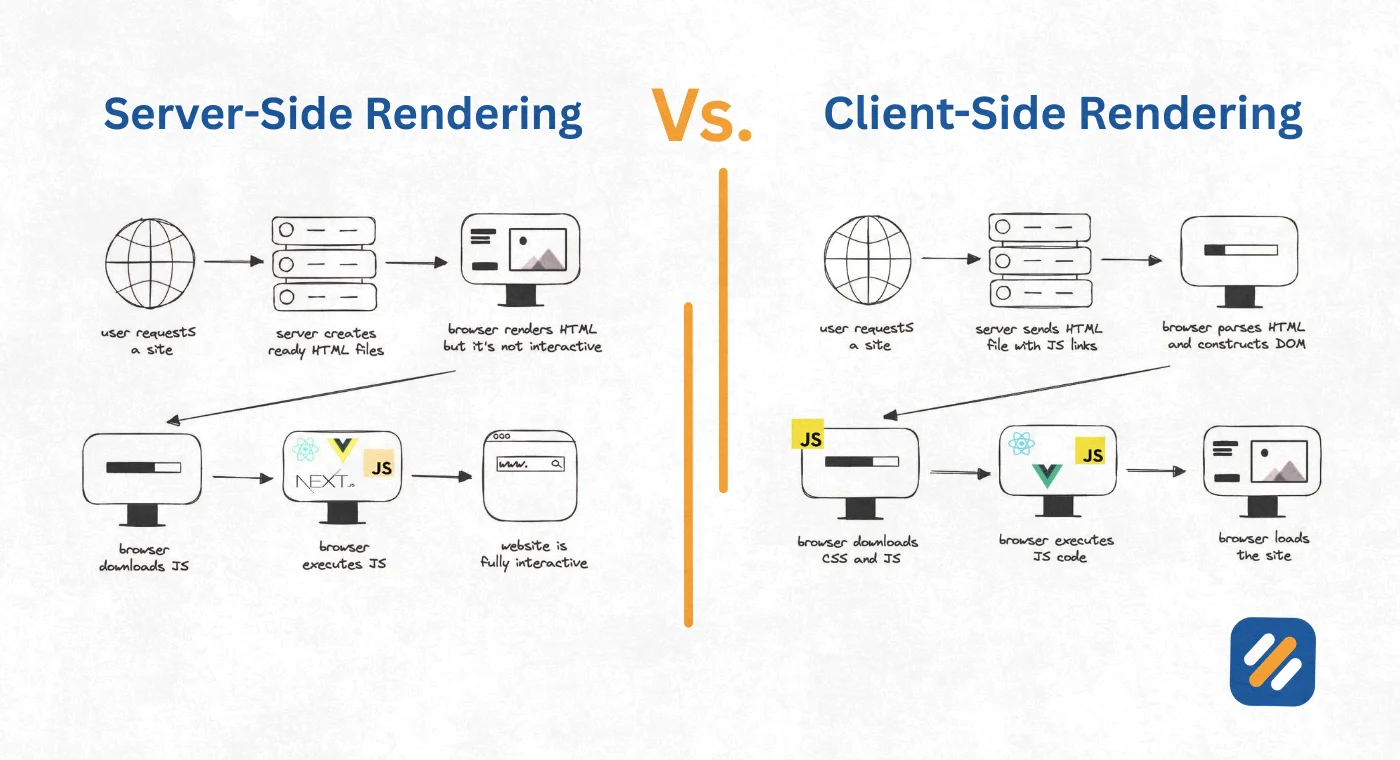
The alternative to SSR is Client-Side Rendering, where the server sends a nearly empty HTML file to the browser and then relies on JavaScript to build the page content after it arrives. The user stares at a blank or loading screen while their device does all the work.
For SEO professionals and website owners who care about Google rankings and real user experience, understanding what is SSR and when to use it is no longer optional knowledge. It is a fundamental technical decision that affects how Google crawls your site, how fast your pages load, and how many visitors actually stay long enough to become customers.
2 How Server-Side Rendering Actually Works | Step by Step
Understanding the SSR process at a practical level removes all the mystery around why it performs the way it does for both users and search engines.
Here is exactly what happens when a user visits a server-side rendered website:
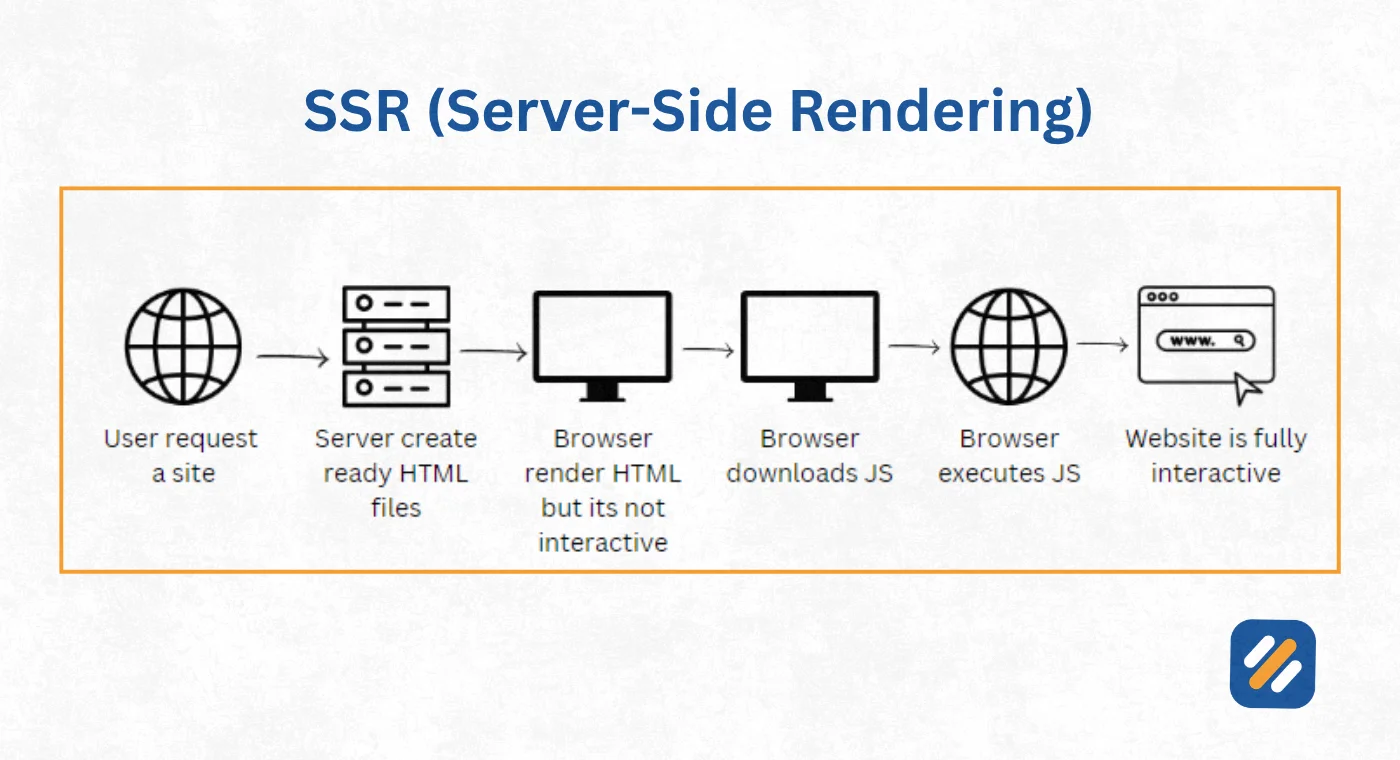
Step 1: The browser sends a request. When a user types your URL or clicks a link, their browser sends an HTTP request to your web server asking for the page at that address.
Step 2: The server receives the request and processes it. The server receives the request, pulls the necessary data from a database or API, and runs the JavaScript framework on the server itself to build the full HTML page.
Step 3: The server sends a complete HTML document. Unlike client-side rendering where the server sends a skeleton, SSR sends back a fully populated HTML page with all the text, headings, images, and structured content already in place.
Step 4: The browser displays content immediately. The browser starts rendering the visible content the moment the HTML arrives. The user sees real content within milliseconds rather than waiting for JavaScript to download, parse, and execute.
Step 5: JavaScript hydrates the page. After the initial HTML is displayed, the browser downloads the JavaScript bundle and attaches interactive behaviour to the already-visible elements. This process is called hydration and it is what makes server-side rendered pages interactive after they appear.
This five step process is what separates SSR web development from client-side approaches and why rendering server behaviour has such a direct impact on both performance metrics and search engine visibility.
3 SSR Benefits: What Server-Side Rendering Actually Delivers
The server-side rendering benefits that matter in practice go well beyond the theoretical advantages most articles describe. Here is what SSR actually delivers when implemented correctly:
Faster Time to First Contentful Paint
Time to First Contentful Paint, known as FCP, measures how quickly the first visible content appears on screen. Because SSR sends a fully built HTML page, the browser can start displaying real content within the first network response. On client-side rendered sites, FCP is delayed by however long it takes JavaScript to download and execute. For users on mobile connections or slower devices, this difference can be measured in seconds.
Superior SEO Performance
This is the SSR benefit that matters most for anyone running a content website, blog, or ecommerce store. When Google's crawler visits an SSR page, it receives the complete HTML with all the content, headings, and structured data already in place. Google can read, index, and rank the page immediately without waiting for JavaScript to execute.
With client-side rendering, Google's crawler has to render the JavaScript to see the content. While Google has improved its ability to do this, it is an additional step that can delay indexing, reduce crawl frequency, and in some cases result in content being missed entirely.
Improved Core Web Vitals Scores
Google's Core Web Vitals include Largest Contentful Paint (LCP), Interaction to Next Paint (INP), and Cumulative Layout Shift (CLS). SSR directly improves LCP scores because the largest content element on the page is delivered in the initial HTML response rather than being injected by JavaScript after load. Better Core Web Vitals means better rankings, particularly in competitive niches where technical performance is a differentiating factor.
Better Accessibility
Screen readers and assistive technologies rely on HTML being present in the document when the page loads. Server-side rendering ensures that all content is available immediately in the HTML, making SSR sites significantly more accessible to users who rely on these tools.
Social Media Sharing That Actually Works
When someone shares your URL on LinkedIn, Twitter, or Facebook, the platform's crawler visits the page to generate a preview with the title, description, and image. Most social media crawlers cannot execute JavaScript. A client-side rendered page shared on social media often generates a blank preview with no image or description. An SSR page generates a complete, attractive preview every time.
4 Server-Side Rendering vs Client-Side Rendering | The Complete Comparison
The server side rendering vs client side rendering debate is not about which is objectively better. It is about which is right for your specific use case. Here is the complete comparison across every dimension that matters:
| Factor | Server-Side Rendering (SSR) | Client-Side Rendering (CSR) |
|---|---|---|
| Where rendering happens | On the web server before delivery | In the user's browser after delivery |
| Initial page load speed | Fast, content visible immediately | Slow, blank screen until JS executes |
| SEO performance | Excellent, Google reads full HTML instantly | Poor to moderate, requires JS rendering |
| Core Web Vitals | Strong LCP and FCP scores | Weaker initial scores, improves after load |
| Time to Interactive | Slightly longer due to hydration | Fast once JS loads |
| Server load | Higher, server renders every request | Lower, browser handles rendering |
| Hosting cost | Higher, requires server infrastructure | Lower, static files can use CDN |
| Accessibility | Excellent, full HTML available immediately | Dependent on JS execution |
| Social media previews | Perfect, crawlers read complete HTML | Often broken, crawlers miss JS content |
| Best for | Blogs, news sites, ecommerce, SEO-driven sites | Web apps, dashboards, SaaS tools |
| Development complexity | Moderate to high | Lower for simple apps |
| Real world examples | Next.js sites, Nuxt.js sites, WordPress | React SPAs, Angular dashboards, Vue apps |
5 SSR Frameworks: The Tools Developers Use to Implement Server-Side Rendering
Implementing SSR from scratch is complex. Modern SSR frameworks handle the heavy lifting and let developers focus on building features rather than configuring rendering pipelines. Here are the frameworks that dominate SSR web development in 2026:
Next.js (React)
Next.js is the most widely adopted SSR framework in the world. Built on top of React, it offers server-side rendering, static site generation, and hybrid approaches within a single framework. Next.js introduced the App Router in version 13, which uses React Server Components to give developers granular control over which parts of a page render on the server and which render on the client.
Websites like Hulu, TikTok, and Nike run on Next.js.
Nuxt.js (Vue)
Nuxt.js is the SSR framework for Vue.js applications. It mirrors much of what Next.js offers for React but within the Vue ecosystem. Nuxt 3, released in 2022, introduced a complete rewrite with improved performance, TypeScript support, and a hybrid rendering engine called Nitro that supports multiple deployment targets including serverless environments.
SvelteKit (Svelte)
SvelteKit is the official SSR framework for Svelte, a newer JavaScript framework that compiles components to vanilla JavaScript at build time. SvelteKit is notable for its exceptional performance characteristics because Svelte's compiled output is significantly smaller than React or Vue bundles, which means faster hydration and better Time to Interactive scores.
Remix
Remix is a React-based framework that takes a different philosophical approach to SSR. Rather than treating the server and client as separate concerns stitched together, Remix is built around web fundamentals like HTML forms and HTTP, making it particularly strong for applications that need to work correctly even when JavaScript fails to load.
Angular Universal
Angular Universal is Google's official SSR solution for Angular applications. It pre-renders Angular pages on the server and is particularly common in enterprise environments where Angular is already the established frontend framework.
6 SSR Drawbacks | The Real Limitations Nobody Talks About Honestly
Every article on SSR benefits tends to gloss over the genuine limitations. Understanding where server-side rendering struggles is essential for making the right architectural decision.
Higher server infrastructure cost
Every page request in a pure SSR setup requires the server to build a new HTML page. On a small blog this is negligible. On a site receiving millions of page views per day, this computational cost adds up significantly. Client-side rendered sites can serve the same JavaScript bundle from a CDN indefinitely with near-zero per-request cost. SSR requires real server capacity that scales with traffic.
Slower Time to Interactive
While SSR delivers visible content faster, the page is not immediately interactive. After the HTML arrives, the browser still needs to download and execute the JavaScript hydration bundle before buttons, forms, and dynamic elements respond to user input. On slow connections, users can see a page that looks ready but does not respond to clicks, which creates a frustrating experience known as the "uncanny valley" of web performance.
Increased development complexity
Building an SSR application requires thinking about code that runs in two different environments simultaneously: the server environment without browser APIs, and the client environment with browser APIs. Code that uses window, document, or localStorage will break on the server. Managing this boundary adds complexity that purely client-side applications do not have to deal with.
Third-party library compatibility
Many JavaScript libraries assume they are running in a browser. When you try to import them into an SSR environment, they fail immediately because browser-specific APIs are not available on the server. This forces developers to use dynamic imports, conditional checks, or alternative libraries, which adds friction to otherwise straightforward integrations.
7 When to Use SSR and When Not To | The Decision Framework
Choosing whether to use server-side rendering should be a deliberate decision based on your specific requirements, not a default choice or a trend-following decision.
Choose SSR when:
Your website is content-driven and organic search traffic is a primary growth channel. Blogs, news sites, documentation sites, ecommerce product pages, and marketing landing pages all benefit directly from the SEO advantages of server-side rendering.
Your audience includes users on slower mobile connections or older devices. SSR reduces the processing burden on the user's device by doing the rendering work on a powerful server instead.
Your pages need to generate accurate social media previews when shared. Any site where social sharing is part of the marketing strategy needs SSR or static generation to ensure previews work correctly.
Choose Client-Side Rendering when:
Your application is highly interactive and functions more like a desktop software tool than a website. Dashboards, project management tools, design applications, and real-time collaborative tools prioritise interactivity over initial load speed and SEO.
Your users are authenticated and your pages do not need to be indexed by Google. Internal business applications, admin panels, and member-only content areas have no SEO requirement and no need for SSR's added complexity and cost.
Consider Hybrid or Incremental Static Regeneration when:
Your site has a mix of content types where some pages are highly dynamic and others are static. Modern frameworks like Next.js allow you to make this decision at the individual page level, using SSR for dynamic pages, static generation for stable content pages, and client-side rendering for highly interactive components within those pages.
8 SSR and SEO: Why Server-Side Rendering Is the Technical SEO Advantage Most Websites Miss
From an SEO perspective, the relationship between server-side rendering and Google rankings is more nuanced than most guides acknowledge. Here is what the evidence and real-world experience actually shows.
Google can render JavaScript. This is a confirmed fact. But Google renders JavaScript in a second wave of indexing that can happen hours, days, or even weeks after the initial crawl. Pages that require JavaScript to display their content are indexed later, updated less frequently, and may experience ranking delays compared to pages where the content is available in the initial HTML.
For a new website trying to build topical authority quickly, this delay matters. An SSR page published today can be indexed and ranking within 24 to 48 hours. A client-side rendered page covering the same topic might not be fully indexed for a week or more.
Core Web Vitals are now a confirmed ranking signal. SSR's direct improvement of LCP scores translates into a measurable ranking advantage on competitive keywords where two pages are otherwise of similar quality. In many years of doing technical SEO across multiple industries, switching clients from client-side rendered JavaScript frameworks to SSR consistently produced improvements in Core Web Vitals scores within weeks of deployment, followed by ranking improvements within one to three months.
Structured data and schema markup work more reliably with SSR. When schema markup is delivered in the initial HTML rather than injected by JavaScript, Google picks it up more consistently and displays rich results more reliably. For ecommerce sites targeting product rich snippets and blogs targeting FAQ rich results, this consistency has a direct impact on click-through rates from search results.
9 3 Expert Tips for Getting the Most Out of Server-Side Rendering
Tip 1: Use Incremental Static Regeneration for High-Traffic Pages
For pages that change infrequently, use Next.js Incremental Static Regeneration instead of pure SSR. This caches the rendered HTML and regenerates it in the background on a schedule, giving you SSR-quality SEO with CDN-level performance and near-zero server cost per request.
Tip 2: Audit Your SSR Implementation With Google Search Console's URL Inspection Tool
After deploying SSR, use the URL Inspection tool in Google Search Console to fetch your pages as Google sees them. Confirm that the rendered HTML contains all your target keywords and structured data before assuming your SSR setup is working correctly for SEO.
Tip 3: Never Hydrate the Entire Page When Only Part of It Needs Interactivity
Modern frameworks like Next.js App Router and SvelteKit support partial hydration, where only interactive components load JavaScript while static content remains pure HTML. Implementing this reduces your JavaScript bundle size, improves Time to Interactive scores, and lowers server costs without sacrificing any of the SEO benefits of full SSR.
10 Conclusion
Server-side rendering (SSR) is not a trend or a preference. For websites where organic search traffic, page speed, and user experience matter, it is the technically superior approach to delivering web content.
The SSR meaning comes down to one simple principle: do the work on the server where you have full control over performance and output, rather than delegating it to millions of different user devices with unpredictable capabilities and connection speeds.
If you are building or rebuilding a content website, an ecommerce store, or any site where Google rankings drive traffic, the question is not whether to use server-side rendering. The question is which SSR framework fits your team's skills and your project's requirements.
Start with Next.js if your team knows React. Start with Nuxt.js if your team knows Vue. Either way, make the decision deliberately and implement it correctly from the beginning. Retrofitting SSR onto an existing client-side application is far more painful than building with SSR from day one.
Have a question about server-side rendering or which framework is right for your project? Leave a comment below and I will answer it personally.
Join 1,000+ business owners and bloggers who get one actionable SEO tip every week — straight to their inbox. Free forever.
Get Free Weekly Tips →