- Internal linking is one of the most powerful and most ignored on-page SEO tactics available to any website owner
- Every internal link passes PageRank authority from one page to another, directly influencing which pages Google ranks
- Dofollow internal links pass full link equity while nofollow internal links pass none, making the distinction critical for SEO strategy
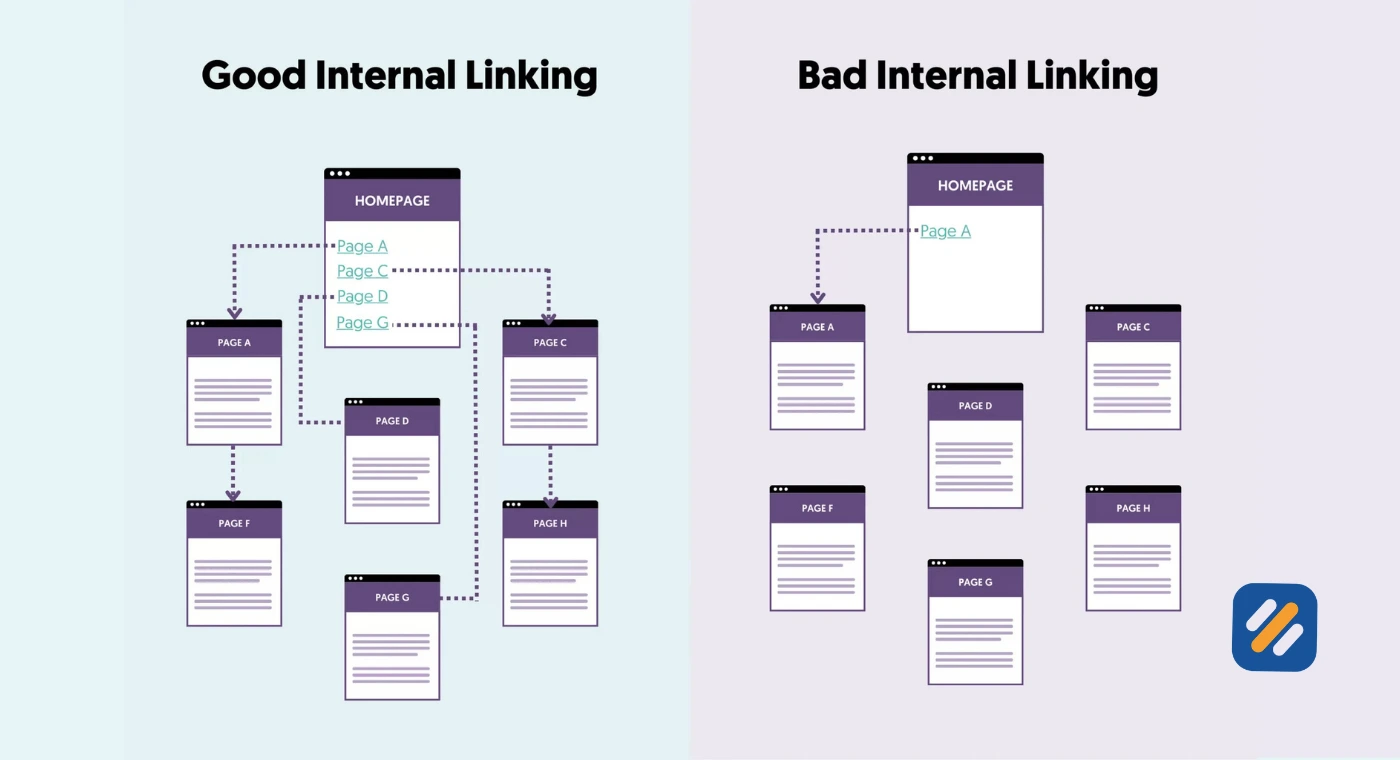
- Orphaned pages, broken internal links, and pages buried more than three clicks deep are the three most damaging internal linking mistakes
- A structured internal linking audit every 60 to 90 days is essential for maintaining rankings on a growing website
1 What Is Internal Linking and Why Most Websites Get It Completely Wrong
Internal linking is one of those SEO fundamentals that every guide mentions and almost nobody executes properly.
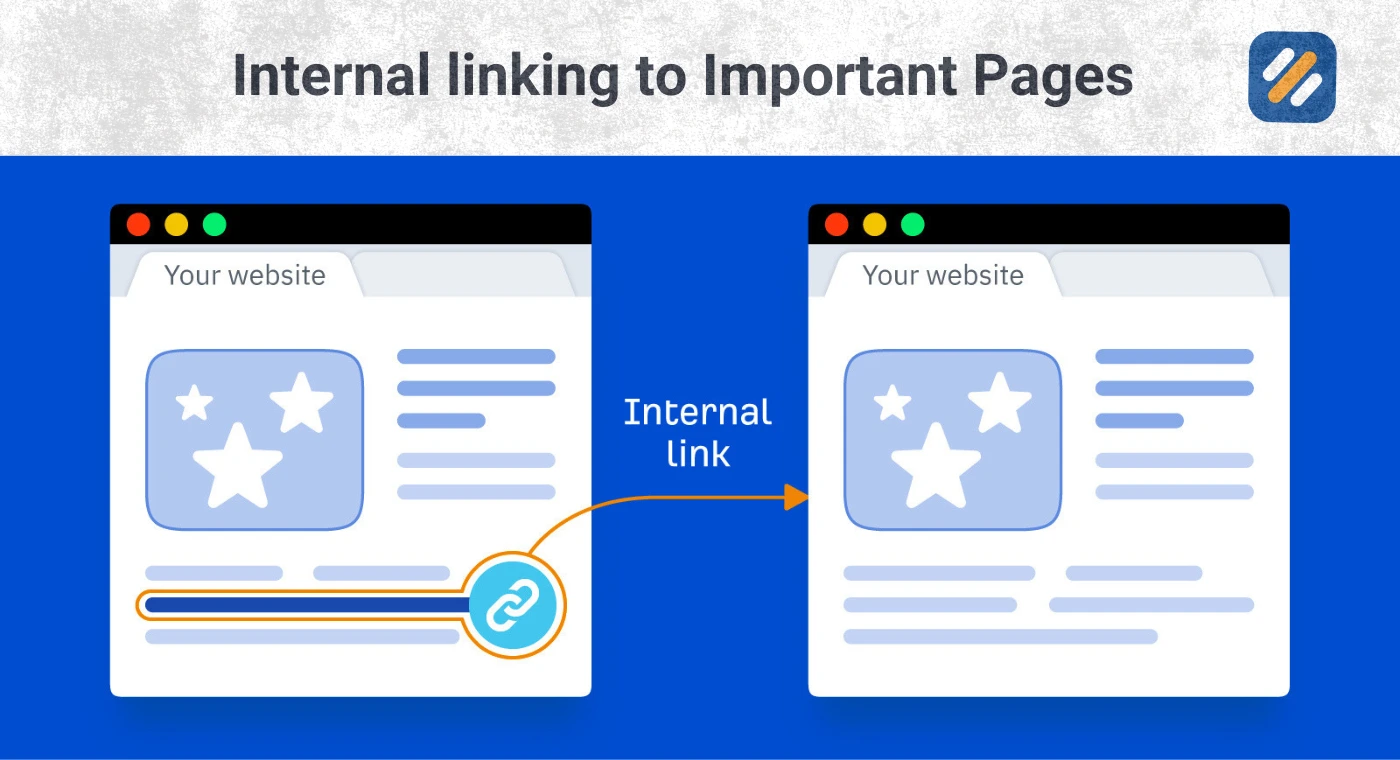
An internal link is a hyperlink that connects one page on your website to another page on the same website. When you publish a blog post about keyword research and link the phrase "title tag optimisation" to your article about title tags, that is an internal link. Simple concept. But the execution, the strategy behind where you link, what anchor text you use, how many links you add, and which pages you prioritise, is where most websites leave enormous ranking potential on the table.
In many years of doing SEO audits across B2b, ecommerce, SaaS, and service-based websites, internal linking is consistently the area where I find the most untouched opportunity. Pages that should be ranking on page one are sitting on page three simply because no other page on the same site is pointing to them with relevant anchor text.
Google's own documentation confirms why this matters. Google discovers pages through internal links amongst other pages. If your best content is not connected to the rest of your site through a logical internal link structure, Google may never find it, index it properly, or rank it where it deserves to be.
2 How Internal Links Work | The PageRank and Link Equity Explained
To understand why internal linking matters so much for SEO, you need to understand PageRank.
PageRank is Google's original algorithm for measuring the importance of a webpage. A page earns PageRank when other pages link to it. The more authoritative the linking page, the more PageRank it passes. This applies equally to internal links and external backlinks.
Here is what most beginners miss. When a high-authority page on your website links to a less authoritative page, it passes a portion of its PageRank to that page. This is called link equity or link juice. It is real, it is measurable, and it is one of the fastest ways to improve the rankings of underperforming pages without building a single new backlink.
Think of your website as a network of water pipes. PageRank is the water. Your homepage and your most linked-to articles are the main tanks. Every internal link you add is a pipe connecting those tanks to other pages. Pages with no internal links pointing to them are disconnected from the network entirely. They get no water. They cannot grow.
The practical implication is significant. If you publish a new article and do not add any internal links pointing to it from existing pages, you are forcing Google to discover and rank that article entirely on its own authority. But if you add three to five internal links from high-traffic, high-authority pages on your site, you are immediately sharing your established authority with that new page and accelerating its path to page one.
3 Dofollow vs Nofollow Internal Links | The Difference That Decides Whether Authority Passes
This is a topic that every internal linking guide covers superficially and almost never explains with enough clarity for beginners to act on it correctly.
Every link on your website is either dofollow or nofollow. The difference is a single HTML attribute and it completely changes what that link does for your SEO.
Dofollow links are the default. When you add a link in WordPress without any special settings, it is automatically dofollow. A dofollow link passes full PageRank authority from the source page to the destination page. This is what you want for all internal links pointing to pages you want Google to rank.
The HTML code for a dofollow link looks like this: a href="https://yoursite.com/target-page" Anchor Text /a
Nofollow links contain an additional rel="nofollow" attribute that instructs Google not to pass PageRank through the link. Google introduced nofollow originally to combat comment spam on external links. The problem is that many WordPress themes, plugins, and page builders accidentally apply nofollow to internal links, silently blocking authority from flowing to pages you want to rank.
The HTML code for a nofollow link looks like this: a href="https://yoursite.com/target-page" rel="nofollow" Anchor Text /a
| Link Type | Passes PageRank | When to Use It | Common Mistake |
|---|---|---|---|
| Dofollow internal link | Yes, full authority passes | All internal links to pages you want ranked | Not checking if plugins add nofollow by mistake |
| Nofollow internal link | No, authority is blocked | Login pages, thank you pages, legal pages | Using nofollow on content pages that need ranking |
| Dofollow external link | Passes authority to other site | Citing reputable sources like Google or Ahrefs | Linking to low quality external sites |
| Nofollow external link | No authority passes externally | Sponsored links, user generated content, affiliates | Forgetting to nofollow paid or affiliate links |
The action you should take right now is to audit your internal links and confirm that every link pointing to a content page you want ranked is dofollow. In Rank Math and Yoast SEO, you can check this by inspecting the link HTML in your WordPress editor. If you see rel="nofollow" on any internal link to an important page, remove it immediately.
4 What Are Referring Domains and How Do They Connect to Internal Linking
Understanding referring domains helps you make smarter decisions about which internal pages deserve the most links from the rest of your site.
A referring domain is any external website that links to your website. If Search Engine Journal links to your article, Search Engine Journal is a referring domain. The more unique referring domains pointing to a specific page on your site, the higher that page's authority and the more PageRank it can distribute to other pages through internal links.
This creates a hierarchy of authority on your website that your internal linking strategy should deliberately exploit.
Your most linked pages from external referring domains are your most powerful internal linking assets. These are the pages that can pass the most authority to the rest of your site. Identifying them and using them as hubs for internal links is one of the highest leverage activities in SEO.
Here is how to find your most valuable pages for internal linking purposes
Go to Ahrefs free Webmaster Tools or SEMrush free version and look at your indexed pages report sorted by number of referring domains. The pages with the highest referring domain counts are your authority hubs. Every new article you publish should receive at least one internal link from one of these high-authority pages wherever the topic is relevant.
For a website like SEOWithRoman.com in its early months with limited external backlinks, the homepage typically has the most authority. This means linking from the homepage to your most important category pages, and from those category pages to your best articles, is the most powerful internal linking architecture you can build right now.
5 Types of Internal Links Every Website Should Use
Not all internal links serve the same purpose. Understanding the different types helps you build a complete linking strategy rather than just adding random links throughout your content.
Navigational links appear in your main menu, header, and sidebar. These are permanent links that appear on every page of your website. Because they appear so frequently, Google gives them less individual weight but they are critical for site architecture and user experience. Your main category pages should always appear in navigation.
Contextual links are embedded within the body text of your articles. These are the most valuable type of internal link for SEO because they appear within relevant content with descriptive anchor text that tells Google exactly what the linked page is about. Every article you publish should contain three to five contextual internal links minimum.
Footer links appear at the bottom of every page. They are useful for linking to important but lower-traffic pages like your Privacy Policy, Disclaimer, Contact, and About pages. Google gives footer links less authority than contextual links because they appear on every page regardless of content relevance.
Breadcrumb links show users their location within your site hierarchy. For example, Home then SEO for Beginners then What Is SEO. Breadcrumbs are excellent for technical SEO because they help Google understand your site structure and they add additional internal links to category and homepage level pages automatically.
CTA links are call to action links embedded within content that point users toward a service page, contact page, or hire me page. For a service-based SEO blog, these are the most commercially valuable internal links because they connect educational content readers to the pages where they can become clients.
6 Internal Linking Best Practices | The Rules That Separate Good Strategy From Great Strategy
After auditing dozens of websites across multiple industries, these are the internal linking best practices that consistently move the needle on rankings.
Use descriptive keyword-rich anchor text: The anchor text of an internal link tells Google what the destination page is about. "Click here" and "read more" are wasted opportunities. "How to do keyword research for free" tells Google exactly what the linked page covers and reinforces the keyword relevance of the destination page. Keep anchor text under five words and make it naturally descriptive.
Aim for three to five internal links per article minimum: A new article with no internal links pointing to it and no internal links within it is an island. Google has difficulty assessing its importance relative to the rest of your site. Three to five internal links in both directions, pointing to the article from existing pages and pointing from the article to related content, is the baseline for every piece of content you publish.
Never exceed 100 internal links on a single page: Google's crawlers have limits on how many links they follow per page. Overloading a page with internal links dilutes the value of each individual link and confuses both Google and your readers about which links actually matter.
Keep important pages within three clicks of the homepage: Google's own statements confirm that pages closer to the homepage receive more crawl attention and are generally considered more important. Any page sitting four or more clicks deep from your homepage is being treated as a low-priority page by Google's crawlers regardless of how good the content is.
Fix broken internal links immediately; A broken internal link points to a page that no longer exists and returns a 404 error. It passes no authority, it frustrates users, and it wastes crawl budget. Run a monthly audit and fix every broken internal link you find.
7 How to Build an Internal Linking Strategy Step by Step
Here is the exact internal linking strategy I build for client websites and apply to my own content:
Step 1: Map your site architecture. Before adding a single link, draw out your site structure. At the top is your homepage. Below that are your main category pages. Below those are your individual articles and service pages. This pyramid structure is the foundation of a clean internal linking architecture.
Step 2: Identify your pillar pages. Pillar pages are your most comprehensive articles covering broad topics. For SEOWithRoman.com, pillar pages might be "Complete Guide to On-Page SEO" or "Everything You Need to Know About Keyword Research." Every article in that category should link back to its pillar page. This builds topical clusters that Google rewards with higher authority across the entire topic.
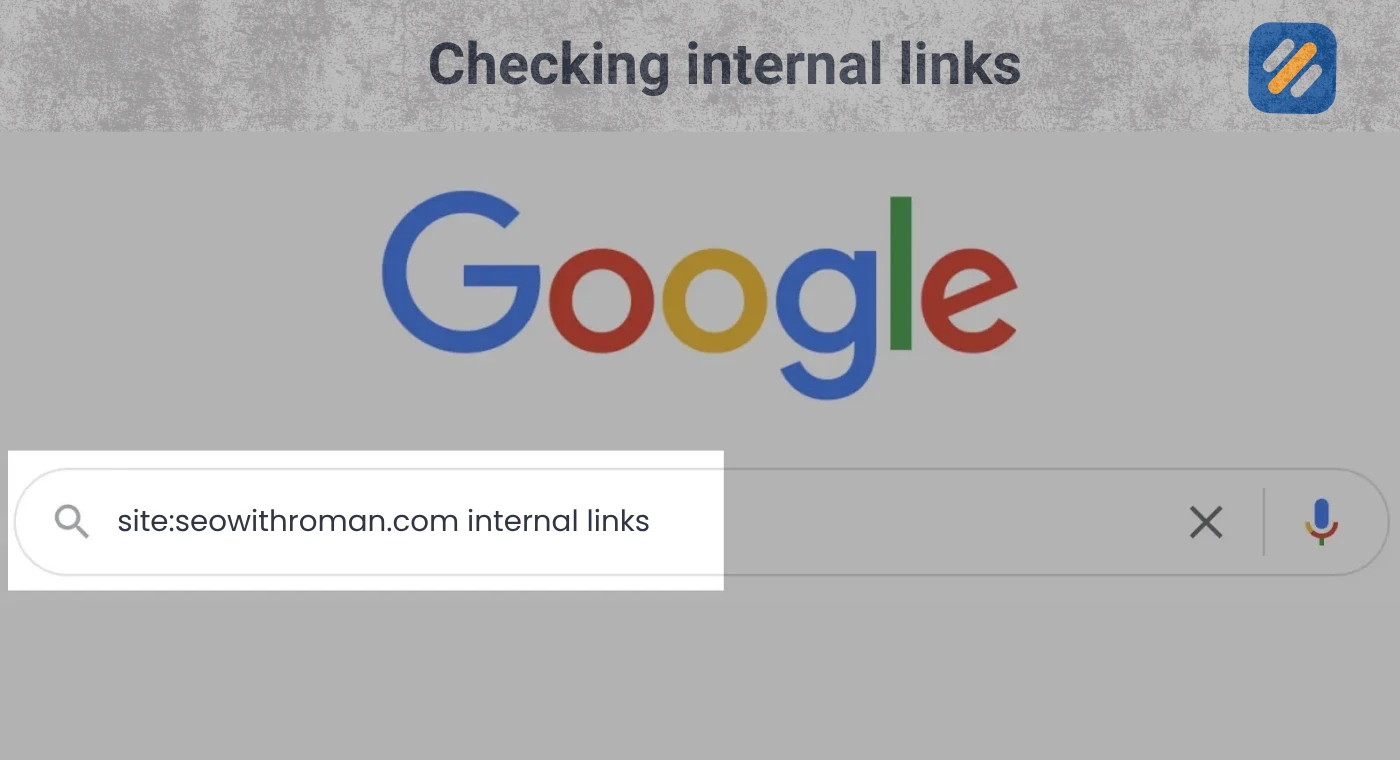
Step 3: Find internal linking opportunities using Google site search. Go to Google and type site:yourwebsite.com "target keyword" replacing target keyword with the topic of your new article. Google will show you every existing page on your site that mentions that topic. These are your most natural internal linking opportunities. Open each page and add a contextual link to your new article where it fits naturally.
Step 4: Link from your highest authority pages to new content. Use Ahrefs or SEMrush to identify which pages on your site have the most referring domains. These are your most powerful pages. Whenever you publish new content, prioritise adding an internal link from one of these high-authority pages to give your new article an immediate authority boost.
Step 5: Eliminate orphaned pages. An orphaned page is any page on your site that has zero internal links pointing to it. Google cannot discover it through crawling. It receives no PageRank from the rest of your site. Run a site audit using Screaming Frog free version or Google Search Console and identify every orphaned page. Add at least two internal links to each one from topically relevant existing content.
Step 6: Conduct an internal link audit every 60 days. As your site grows, internal linking issues accumulate. New 404 pages appear. Redirect chains form. Nofollow attributes get added accidentally. A 60-day audit cycle using Screaming Frog or Rank Math's internal linking suggestions catches these issues before they compound into serious ranking problems.
8 Internal Link Audit: Common Issues and How to Fix Them
| Issue | What It Means | SEO Impact | How to Fix It |
|---|---|---|---|
| Broken internal links | Link points to a deleted or moved page | Passes no authority, wastes crawl budget | Update or remove the broken link, set up 301 redirect |
| Orphaned pages | Page has zero internal links pointing to it | Google cannot discover or rank it properly | Add 2 to 3 contextual links from relevant existing pages |
| Nofollow on content links | Internal link has rel="nofollow" blocking authority | No PageRank passes to destination page | Remove nofollow attribute from all content page internal links |
| Too many links on one page | More than 100 internal links on a single page | Dilutes link value, confuses crawlers | Reduce to most relevant links only |
| Crawl depth over 3 clicks | Page is more than 3 clicks from homepage | Treated as low priority by Google | Add direct link from homepage or category page |
| Redirect chains in internal links | Internal link points to old URL that redirects | Loses link equity, slows crawl speed | Update internal links to point directly to final URL |
| Generic anchor text | Anchor text says "click here" or "read more" | Wastes keyword relevance signal | Replace with descriptive keyword-rich anchor text |
| Duplicate anchor text | Same anchor text links to multiple different pages | Confuses Google about which page is relevant | Use unique anchor text for each destination page |
9 Internal Linking for Service-Based Websites | How to Turn Readers Into Clients
This section is specifically for personal brand blogs and service-based websites where the goal is not just rankings but actual client enquiries.
Most SEO guides treat internal linking purely as a technical and authority distribution exercise. For a service-based blog like SEOWithRoman.com, internal linking is also your most powerful sales funnel tool.
Here is how the strategy works. A visitor from the US or UK lands on your article about keyword research. They are a small business owner trying to improve their Google rankings. At the bottom of the article, they read your conclusion and you have a contextual internal link that says something like "If you would rather have an experienced SEO specialist handle this for you, visit my Hire Me page to learn how we can work together."
That single internal link turns an educational reader into a potential client without any additional marketing spend.
For this to work effectively, every article on SEOWithRoman.com should contain at least one internal link pointing to either the Hire Me page or the Contact page, placed naturally within the content at a point where the reader has already received enough value to trust your expertise.
The placement matters. Do not put the service link at the top of the article before you have delivered value. Place it in the conclusion or at a natural transition point where the reader has completed learning a concept and the next logical step is getting professional help to implement it.
This is the internal linking strategy that turns organic traffic into a freelance client pipeline, which is one of the three income streams we planned for SEOWithRoman.com from the beginning.
10 3 Expert Tips for Internal Linking That Most SEO Guides Never Mention
Tip 1: Use the Skyscraper Method for Internal Link Building
When you publish a comprehensive pillar article, go back through every older article in that category and add a link to your new pillar page. A single comprehensive guide that receives internal links from 10 to 15 supporting articles builds topical authority significantly faster than spreading links randomly across your content.
Tip 2: Check Your Internal Links for Nofollow Every Time You Update a Page
Some WordPress plugins, particularly page builders and table of contents plugins, automatically add rel="nofollow" to links they generate. Every time you update an existing article, inspect the internal links and confirm none of them have been modified to nofollow by a plugin update.
Tip 3: Prioritise Internal Linking to Pages Ranking Between Positions 5 and 15
In Google Search Console, filter your performance report to show pages ranking between positions 5 and 15. These pages are already indexed and trusted by Google but need a final push. Adding three to five new internal links to these pages from high authority pages on your site is often enough to move them from page two to page one without creating any new content.
11 Want Your Internal Linking Done Right From Day One? Here Is How We Can Help
Building a strong internal linking structure takes time, systematic auditing, and a clear understanding of how PageRank flows through your specific site architecture. Most small business owners and bloggers get the basics right but miss the strategic layer that turns a functional site into a ranking machine.
If you want your website's internal linking structure professionally audited and optimised, here is what working with me looks like:
I review your full site architecture, identify every orphaned page, broken internal link, nofollow issue, and crawl depth problem, then build a complete internal linking plan that distributes authority to the pages that matter most for your business goals.
Every client website I work on gets a clean, logical internal link structure that supports both search engine crawling and human navigation, with service page links placed strategically to convert educational readers into enquiries.
If that sounds like what your website needs, visit my Hire Me page and let's talk about your specific situation.
12 Conclusion
Internal linking is not a one-time task. It is an ongoing system that grows in power as your content library expands. Every new article you publish is an opportunity to strengthen existing pages through incoming links and to send readers toward your most important pages through outgoing links.
The websites that dominate their niches in 2026 are not just publishing good content. They are building deliberate, strategic internal link structures that tell Google exactly which pages matter most and guide human readers toward taking action.
Start today. Pick your five most important articles. Find three existing pages on your site that can link to each one with relevant anchor text. Make those connections. Then run a quick audit for orphaned pages and fix the ones you find.
That single afternoon of work can move rankings that have been stagnant for months.
Have a question about your internal linking strategy? Drop a comment below and I will answer it personally. Or visit my Hire Me page if you want this done professionally for your website.
Join 1,000+ business owners and bloggers who get one actionable SEO tip every week — straight to their inbox. Free forever.
Get Free Weekly Tips →