- The best apps for time management fall into three categories: time trackers, task planners, and focus tools
- Clockify is 100% free for unlimited users on its core time tracking features, making it the top free pick
- Time management tools are not just for general productivity, SEO specialists and digital marketers use them to track content output, keyword research sessions, and client reporting time
- The 3-3-3 rule for time management recommends completing 3 hours of deep work, 3 shorter tasks, and 3 maintenance tasks every single day
- The right time management app depends on whether you work solo, in a team, or need billable hour tracking for clients
1 Why Time Management Apps Are No Longer Optional in 2026
Let me be direct about something most productivity articles skip over.
The problem is not that people do not know how to manage their time. The problem is that without a system, time disappears in ways that are nearly impossible to track or fix. You finish a day feeling busy but have nothing concrete to show for it.
Time management apps solve this by making invisible time visible. They show you exactly where your hours went, which tasks took longer than expected, and where you are consistently losing productivity without realising it.
For SEO specialists, content creators, and digital marketing professionals this matters even more. SEO work is made up of dozens of micro-tasks: keyword research, content briefing, on-page optimisation, backlink outreach, reporting, and client communication. Without a time management tool tracking each of these, it is almost impossible to know whether you are spending your hours on the activities that actually move rankings.
In many years of doing SEO work across multiple client accounts simultaneously, the single biggest productivity shift I made was not learning a new tactic. It was building a time tracking system that showed me exactly how long each deliverable actually took versus how long I thought it took. The gap was eye-opening every single time.
This article covers the best apps for time management in 2026 across three categories: time trackers, task planners, and focus tools. Every app here has been evaluated for real-world usefulness, not just feature lists.
2 What are the Best Apps for Time Management | Understanding the 3 Categories
Before jumping into individual tools, you need to understand that time management apps are not all doing the same job. Choosing the wrong category is why most people try an app for two weeks and abandon it.
There are three distinct categories
Time Trackers record how long you spend on specific tasks, projects, or clients. They answer the question: where did my time actually go? Best for freelancers, agencies, SEO specialists, and anyone billing by the hour.
Task and Project Planners organise what you need to do and when. They answer the question: what should I be working on right now? Best for teams managing multiple projects, content calendars, and deadline-driven workflows.
Focus Tools eliminate distractions and help you stay concentrated during work sessions. They answer the question: how do I stop wasting time on things that do not matter? Best for individuals who struggle with attention, social media distractions, or context switching.
The most powerful time management setup combines at least one tool from each category. For example, an SEO professional might use Clockify to track time on client tasks, Todoist to manage their content calendar, and Forest to stay focused during deep keyword research sessions.
3 Best Apps for Time Management for SEO and Digital Marketing Work
Time tracking is where most SEO professionals and digital marketers get the biggest return from time management tools. When you know exactly how long link building takes versus content writing versus reporting, you can price services more accurately, identify bottlenecks in your workflow, and justify your hours to clients with real data.
Clockify | Best Free Time Tracker Overall
Clockify is the most widely used free time tracking app available in 2026. Unlike most tools that limit free users to a handful of seats, Clockify’s core time tracking features are available to unlimited users at zero cost.
For SEO work, Clockify is particularly useful because you can create separate projects for each client, tag entries by task type such as keyword research, technical audit, or content optimisation, and generate detailed reports showing exactly how billable hours were distributed across the month.
Is Clockify 100% free? Yes, for its core time tracking features. The free plan includes unlimited users, unlimited projects, unlimited time tracking, basic reports, and browser extensions. Paid plans starting at $3.99 per user per month unlock additional features like time rounding, budgeting, invoicing, and advanced reporting. For solo SEO specialists or small teams, the free version covers everything needed.
Toggl Track | Best for Simple Time Awareness
Toggl Track takes a different approach. Where Clockify is feature-rich, Toggl prioritises simplicity. Hit start, do the work, hit stop. That is genuinely the full workflow.
What makes Toggl valuable for SEO and digital marketing work is its reporting. Time reports are highly visual, showing you at a glance which client or project consumed the most hours in any given week. The calendar view helps you plan your workload and spot where you are over or under-committing.
Toggl’s free plan covers up to 5 users with unlimited time tracking and basic reports. Paid plans start at $9 per user per month.
My Hours | Best for Client Billing Accuracy
My Hours is the strongest option for SEO freelancers and agencies that need to bill clients accurately. It goes beyond basic time tracking with custom billing rates per user, project budget tracking, and automated timesheet approvals.
The free plan covers up to 5 users. Paid plans range from $4 to $9 per user per month depending on the billing cycle.
4 Best Task Management Apps for SEO Content Calendars and Project Planning
Task management is where content marketers and SEO teams spend most of their productivity tool time. A well-structured task management system turns a chaotic content calendar into a predictable publishing machine.
Todoist | Best for Individual SEO Task Management
Todoist is the cleanest task management app available for individuals managing complex workloads. For SEO professionals, it works exceptionally well for managing content pipelines: you can create a project for each website you manage, add tasks for every article at each stage from keyword research to publishing, set recurring tasks for monthly reporting and site audits, and prioritise by urgency using color-coded priority labels.
The AI-powered natural language input means you can type “write meta descriptions for 10 pages by Friday” and Todoist creates the task with the correct deadline automatically. The free plan is generous for individuals. Paid plans start at $5 per user per month.
Notion | Best for AI-Powered SEO Project Management
Notion has become one of the most powerful time management tools for SEO teams in 2026 specifically because of its AI capabilities. You can build a complete SEO content calendar inside Notion, use AI to generate content briefs from keyword data, organise your entire keyword research database, and track article status from brief to published in one centralised workspace.
What separates Notion from simpler task apps is that it functions as both a project management tool and a knowledge base. Your SOPs, style guides, client notes, and content strategies all live in the same system as your tasks and deadlines. The free plan covers one user. Team plans start at $10 per user per month.
Trello | Best for Visual SEO Team Workflows
Trello’s Kanban boards work exceptionally well for visualising an SEO content workflow. Create columns for each stage of your process: Keyword Research, Brief Approved, In Writing, In Review, Scheduled, Published. Every article moves through these columns as a card.
The visual nature of Trello means any team member can see the status of every piece of content at a glance without attending a status meeting. The free plan supports up to 10 users. Paid plans start at $5 per user per month.
Asana | Best for Enterprise SEO Teams
For larger SEO teams managing multiple clients, campaigns, and cross-functional projects simultaneously, Asana provides the structure and reporting depth that simpler tools cannot match. Asana’s timeline view, workload planning, and over 300 integrations make it the strongest option for enterprise-level time management in digital marketing.
The free plan supports 2 users. Paid plans start at $10.99 per user per month.
5 Best Focus Apps That Help You Actually Do Deep SEO Work
Knowing what to do and tracking your time means nothing if you cannot concentrate long enough to complete the work. Focus apps address the single biggest productivity killer in digital work: distraction.
Forest App | Best Free Focus Tool
Forest uses a gamified approach that sounds simple but works surprisingly well. You plant a virtual tree when you start a focus session. The tree grows while you work and dies if you leave the app to check social media or browse other sites. Completed sessions add trees to your forest, and accumulated focus time converts into real tree planting through the app’s charity partnerships.
For SEO professionals, Forest works well during keyword research sessions, article writing, and technical audit work where deep concentration over 25 to 50 minutes produces significantly better results than distracted work stretched over two hours.
Forest is free on desktop and approximately $3.99 as a one-time purchase on iOS and Android.
RescueTime | Best for Understanding Where Time Actually Goes
RescueTime runs silently in the background and automatically tracks every application and website you use throughout the day. At the end of the week it produces a detailed report showing your productivity score, your most time-consuming applications, and your focus patterns across different times of day.
For SEO and digital marketing professionals, RescueTime’s automatic tracking often reveals uncomfortable truths. It is common for professionals who feel they spend 6 hours per day on productive work to discover through RescueTime that only 3.5 of those hours involved focused output. Knowing this is the first step to fixing it.
Paid plans start at $9 per user per month.
TickTick | Best for Reminder-Driven SEO Task Management
TickTick combines task management with focus tools in one application. Its built-in Pomodoro timer, habit tracker, and multiple reminder types make it ideal for SEO professionals who need both task organisation and focus support without managing two separate applications.
The Eisenhower matrix view inside TickTick is particularly useful for SEO task prioritisation. It lets you categorise tasks by urgency and importance, which directly maps to how experienced SEO professionals should be spending their time: high importance and high urgency tasks like a site crawl error outbreak get done immediately, while low importance and low urgency tasks like social media scheduling get batched or delegated.
Free plan available for one user. Paid plan at $2.99 per user per month billed annually.
6 How Time Management Tools Directly Support SEO and Digital Marketing Performance
This is the section most time management articles skip entirely because they are written for a general audience. For SEO specialists and digital marketers, time management tools do something far more specific than general productivity.
Time tracking for SEO task management reveals true capacity: When you track time across keyword research, content writing, technical fixes, link building, and reporting, you quickly discover which activities take far longer than you estimated. Most SEO specialists discover that reporting and client communication consume 30 to 40 percent of their billable time, leaving far less time than expected for actual optimisation work.
Task management apps turn keyword plans into publishing calendars: A keyword list sitting in a spreadsheet does not produce content. When each keyword becomes a task in Todoist or a card in Trello with an assigned writer, a deadline, and a status label, the publishing pipeline becomes manageable and predictable.
Focus tools protect deep work time: Keyword research, technical SEO audits, and content strategy work require uninterrupted concentration. A 90-minute focus session of genuine deep work on technical SEO produces more results than three hours of distracted work with constant notifications. Forest and RescueTime specifically protect this deep work time.
Employee time tracking apps support agency billing accuracy: For SEO agencies, knowing the true cost of each deliverable is what separates profitable client relationships from ones that drain the team. Clockify and My Hours both provide the granular time data needed to price services correctly.
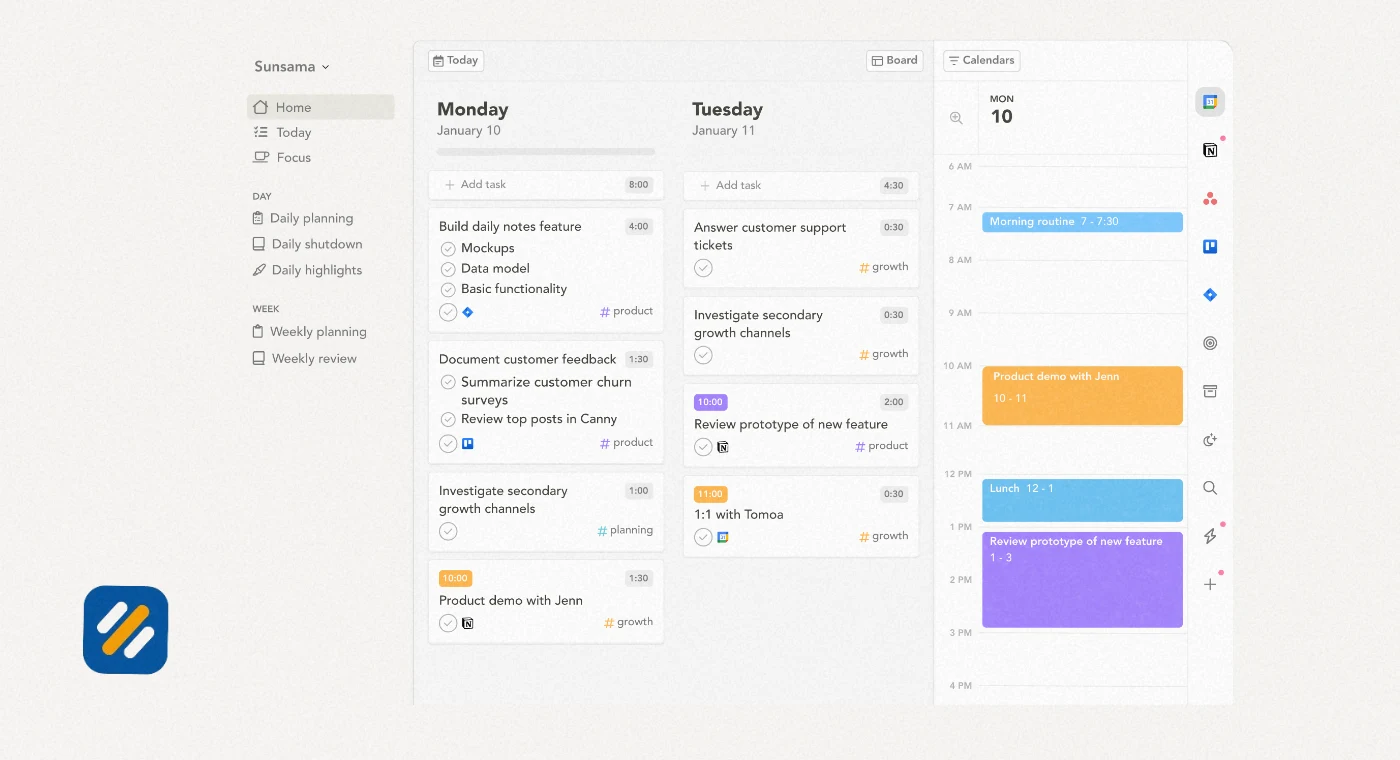
7 Best Apps for Time Management Compared at a Glance
| App | Category | Free Plan | Best For | Starting Paid Price |
|---|---|---|---|---|
| Clockify | Time Tracker | Yes, unlimited users | SEO client billing, team time tracking | $3.99/user/month |
| Toggl Track | Time Tracker | Yes, 5 users | Simple time awareness, visual reports | $9/user/month |
| My Hours | Time Tracker | Yes, 5 users | Client billing accuracy, budget tracking | $4/user/month |
| Todoist | Task Planner | Yes, 1 user | Individual SEO task management | $5/user/month |
| Notion | Task Planner | Yes, 1 user | AI project management, knowledge base | $10/user/month |
| Trello | Task Planner | Yes, 10 users | Visual team content workflows | $5/user/month |
| Asana | Task Planner | Yes, 2 users | Enterprise SEO team management | $10.99/user/month |
| TickTick | Focus and Tasks | Yes, 1 user | Reminders, Pomodoro, habit tracking | $2.99/user/month |
| Forest | Focus | Free on desktop | Gamified focus, distraction blocking | $3.99 one-time |
| RescueTime | Focus | No | Automatic productivity tracking | $9/user/month |
8 What Is the 3-3-3 Rule for Time Management
The 3-3-3 rule is one of the most practical time management frameworks for knowledge workers and digital professionals. It was popularised by productivity writer Oliver Burkeman and structures your workday into three distinct layers of work.
Here is how the 3-3-3 rule works
3 hours of deep focused work on your single most important task or project. This is the work that requires genuine concentration and produces your highest value output. For an SEO specialist, this might be a full technical audit, writing a comprehensive content piece, or building out a keyword strategy for a new client.
3 shorter tasks that need to be done but do not require deep concentration. These are the to-dos that pile up and create mental clutter when ignored: responding to emails, updating keyword tracking spreadsheets, reviewing a team member’s work, scheduling social posts, or briefing a new article.
3 maintenance activities that keep your work environment and systems functioning properly. For an SEO professional this might mean updating your project management tool, checking Google Search Console for new issues, reviewing a client’s analytics dashboard, or organising your keyword research files.
The 3-3-3 rule works because it acknowledges that not all work is equal. Deep work produces disproportionate results but cannot be sustained for 8 hours straight. Shorter tasks and maintenance work are necessary but become distracting when they interrupt deep work sessions.
Applied to SEO and digital marketing, pairing the 3-3-3 rule with a time tracker like Clockify and a task manager like Todoist creates a complete daily productivity system that is both simple to follow and measurable.
9 3 Expert Tips for Getting the Most From Your Time Management App
Tip 1: Track time before you manage it
Before choosing a task management system, spend one week tracking where your time actually goes using Clockify or Toggl. Most people discover that the tasks they think take one hour consistently take two. This data is what should shape your task planning, not assumptions.
Tip 2: Use the Pomodoro technique for SEO deep work sessions
Set a 25-minute timer inside TickTick or Forest for keyword research, content briefing, or technical audit work. After four Pomodoros, take a 20-minute break. This structure produces more quality output per hour than open-ended work sessions and prevents the mental fatigue that makes SEO work feel endless.
Tip 3: Review your time data weekly, not just daily
Weekly time reviews reveal patterns that daily reviews miss entirely. If keyword research consistently takes twice as long on Mondays, you know not to schedule client calls on Monday mornings. If reporting always runs over on the last Friday of the month, you know to block the full day. Weekly reviews turn time tracking data into workflow improvements.
10 Conclusion
The Best apps for time management is not any one with the most features. It is the one you will actually use consistently every week.
For most SEO specialists and digital marketers, a three-tool combination works better than any single app: a time tracker to measure reality, a task planner to organise what needs doing, and a focus tool to protect the deep work sessions that produce your best output.
Start with Clockify for free time tracking. Add Todoist or Trello for task management. Use Forest during your deep work blocks. Apply the 3-3-3 rule to structure your daily output.
That combination costs almost nothing, takes less than a week to set up, and will change how you understand and manage your working hours permanently.
Which time management app are you currently using? Drop a comment below and let me know what is working for you.
Join 1,000+ business owners and bloggers who get one actionable SEO tip every week — straight to their inbox. Free forever.
Get Free Weekly Tips →