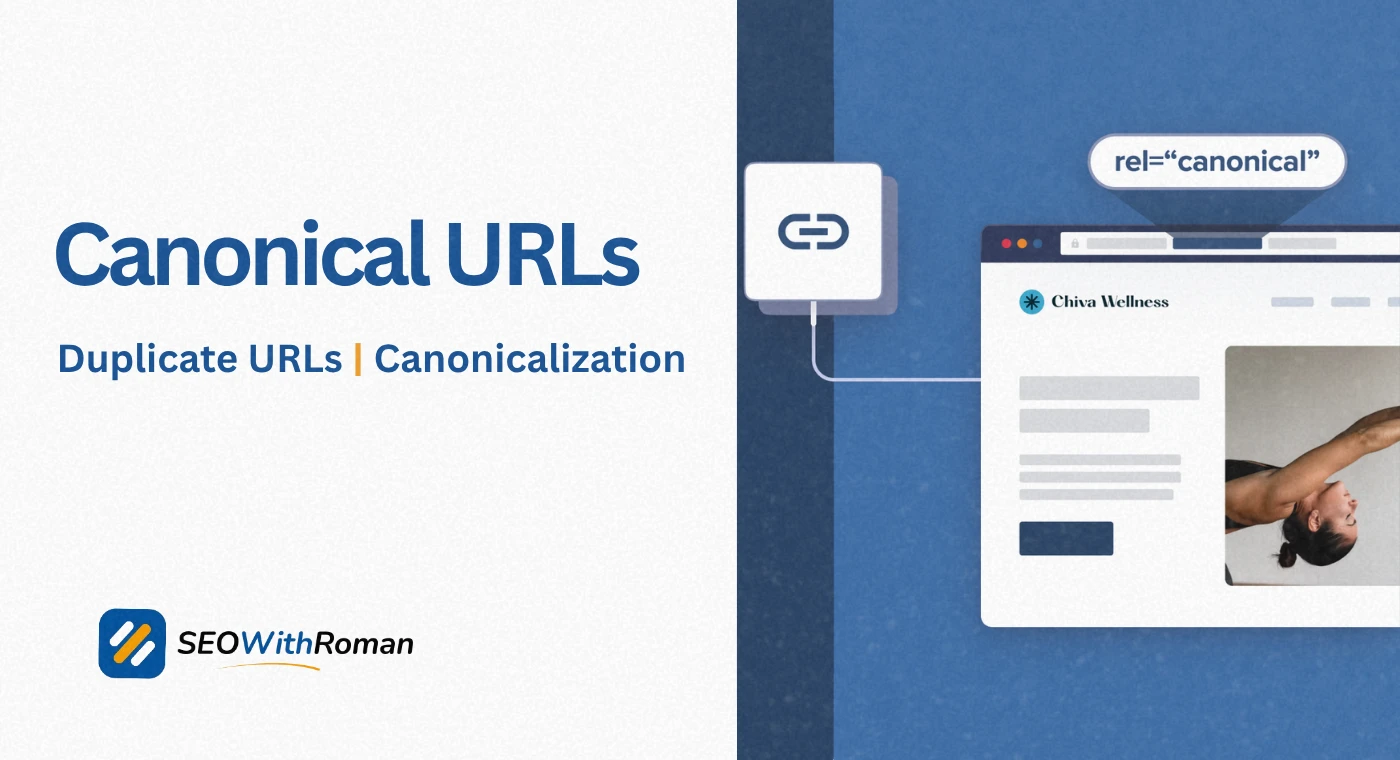
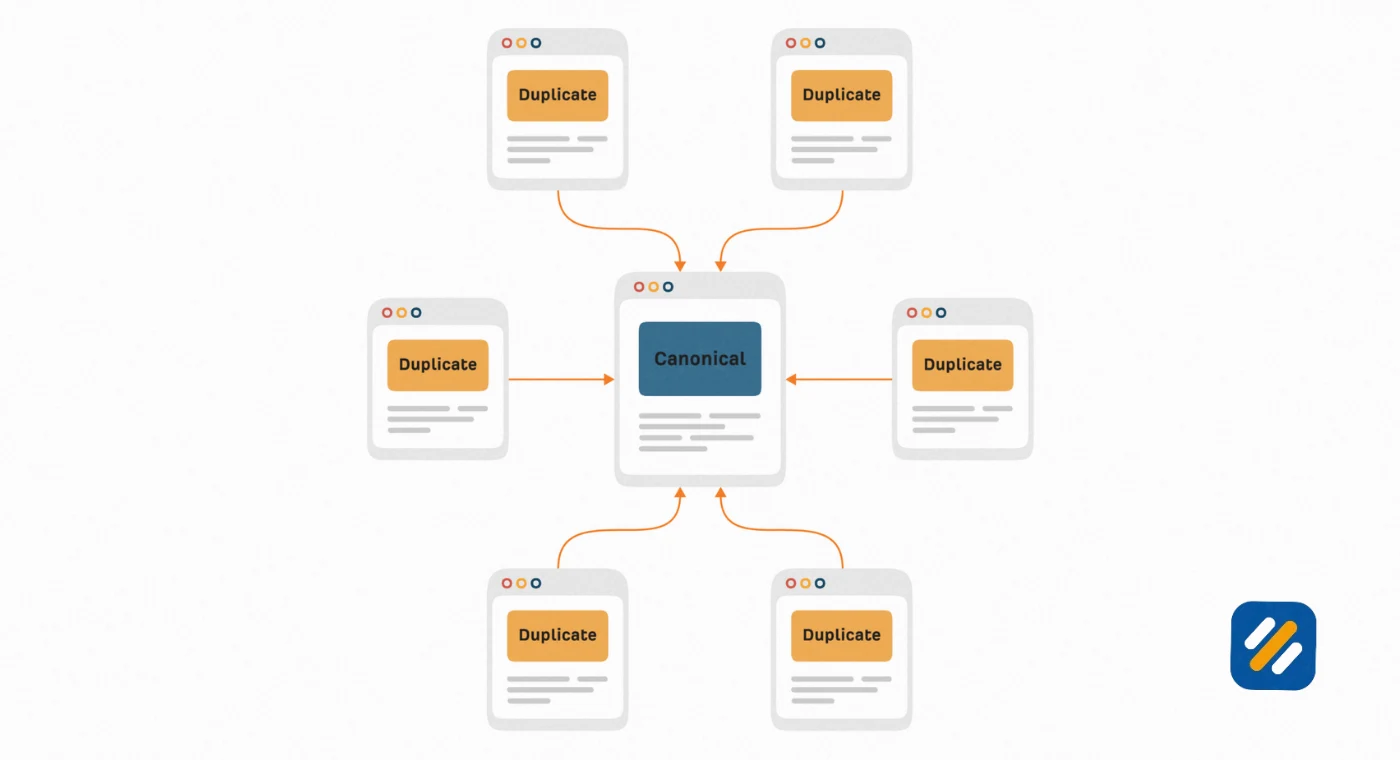
- A canonical URL is the single preferred version of a webpage that Google indexes and ranks when multiple URLs show the same or very similar content
- Without canonical tags, Google decides which version of your page to rank and it does not always choose the one you want
- Canonical tags do not directly boost rankings but they consolidate link equity, prevent keyword cannibalization, and protect your crawl budget
- WordPress users can set canonical URLs in seconds using Rank Math SEO without touching any HTML code
- Google treats canonical tags as a strong hint, not a hard rule, so all your other signals must align consistently for the tag to be respected
1 What Is a Canonical URL and Why Does It Exist
If you have ever noticed that the same webpage on your website can be reached through multiple different web addresses, you have already encountered the problem canonical URLs solve.
A canonical URL is the master version of a webpage. It is the URL you want Google to index, rank, and show in search results when duplicate or near-duplicate versions of that same page exist across different addresses.
The word canonical itself comes from the concept of an authoritative source. In religion and literature, a canonical text is the accepted, official version. In SEO, a canonical URL is the accepted, official version of a webpage that Google should treat as the real one.
Here is a real-world example of how this problem appears on ordinary websites without anyone deliberately creating it
- https://seowithroman.com/how-to-do-keyword-research
- https://seowithroman.com/how-to-do-keyword-research/
- https://seowithroman.com/how-to-do-keyword-research?utm_source=newsletter
- http://seowithroman.com/how-to-do-keyword-research
All four of those addresses could show the exact same article. To a human reader they look identical. To Google they look like four separate pages competing for the same keyword. Without a canonical URL telling Google which one is the real version, Google has to guess. And when Google guesses, it does not always choose the version you want.
In many years of doing technical SEO audits, canonical issues are consistently among the most silently damaging problems I find on small business and blog websites. The content is good. The on-page optimisation is solid. But duplicate URL variations are splitting the authority that should all be flowing to one strong page.
2 What Does Canonical Mean in SEO | The Exact Definition
In SEO, the word canonical describes a relationship between pages. It answers one question: among all the versions of this page that exist on the internet, which one is the definitive, preferred version that should be indexed and ranked?
The canonical page is the winner. All other versions of the same content are non-canonical URLs, also called alternate URLs or duplicate URLs.
When you declare a canonical URL, you are telling Google three things simultaneously. First, this is the version I want to appear in search results. Second, any backlinks pointing to other versions of this page should count toward this version. Third, do not waste crawl budget processing the duplicate versions as if they were separate pages with separate ranking potential.
URL canonicalization is the broader process of consolidating all these duplicate URLs into one authoritative address. It is not a single action you take once. It is an ongoing part of managing a website that grows, changes URLs, runs marketing campaigns with tracking parameters, and gets linked to from external websites using different URL formats.
3 What Is a Canonical URL Example | Seeing It in Real Practice
The fastest way to understand canonical URLs is to see a real example of the problem they solve and exactly how the solution works.
Imagine you run an ecommerce website selling running shoes. You have a product page for a blue Nike trainer. That product page can be reached through all of these URLs depending on how a visitor arrives
- https://example.com/products/blue-nike-trainer (the clean product URL)
- https://example.com/products/blue-nike-trainer?color=blue (filtered by colour)
- https://example.com/products/blue-nike-trainer?ref=homepage (referred from homepage)
- https://example.com/products/blue-nike-trainer?sort=price (sorted by price)
- https://example.com/products/blue-nike-trainer/ (trailing slash version)
Every single one of these URLs shows the exact same product page. But Google sees five separate pages all with duplicate content. Without a canonical tag, Google has to decide which of these five versions to rank. It may choose the wrong one, split your backlink authority across all five, and waste crawl budget visiting pages that add no new information.
The canonical tag solution looks like this. In the HTML head section of every version of this page, you add one line:
link rel="canonical" href="https://example.com/products/blue-nike-trainer"
This tells Google that regardless of which URL a visitor used to reach this page, the official version is the clean product URL. All authority flows there. That is the URL that appears in search results. The other versions get crawled occasionally but never ranked as separate pages.
4 What Is a Canonical Domain and How It Differs From a Canonical URL
These two terms get confused regularly so it is worth separating them clearly.
A canonical URL is about a specific page. It answers: among all the versions of this one page, which version is preferred?
A canonical domain is about your entire website. It answers: between all the root domain variations that could reach my website, which one is the official home?
Most websites can be reached through multiple domain variations without the owner ever setting this up intentionally
To Google, these are four separate websites unless you tell it otherwise. A canonical domain declaration means choosing one of these as your official domain, setting up 301 redirects from all other variations to that one, and making sure your canonical tags always reference that exact domain format consistently.
For any website built in 2026, the canonical domain should always be the HTTPS non-www or HTTPS www version, depending on which you prefer, with the other versions redirecting to it automatically. The protocol must always be HTTPS. HTTP is not acceptable for a canonical domain in modern SEO.
5 How Canonical Tags Help Your SEO | The Four Real Benefits
Canonical tags are not a magic ranking booster. But they protect and preserve the SEO value you have already built in four specific ways that compound over time.
Benefit 1: Link Equity Consolidation
This is the most financially valuable benefit of canonical tags and the one most beginners never think about.
When another website links to your content, that backlink passes authority to the specific URL it points to. If you have five versions of the same page and backlinks from different websites point to different versions, that authority is fragmented across five addresses instead of concentrated on one.
A canonical tag tells Google to treat all those backlinks as if they point to your preferred URL. The link equity consolidates. Your canonical page becomes stronger and ranks higher than it would if the authority was scattered.
Benefit 2: Crawl Budget Protection
Google allocates a specific crawl budget to your website based on its size and authority. Every time Googlebot visits a duplicate URL, it spends crawl budget that could have been used discovering new content.
For a small blog with fifty articles, this matters less. For a website with thousands of pages, canonical tags and proper URL management can make the difference between new content being indexed within hours or sitting undiscovered for weeks.
Benefit 3: Prevention of Keyword Cannibalization
When multiple versions of the same page are indexed as separate pages, they compete against each other for the same keyword. Google sees two pages from the same domain targeting the same query and has to decide which one to rank. Neither gets the full authority it deserves. Canonical tags eliminate this internal competition by consolidating everything onto one page.
Benefit 4: Cleaner Analytics Data
Without canonical tags, your website analytics split data across multiple URL versions. A single article might show traffic across four or five addresses, making it impossible to accurately measure how well that content is actually performing. Canonical URLs consolidate analytics data to one address, giving you clean, accurate reporting.
6 What Is a Canonical Tag and How Does It Actually Work in HTML
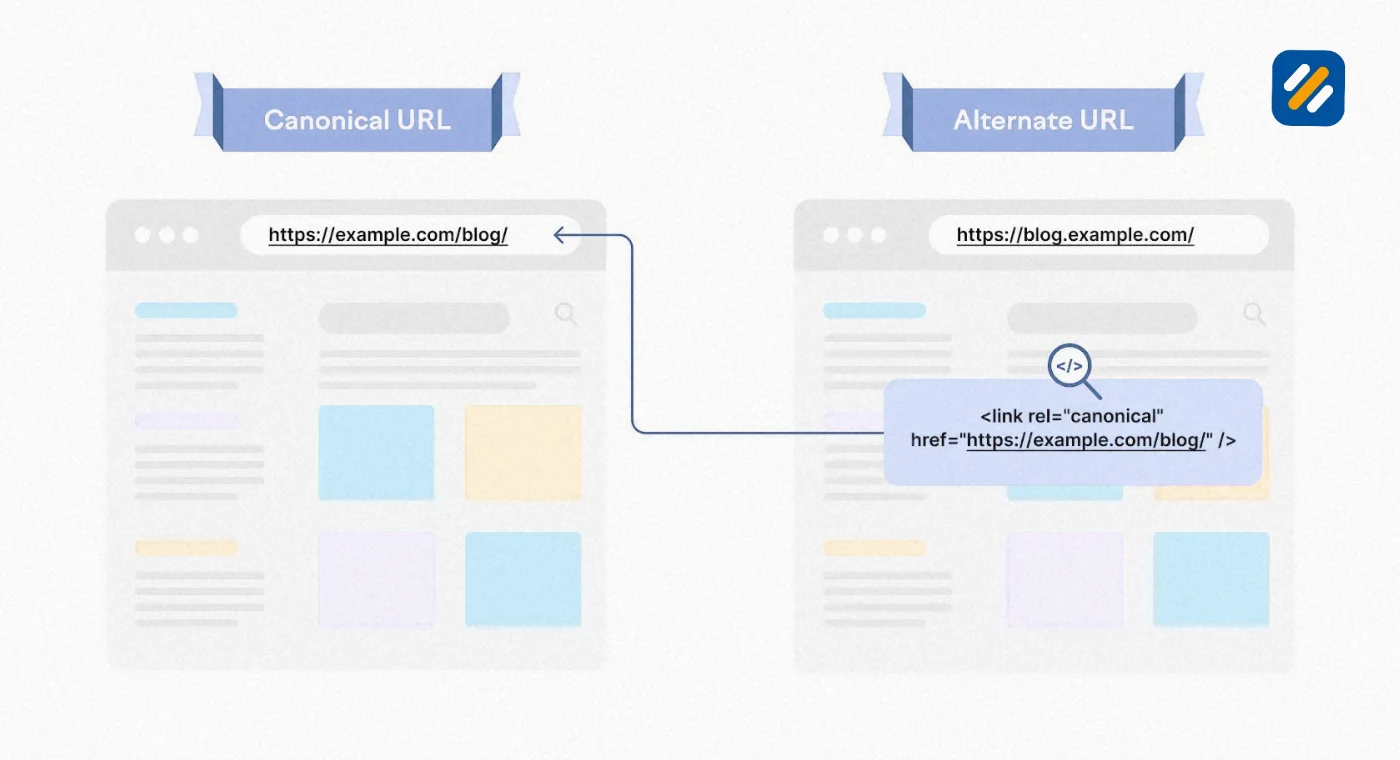
A canonical tag is a single line of HTML code placed inside the head section of your webpage that declares which URL is the preferred version of that page.
The HTML canonical tag looks exactly like this:
link rel="canonical" href="https://example.com/your-preferred-url/"
Let me break down each part so you understand what every element does:
link is the HTML element that defines a relationship between the current document and an external resource.
rel="canonical" defines the type of relationship. It tells the browser and search engine bots that the href value is the canonical version of this page.
href="https://example.com/your-preferred-url/" is the absolute URL of your preferred page. Always use the full URL including https and your complete domain. Never use a relative URL like /your-preferred-url/ because it creates ambiguity that search engines may interpret differently.
This tag must appear inside the head section of your page HTML, between the opening head tag and the closing head tag. If it appears anywhere else in the document, Google will ignore it.
Every page on your website should have a canonical tag, including the canonical page itself. When a page points to its own URL as the canonical, it is called a self-referencing canonical tag. Google’s John Mueller has confirmed that self-referencing canonical tags strengthen your canonicalization signals and make your preferred URLs more predictable to Google’s crawlers.
7 How to Add a Canonical URL in WordPress Using Rank Math
For most WordPress websites, you never need to touch HTML code to set canonical URLs. Rank Math SEO handles it automatically and gives you manual control whenever you need it.
Here is exactly how canonical tagging works in Rank Math
Automatic self-referencing canonical tags
Rank Math automatically adds a self-referencing canonical tag to every page and post you publish. You do not need to do anything. Every article you publish already has the correct canonical URL set by default pointing to its own permalink.
How to set a custom canonical URL in Rank Math manually
When you need to point a page’s canonical to a different URL (for example, when you have a paginated series or a duplicate product page), here is the process:
Open any post or page in the WordPress editor. In the Rank Math SEO panel on the right side or bottom of the screen, click on the Advanced tab. You will see a field labeled Canonical URL. Enter the full preferred URL you want Google to treat as the canonical version. Save or update the page.
Rank Math will now output that URL in the canonical tag in the page’s HTML head section.
Verifying your canonical tag is working
After publishing or updating a page, right-click anywhere on that page in your browser and select View Page Source. Press Ctrl F and search for “canonical.” You should see a line that reads: link rel="canonical" href="your preferred URL here"
If the URL shown is the correct preferred version, your canonical tag is working correctly.
8 Canonical Tag vs 301 Redirect | Which One Should You Use
This is one of the most common questions I get from clients when we are working through technical SEO audits. The answer depends on whether you need the duplicate URL to remain accessible.
| Situation | Use Canonical Tag | Use 301 Redirect |
|---|---|---|
| Same content, different URL parameters | Yes | No, page needs to stay accessible |
| Old URL permanently replaced by new URL | No | Yes, old URL no longer needed |
| HTTP version of a page that has HTTPS | No | Yes, HTTP should never be live |
| www and non-www versions of same page | No | Yes, choose one and redirect the other permanently |
| Paginated content on same domain | Yes | No, each page needs to stay accessible |
| Syndicated content on external site | Yes, on the external copy | No |
| Tracking parameter URLs from campaigns | Yes | No, campaigns may need the parameter URLs |
| Expired promotional page with backlinks | No | Yes, redirect to most relevant live page |
The key principle is this. Use a canonical tag when you need both versions of a URL to remain accessible but want Google to consolidate ranking signals onto one version. Use a 301 redirect when the duplicate version serves no purpose and can safely be retired, sending both users and search engines directly to the preferred version permanently.
Never use a canonical tag instead of a redirect when the alternate URL should simply stop existing. And never use a redirect instead of a canonical tag when you still need users to be able to access both URLs directly.

9 Common Canonical Tag Mistakes That Silently Damage Your SEO
After auditing hundreds of websites, these are the canonical mistakes that appear most frequently and cause the most damage:
Canonicalising to a redirected URL: If your canonical tag points to a URL that itself redirects to another URL, you have created a conflict. Google sees a canonical pointing to page A, but page A sends everyone to page B. These conflicting signals often result in Google ignoring your canonical entirely and choosing its own preferred version.
Setting all 404 pages to redirect to the homepage and calling it canonical: This is a soft 404 mistake disguised as a canonical fix. Pointing every broken URL to your homepage does not consolidate authority. Google recognises that the homepage is not topically related to the broken URL and ignores the signal.
Using relative URLs in canonical tags: Writing link rel="canonical" href="/blog/my-article" instead of the full absolute URL creates ambiguity. Always use the complete URL including https and your domain.
Having duplicate canonical tags on the same page: If your CMS automatically adds a canonical tag and you or a plugin manually add another one, Google sees two conflicting declarations and disregards both. Check your page source regularly to make sure only one canonical tag appears per page.
Canonicalising pages with completely different content to each other: Canonical tags are for duplicate or near-duplicate content only. Using a canonical tag to point an unrelated page to your homepage in an attempt to consolidate authority is not how canonicalisation works and Google will ignore it.
Forgetting to update canonical tags after a site migration: When you move your website to a new domain or restructure your URLs, canonical tags from the old structure may still be live on the new site. Outdated canonical tags pointing to old URLs or the old domain send confusing signals that can suppress rankings for months after a migration.
10 How to Check and Audit Canonical URLs on Your Website
Once you have canonical tags in place, checking that they are working correctly and that Google is respecting your declared canonicals is an important part of ongoing technical SEO maintenance.
Here is how to audit canonical URLs effectively using free tools:
Google Search Console URL Inspection Tool
This is the most authoritative source for canonical data because it shows you exactly what Google has decided, not just what your tags say.
Open Google Search Console and paste any URL into the inspection bar at the top. In the report that loads, look for two fields: User-declared canonical which shows the URL your canonical tag specifies, and Google-selected canonical which shows the URL Google actually chose to index.
If these two fields match, Google is respecting your canonical declaration. If they differ, Google has overridden your tag with its own choice. This usually means one of your other signals (redirects, internal links, sitemap) is pointing to a different URL and creating a conflict.
View Page Source Method
For any individual page, right-click in your browser and select View Page Source. Search for “canonical” using Ctrl F. Confirm that exactly one canonical tag appears and that it points to the correct absolute URL with https and your full domain.
Screaming Frog Free Version
Screaming Frog’s free version crawls up to 500 pages and shows you the canonical URL for every page it visits. Export the crawl data and filter the canonical column to spot any pages with missing canonical tags, self-referencing errors, or canonical tags pointing to the wrong URLs.
11 3 Expert Tips on Canonical URLs That Most Guides Never Mention
Tip 1: Always Include Canonicals in Your XML Sitemap Strategy
Your sitemap should only contain canonical URLs, never alternate or duplicate versions. If a paginated URL, a filtered product URL, or a tracking parameter URL appears in your sitemap, you are sending Google a conflicting signal. Your sitemap says this URL is important and worth indexing. Your canonical tag says ignore this version. Google has to choose which signal to believe. Keep your sitemap clean by only submitting the exact canonical versions of your pages.
Tip 2: Check Your Canonical After Every Plugin Update
On WordPress websites, plugin updates frequently overwrite or duplicate canonical tag settings. I have seen Rank Math and theme framework updates both introduce duplicate canonical tags on the same page. After any significant plugin update, spot-check five to ten pages by viewing their page source and searching for canonical. Finding two canonical tags on a page after an update is far more common than most WordPress users realise.
Tip 3: Google Treats Canonical Tags as a Hint, Not an Order
This is the most important mindset shift for anyone implementing canonical tags. Google has clearly stated that rel=canonical is a hint, not a directive. If your canonical tag conflicts with your redirects, your internal links, your sitemap, or your HTTPS setup, Google will choose whichever signal it finds most consistent and ignore the canonical tag entirely.
The canonical tag only works reliably when everything else on your site is aligned. HTTPS is enforced, www preference is consistent, internal links all point to the canonical version, and your sitemap contains only canonical URLs. When all signals agree, Google follows your canonical. When they conflict, all bets are off.
12 Conclusion
Canonical URLs are not the most exciting part of SEO. They do not instantly boost rankings and they rarely appear on any beginner’s priority list. But every website that grows beyond twenty or thirty pages will eventually have duplicate URL problems if canonical tags are not in place from the start.
The good news is that on a WordPress website with Rank Math, canonical tags are mostly handled automatically. You set the permalink structure correctly, let Rank Math add self-referencing canonicals to every page, and only intervene manually when you have a specific duplicate URL situation that needs custom handling.
What matters most is understanding what canonical URLs do, recognising when you have a canonicalisation problem, and knowing how to check that Google is respecting your declared canonicals rather than choosing its own version.
Check your canonical URLs in Google Search Console today. Look at five of your most important pages and compare the user-declared canonical with the Google-selected canonical. If they match on every page, your canonicalisation is working correctly. If any of them differ, you have a signal conflict worth investigating before it costs you rankings you have already earned.
Have a question about canonical URLs or a specific canonicalisation issue on your website? Leave a comment below and I will answer it personally.
Join 1,000+ business owners and bloggers who get one actionable SEO tip every week — straight to their inbox. Free forever.
Get Free Weekly Tips →