- The Ahrefs keyword generator is a free SEO keyword research tool that generates up to 150 keyword ideas per search with search volume and keyword difficulty data
- Ahrefs calculates keyword difficulty based on the average number of backlinks pointing to the top 10 ranking pages for that keyword
- The free version requires no account and gives instant results, making it one of the most accessible free keyword tools available
- Ahrefs and SEMrush are both industry leading tools but serve slightly different research styles, Ahrefs excels at backlink data while SEMrush leads on competitor analysis depth
- For a new website, always filter for keywords with a difficulty score under 20 and traffic potential above 100 monthly searches
1 What Is the Ahrefs Keyword Generator and Why Every SEO Beginner Needs It
If you have ever opened a blank document to write an article and had absolutely no idea what keyword to target, you already understand exactly why the Ahrefs keyword generator exists.
The Ahrefs keyword generator is a free SEO keyword research tool that takes a single seed word or phrase and returns up to 150 related keyword ideas, complete with monthly search volume estimates and keyword difficulty scores. You do not need an Ahrefs account to use it. You do not need to enter a credit card. You go to ahrefs.com/keyword-generator, type a topic, and within seconds you have a list of real search queries people are typing into Google right now.
I have been doing SEO for many years across B2b, healthcare, ecommerce, and SaaS websites. The Ahrefs free keyword generator is consistently the first tool I recommend to beginners because it removes the single biggest obstacle most new website owners face: not knowing what to write about.
What makes it different from simply guessing topics is the data behind it. Every keyword it returns is backed by Ahrefs’ clickstream database, which tracks the actual search behaviour of millions of users. The search volumes it shows are not estimates pulled from a basic API. They reflect how real people search across Google, Bing, YouTube, and Amazon.
2 What Does the Ahrefs Keyword Generator Actually Show You
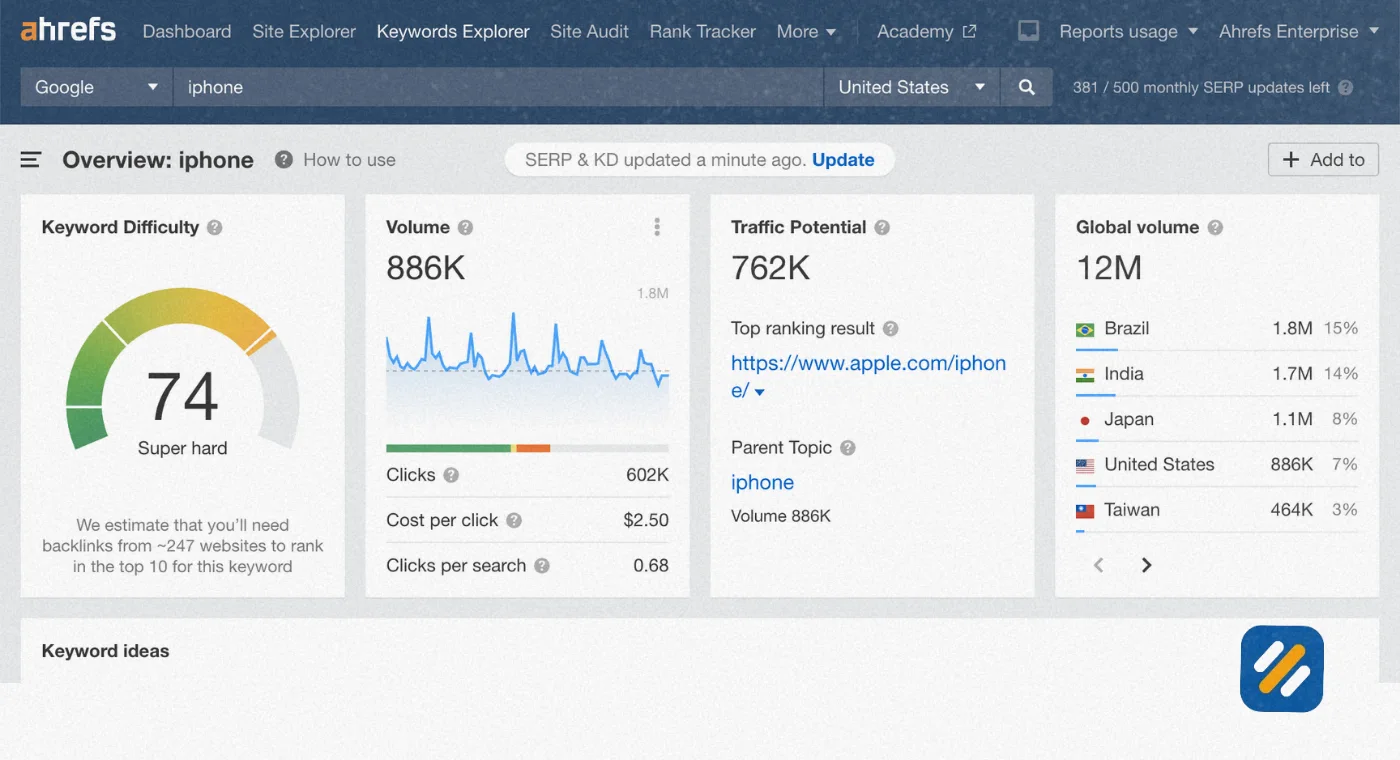
This is where most beginner guides fall short. They tell you the tool exists but never explain what each metric actually means for your content decisions. Let me break down every data point the Ahrefs keyword generator returns:
Keyword Ideas
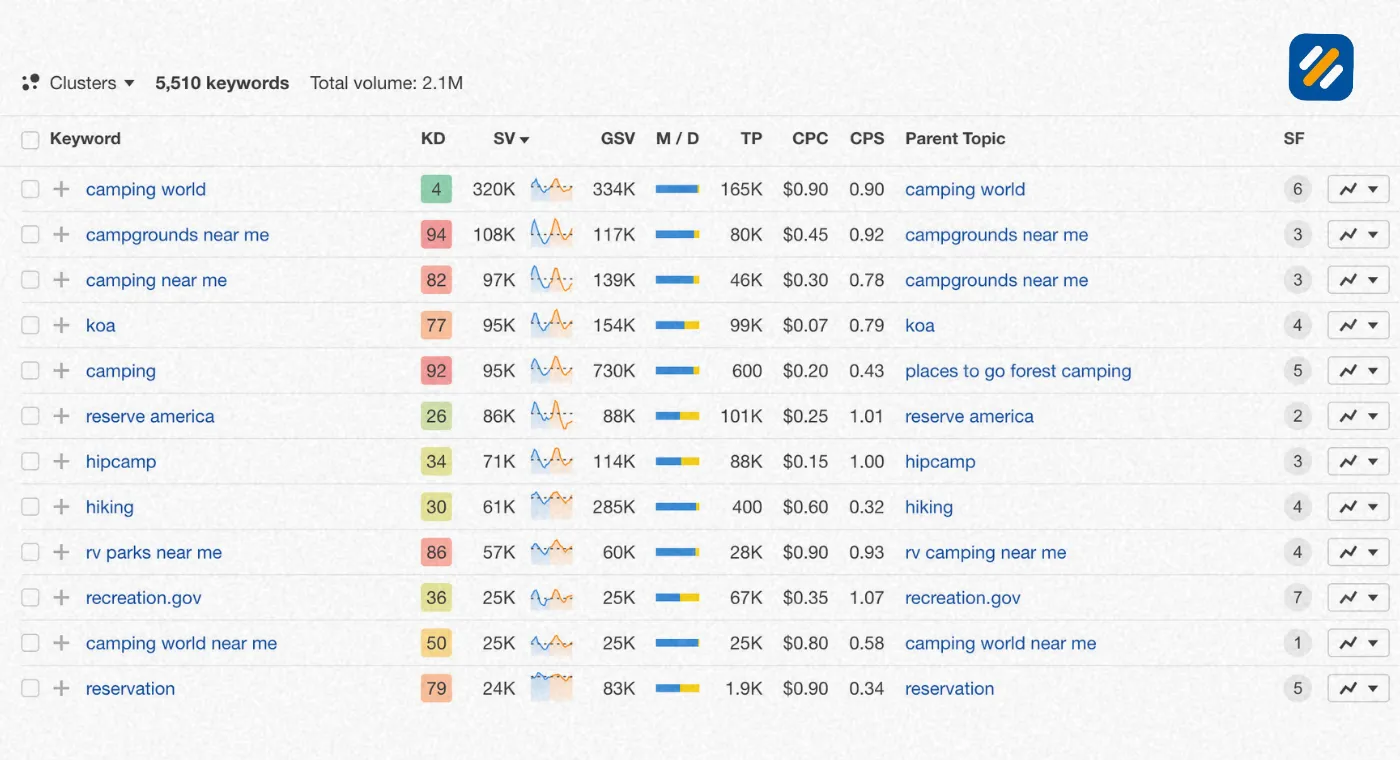
When you enter a seed keyword, the tool returns up to 150 related search phrases. These are grouped into matching terms, which contain your exact seed word, and related terms, which are semantically connected but may use different phrasing. For a topic like “keyword research,” you might see suggestions like “keyword research for beginners,” “free keyword research tools,” and “how to find low competition keywords.”
Monthly Search Volume
This shows the average number of times a keyword is searched per month in the location you selected. Ahrefs pulls this from clickstream data rather than relying solely on Google’s own estimates, which means the numbers are often more accurate than what Google Keyword Planner shows, particularly for long-tail and niche keywords.
Keyword Difficulty Score
This is the metric beginners misunderstand most often. Ahrefs keyword difficulty is a score from 0 to 100 that estimates how hard it would be to rank in the top 10 Google results for that keyword. A score of 0 to 10 means very easy. A score of 10 to 30 means manageable for a newer website. A score above 50 means you need significant domain authority and backlinks to compete.
Traffic Potential
This is different from search volume and far more useful. Traffic potential shows the total monthly traffic the current top-ranking page receives for that keyword across all the keywords it ranks for, not just the one you searched. A keyword with 500 monthly searches but 3,000 traffic potential means the page ranking for it is also pulling in traffic from dozens of related terms. That is the keyword worth writing about.
3 Is Ahrefs Free or Paid | What You Actually Get Without Spending a Penny
This question comes up in almost every conversation I have with new SEO learners. The honest answer is: Ahrefs is both, and the free version is more useful than most people realise.
Ahrefs Free Keyword Generator
The free keyword generator at ahrefs.com/keyword-generator requires no account and no payment. Enter any seed keyword, select a search engine and country, and receive up to 150 keyword ideas with search volume and difficulty scores instantly. You can run as many searches as you want with no daily limit on the free generator tool specifically.
Ahrefs Webmaster Tools (AWT)
This is a separate free product that requires a free account. With AWT you can verify your own website and access a deeper set of data including your site’s organic keywords, backlink profile, crawl health, and which pages are ranking for which terms. This is genuinely powerful for website owners who want to monitor their own SEO performance at zero cost.
Ahrefs Paid Plans
The paid version starts at $129 per month and unlocks the full Keywords Explorer, Site Explorer, Content Explorer, Rank Tracker, and Site Audit tools. These are professional-grade tools used by SEO agencies and in-house teams managing large websites.
| Feature | Free Keyword Generator | Free AWT Account | Paid Plans |
|---|---|---|---|
| Keyword ideas per search | Up to 150 | Unlimited via Keywords Explorer | Unlimited |
| Search volume data | Yes, basic | Yes, detailed | Yes, detailed with history |
| Keyword difficulty score | Yes | Yes | Yes, with full SERP analysis |
| Traffic potential data | Limited | Yes | Yes |
| Competitor keyword analysis | No | Limited to your verified sites | Full access |
| Rank tracking | No | No | Yes |
| Backlink analysis | No | Yes for your own site | Full access |
| Site audit | No | Yes for your own site | Full access |
| Account required | No | Yes, free | Yes, paid |
For a beginner building a personal brand blog or small business website, the free keyword generator combined with a free AWT account gives you everything you need for the first six to twelve months.
4 How to Use the Ahrefs Free Keyword Generator Step by Step
Here is the exact process I use when starting keyword research for a new website or content plan using only the free Ahrefs keyword generator:
Step 1: Go to ahrefs.com/keyword-generator
No account required. The tool loads immediately with a search bar and country selector.
Step 2: Enter your seed keyword
Type the broad topic you want to write about. Keep it to one to three words. For example “SEO,” “keyword research,” or “WordPress speed.” The broader the seed, the more diverse the suggestions.
Step 3: Select your target search engine and country
The free tool lets you choose between Google, Bing, YouTube, and Amazon. For blog content targeting US or UK readers, select Google and set the country accordingly. This filters results to show search volumes from your actual target market.
Step 4: Review the keyword ideas list
Scan the results for keywords that are relevant to your content, have at least 100 monthly searches, and show a keyword difficulty score under 30 for a newer website.
Step 5: Identify your traffic potential winners
Look for keywords where the traffic potential number is significantly higher than the search volume. This gap indicates that ranking for this keyword will bring in traffic from multiple related terms, not just the one you targeted.
Step 6: Note your secondary keywords
The keyword ideas list itself is your secondary keyword source. The related terms that appear around your primary keyword are the supporting keywords to plant naturally throughout your article.
Step 7: Validate with Google Search Console
Before committing to a keyword, check Google Search Console to see if your site is already getting any impressions for similar queries. If Google is already showing your site for related searches, that is a strong signal you can rank for this new keyword faster.
5 Ahrefs Keyword Generator for YouTube | Finding Video Keywords That Rank
Most people do not know the Ahrefs keyword generator works for YouTube as well as Google. This is one of the most underused features of the free tool and it gives content creators a significant advantage.
When you switch the search engine selector from Google to YouTube, the tool returns keyword ideas based on actual YouTube search data. The search volumes shown reflect how often people search for that term on YouTube specifically, not on Google.
This matters because YouTube SEO and Google SEO require different keyword strategies. YouTube searchers tend to use more conversational, how-to style queries. They search for “how to use Ahrefs for keyword research” rather than “Ahrefs keyword research guide.” The YouTube mode in the Ahrefs keyword generator surfaces exactly these natural language variations.
For SEOWithRoman.com, this feature is particularly useful for planning future YouTube content that supports the blog. If a keyword has strong search volume on both Google and YouTube, creating both a blog article and a YouTube video targeting the same keyword doubles your chances of appearing in search results for that query.
How to use it effectively: Enter your seed keyword, switch to YouTube mode, and look for how-to and tutorial style queries with difficulty scores under 20. These are the easiest YouTube ranking opportunities available in your niche.
6 How Does Ahrefs Calculate Traffic and Keyword Difficulty
Understanding how Ahrefs builds its data is what separates an SEO specialist from someone who just uses the tool without understanding it. Here is exactly how both core metrics work:
How Ahrefs Calculates Search Volume
Ahrefs does not rely solely on Google Keyword Planner data. It uses clickstream data collected from millions of real browser users who have agreed to share anonymous browsing behaviour. This data is combined with machine learning models to produce search volume estimates that are often more accurate than Google’s own publicly available figures, particularly for low-volume and long-tail keywords where Google’s estimates are known to be imprecise.
How Ahrefs Calculates Keyword Difficulty
Ahrefs keyword difficulty is based on one primary factor: the average number of referring domains pointing to the top 10 ranking pages for that keyword. More backlinks to the top 10 results means a higher difficulty score. A keyword where all top 10 pages have only 5 to 10 referring domains each will show a very low difficulty score. A keyword where the top pages each have thousands of referring domains will show a difficulty score above 70.
This approach is different from how SEMrush calculates difficulty, which factors in a broader set of signals including on-page optimisation strength. Neither method is perfect but Ahrefs’ backlink-focused approach is generally more reliable for predicting how hard it will be for a new page to break into the top 10.
How Traffic Potential Is Calculated
Traffic potential is derived from the top-ranking page for your target keyword. Ahrefs looks at all the organic keywords that page ranks for and sums up the estimated monthly traffic across all of them. This gives you a far more realistic picture of the upside from creating content on that topic than search volume alone ever could.
7 Ahrefs vs SEMrush Keyword Generator | Which One Should You Use
Both tools are industry leaders and both are used daily by professional SEO specialists. The honest answer is that they complement each other rather than compete. But if you can only use one, here is how they differ in practice:
| Feature | Ahrefs Keyword Generator | SEMrush Keyword Generator |
|---|---|---|
| Free keyword ideas per search | Up to 150 | Up to 10 on free plan |
| Account required for free use | No | Yes |
| Keyword difficulty calculation | Based on backlinks to top 10 pages | Based on multiple ranking factors |
| Traffic potential metric | Yes, from top ranking page | Yes, via keyword overview |
| YouTube keyword data | Yes | No in free version |
| Amazon keyword data | Yes | No in standard tool |
| Competitor keyword gap analysis | Paid only | Available on free plan, limited |
| Database size | 20 billion keywords | 25 billion keywords |
| Best for | Backlink-focused research, traffic potential analysis | Competitor analysis, PPC research, content gap finding |
In my daily SEO work I use both. Ahrefs for evaluating keyword difficulty based on backlink competition and finding traffic potential winners. SEMrush for competitor keyword gap analysis and understanding which terms a competitor ranks for that I do not yet target.
For a beginner with zero budget, the Ahrefs free keyword generator wins on pure accessibility because it requires no account and returns more free data per search than SEMrush’s free tier.
8 How to Track Keywords in Ahrefs After You Have Published
Finding keywords is only half the job. Once your articles are live, you need to know whether they are actually ranking and moving up or down in search results. Here is how keyword tracking works within the Ahrefs ecosystem:
Using Ahrefs Rank Tracker (Paid)
The Ahrefs Rank Tracker lets you add keywords you want to monitor and checks your rankings daily. You can see ranking history, track competitors for the same keywords, and receive email alerts when your rankings change significantly. This is the most comprehensive tracking option but requires a paid Ahrefs plan.
Using Google Search Console for Free Keyword Tracking
For beginners who cannot yet invest in paid tools, Google Search Console is a completely free keyword tracker that shows your actual Google rankings. Go to the Performance report, click the Queries tab, and you can see exactly which keywords are showing your pages in Google results, your average position, your impressions, and your click through rate. Filter by page to see which keywords are driving traffic to each specific article.
Using Ahrefs Webmaster Tools for Free Rank Monitoring
With a free AWT account and your site verified, you can see your organic keyword rankings inside the Organic Keywords report under Site Explorer. This updates regularly and gives you a clear picture of which keywords your pages rank for without paying for the full Rank Tracker feature.
For a new website like SEOWithRoman.com, the combination of Google Search Console plus Ahrefs Webmaster Tools gives you everything you need to track keyword performance in the first twelve months at zero cost.
9 3 Expert Tips to Get More From the Ahrefs Keyword Generator
Tip 1: Search Your Competitors URL in AWT Instead of a Seed Keyword
Instead of starting with a topic, enter a competitor’s URL into Ahrefs Webmaster Tools or the free Site Explorer preview. The organic keywords report shows every keyword they rank for. Filter by KD under 20 and traffic potential over 200. These are proven keywords in your niche that a real website is already ranking for, which eliminates the guesswork entirely.
Tip 2: Use the Parent Topic to Find Your Real Ranking Opportunity
Every keyword in Ahrefs has a Parent Topic, which is the broader keyword that the top-ranking page is actually optimised for. If you target the parent topic instead of the exact long-tail variation, your article can rank for dozens of related terms simultaneously rather than just one. Always check the parent topic before finalising your target keyword.
Tip 3: Filter by Questions to Find AIO-Ready Content Ideas
Switch the keyword ideas view to Questions mode in the free generator. Every result is a real question people are typing into Google. These question-format keywords are exactly what Google’s AI Overviews pull answers from. Writing articles that directly answer these questions in a clear, structured format gives you the best chance of appearing in both regular search results and AI-generated search answers simultaneously.
10 Conclusion
The Ahrefs keyword generator is one of the most genuinely useful free tools in SEO, not because it is flashy or complex, but because it removes the most common obstacle beginners face: not knowing what to write about or whether a topic is worth targeting.
Use the free generator to find your keywords. Use Google Search Console to track how they perform after publishing. Use Ahrefs Webmaster Tools to monitor your overall organic keyword footprint as your site grows. Add SEMrush free competitor analysis when you want to understand what your rivals are ranking for that you are not yet covering.
That combination covers every stage of keyword research from discovery to tracking without spending a single dollar in your first year.
Tried the Ahrefs keyword generator and found a keyword you are not sure about? Drop it in the comments below and I will tell you exactly whether it is worth targeting for your website.
Join 1,000+ business owners and bloggers who get one actionable SEO tip every week — straight to their inbox. Free forever.
Get Free Weekly Tips →