- A single page website can rank on Google but only when every section is built with deliberate SEO strategy behind it
- One page website SEO requires a single focused primary keyword because you cannot target multiple topics without confusing Google
- Anchor links, schema markup, and section-based keyword placement are the three technical elements that separate ranking single page sites from invisible ones
- Single page sites work best for portfolios, service businesses, product launches, and local businesses with one core offering
- A well-optimised one page website can absolutely make money through lead generation, affiliate marketing, digital products, and direct service bookings
1 What Is Single Page Website SEO and Why It Demands a Different Strategy
Most SEO advice assumes you are working with a multi-page website. Multiple blog posts, multiple landing pages, a category structure, and dozens of URLs all working together to build topical authority across a wide range of keywords.
Single page website SEO throws that entire playbook out
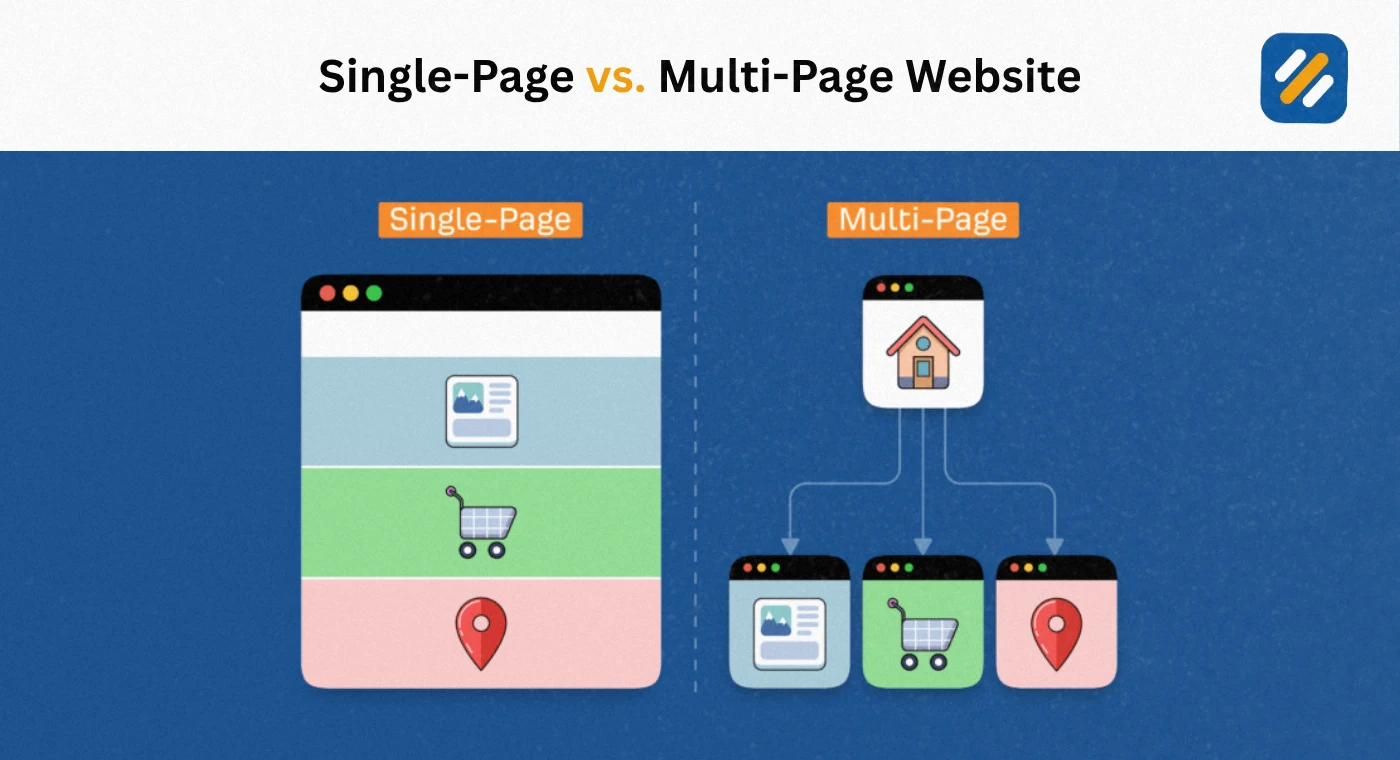
A single page website is exactly what it sounds like. One URL. One HTML document. Everything your business, portfolio, or product needs to communicate lives on a single scrollable page. There are no blog posts, no internal pages, and no category architecture.
This creates a fundamentally different SEO challenge. You cannot spread your keyword targeting across multiple pages. You cannot use internal links to pass authority around your site. You cannot build topical depth by publishing supporting content over time.
What you can do is build one exceptionally well-optimised page that does everything right in one place.
In many years of working on SEO across different website structures and industries, I have seen single page websites outrank multi-page competitors for targeted local and niche keywords. I have also seen single page sites sit invisibly on page five because their owners treated them like brochures instead of search-optimised assets.
The difference is always strategy. This guide covers exactly what that strategy looks like.
2 Is a One Page Website Good for SEO? The Honest Answer
This is the question most beginners ask first and most guides answer dishonestly.
The truthful answer is: it depends entirely on what you are trying to rank for and what your business goal is.
A one page website is genuinely good for SEO in these specific situations
A local service business with one core offering and a tight geographic target. A plumber in Manchester or a photographer in Austin does not need twenty pages. They need one perfectly optimised page that ranks for their primary service keyword in their city.
A portfolio or personal brand site where the goal is appearing in branded searches and making a strong first impression when clients search your name.
A product launch or event page where there is one audience, one offer, and one conversion goal.
A one page website is genuinely bad for SEO in these situations
Any business trying to rank for multiple unrelated keywords. You cannot rank a single page for "accounting software," "payroll management," and "tax filing tools" simultaneously without sending confusing signals to Google about what the page is actually about.
Any business that needs to build long-term topical authority through content. A single page cannot host a blog. Without a blog, you cannot consistently publish new content, which means your ranking opportunities are permanently capped at whatever the one page can target.
The honest summary is this: one page website SEO is a real and viable strategy for focused, niche businesses. It is not a viable long-term strategy for anyone who needs to compete across a broad range of keywords over time.
3 Single Page vs Multi Page Website | Which One Wins for SEO
This is the most searched question about single page SEO and it deserves a complete, data-driven answer rather than a vague "it depends."
| Factor | Single Page Website | Multi Page Website |
|---|---|---|
| Keyword targeting | One primary keyword, limited secondary coverage | Unlimited keywords across separate URLs |
| Internal linking | Not possible, no other pages exist | Full control, passes authority across the site |
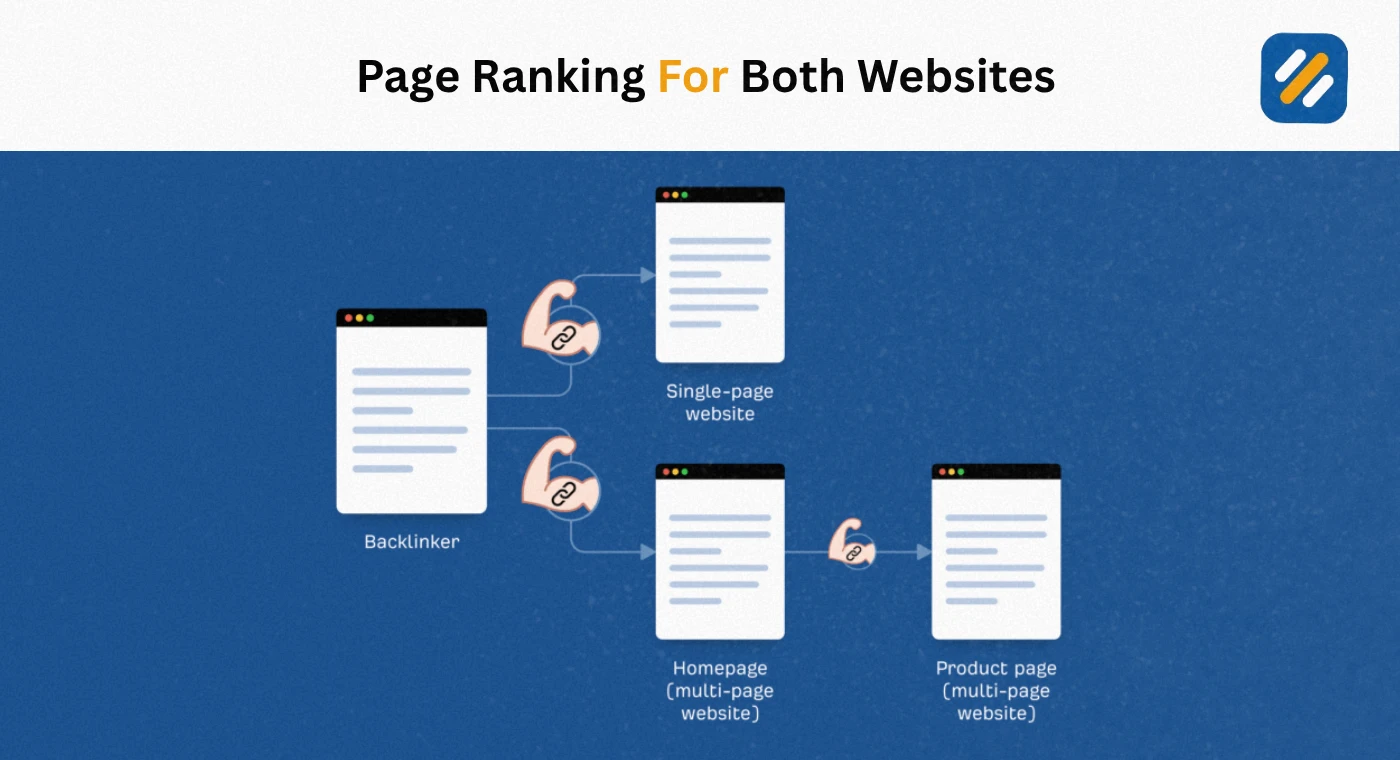
| Link equity | All backlinks concentrate on one URL, very powerful | Spread across pages, requires strategic distribution |
| Topical authority | Difficult to build, limited by page length | Builds naturally through content volume over time |
| Page speed | Typically faster, fewer assets to load | Depends on site structure and optimisation |
| User experience | Great for simple offers and focused audiences | Better for complex products with multiple audiences |
| Content freshness | Hard to update regularly | Easy to add new content consistently |
| Local SEO | Excellent for single location businesses | Better for multi-location businesses |
| E-E-A-T signals | Harder to demonstrate expertise with one page | Easier through author pages, blog posts, case studies |
| Best for | Portfolios, local services, product launches, events | Blogs, ecommerce, agencies, SaaS, content businesses |
The verdict for SEO on single page vs multiple pages comes down to your business model. If you serve one audience with one offer in one location, a single page optimised correctly will outperform a poorly structured multi-page site. If you need to grow organic traffic across multiple topics over time, a multi-page site is the only viable long-term strategy.
4 What Is a One Page Website Called | and Which Type Is Right for You
There is genuine confusion around terminology here because different types of single page websites serve very different purposes and have different SEO implications.
A one page website goes by several names depending on its purpose
Landing page: The most common term. A landing page is a single page designed to capture leads or drive a specific conversion. It typically has one call to action and no navigation menu linking to other pages. Landing pages are used for advertising campaigns, product launches, and email list signups.
Parallax website: A design style where different sections of the page scroll at different speeds, creating a layered visual effect. Parallax websites are single page sites from an SEO perspective even though they feel like they have multiple sections.
Microsite: A small focused website, sometimes just one page, built around a single campaign, product, or event. Microsites sometimes have two or three pages but operate independently from a main brand website.
Scrolling website: The cleanest description of a modern single page site where all content lives on one URL and users navigate by scrolling rather than clicking between pages.
One-pager: The informal term used by web designers and small business owners to describe any website that fits on a single page.
From an SEO standpoint, all of these are treated the same way by Google. One URL, one set of content, one set of signals to evaluate. The design style and terminology do not change the underlying SEO strategy.
5 The Complete Single Page SEO Strategy | Step by Step
Here is the exact strategy I use when optimising a single page website for Google. Every step is based on what works in real client projects, not theory.
Step 1: Choose one primary keyword and commit to it completely
This is where most single page SEO fails before it starts. Business owners try to target five or six keywords on one page and end up ranking for none of them.
Your single page website needs one primary keyword that accurately describes your core offering for your specific audience. Every headline, every paragraph, and every section of the page exists to support that one keyword.
For seo on single page website projects, I recommend targeting a keyword with a difficulty score under 40 and at least 500 monthly searches in your target country. Long-tail keywords work exceptionally well for single page sites because the competition is lower and the search intent is more specific and easier to match precisely.
Step 2: Structure the page with H2 sections that each target a secondary keyword
Since you cannot create new pages for secondary keywords, your H2 headings become the next best thing. Each major section of your page functions like a mini-page within the overall document.
Use each H2 to target a related secondary keyword. If your primary keyword is "freelance web designer London," your H2 sections might target "web design services London," "hire a web designer," "portfolio web designer," and "web design pricing." Each section focuses on one secondary keyword while supporting the overall page theme.
Step 3: Add anchor links and a sticky navigation menu
This is the technical element that separates professional single page SEO from amateur attempts. Anchor links create internal navigation on a single page by letting users jump directly to specific sections.
From an SEO perspective, anchor links do something critical. They give Google clear signals about the distinct topics covered within your single page, essentially creating a navigable structure where none technically exists. Google can crawl and understand a page with clear anchor navigation far more effectively than a wall of scrolling text with no structural markers.
Step 4: Optimise every on-page SEO element
Single page websites cannot afford to waste any on-page optimisation opportunity because there are no other pages to compensate. Every element must be done correctly:
Title tag with primary keyword within the first four words, under 60 characters. Meta description with primary keyword, a clear benefit statement, and a call to action, under 160 characters. H1 heading containing the primary keyword. Primary keyword in the first 100 words of the page content. Secondary keywords in H2 section headings. Alt text on every image with descriptive keyword-relevant descriptions. URL structure using your primary keyword if possible.
Step 5: Add schema markup to compensate for missing page structure
Without multiple pages, single page sites have limited structured data opportunities. But the schema types that are available matter enormously for how Google displays your page in search results.
For a service business one page website, add LocalBusiness schema with your name, address, phone number, opening hours, and service area. For a portfolio or personal brand, add Person schema with your name, job title, and social profiles. For a product launch page, add Product schema with pricing, availability, and review data if applicable.
Schema markup does not directly improve rankings but it significantly improves how your listing appears in search results through rich snippets, which increases click through rates without any improvement in ranking position.
Step 6: Maximise page speed and Core Web Vitals
Single page websites have one technical advantage over multi-page sites: everything loads from one URL. This can be a speed advantage, but only if the page is built efficiently.
The most common speed killers on single page websites are oversized hero images, unoptimised video backgrounds, heavy JavaScript animations, and multiple third-party scripts loading simultaneously. Use PageSpeed Insights to identify your specific issues. Target a score of 90 or above on mobile. On a single page site, every millisecond of load time affects your only indexable URL, so there is nowhere to hide performance problems.
6 Technical SEO for Single Page Websites | The Elements Most Guides Miss
Beyond the basics, single page websites have specific technical SEO requirements that most guides overlook entirely.
Handling JavaScript rendering correctly
Many modern single page websites are built with JavaScript frameworks like React, Vue, or Angular. These frameworks can create serious SEO problems because Google needs to render JavaScript before it can read the content. If your page content only appears after JavaScript executes, Google may see an empty page during crawling.
The solution is to use server-side rendering or static site generation, which delivers fully rendered HTML to Google's crawler without requiring JavaScript execution. If you are building a single page website on WordPress with Elementor, this is handled automatically. If you are using a custom JavaScript framework, verify your rendering approach before publishing.
Canonical tags and duplicate content prevention
Single page websites occasionally create duplicate content issues through URL parameters used by tracking tools, form submissions, or anchor link variations. Set a canonical tag on your page pointing to the clean primary URL to prevent Google from indexing multiple versions of the same content.
Robots.txt and sitemap configuration
Even a single page website needs a properly configured robots.txt file and an XML sitemap submitted to Google Search Console. The sitemap for a single page website contains only one URL but submitting it still accelerates how quickly Google discovers and crawls your page after publication or updates.
| Technical Element | Why It Matters for Single Page SEO | How to Implement |
|---|---|---|
| Anchor links | Creates navigable structure Google can parse | Add id attributes to each section, link from nav menu |
| Schema markup | Enriches search listing, enables rich snippets | Use Rank Math or Google's Schema Generator |
| Canonical tag | Prevents duplicate content from URL variations | Add rel canonical pointing to primary URL |
| Server-side rendering | Ensures JavaScript content is crawlable | Use SSR framework or static site generator |
| XML sitemap | Speeds up crawling and indexing | Submit via Google Search Console |
| Core Web Vitals | Affects page experience ranking signal | Fix via PageSpeed Insights recommendations |
| Hreflang tags | Required if page targets multiple languages or countries | Add in head section for each language/country version |
7 How Much Does a One Page Website Cost | What You Actually Need to Budget
This is one of the most practical questions anyone building a single page website asks, and the answer varies enormously depending on how you build it.
DIY approach using WordPress and Elementor
Domain name on Namecheap: approximately $10 per year. Hosting on Hostinger Business plan: approximately $36 to $48 per year. Astra free theme: $0. Elementor free version: $0. Rank Math free SEO plugin: $0.
Total cost for a professionally built single page WordPress website: $46 to $58 for the first year. This is the approach that gives you the best balance of control, SEO capability, and affordability.
Using a website builder like Wix or Squarespace
These platforms charge $16 to $45 per month depending on the plan. Annual cost: $192 to $540. The advantage is ease of use. The SEO disadvantage is less control over technical elements, slower page speeds compared to optimised WordPress installations, and platform-level limitations on schema markup and canonical tag configuration.
Hiring a freelance web designer
A professionally designed single page website from a freelance designer typically costs between $500 and $3,000 depending on the designer's experience and location. US and UK designers typically charge $1,500 to $3,000. Pakistani and South Asian designers with equivalent skills typically charge $300 to $800.
Hiring a web design agency
Agency pricing for a single page website starts at $2,000 and can reach $10,000 or more for custom design work. For most small businesses and personal brands, agency pricing is not justified for a single page website.
8 Can You Make Money With a One Page Website | Real Monetisation Strategies
Yes. Absolutely. But the monetisation strategy needs to match what a single page website can realistically do.
A one page website cannot host a blog, so AdSense revenue from organic traffic is not a viable primary income stream. What it can do very effectively is convert visitors into customers, clients, or leads.
Service business lead generation. This is the highest value use case for a one page website. A well-optimised single page site for a local service business can generate consistent inbound enquiries worth thousands of dollars per month. One new client from a single page site that ranks for a local service keyword can generate more revenue than months of blog advertising.
Digital product sales. A single page website optimised for a product keyword can sell ebooks, templates, courses, or tools directly. Tools like Gumroad and Lemon Squeezy integrate easily with single page sites and handle payment processing without requiring a multi-page ecommerce setup.
Affiliate marketing. A single page site targeting a specific product review keyword or "best X for Y" keyword can generate significant affiliate commissions. The key is targeting a narrow enough keyword that your single page can realistically rank for it against multi-page competitors.
Consulting and freelance client acquisition. A single page portfolio or personal brand site is one of the most effective tools for attracting freelance clients. When a potential client searches your name and finds a professionally designed, well-optimised single page site, your credibility converts faster than any amount of cold outreach.
Local business bookings. Restaurant reservation pages, salon booking pages, and photography inquiry pages built as single page websites with local SEO optimisation can generate consistent booking revenue from organic Google traffic.
9 3 Expert Tips for Single Page Website SEO That Competitors Do Not Cover
These are the tactics that consistently make a difference on single page sites I have worked on, and that most SEO guides skip entirely.
Expert Tip 1: Use FAQ schema at the bottom of your page to target multiple question keywords simultaneously
Since you cannot create new pages for question-based keywords, adding a FAQ section with proper FAQ schema markup at the bottom of your single page site lets you capture People Also Ask rankings for multiple related queries without creating new URLs. Each question in your FAQ effectively targets a separate keyword within your single page structure. This is the closest thing to multi-page keyword targeting available to a single page website.
Expert Tip 2: Update your page content quarterly and re-submit to Google Search Console
Single page websites have no new content to signal freshness to Google. The solution is treating your page like a living document. Review it every three months, update statistics, refresh examples, and improve sections based on what Google Search Console tells you about which queries the page is already appearing for. After each update, use the URL Inspection tool in Google Search Console to request a re-crawl. This signals content freshness and can improve rankings for time-sensitive queries.
Expert Tip 3: Build section-specific anchor links and use them as the basis for your backlink anchor text strategy
Most backlink building advice assumes you are sending links to multiple pages. On a single page site, all your links point to one URL. But you can differentiate by building links to specific anchor sections using fragment URLs like yoursite.com/#services or yoursite.com/#pricing. When you reach out for backlinks, ask linking sites to point to the specific section most relevant to their content. This creates more natural, contextually relevant backlinks and tells Google exactly which section of your page is being endorsed by each external source.
10 Conclusion
Single page website SEO is not a limitation. It is a focused strategy that, when executed correctly, can outperform bloated multi-page sites for the keywords that matter most to your business.
The foundation is always the same. One primary keyword. Clear section structure with anchor navigation. Every on-page element optimised without exception. Schema markup to compensate for missing page hierarchy. Page speed treated as a non-negotiable priority. And backlinks pointing to one powerful URL instead of being diluted across dozens of pages.
Whether you are building a portfolio, a local service page, a product launch, or a personal brand site, the principles in this guide give you everything you need to build a single page website that Google can find, understand, and reward with rankings.
Start with your keyword. Build your structure around it. Optimise every element before you publish. Then submit to Google Search Console and monitor the results every two weeks.
That is single page SEO done properly. And done properly, one page is all you need.
Have a question about your specific single page website SEO situation? Leave a comment below and I will give you a personalised answer.
Join 1,000+ business owners and bloggers who get one actionable SEO tip every week — straight to their inbox. Free forever.
Get Free Weekly Tips →